One-Page SOPs People Actually Follow (Free Template)
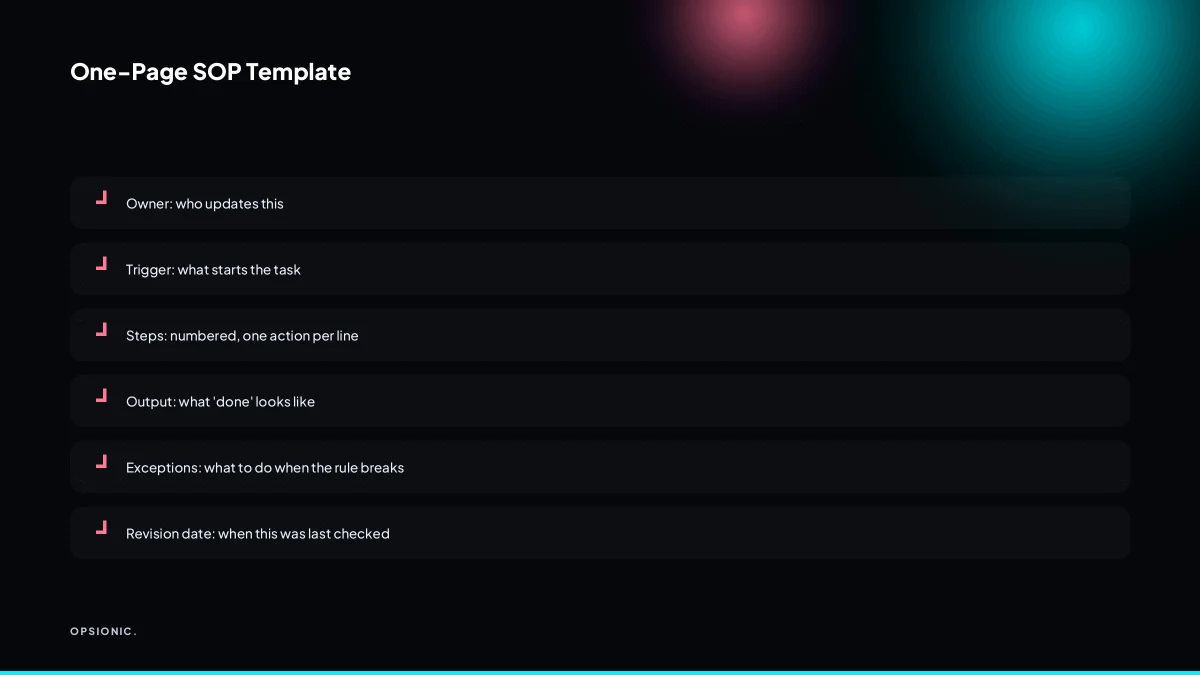
A standard operating procedures small business template gives you a one-page format to capture how recurring work gets done. It names the owner, trigger, steps, and exception path so a new person can follow it without asking. The best templates stay short, live where the work happens, and flag steps ready for automation.
What is an SOP and why does a small business need one?
An SOP is a written set of instructions for a recurring task. Even a five-person shop needs them because verbal training fades, staff change, and interruptions cost time. A one-page SOP means the new hire can follow the steps without asking, and the owner stops being the only person who knows how things work.
In plain terms, an SOP is the answer to the question “how do we do this here?” It covers the specific clicks, fields, files and checks for one task, not the whole business. For example: how to raise an invoice in your accounting tool, how to onboard a new client, or how to file a supplier receipt. It is not a policy document. It is a recipe.
A small business needs SOPs even when no regulator demands them. Here is why.
- Staff change. Someone leaves, someone new starts, or a freelancer covers a holiday. Without a written procedure, the owner retrains from memory every time.
- People forget. A task done monthly is easy to do slightly differently each time. Small drift becomes a mistake.
- You cannot improve what is not written down. If the process lives only in one person’s head, you cannot spot the step that wastes ten minutes.
The cost of not having an SOP shows up as interruptions. A junior staff member asks the owner how to handle a refund, so the owner stops a paying task to explain it for the fourth time. Or the job gets done wrong, the client notices, and someone redoes the work. Those are the signs your business needs automation, but the first fix is simpler: write the steps down once.
What is the simplest SOP format that still works?
The simplest format is a single page with six fields: owner, trigger, steps, output, exceptions, and revision date. Skip the purpose statement and scope. Use numbered steps with one action per line, and name the exact tool and field. Add a screenshot or a 30-second video for the fiddly parts.
Each field earns its place. Owner names the person who does the task, not the department. Trigger states the event that starts the work: “New booking email arrives” or “Client asks for a refund.” Steps are the numbered actions, one per line. Output defines what finished looks like: “Reply sent, refund logged in Stripe, note added to CRM.” Exceptions lists the two or three cases where the person should stop and ask. Revision date tells the reader whether this page is current or stale.
A one-page limit forces you to cut the history, the philosophy and the edge cases nobody hits. If a step does not change the outcome, it does not belong on the page. If you cannot fit the task on one side of A4, the task is probably two SOPs wearing a trench coat.
Screenshots and short videos replace paragraphs. A picture of the exact dropdown to open beats “locate the status field in the top right of the order screen.” A 30-second screen recording of a fiddly export beats four paragraphs of written directions. Put the image next to the step it illustrates, not in an appendix.
Print this checklist and run any existing SOP through it:
- Owner is a named person, not a role or a team.
- Trigger is a specific event you can observe.
- Every step is one action, numbered, starting with a verb.
- Every step names the exact tool and field, not “the system.”
- Output states what done looks like in one sentence.
- Exceptions list the cases where the reader must stop and ask.
- Revision date is within the last six months.
- The whole document fits on one printed page.
- Screenshots sit next to the steps they explain.
- Any video is under 60 seconds and linked, not embedded.
If a line cannot be ticked, fix that line before you share the SOP. A checklist you can actually complete is the difference between a document people open and a document people ignore.
Not sure which of these applies to you?
Answer six questions and see what we would automate first in your business, and what it is worth.
Which sections does a small business SOP actually need?
A small business SOP needs owner, trigger, steps, output, exceptions, and revision date. Skip purpose, scope, definitions, and references. Those belong in a policy manual, not a working document. If a section does not help someone do the task right now, leave it out.
The test is simple: a section earns its place only if it changes what the reader does next. Owner tells them who to ask. Trigger tells them when to start. Steps tell them what to click. Output tells them what finished looks like. Exceptions stop them freezing when the normal path breaks. Revision date tells them whether to trust the page. Everything else is padding.
| Section | Essential? | Why |
|---|---|---|
| Owner | Yes | Names the person who answers questions and updates the page |
| Trigger | Yes | Defines the exact event that starts the task |
| Steps | Yes | The actual work, in order |
| Output | Yes | Describes the finished state so the reader knows when to stop |
| Exceptions | Yes | Lists what to do when the normal path fails |
| Revision date | Yes | Shows whether the SOP is current |
| Purpose or scope | No | Explains the task instead of helping someone do it |
| Definitions | No | Belongs in a shared glossary, not on a working page |
| References | No | Links to source documents sit better in a policy manual |
Boilerplate sections make SOPs unread because they bury the trigger and the steps under paragraphs nobody needs. A reader who opens the document to book a courier does not want a paragraph about why courier booking matters. They want the booking link and the reference format. Every line of purpose or scope pushes the useful line further down the page, and the further down it is, the less likely anyone reaches it before giving up.
An exception log does not have to bloat the page. Keep the main SOP to the happy path, then add one short block at the end with three lines: what to do if the supplier is out of stock, what to do if the customer replies after hours, what to do if the software is down. If a fourth exception appears, add it to the block. The block stays tight because it only holds actions, not explanations.
How detailed should the steps be for a new hire?
Write each step as a single action a new hire can take without asking. Name the tool, the button, the field, and the format. For example, “In Xero, click Reconcile, select the bank account, and match the receipt to the transaction.” If a step needs judgement, write the rule for that judgement.
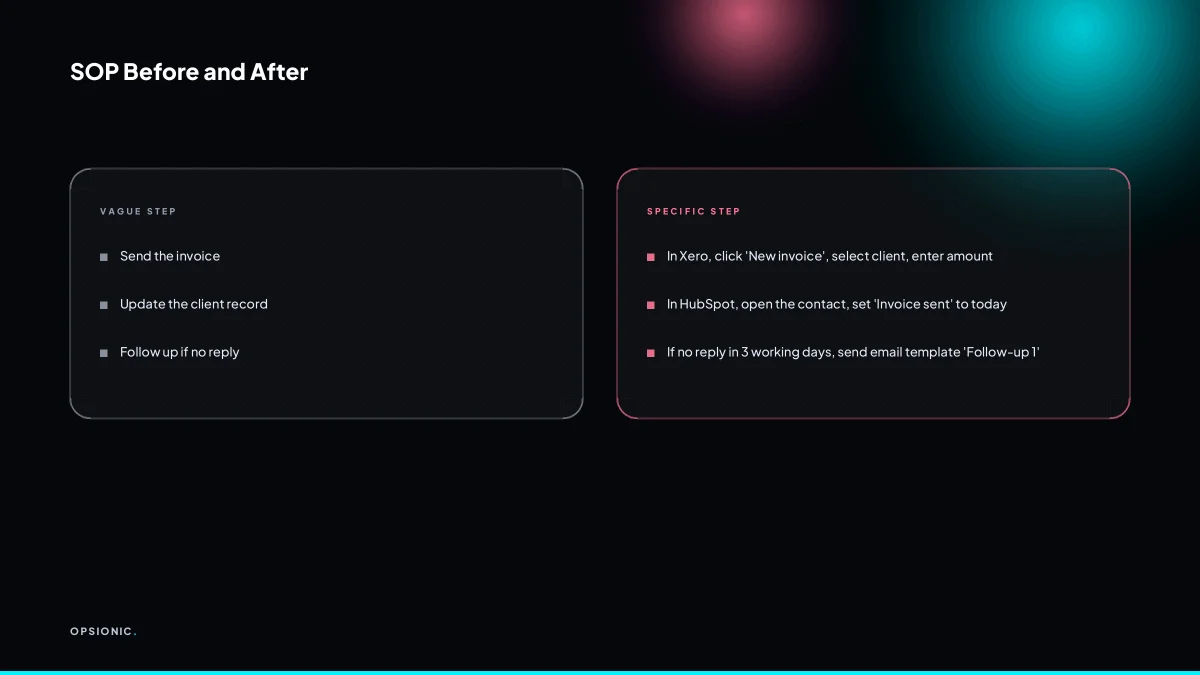
The new hire test is simple. Read the step as if you started yesterday and know nothing about the job. If you would need to ask a question, the step is too vague. “Update the client record” fails the test because it does not say which tool, which record, or which field. “In HubSpot, open the contact called Acme Ltd, set Lifecycle stage to Customer, and save” passes it. The difference is the difference between a task and an instruction.
Name the tool first, then the path. “In Google Sheets, open the tab called Weekly, find the row for today’s date, and type the number from the invoice into column E.” Do not write “log the invoice” and expect the hire to work out where it goes. The same applies to buttons. “Send” is not a button name. “Click the blue Send and Close button in the top right” is. Fields need a format rule: “Enter the date as YYYY-MM-DD” or “Write the amount in euros with two decimals.”
For repetitive clicks, a screenshot or a short Loom video beats a paragraph. One screenshot showing the exact button saves ten lines of description. Keep the video under one minute and show the click, not the thinking. The written step stays as the reference; the video is the demonstration.
Worked example, invented figures: a bookkeeper writes an SOP for reconciling supplier invoices. The old version said “match the invoice to the payment.” The new hire spent 12 minutes per invoice checking which field to use and which date format to enter. After rewriting the step with the tool, the button, and the format rule, the same hire spends 4 minutes per invoice. At 30 invoices a week, the saving is 30 × 8 minutes = 240 minutes, or 4 hours a week. At a loaded cost of EUR 22 per hour, that is EUR 88 a week saved by one rewritten step.
What is this costing you now?
Based on removing half of that time.
Who should own an SOP and keep it current?
Assign one person as the SOP owner. That person is responsible for updating the document when the process changes and for answering questions about it. The owner does not have to be the person who does the task, but they must be the one who notices when the SOP drifts from reality.
The owner’s job is not to write the first draft alone. It is to keep the document honest. When a tool changes its interface, when a supplier changes a form, or when a team member finds a faster route, the owner checks the SOP and edits the relevant step. They also decide when a question from a colleague means the document is unclear, not the colleague.
Review the SOP every quarter. That is enough for most small business processes. A quarterly review takes about 30 minutes: open the document, walk through each step, and ask whether the buttons, names and fields still match what is on screen. If nothing changed, leave the document alone.
When nobody owns an SOP, two things happen. First, the document goes stale. A step that says “click Export” when the button now says “Download” quietly becomes wrong. Second, people stop trusting it and build private workarounds. The new hire follows the written steps, fails, and asks a colleague who says “ignore the document, do this instead.” The SOP becomes decoration, and the time it was meant to save returns as questions and corrections.
Where should SOPs live so people actually open them?
Store the SOP where the work happens, not in a separate folder. If the task is done in Google Drive, put the SOP in the same Drive folder. If it is done in a project tool, pin it to that project. A document nobody can find during the task is as useful as no document at all.
The location options are straightforward. A Google Doc works when the team already lives in Drive. A Notion page suits teams that run projects there. A Slack message pinned to a channel works for quick, three-step procedures. A printed sheet at the workstation still beats a buried file for physical tasks like packing orders or cleaning equipment.
A centralised “SOP binder” fails for a simple reason: it adds a navigation step. The person doing the task has to stop, remember where the binder lives, search it, and only then start the work. Most people will not do that under time pressure. They will guess instead.
The fix is to link the SOP from the trigger point. If a form submission starts the task, include the SOP link in the confirmation email. If a calendar event starts it, put the link in the event description. The document appears exactly when the person needs it, without a search.
Want this running in your business next week?
A relaxed 20-minute video chat. Camera on or off. You leave with a plan whether or not you hire us.
- No call unless you ask for one
- From EUR 399 a month, no setup fee
- Built and run for you, not handed over as homework
Sources we checked
Questions people ask
How long does it take to write a one-page SOP?
Most one-page SOPs take 20 to 40 minutes to draft if you already know the task. Write the six fields, add one screenshot, then ask a colleague to follow it without help. Fix the first step they stumble on. The first draft is rarely perfect, but a usable page beats a perfect page nobody opens.
Can I use a video instead of a written SOP?
A short video works well as a demonstration, but it is a poor reference. You cannot search a video, skim it, or print it. Use a written one-page SOP as the main document and link a video under 60 seconds for the fiddly clicks. The written steps stay the source of truth.
What if the process changes every week?
If the process genuinely changes weekly, an SOP is the wrong tool. Write down the stable parts: who owns it, what triggers it, what finished looks like, and who to ask when unsure. For the changing middle, keep a short decision rule instead of numbered steps. Review monthly rather than quarterly.
Should I have an SOP for every task or just the important ones?
Start with tasks that are repeated, handed to someone else, or expensive to get wrong. Invoicing, onboarding, refunds and supplier payments are good first candidates. A task done once a year by the owner does not need an SOP yet. Add pages as the team grows or as mistakes repeat.
How do I get my team to actually follow the SOP?
Keep it to one page, name the exact buttons, and put it where the work happens: linked from the tool, not buried in a shared drive. Ask the person who does the task to review the draft. When someone asks a question the SOP should answer, fix the SOP that day and tell them you did.
What is the difference between an SOP and a checklist?
A checklist is a list of items to tick off. An SOP explains how to do each item, in order, with the tools and fields named. Many one-page SOPs end with a short checklist for the final checks. Use a checklist alone only when the steps are obvious and the risk is forgetting one.
Can an SOP be automated?
Often, yes. If the steps are clicks in tools that have an API, the repetitive middle can run on its own and the SOP becomes a shorter page about exceptions and checks. Start by writing the SOP, then mark which steps are pure data entry. Those are the first candidates for automation.