What One Automation Actually Costs: DIY, Freelancer, Agency
How much does it cost to automate a business process? DIY tools start at EUR 20 per month, freelancers charge EUR 500 to EUR 5,000 per build, and agencies like Opsionic charge from EUR 399 per month per automation with no setup fee, on a 6-month initial term. Ongoing costs include tool subscriptions and hosting from EUR 39 per month.
What are the real cost options for automating one process?
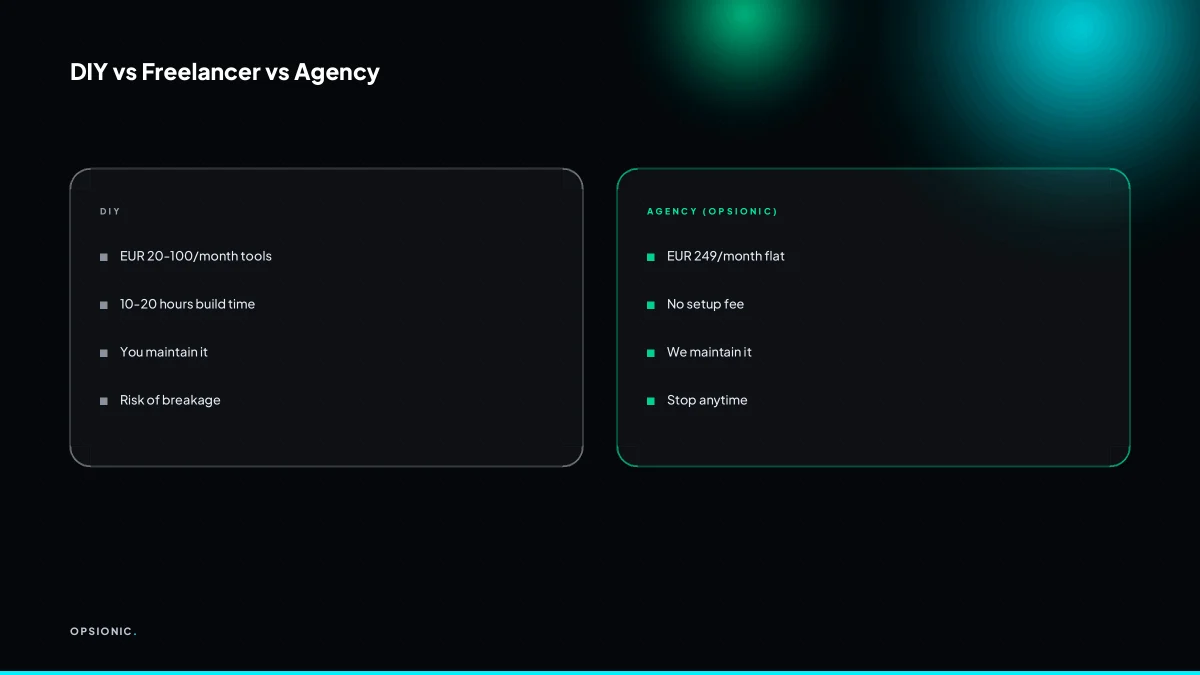
You have three main paths. DIY tools like Zapier or Make typically cost EUR 20 to EUR 100 per month, plus your time. Freelancers typically charge EUR 500 to EUR 5,000 per build, depending on complexity. An agency like Opsionic charges from EUR 399 per month per automation, with no setup fee and a 6-month initial term.
DIY tools look cheap until you count the hours. A Zapier or Make plan is a fixed monthly cost, but someone still has to map the workflow, test the triggers, handle errors, and rework it when a login changes. A realistic first automation often takes a non-technical owner ten to twenty hours. At any sensible hourly rate, that is more than a year of agency fees before the automation even runs.
Freelancers remove your time but add uncertainty. A one-off build for EUR 500 to EUR 5,000 may work perfectly on day one. Six months later, when an API changes or a field breaks, you either pay again or learn the system yourself. The real cost of business automation is rarely the first invoice. It is the maintenance, the debugging, and the quiet hours spent checking why a step stopped firing.
An agency model shifts the risk. Opsionic charges from EUR 399 per month per automation, with no setup fee and a 6-month initial term; the workflow is yours from day one. The monthly price includes building, hosting, monitoring, and fixing. You stop paying when you stop wanting it.
| Option | Typical cost | Your time | Who fixes it when it breaks |
|---|---|---|---|
| DIY tool | EUR 20 to EUR 100 per month | High, ongoing | You |
| Freelancer | EUR 500 to EUR 5,000 per build | Low at first, high later | You or another freelancer |
| Agency | EUR 399 per month per automation | Low, ongoing | The agency |
What exactly does Opsionic charge per automation?
Opsionic charges from EUR 399 per month for a single workflow, or EUR 599 for a managed automation across several systems. There is no setup fee and no long-term contract. You can stop at any time. This includes building, testing, hosting on our private server, and ongoing maintenance. Larger projects get a fixed quote after a free planning chat.
That monthly price is the whole price. You do not pay extra when the automation breaks, when a connected app changes its interface, or when you want a small adjustment. The team watches the logs, applies fixes, and keeps the workflow running.
What the monthly price includes:
- Building the automation and testing it against your real data.
- Hosting on a private server, not a shared public cloud account.
- Ongoing maintenance, monitoring, and fixes as part of the same fee.
- No setup fee, no minimum term, and no exit penalty.
You can stop at any time. If the automation stops earning its keep, you cancel and the billing stops the same month. There is no reclaiming of setup costs and no locked-in annual plan.
For a wider look at what we build and run for small businesses, see our automation services.
Not sure which of these applies to you?
Answer six questions and see what we would automate first in your business, and what it is worth.
What does a DIY automation really cost in time and tools?
DIY automation typically costs EUR 20 to EUR 100 per month for tools like Zapier or Make. But your time is the hidden cost. Building a reliable invoice reminder in Zapier can take 10 to 20 hours including testing. If you value your time at EUR 50 per hour, that is EUR 500 to EUR 1,000 in labour.
Tool subscriptions are the easy part to price. Zapier typically starts around EUR 20 per month for basic multi-step workflows. Make is often cheaper for similar volumes, while n8n can run free if you host it yourself on a small server. The subscription is never the problem.
Your time is. A standard automation connecting two or three apps takes longer than most people expect:
- Mapping the exact trigger and actions: 2 to 3 hours
- Handling edge cases like duplicate invoices or missing email addresses: 3 to 5 hours
- Testing with real data and fixing failed runs: 4 to 6 hours
- Writing clear error alerts so you notice when it breaks: 1 to 2 hours
Then the hidden costs start. Every app updates its interface or API, and a working automation can break overnight. You need to monitor runs, read error logs, and rebuild steps when a field name changes. If you want a concrete walkthrough of one common build, see our guide on how to automate invoice reminders.
Maintenance is not a one-off. Budget an hour or two per month per automation, more if you run several. The cheaper the tool, the more of that maintenance falls on you.
How much does a freelancer charge to build an automation?
Freelancers typically charge EUR 500 to EUR 5,000 per automation build. The range depends on complexity, integrations, and experience. You pay once for the build, but you own the maintenance. If the automation breaks or an API changes, you pay again or fix it yourself.
What drives the freelancer price
A simple two step Zapier connection might cost EUR 500. A multi app workflow with conditional logic, error handling and a custom script can reach EUR 5,000. The freelancer’s location matters too. A developer in Eastern Europe or South Asia often quotes lower than one in London or New York, but you may spend more time briefing and reviewing the work.
You also pay for discovery. A good freelancer asks about your current process before writing a single step. That scoping call is part of the price, even if it is not itemised.
One time cost, then you carry it
The build fee is the only guaranteed cost. After handover, you own the automation. That means you monitor failed runs, update field names when a CRM changes, and reauthenticate connections when tokens expire. If a step breaks, you either learn to fix it or pay the freelancer again at their hourly rate.
The risks that stay hidden
- No service level agreement. If the freelancer is busy, your broken automation waits.
- No ongoing support unless you negotiate a retainer, which adds monthly cost.
- Documentation varies. Some freelancers hand over a clean diagram. Others leave you guessing which trigger feeds which action.
For a small business, the freelancer route works when the process is stable and you have someone technical in house. Otherwise, the build fee is only the first bill.
What is this costing you now?
Based on removing half of that time.
What ongoing costs should I budget for after the build?
Ongoing costs include tool subscriptions, hosting, and maintenance. DIY tools typically cost EUR 20 to EUR 100 per month. Private server hosting at Opsionic starts at EUR 39 per month. Freelancer builds often require you to handle these costs separately. Agency plans usually bundle hosting and maintenance.
Tool subscriptions vary by platform. Zapier typically starts around EUR 20 per month for basic multi-step automations, rising with task volume. Make is similar, often EUR 9 to EUR 30 for small businesses. n8n is open source, so the software itself is free, but you still need somewhere to run it.
Hosting is the line item most people forget. A private server means your automations run even when your laptop is closed. Managed server hosting from Opsionic starts at EUR 39 per month and includes the server itself, updates, and monitoring.
Maintenance covers breakages, tool updates, and small changes to the workflow. With DIY, that is your time. With a freelancer, it is a new invoice each time something breaks. With an agency plan, maintenance is usually part of the monthly fee.
| Route | Tool subscription | Hosting | Maintenance | Typical monthly total |
|---|---|---|---|---|
| DIY | EUR 20 to EUR 100 | EUR 0 to EUR 39 | Your time | EUR 20 to EUR 139 |
| Freelancer build | EUR 20 to EUR 100 | EUR 0 to EUR 39 | Hourly or per fix | EUR 20 to EUR 139 plus fixes |
| Agency plan | Usually bundled | Usually bundled | Usually bundled | From EUR 399 per automation |
How do I decide if a process is worth automating?
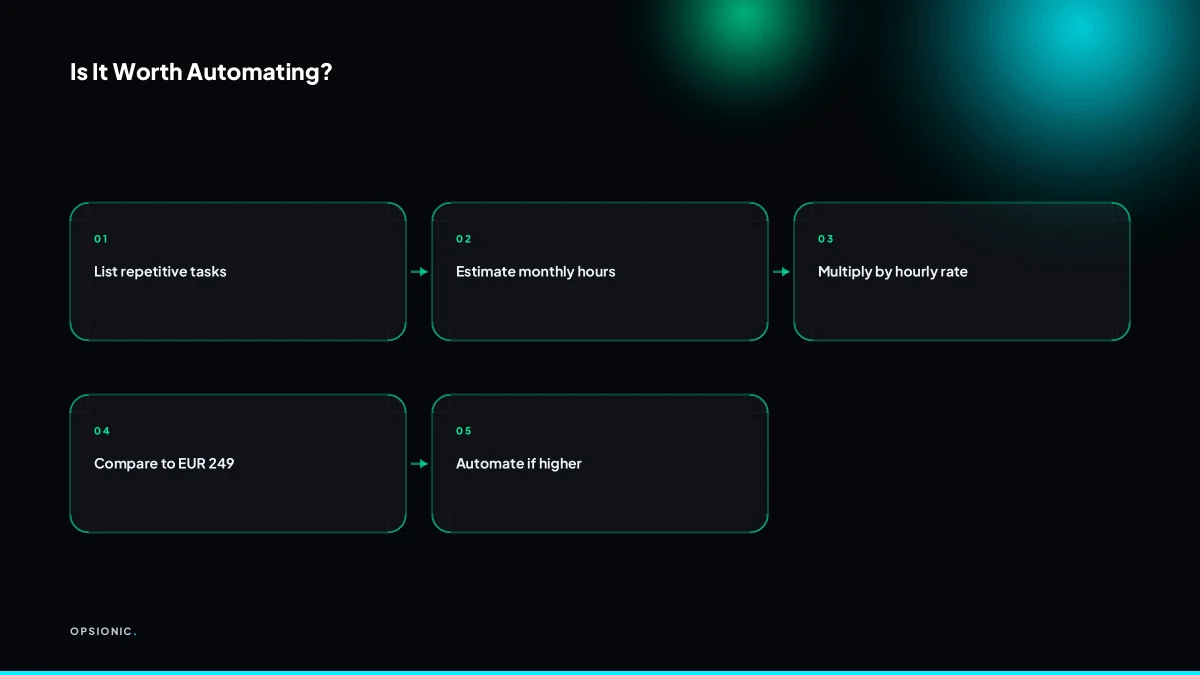
A process is worth automating if it costs more than EUR 399 per month in labour or lost revenue. Calculate the hours spent per month multiplied by your hourly rate. If that exceeds EUR 399, automation likely pays for itself. Start with invoice reminders or quote follow-ups, which directly recover revenue.
- List every recurring task you do by hand each week. Include admin, follow-ups, data entry and file moves.
- Estimate the hours each task takes per month. Be honest: a five-minute task done daily is over two hours a month.
- Multiply those hours by your hourly rate. If you charge EUR 60 per hour and spend three hours on invoice chasing, that is EUR 180 of your time gone.
- Add the cost of late or lost payments. For invoice reminders, a missed payment of EUR 500 dwarfs the labour cost. For quote follow-ups, a dead lead is a sale that never happened.
- Compare the total against EUR 399. If the number is higher, the process earns its place on your automation shortlist.
Invoice reminders are the clearest case. A small business sending 40 invoices a month and chasing ten late payers by hand could spend four hours on reminders alone. That is EUR 240 at EUR 60 per hour, before accounting for the invoices that slip through. Automating quote follow-ups works the same way: a sequence that touches every lead once, twice and a third time costs nothing extra to run, but each recovered quote goes straight to revenue.
Do not automate one-off jobs. If a process happens once a quarter and takes twenty minutes, the setup time is not justified. The same applies to tasks with constantly changing steps. Automation suits repetition, not rarity.
Want this running in your business next week?
A relaxed 20-minute video chat. Camera on or off. You leave with a plan whether or not you hire us.
- No call unless you ask for one
- From EUR 399 a month, no setup fee
- Built and run for you, not handed over as homework
Sources we checked
Questions people ask
Is there a minimum contract length for Opsionic automation?
No, there is no minimum contract. You can stop at any time, and billing stops the same month. There is no exit penalty, so you are never locked in.
Can I automate a process that uses two different software tools?
Yes, most automations connect two or more tools, such as your CRM and email. We build and maintain these integrations as part of the monthly fee.
What happens if my automation breaks?
We monitor your automations and fix issues as part of the monthly fee. You do not pay extra for breakages or small adjustments.
Do I need to buy Zapier or Make separately?
No, you do not need to buy any automation tool separately. Our monthly fee includes the software, hosting, and maintenance.
How long does it take to set up an automation?
Most automations are built and running within a week. Larger projects may take longer, but we agree on a timeline after the free planning chat.
Can Opsionic automate processes in Google Sheets?
Yes, Google Sheets is a common tool we connect to other apps, such as forms or CRMs. We can automate data entry, updates, and reporting.
What if I only need one automation for a short project?
That works. Our plans are monthly, so you can use an automation for a few months and stop when the project ends. No long-term commitment.