Automated Appointment Reminders: Cut No-Shows Without Annoying Anyone
To automate appointment reminders for your small business, choose the right channel per client, send two reminders max, and always include a reschedule link. SMS works best for time-sensitive services, email for detail-heavy appointments, and WhatsApp for international clients. Use a scheduling tool with built-in automations or connect your calendar to an automation platform. This reduces no-shows without extra admin.
Which channel should I use: SMS, email, or WhatsApp?
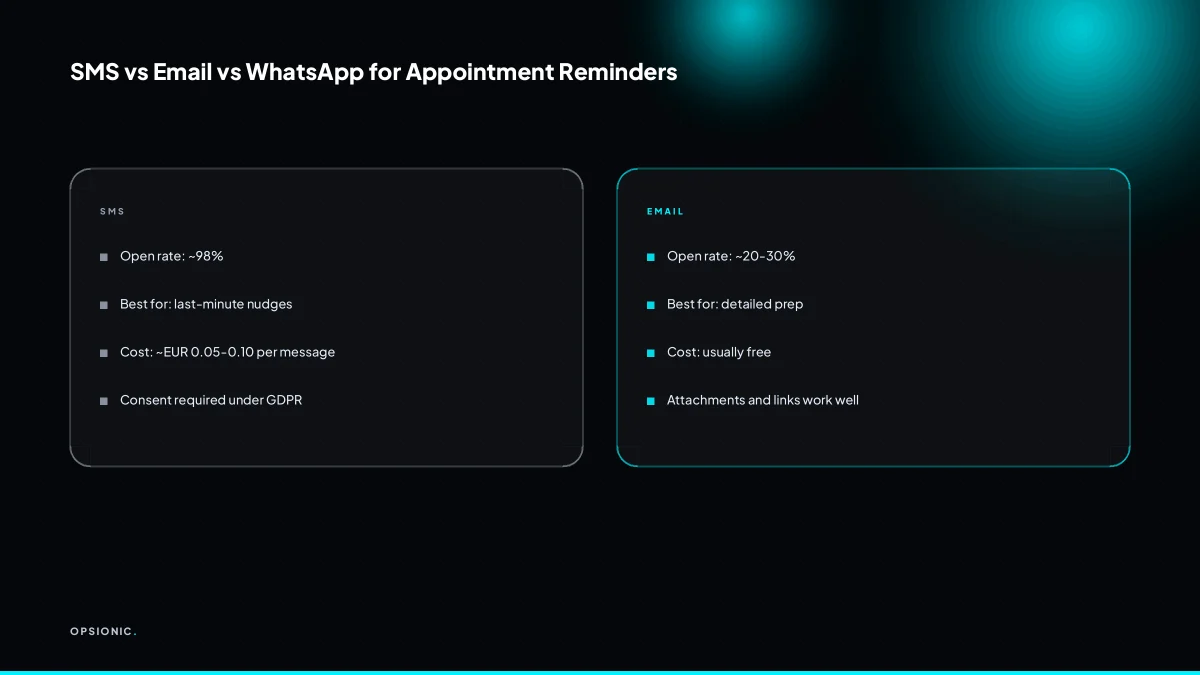
SMS suits last-minute, time-critical reminders because people read texts within minutes. Email suits appointments that need preparation, like consultations or estimates, because you can attach documents and links. WhatsApp works well for clients who already use it daily, especially across borders.
The table below gives rough working numbers. Open rates are broad estimates from industry chatter, not Opsionic data, and they vary by country and list quality. Costs are per message sent, at the time of writing, from common business platforms. Check the vendor’s own pricing page before you commit.
| Channel | Typical open rate (rough estimate) | Cost per message (approximate, at time of writing) | Best use case |
|---|---|---|---|
| SMS | 90 to 98 percent | EUR 0.04 to EUR 0.09 | Same-day or next-day reminders, short confirmations |
| 20 to 40 percent | EUR 0.00 to EUR 0.01 via your provider | Pre-appointment briefs, intake forms, document attachments | |
| 70 to 95 percent | EUR 0.03 to EUR 0.08 for business API messages | International clients, ongoing chat threads, reschedule nudges |
Salons and barbers do well with SMS. The appointment is short, the client is often on the move, and nobody opens email to confirm a haircut. A reminder sent three hours before the slot, with a reply option like “Reply C to confirm or R to reschedule,” stops most no-shows without a phone call.
Clinics and consultancies need more than a ping. A physiotherapist may want to send a pre-session questionnaire. An accountant preparing for a tax meeting may need to attach last year’s figures. Email carries that weight. Use SMS or WhatsApp only for the final nudge on the day itself.
Mixing channels is not inconsistency. Email the preparation pack two days before. Send an SMS the evening before. Use WhatsApp for the reschedule link when someone cancels, because that is where a quick reply is most likely. The channel follows the job the message has to do.
When should each reminder go out?
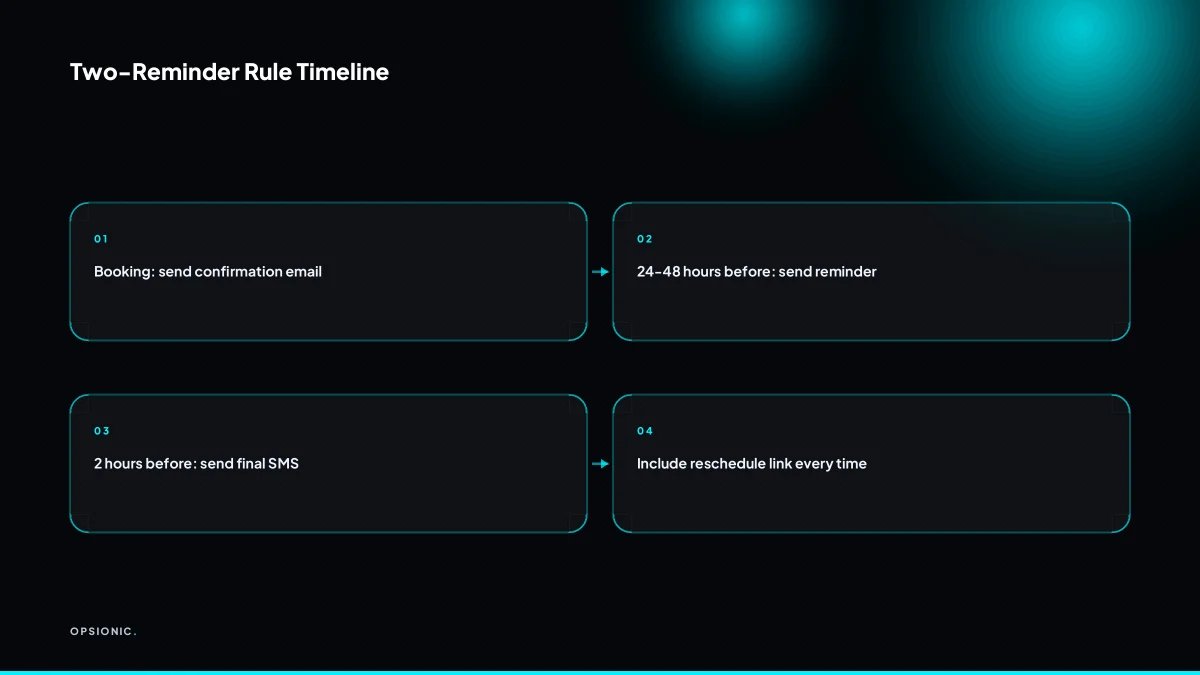
Send a confirmation immediately after booking, then a single reminder 24 to 48 hours before the appointment. For appointments booked far in advance, add a third reminder one week out. For same-day bookings, skip straight to a reminder two hours before.
Timing depends on how far ahead the customer books. A haircut booked three days out needs one reminder. A dental check-up booked six weeks out needs the early nudge plus the final one. The rule stays the same: never more than two touchpoints after the confirmation, unless the customer has explicitly asked for more.
- Send the confirmation the moment the booking lands. This is not a reminder. It is the receipt that tells the customer the slot is theirs. Include the date, time, location and a calendar file.
- Send the one-week reminder for appointments booked more than ten days out. Keep it short. One line confirming the slot, one line offering a reschedule link. No sales content.
- Send the final reminder 24 to 48 hours before the appointment. This is the one that actually cuts no-shows. For a morning appointment, send it the previous afternoon. For an afternoon slot, send it the same morning.
- Handle same-day bookings with a single two-hour reminder. The confirmation and the reminder merge into one message: “Booked for 3pm today. Reply C to cancel or R to reschedule.”
- Cap the sequence at three messages per appointment. Confirmation, early reminder if needed, final reminder. Anything more and the customer starts tuning out every message you send, including the ones that matter.
A typical service business with a 48-hour booking window works like this. Tuesday 10am: customer books a Thursday 2pm slot and gets the confirmation. Wednesday 2pm: the 24-hour reminder goes out. Thursday 10am: nothing, because the 24-hour reminder already did the job. The customer shows up, or the reschedule link catches the ones who would have ghosted.
Not sure which of these applies to you?
Answer six questions and see what we would automate first in your business, and what it is worth.
What should the reminder actually say?
A good reminder has four parts: the appointment details, a clear call to action, a reschedule link, and a polite closing. Keep it under 160 characters for SMS, or a short paragraph for email. Use the client’s name and the specific service. Write like you would in a quick text to a colleague.
Start with a template you can reuse for every booking:
Hi [First name], this is a reminder for your [service] on [day] at [time] with [business name]. If you need to change it, you can reschedule here: [link]. See you then.
That is 168 characters for SMS if the name, service and link are short. Trim the closing to “See you” or drop the business name if you need to get under 160.
The reschedule link is the single most important element. A reminder without one tells the client what is happening but gives them nothing to do if the time no longer works. A reminder with one turns a potential no-show into a rebooking. The client clicks, picks a new slot, and your calendar stays full.
To avoid sounding robotic, write the reminder as one sentence plus one action. Do not say “We wish to inform you that your appointment has been scheduled.” Say “Your haircut is booked for Thursday at 2pm.” Use contractions. Use the client’s first name. If you would not say “kindly confirm your attendance” in a text to a colleague, do not put it in a reminder.
Here is a worked example, not a client. Suppose a physiotherapy clinic has 40 appointments a week and a 12 percent no-show rate before reminders. That is 4.8 missed slots a week, roughly 5. After adding a two-reminder sequence with a reschedule link, the no-show rate drops to 5 percent. That is 2 missed slots a week. The clinic recovers 3 appointments a week. At EUR 65 per appointment, that is EUR 195 of recovered revenue a week, or about EUR 10,140 a year. These numbers are illustrative, not from any study or client.
Now compare two versions of the same reminder.
Bad: “Dear valued client, this message serves to inform you that your upcoming appointment has been scheduled. Please be advised that failure to attend may result in a fee. We look forward to serving you.”
Good: “Hi Sam, your physio session is Thursday at 2pm. Need to move it? Grab a new time here: [link]. See you then.”
The bad version tells Sam nothing useful and sounds like a terms sheet. The good version tells him the time, gives him an action, and sounds like a person. The reschedule link does the work that a cancellation fee only threatens to do.
How do I set this up without technical skills?
Start with the scheduling tool you already use. Google Calendar, Calendly, and Acuity all have built-in reminder emails. For SMS or WhatsApp, connect your calendar to Zapier or Make and set up a simple automation: when an event starts in X hours, send a message. No coding is required.
- Open Zapier and create a new Zap. Pick Google Calendar as the trigger app and choose “Event Start” as the trigger event.
- Connect your Google Calendar account. Zapier will ask for permission to read your events. Approve it once and you are done.
- Set the timing offset. Tell Zapier to run the trigger 24 hours before the event starts. This is your first reminder.
- Add an action step. Choose Gmail to send a plain email reminder, or pick Twilio for SMS and paste in your Twilio account SID and auth token.
- Write the message template. Use fields like Event Start Time and Event Title so each reminder fills itself in. Include a reschedule link from your booking tool if it offers one.
- Turn the Zap on. Test it with a dummy event tomorrow, then let it run.
For WhatsApp, connect the WhatsApp Business Cloud API through Zapier. Twilio also handles WhatsApp messages, so one Twilio account can cover both SMS and WhatsApp from the same Zap. If your booking system does not support reminders at all, export bookings to Google Calendar automatically or switch to a calendar that does. When the setup feels like too much fiddling, a done-for-you service can build and run the whole reminder sequence on your behalf. That is exactly the kind of work we cover under what we automate for small businesses.
What is this costing you now?
Based on removing half of that time.
What mistakes make reminders annoying?
The biggest mistakes are sending too many reminders, using a generic message with no personalisation, and not including a reschedule option. Sending reminders at odd hours, like 11pm, also irritates clients. Never send SMS or WhatsApp reminders without prior consent.
The nagging spammer. You send a confirmation, a 48-hour reminder, a 24-hour reminder, a morning-of reminder, and a post-appointment thank you. Clients stop reading any of them, and a few block the number. Cap the sequence at two reminders for most appointments. One early heads-up and one final confirmation is enough.
The copy-paste robot. Every message reads “Dear client, your appointment is confirmed.” No name, no service, no time, no address. Recipients assume it is spam or cannot tell which booking it refers to. Pull the client’s first name, the service, the date, and the location into every message. A reminder that names the actual haircut, dentist, or consultation is read and acted on.
The dead end. The reminder says “We look forward to seeing you” and offers no way to change the booking. A client who cannot make it simply no-shows, or cancels by replying to an unmonitored number. Include a reschedule link in every reminder. One click turns a cancellation into a rebooking instead of a hole in the day.
Frequency caps and consent
Reminder fatigue is real. Two messages per appointment is the practical ceiling for most service businesses. If you run a high-value or high-preparation appointment, such as a surgery or a property viewing, a third message the morning of is justified. Beyond that, you are training clients to mute you.
In Europe, SMS and WhatsApp reminders may fall under GDPR. You need a lawful basis to contact a client on a personal number. Consent is the cleanest one. Ask at booking time: “May we send a reminder by SMS or WhatsApp?” and record the answer. Do not treat a phone number on a form as implied consent. For existing clients, you can rely on legitimate interest in some cases, but consent is simpler to defend and easier to prove.
Audit your current reminder flow
- Count the messages per appointment. If it is more than two without a strong reason, cut one.
- Read a real message out loud. Does it name the person, the service, the time, and the place?
- Check the send times. Are any messages going out before 8am or after 8pm in the client’s time zone?
- Look for a reschedule or cancel link. If there is not one, add it.
- Confirm you have consent on file for SMS and WhatsApp. If you cannot show it, switch to email until you collect it.
What does this cost and is it worth it?
Basic email reminders are free with most booking tools. SMS costs around EUR 0.05 to EUR 0.10 per message via Twilio at the time of writing, and WhatsApp Business may be free for a limited number of conversations each month. If you build a custom automation with Zapier, expect around EUR 20 per month at the time of writing.
Email costs nothing on most booking platforms because it rides on your existing subscription. SMS is the real variable: a single reminder sequence of two messages costs roughly EUR 0.10 to EUR 0.20 per appointment. WhatsApp sits in between, free below a certain conversation threshold, then metered after that. Automation platforms add a layer: Zapier starts at around EUR 20 a month at the time of writing, Make has a free tier at the time of writing, and n8n can run on your own server for the cost of hosting if you self-host. The software is rarely the expensive part.
Take a worked example, not a client: a five-person clinic with 30 appointments a week. Each appointment gets one email (free) and one SMS at EUR 0.07. That is EUR 2.10 a week, or about EUR 9 a month, in SMS fees. Add a EUR 20 Zapier plan and the total is EUR 29 a month. A single no-show at that clinic might be a EUR 60 consultation. One saved no-show pays for two months of reminders.
The hidden cost is manual work. If a receptionist spends ten minutes a day copying names and times into messages, that is 50 minutes a week, or over 40 hours a year. Paid at EUR 18 an hour, that is EUR 720 of labour doing something a script can do in seconds.
DIY makes sense when you use one booking tool with built-in reminders and you only need email. A paid automation service earns its fee when you need SMS and WhatsApp across different time zones, when reminders must trigger from a spreadsheet or CRM, or when you want the reschedule link to update your calendar automatically. That is the point where the monthly fee stops being a cost and starts being cheaper than the hours you are burning. The full arithmetic of build versus buy is covered in what one automation actually costs.
Want this running in your business next week?
A relaxed 20-minute video chat. Camera on or off. You leave with a plan whether or not you hire us.
- No call unless you ask for one
- EUR 399 a month, no setup fee, on a 6-month initial term
- Built and run for you, not handed over as homework
Sources we checked
Questions people ask
Can I automate appointment reminders from Google Calendar?
Yes. Google Calendar integrates with Zapier or Make to send reminders via email, SMS, or WhatsApp when an event is about to start. Set up a Zap with Google Calendar as the trigger and your messaging app as the action.
How do I get clients to actually read my reminders?
Keep messages short, personal, and actionable. Use the client's name, the service, and a clear reschedule link. Send at reasonable hours, and limit to two reminders per appointment. Avoid robotic language.
Is it legal to send SMS reminders without asking?
For SMS and WhatsApp, you generally need prior consent, such as a checkbox at booking. Email reminders to existing clients may be allowed under soft opt-in rules, but check local regulations. Always provide an opt-out.
What is the best free appointment reminder app?
Google Calendar offers free email reminders. Calendly and Acuity have free tiers with built-in email notifications. For SMS, you may need a paid service like Twilio, but you can start with email at no cost.
How do I handle cancellations automatically?
Include a reschedule link in your reminder. When the client clicks it, they can pick a new slot or cancel. Use automation to update your calendar and send a confirmation. This turns a potential no-show into a rebooking.
Can I use WhatsApp for appointment reminders without a business account?
You need a WhatsApp Business account to use the API for automated messages. The free WhatsApp Business app can send manual reminders, but for automation, you'll need the API via a provider like Twilio.
What if a client replies to an automated reminder?
Set up a two-way conversation: if the client replies, the message should route to your staff or an automated response. For example, reply 'R' to reschedule could trigger a reschedule link. Otherwise, ensure replies are monitored.