Questions to Ask an Automation Agency Before You Sign
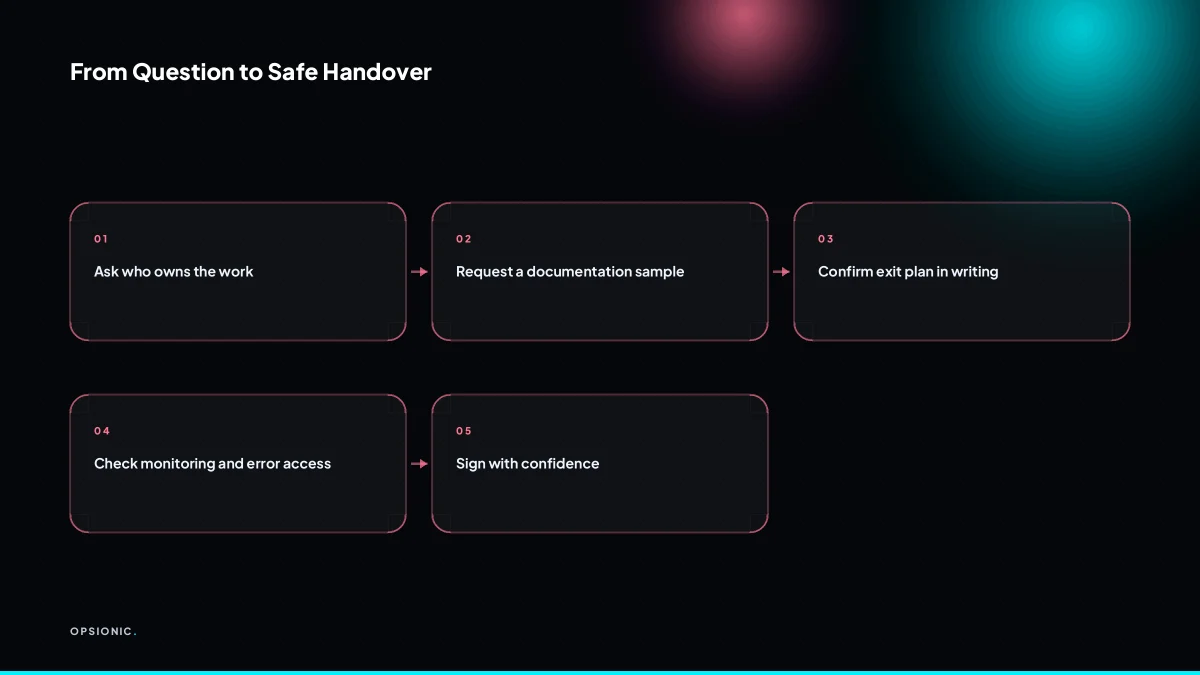
Before hiring an automation agency, ask who owns the work, what happens if they disappear, how documentation is handled, what the monthly fee includes, which tools they use and who pays, how errors are monitored, and what access they need. The answers to these questions to ask an automation agency tell you if you will be locked in or protected.
Who owns the automations once the project is done?
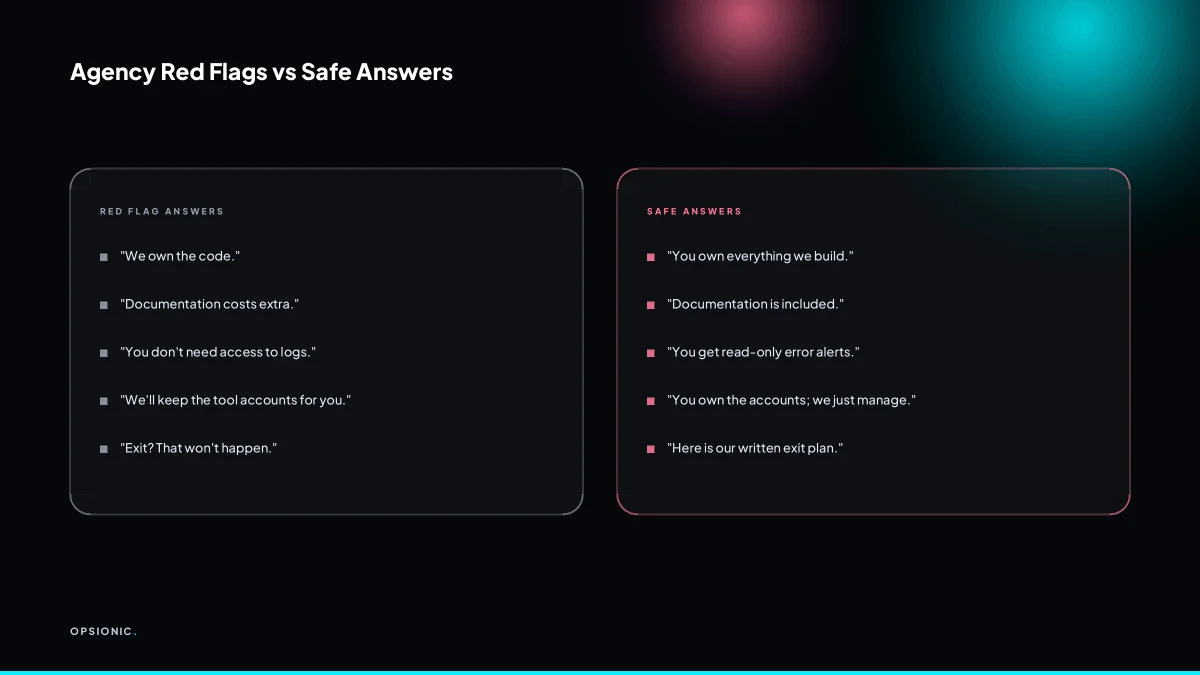
Ownership should be explicit in the contract. You want full rights to the workflows, code, and any documentation produced for you, so you can edit, move, or hire someone else later. If the agency claims ownership of the logic or charges a fee to release it, that is a red flag.
Ownership decides what happens when you want to change something. A workflow that works today will need adjusting when your pricing changes, when you add a new tool, or when a member of staff leaves. If you do not own the build, every change becomes a negotiation. You pay again for access to your own process. If you ever want to leave the agency, you may find you cannot take the automation with you.
In the contract, look for a clause that assigns intellectual property to you on full payment. The clause should cover the workflow logic, any custom code, and the written documentation. Avoid terms that grant the agency a licence to reuse your build for other clients without your consent.
After delivery, verify ownership in practice. Ask for the workflow to be built in an account you control, not one the agency holds on your behalf. Request an export of the workflow file and a copy of any documentation. If the agency hesitates on either point, treat that as a warning.
Our answer is simple. When we build an automation for you, you own it. The workflows, the code, and the documentation are yours once the project is paid. You can see how we structure that in our build process, and you can ask us to walk through the handover before you sign anything.
What happens if your agency goes out of business?
Ask for a written exit plan. It should state that you will receive all credentials, documentation, and a copy of the automations if the agency ceases trading. If the agency hosts your automations on their own servers, ask how you would take over that hosting or migrate to your own.
An exit plan is non-negotiable because your business keeps running even if your agency does not. Without one, a dissolved company can take your workflows, login details and data with it. You would be left rebuilding from memory while invoices pile up.
A good exit clause covers three things. First, ownership: the automations and their documentation belong to you once paid. Second, access: you hold admin rights to every account the agency created for you. Third, handover: a defined process for transferring credentials and files if the agency closes.
Hosting raises a separate set of questions. If your workflows run on the agency’s server, you need to know how to move them. Ask whether you can export the automations in a standard format, whether you can take over the existing server, or whether you must rebuild on your own infrastructure. A clear answer here is as important as the exit clause itself.
Here is a checklist to print and take into any agency conversation:
- Ask for the exit plan in writing before signing.
- Confirm you receive all credentials, including hosting, DNS and third-party app logins.
- Confirm you receive a copy of every automation in an exportable format.
- Confirm documentation covers what each workflow does and where it runs.
- Ask who owns the server if the agency hosts your automations.
- Ask how long a handover would take and whether it is included in the fee.
- Ask whether the agency keeps a backup of your automations outside their own infrastructure.
At Opsionic, we treat this as a basic part of the job. You own the automations once the project is paid, and you get the credentials and documentation from day one. If you host with us through our managed server hosting, we will walk you through how to export and migrate before you ever need to. The exit is planned before the build starts.
Not sure which of these applies to you?
Answer six questions and see what we would automate first in your business, and what it is worth.
How do you document what you build?
Documentation should be written for a competent outsider, not just the person who built it. You want a plain-language description of each automation, the tools involved, the triggers and actions, error handling, and who to contact. Ask to see a sample before you sign.
Good documentation covers the full path of a workflow. It names the trigger, such as a new row in a Google Sheet. It lists every step that follows, including conditional branches. It states where data is stored, which accounts hold credentials, and what happens when a step fails. It also records the business reason for the automation, so a future reader understands why a rule exists.
Test the sample the way you would test a fire escape. Hand it to someone in your business who has never seen the build. Ask them to explain, in their own words, what the automation does and where it might break. If they cannot, the documentation is not finished.
This matters for maintenance. When a tool changes its API or a team member leaves, the next person needs to pick up without a week of archaeology. It also matters for audits. A regulator or an accountant may ask why a record moved from one system to another. Clear documentation answers that question in minutes, not days.
At Opsionic, we write documentation for the person who takes over after us. Each build includes a plain-language runbook, a diagram of the flow, and a list of failure points. You can see how this fits into our wider approach on the services we provide for small businesses.
What exactly is included in the monthly fee?
Monthly fees should cover monitoring, maintenance, and small changes, not just the software licence. Ask what counts as a small change versus a new project, how quickly you can expect fixes, and whether the fee is fixed or can rise with usage.
Ask the agency to split the work into two buckets: what the monthly fee covers, and what would be billed as a separate project. The monthly fee should cover keeping the automation alive: watching for failed runs, updating broken connections, and making small edits like changing an email address or adding a field to a form. Anything that takes more than an hour or two becomes a separate project with its own quote.
Define that boundary before you sign. A useful rule is to ask for a written example of the largest change included in the fee. One agency might call a new approval step a small change; another might bill it as a project. The answer tells you how they think about scope.
Fee structures vary. Some agencies charge a flat rate regardless of how many tasks run each month. Others cap usage and charge extra above the limit. Ask what happens if you double your volume. If the answer is vague, the invoice will not be.
Here are questions to ask about what is included:
- Is monitoring and error alerting included, or is it an extra?
- What size of change is included in the monthly fee? Ask for a written example.
- Are software licences included, or do you pay the platform directly?
- Are documentation updates included when the workflow changes?
- Is there a usage limit, and what happens if you exceed it?
At Opsionic, our managed automation fee of EUR 599 per month includes monitoring, maintenance, and small changes. A single workflow starts at EUR 399 per month. Larger projects get a fixed quote on the free planning chat. If you want to understand what sits behind those numbers, see the real cost of business automation.
What is this costing you now?
Based on removing half of that time.
Which tools do you use, and who pays for the licences?
The agency should tell you exactly which platforms they will connect, such as Zapier, Make, or n8n, and who holds the account. You want to own or control the accounts so you can revoke access and see the billing. If the agency insists on their own account, ask why.
Owning the tool accounts means you keep the keys. If the relationship ends, your workflows, connections, and history stay with you. If the agency holds the account, you may have to rebuild everything from scratch or wait for them to export it.
Licence payments should sit on your card, not theirs. You pay the platform directly, and the agency works inside your account. This keeps pricing transparent and stops you paying a hidden markup on software you could buy yourself.
Ask what data flows between tools before anything is built. You want a plain list: which app sends what, where it lands, and which account owns each step. If the agency cannot describe that in a few sentences, the automation is not ready to build.
At Opsionic, you own every account we touch. We work inside your Zapier, Make, or n8n workspace, and you hold the billing and admin rights. We document every connection so you can see what runs where. If you want to understand what a platform like Zapier really costs before you commit, read what Zapier really costs for a small business.
How do you handle errors and monitoring after launch?
Ask what happens when an automation fails. A good agency has monitoring in place, alerts someone, and fixes issues within a defined timeframe. You should also have visibility into error logs and a way to report problems yourself. If they say “we will check manually”, walk away.
Monitoring means watching every run, not just the ones you remember to look at. A failed step in Zapier, Make, or n8n should trigger an alert within minutes, not sit silent until an invoice goes missing. The agency should tell you their response time: same day, four hours, next business day. You need a named channel for reporting problems, and you need access to the run history yourself, so you can see what succeeded and what did not. If the agency is the only one who can see the logs, you cannot verify anything they claim.
- Check the run history in your own workspace after any suspected failure.
- Open the error log for the specific automation and note the failed step.
- Send the run ID and a short description to the agency through the agreed channel.
- Confirm the agency has acknowledged the alert within their stated timeframe.
- Verify the fix by triggering a test run before the next scheduled execution.
At Opsionic, monitoring is part of the service, not an add-on. We alert on failures, we fix within a defined window, and you keep full access to your own logs. This is one of the reasons automation projects fail in small businesses: nobody watches the runs after the launch meeting ends.
Want this running in your business next week?
A relaxed 20-minute video chat. Camera on or off. You leave with a plan whether or not you hire us.
- No call unless you ask for one
- From EUR 399 a month, no setup fee
- Built and run for you, not handed over as homework
Sources we checked
Questions people ask
What should I look for in an automation agency contract?
Look for a clause assigning intellectual property to you on full payment, covering workflow logic, custom code and documentation. You want admin rights to every account created for you, a written exit plan, and a clear split between what the monthly fee covers and what is billed as a separate project.
How do I know if an automation agency is reliable?
Ask for a sample of their documentation and read it as an outsider. Check whether monitoring and error alerting are included, who holds the platform accounts, and what happens when a workflow fails. Vague answers on scope, ownership or handover are the warning signs worth taking seriously.
Can I switch automation agencies later?
Yes, if you own the accounts, the workflow files and the documentation. Insist the build sits in your own Zapier, Make or n8n workspace rather than the agency's, and request an exportable copy of every workflow. Without those, switching means rebuilding from scratch.
What is a reasonable setup fee for business automation?
Many agencies charge nothing upfront and fold the build into a monthly retainer, while others quote a one-off project fee. Opsionic charges no setup fee, with managed automation at EUR 599 per month or a single workflow from EUR 399 per month, and larger projects quoted individually.
How long does it take to build an automation with an agency?
A single workflow connecting two tools can often be built and tested within a week or two, while multi-step projects with approvals, error handling and several systems take longer. Ask for a written scope and timeline before you commit, and treat a missing timeline as a missing answer.
Do I need to know how to code to work with an automation agency?
No. You need to describe the process clearly and name the tools involved, and the agency handles the build. What helps is knowing who in your business owns each step, so the documentation and handover land with the right person when the project ends.
What is the difference between an automation agency and a freelancer?
A freelancer typically builds and hands over, leaving monitoring and fixes to you. An agency usually runs the automation afterwards, covering monitoring, maintenance and small changes for a monthly fee. The trade-off is cost against ongoing cover when something breaks.