Why Automation Projects Fail in Small Businesses
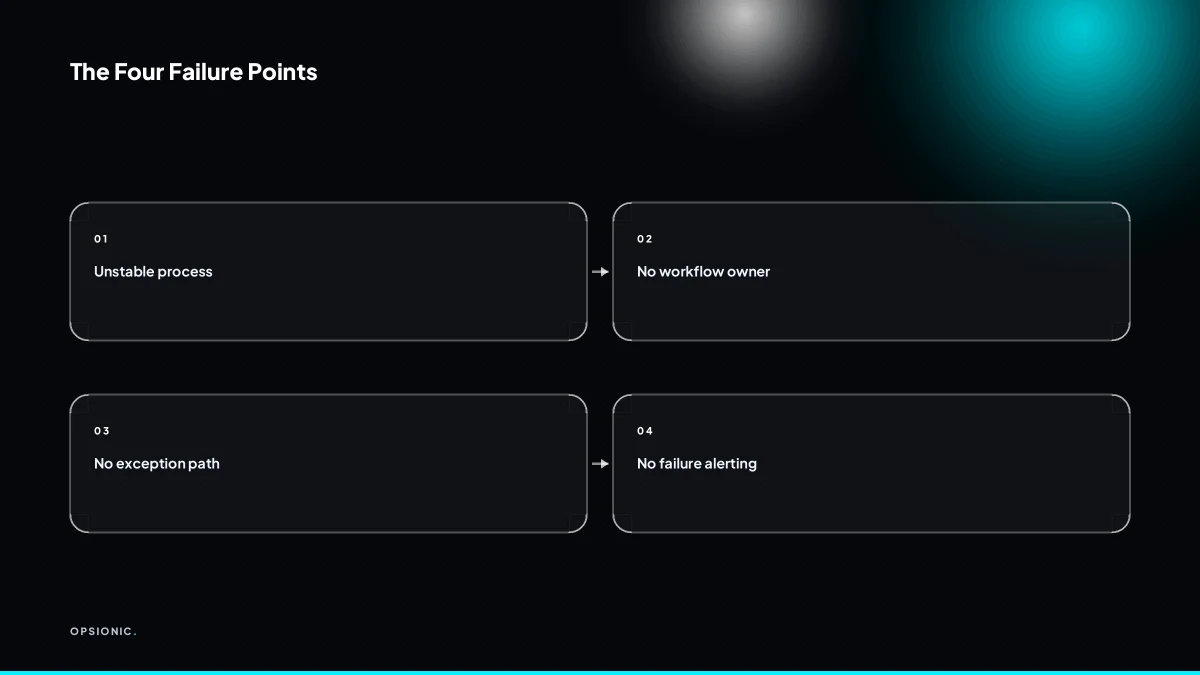
Automation projects fail in small business when the underlying process is broken, no one owns the workflow after launch, exceptions are not handled, and no alert fires when the automation silently stops. Before spending money, check whether the task is stable, owned, and measurable. Most failures are predictable, and each has a test you can run this week.
Why do automation projects fail in small businesses?
Automation projects fail in small businesses for four main reasons: the process being automated is not stable or well understood, no single person owns the automation after launch, exceptions are not designed for, and there is no alerting when the workflow stops working. Each can be caught before any money is spent.
None of these failures is random. They follow from how small businesses buy and build automation. A founder picks the task they hate most, sketches a rough flow, and hands it to a tool or a freelancer. The tool does what it is told. The problem is that the instructions were incomplete.
The first failure mode is a broken process. If the human version already depends on judgement calls, unwritten rules, or the owner stepping in, the automated version inherits those gaps. A quoting workflow that sometimes discounts for long-standing customers cannot be automated until the discount rule is written down. Otherwise the automation either applies the discount to everyone or to no one.
The second is no owner. After launch, nobody is responsible for watching the workflow, updating it when a step changes, or answering the question “is this still right?” A workflow with no owner degrades quietly.
The third is no exception path. Every process has edge cases: a missing email address, a duplicate invoice, a refund. If the automation has no instruction for what to do when the normal path breaks, it stops or does something wrong.
The fourth is no alerting. A workflow can fail silently for weeks. The business only notices when a customer complains or a report looks wrong. By then the damage is done.
You can run a quick pre-mortem on each failure mode before you spend anything. For the process: write down the exact steps a new starter would follow, with every decision rule. If you cannot, the process is not ready. For ownership: name the person who will check the workflow weekly and own changes. If no name comes to mind, stop. For exceptions: list the three most common things that go wrong by hand, and ask what the automation should do for each. If the answer is “I don’t know”, the design is not finished. For alerting: ask how you would learn within one day that the workflow stopped. If the answer is “a customer tells me”, that is not alerting.
These checks take an afternoon. They are the same questions a competent builder should ask before quoting. If a provider skips them, that is the first warning sign. This is exactly the kind of thinking covered in when to hire an automation agency, because the decision is not about the tool. It is about whether the process can survive being automated.
How do I know if my process is too broken to automate?
A process is too broken to automate if you cannot write down the steps without saying “it depends” at least once. If the next action changes based on who is doing it, which client is involved, or what mood the person is in, the process is not stable. Automating it will only make the exceptions happen faster and more often. Test this by writing a standard operating procedure in plain language before touching any tool.
The “it depends” test is simple. Sit down with the person who does the work and ask them to dictate every step. If they pause and say “it depends” for a step, mark it. One or two marked steps might be fixable. Five or more means the process is really several processes wearing one name. You are not ready to automate. You are ready to standardise.
A written standard operating procedure is the prerequisite. It forces decisions that automation cannot make for you. Which client types get which treatment? What happens when a field is blank? Who approves the exception? If the SOP cannot answer those questions, the automation will stop dead at the first unusual case. The tool will not improvise. It will follow the rules you gave it, and then it will wait for a human who may not be watching.
Invoicing is the classic example. A firm might invoice fixed-fee clients on the first of the month, hourly clients every Friday, and one legacy client only after the owner reviews the draft. That is three processes sharing one name. An automation built for the fixed-fee path will misfire on the other two. Before choosing what to automate, you need to know which path you are automating. This is the same logic behind what tasks should a small business automate first, because the answer starts with stability, not enthusiasm.
If you cannot write the SOP, do not buy the tool. Fix the process first. Then automate the version that survives a week without exceptions.
Not sure which of these applies to you?
Answer six questions and see what we would automate first in your business, and what it is worth.
Why does it matter who owns the automation after it is built?
Without a named owner, an automation dies the first time something changes. The person who built it moves on, the tool updates, or the business changes a step, and nobody notices until a customer complains. The owner does not need to be technical, but they must be responsible for checking the workflow, updating it when the process changes, and responding to alerts. Assign this role before you build, not after.
Week to week, the owner does three things. They open the workflow log and look for failed runs. They test one live example to confirm the output still reaches the right place. They read any alert emails and decide whether to fix something now or note it for later. This takes under half an hour most weeks. The point is not busywork. It is that someone has their name on the process.
The real risk appears when staff change. A receptionist leaves, a bookkeeper retires, or a manager moves to another branch, and the automation they championed becomes an orphan. It keeps running because nobody turned it off. It sends invoices with the old bank details, chases leads with a dead phone number, or files documents in a folder nobody opens. The cost is not the tool. It is the silent drift away from what the business now needs.
Choose an owner who already touches the process weekly. That person notices when a step changes because they live with it. Avoid the busiest person in the room, however senior. Avoid the person who only cares about tools. Pick the colleague who complains when data is wrong, because they will notice when the automation is wrong too. If the owner changes jobs, hand the role over the same way you hand over keys: with a short walkthrough, the alert settings, and one test run. This is the same logic behind how automation transforms internal processes, because ownership is what stops the transformation from quietly reversing.
What does a silent failure look like, and how do I prevent it?
A silent failure is when an automation stops working without anyone noticing. For example, an invoice reminder workflow stops sending emails because a date field changed format, and you only find out when a client asks why they were not reminded. To prevent this, build alerting into the workflow: if the automation does not run as expected, it should notify a human immediately. The alert is the difference between a small glitch and a lost client.
Take a small bookkeeping firm that sends 40 invoice reminders a month. Each reminder chases an invoice worth EUR 600 on average. If the workflow dies on the first of the month and nobody notices for three weeks, 30 reminders never go out. Some clients pay anyway. Others wait for the reminder because that is how they work. If ten of those invoices slip by two weeks, the firm is out EUR 6,000 in cash flow for a fortnight, plus the awkward phone calls. The automation did not just stop. It stopped quietly, inside a tool nobody opens every day.
Alerting must be built into the workflow from the first draft, not added when something breaks. A workflow that only runs when clicked is not automation. A workflow that runs and fails without telling anyone is worse than no workflow, because you now trust a process that is not happening. The cheapest alert is an email to a named person when a run fails or when no run happens at all. Slack works well if the team already lives there. A simple dashboard that shows last successful run per workflow is enough for a solo owner. The point is that a human sees the silence, fast. That is also the moment to revisit how to automate invoice reminders so the reminder itself still sounds human when it does go out.
What is this costing you now?
Based on removing half of that time.
What is an exception path, and what happens if I do not build one?
An exception path is a defined route for cases that do not fit the normal workflow. For example, an invoice automation might handle standard invoices, but what about a client with a credit note or a disputed charge? If you do not build an exception path, the automation either fails silently or sends incorrect information. The result is manual cleanup, angry clients, and a loss of trust in the system. Define exceptions before you automate.
Think of a small bookkeeping firm that automates sending monthly invoices from its practice management software. The normal path is simple: create the invoice, attach the PDF, email it. But a client on a payment plan has a reduced amount this month. Without an exception path, the automation sends the full invoice anyway. The client replies confused, the owner checks the system, finds the override was ignored, and now has to send a corrected invoice by hand. The automation saved no time on that job. It created extra work.
Handling exceptions after the fact is more expensive than handling them up front. You pay twice: once when the automation runs wrong, and again when a human repairs the record, explains the mistake, and rebuilds trust. A disputed charge sent to a collections reminder is worse than no reminder at all.
List exceptions before you build. Get the person who does the task today and ask three questions. What makes a normal case normal? What have you seen go wrong in the last six months? Which of those cases still need a human decision? Write the answers down. If you cannot name the exceptions, you are not ready to automate the process. That honesty is the first step in how to start automating your business without inheriting a mess.
When is it better not to automate a task at all?
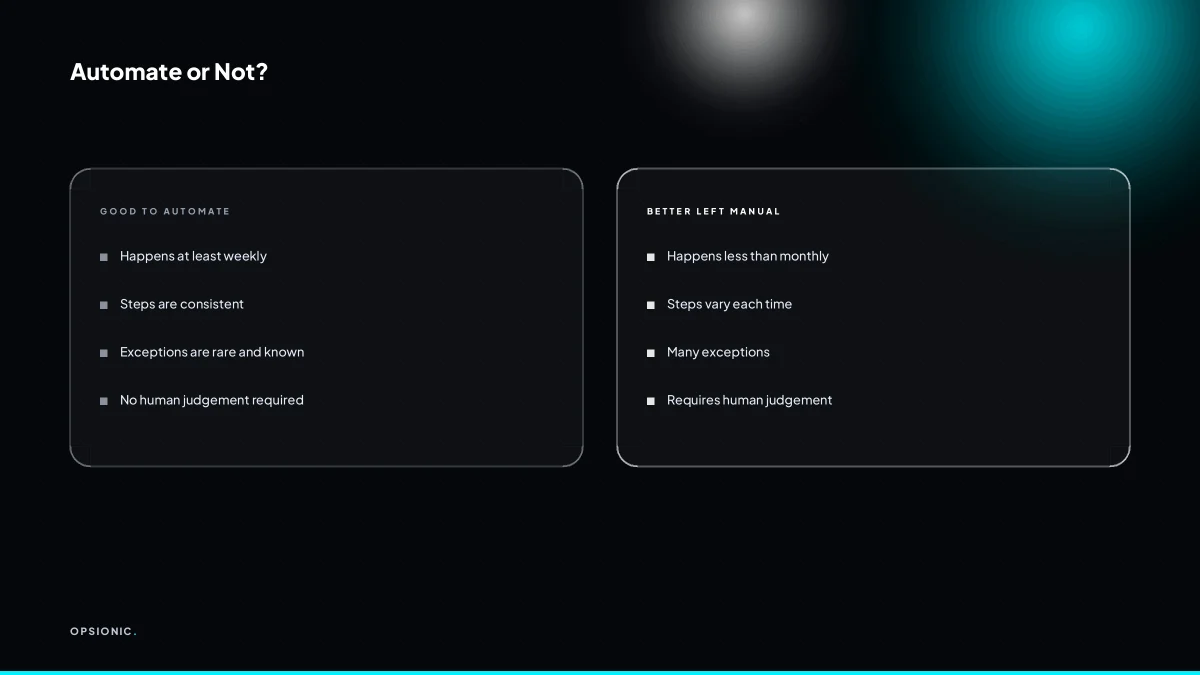
Do not automate a task that is rare, highly variable, or requires human judgement every time. For example, a one-off data migration or a complex negotiation with a key client is not worth automating. The rule is simple: if you do the task less than once a month, or if you cannot write down the decision rules, leave it manual. The time you save will not cover the cost of building and maintaining the automation.
Frequency is the first filter. A task you do twice a year will never repay a build that takes a week, plus ongoing monitoring. Variability is the second. If every instance follows a different path, the automation needs branches for cases you have not seen yet, and each branch is a place to fail.
Judgement-heavy work resists automation because the useful step is the thinking, not the clicking. Approving an unusual discount, deciding whether a complaint is genuine, choosing which supplier to trust after a delay: these need context a workflow cannot hold.
The cost comparison is rarely about the build alone. Suppose a task takes 30 minutes a week by hand. That is roughly 26 hours a year. An automation that needs 15 minutes a week of checking, fixing exceptions and updating rules costs 13 hours a year. You save half a day annually, which may not justify the setup effort. Before you commit, run the payback sum first.
Want this running in your business next week?
A relaxed 20-minute video chat. Camera on or off. You leave with a plan whether or not you hire us.
- No call unless you ask for one
- From EUR 399 a month, no setup fee
- Built and run for you, not handed over as homework
Sources we checked
Questions people ask
What is the biggest mistake small businesses make when automating?
Automating a process that is not stable yet. If the human version depends on judgement calls or unwritten rules, the automation inherits those gaps and fails at the first unusual case. Write the steps down as a standard operating procedure first, then automate the version that survives a normal week without exceptions.
How much does a failed automation project cost on average?
There is no reliable average, and anyone quoting one is guessing. Work out your own figure: add the subscription months wasted, the hours spent cleaning up bad data, and the cash flow delayed while reminders or invoices stopped. A single silent month on 40 reminders worth EUR 600 each is a five-figure problem.
Can I automate a process that I do not fully understand myself?
No, and trying is how projects fail. Sit with the person who actually does the work and have them dictate every step. Every time they say it depends, mark it. One or two marks may be fixable. Five or more means you are really looking at several processes sharing one name.
How do I choose the right automation tool for my small business?
Choose the tool after the process, not before. Write the steps, list the exceptions and name the owner first. Then match the tool to the apps you already pay for and the volume you handle. A simple two-step workflow and a fifty-step one rarely belong on the same platform.
What should I do if my automation has already failed?
Turn it off if it is producing wrong output, then find out how long it has been silent by checking the run log. Fix the process gap that caused the failure, add an alert to a named person, and only restart once you can test one live example end to end.
Is it possible to automate without any technical skills?
Yes, for straightforward workflows between common apps. What you cannot skip is the thinking: writing the steps down, deciding what happens on an exception, and naming someone to check the log weekly. Those are business decisions, not technical ones, and they matter more than the tool.
How long does it take to see if an automation is working?
Give it one full cycle of whatever it handles, so a month for invoicing or a week for lead follow-up. During that cycle, check the run log and test one live example. If no alert has fired and the output landed in the right place, it is working.