Working With a European Automation Agency: VAT, Data, Support
A European automation agency for small business designs, builds and runs software workflows that cut repetitive admin: moving data between tools, chasing invoices, updating records. Choosing a partner inside Europe simplifies VAT through the reverse charge, keeps personal data under GDPR, and gives you support in your own time zone.
What does a European automation agency actually do for a small business?
A European automation agency maps your repetitive admin, then builds and maintains software workflows that move data between the tools you already use. Fewer copy-paste tasks, fewer missed follow-ups, cleaner records for accounting. The agency handles the technical setup, monitoring and fixes, so you do not need an in-house developer.
The work falls into two broad groups. A one-off build is a fixed project: you describe a process, the agency designs the workflow, tests it, and hands it over with documentation. After that you run it yourself, or call them back when something changes. Managed automation is different. The agency keeps an ongoing responsibility for the workflows, watching for failed runs, updating connections when a tool changes its API, and adjusting steps as your business shifts. That is the difference between buying a machine and hiring someone to run it.
Typical tasks that stop being manual include:
- Chasing unpaid invoices with a polite reminder after a set number of days
- Routing a new lead to the right salesperson based on postcode or service type
- Copying a new customer from your CRM into your accounting package without retyping
- Moving a booking from a scheduler into a job management tool and notifying the team
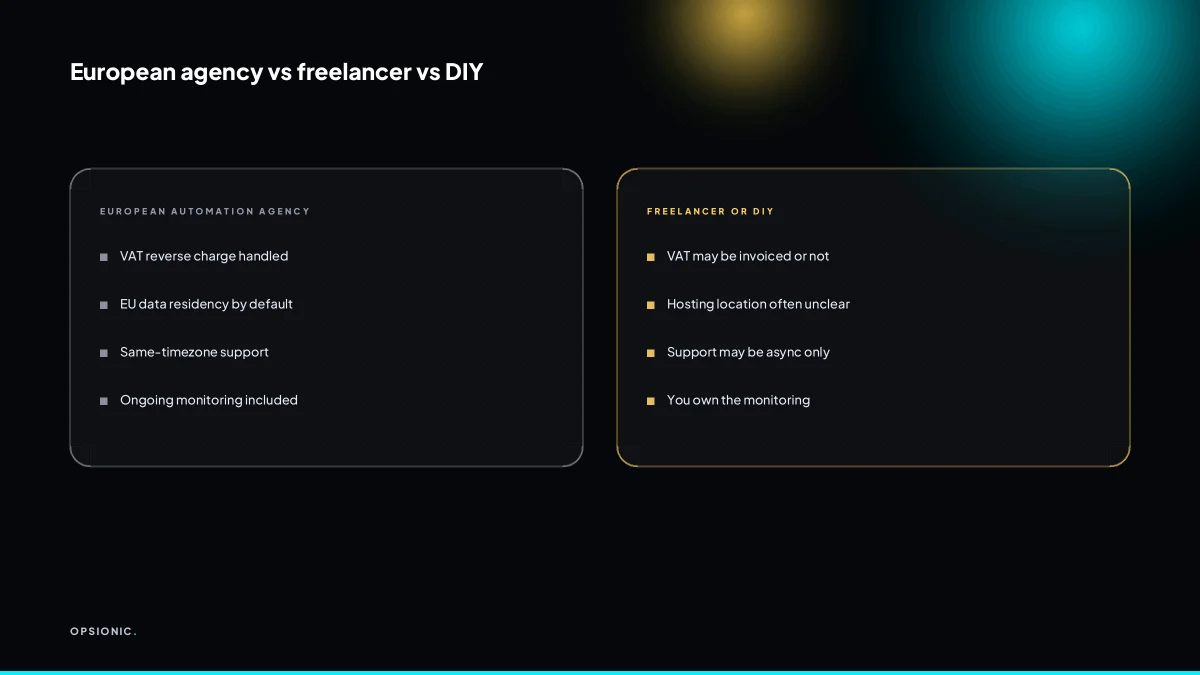
A local partner matters for two practical reasons. First, compliance: a European agency works with GDPR and VAT rules as the default, not as an afterthought. Reverse charge on cross-border invoices is a normal part of the paperwork, not a surprise. Second, support: when a workflow breaks at 10:00 on a Tuesday, you want someone awake in your time zone. The agency’s automation services for small businesses cover both the build and the ongoing care, which is where most of the value sits.
How does VAT and the reverse charge work when I buy automation services across EU borders?
If your business is VAT-registered in one EU country and buys automation services from an agency in another, the reverse charge usually applies. The agency invoices you without VAT, and you account for the VAT yourself in your own return. This avoids paying foreign VAT and reclaiming it later, which saves cash flow and paperwork.
Here is the step-by-step mechanics for a small business buying from an EU automation agency:
- Confirm your VAT registration is active in your own country before you order. The reverse charge only works when your VAT number is valid and the supplier can verify it.
- Give the agency your VAT number at the start of the project, not after the invoice arrives. A missing number usually means the agency has to charge its local VAT instead.
- Check the invoice when it lands. It must show your VAT number, the agency’s VAT number, a clear description of the automation service, and a note that the reverse charge applies. If any of those are missing, ask for a corrected invoice before you pay.
- Record the net amount in your accounts as a purchase. Do not enter a VAT amount from the invoice, because there should not be one.
- Account for output VAT in your own return at your domestic rate on the value of the service. In most EU countries you can usually reclaim that same amount as input VAT in the same return, so the net cash effect is zero.
- File the invoice in your VAT records with your other cross-border purchases. Your tax authority can ask for evidence that you applied the reverse charge correctly.
There are two common cases where the reverse charge does not apply. If your business is not VAT-registered, the agency will normally charge its own local VAT and you cannot reclaim it. And if the service falls outside the scope of the reverse charge rules, such as certain land-related or exempt services, normal invoicing rules apply. For most automation work, the standard cross-border B2B rule is the one you will meet, alongside the wider e-invoicing requirements in the EU.
Not sure which of these applies to you?
Answer six questions and see what we would automate first in your business, and what it is worth.
Why does EU data residency matter and how do I check where an agency hosts my automations?
EU data residency means your customer and business data stays on servers inside the European Economic Area. That keeps you on the right side of GDPR without relying on standard contractual clauses or worrying about US surveillance law. Ask the agency for their hosting provider and the physical location of the servers they use.
Under GDPR, personal data leaving the EEA needs a legal transfer mechanism, and the rules around US-based providers have shifted more than once at the time of writing. If your automations touch names, email addresses, invoices or booking details, keeping that data in Frankfurt, Amsterdam or Paris removes a whole category of legal paperwork. You still need a lawful basis for processing, but you stop carrying transfer risk.
Concrete checks are quick. Ask for the hosting provider by name, the region or city of the data centre, and whether backups and logs sit in the same jurisdiction. Ask for a written data processing agreement that names you as controller and the agency as processor. Ask for a sub-processor list: which tools the agency uses, where each one is hosted, and whether any of them sits outside the EEA.
A practical checklist you could print:
- Ask which hosting provider the agency uses and the physical location of the primary server.
- Ask whether backups, logs and test environments stay inside the EEA.
- Ask for a written data processing agreement before any build starts.
- Ask for the current sub-processor list, including any US-based tools like OpenAI or Twilio.
- Ask what happens to your data if you end the contract: deletion window and proof of deletion.
- Ask whether the agency has a named person responsible for data protection questions.
Red flags are easy to spot. A vague answer like “we use secure cloud providers” is not an answer. Hosting customer data in the US without a clear transfer mechanism is a warning sign. No written DPA, or a DPA that appears only after you chase, suggests the agency treats GDPR as an afterthought. None of this means an agency is dishonest. It means they have not done the procurement work you are paying them to handle. If you want a starting point for your own checks, a practical GDPR checklist for small business automation walks through the same ground from your side of the table.
What time zone and language support should I expect from a European automation partner?
A European partner should offer support during your business hours, not just via a ticket queue that answers overnight. That means a real person you can call or video-chat in the afternoon, not a chatbot. Language matters too: you need someone who can discuss a broken workflow in plain English, German, French or your working language.
Set your expectations at same-day response, not 24/7 coverage. Most small European agencies will not staff a night shift, and you should not pay for one. What you want is a reply within a few working hours when something breaks. If you send a message at 10:00, a reasonable expectation is to hear back before the afternoon is over. If you send it at 16:00, the next morning is fine. Anything slower means your automation sits broken while orders pile up.
Language fit reduces miscommunication on technical fixes. A workflow that stops syncing invoices can fail for many different reasons. You need to describe what you see: the error message, the missing field, the step that did not run. If your partner is working in a second language, a small misunderstanding about “the invoice did not send” versus “the invoice sent twice” can waste an afternoon. When you discuss how we build an automation, ask whether the person who answers your support questions is the same person who built the workflow. That continuity is worth more than a shared time zone.
Test responsiveness before you sign. Send a short question by email on a normal working day. Note the time you sent it and the time you got a real answer, not an auto-reply. Then send a follow-up question two days later. If both replies come within one business day and answer the actual question, that is a good sign. If you get a form response asking you to book a call, treat that as a slower answer.
What is this costing you now?
Based on removing half of that time.
What pricing should a small business expect for managed automation or a single workflow?
Opsionic’s managed automation starts at EUR 599 per month, covering ongoing build, monitoring and changes. A single workflow, built once and handed over, starts at EUR 399 per month on a six-month initial term. Larger projects get a fixed quote after a planning chat. There is no setup fee.
The managed option is the one to compare against a part-time employee. For EUR 599 per month you are paying for someone to watch the automations, fix them when an API changes or a login expires, and build the next workflow without a new quote each time. The single workflow option is cheaper because it is finite: you get a defined build, a handover document, and then you are on your own unless you buy more time.
Here is a worked example, using invented but realistic figures. A five-person electrical firm quotes 30 jobs a month. Each quote means opening the CRM, copying the customer details into a quote template, emailing it, then copying the sent quote into a spreadsheet. That takes about 15 minutes per job. Thirty jobs times 15 minutes is 450 minutes, or 7.5 hours a month. If the owner values their time at EUR 40 an hour, that manual admin costs EUR 300 a month in owner time alone. A managed automation at EUR 599 a month that removes all of that quoting admin is not a saving on paper. It becomes worth it when you add the follow-up chasing: the same firm sends two reminder emails per quote, another 10 minutes per job, another EUR 200 a month. Now the manual cost is EUR 500 a month against EUR 599 for the agency, and the owner gets 12.5 hours back to quote bigger jobs or do site visits.
Before you sign anything, ask the agency to put the scope in writing: what counts as a change, how quickly they respond to a broken workflow, and whether monitoring is included or billed separately. That is exactly the kind of question covered in questions to ask an automation agency before you sign.
What questions should I ask before signing a six-month automation contract?
Before signing, ask who owns the automations if you leave, what happens to your data, how quickly they fix a broken workflow, and whether they document everything. Also ask for a Data Processing Agreement and a clear exit clause. A good agency answers these in writing without hesitation.
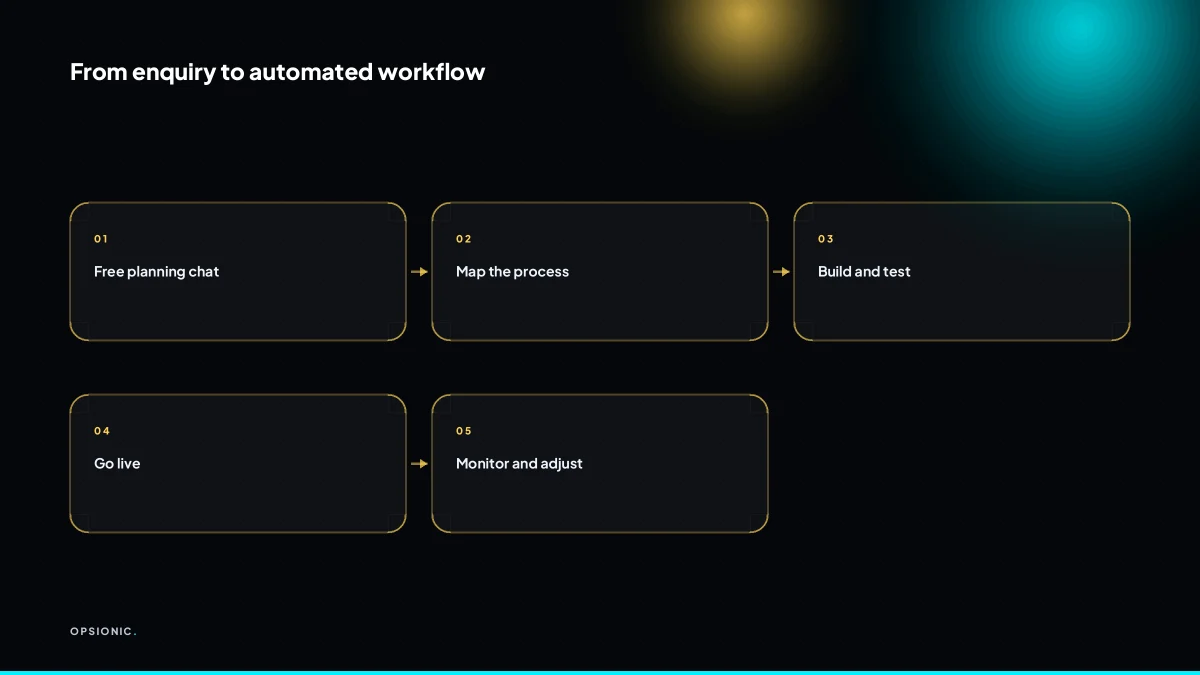
The checklist below turns those questions into checks you can run during the planning chat. If an agency dodges one, treat it as a cost you will pay later.
- Ownership: Ask for a written statement that you own every workflow, script and configuration built for you. Check whether exports are in a format you could hand to another provider or your own developer.
- Portability: Ask how you would get a copy of each automation. If the answer is “we keep it on our server”, ask what happens on day one after cancellation.
- Data deletion: Ask for a written commitment that your data is deleted within a stated number of days after the contract ends, and that they confirm deletion in writing.
- Exit terms: Ask what notice you must give, whether any fee applies, and whether you can export your automations before final deletion.
- Response times: Ask for the maximum time to acknowledge a broken workflow and the typical time to fix it. Ask whether monitoring is included or billed separately.
- Support channels: Ask how you report a fault: email, chat, phone, a ticketing system. Check whether the same person who built the automation handles the fix.
- Documentation: Ask to see a sample of the documentation you will receive for one existing workflow. Confirm it names the tools, the trigger, each step, and where data is stored.
- Handover: Ask whether they provide a written handover pack on exit, and whether it includes credentials, tool names, and a plain-language explanation of what each automation does.
If the answers are vague, ask for them in writing before you sign. A six-month term is reasonable when the exit is clear. You can start that conversation on a free planning call, which you can book a free plan for without any obligation.
Want this running in your business next week?
A relaxed 20-minute video chat. Camera on or off. You leave with a plan whether or not you hire us.
- No call unless you ask for one
- From EUR 399 a month, no setup fee
- Built and run for you, not handed over as homework
Sources we checked
Questions people ask
Do I need to be VAT-registered for the reverse charge to apply?
Yes. The reverse charge only works when your business is VAT-registered and the agency can verify your VAT number. If you are not registered, the agency normally charges its own local VAT, you cannot reclaim it, and the invoice is usually higher as a result.
What happens to my automations if I stop paying the monthly fee?
Managed workflows stop being monitored and updated, so failed runs go unnoticed and API changes eventually break them. A one-off build you own outright keeps running on your own accounts. Agree the exit terms in writing before you start, including what documentation you receive.
Can I move my automations to another provider later?
Usually yes, if you own the accounts the workflows run on. Ask before signing who holds the Zapier, Make or n8n account, whether you get an export of the workflow definitions, and whether any credentials stay with the agency. Provider lock-in is a contract question, not a technical one.
Do you work with businesses outside the EU, like the UK or Switzerland?
Opsionic serves Europe, the US and Asia, so UK and Swiss businesses are fine. The reverse charge rules differ outside the EU, and UK or Swiss VAT treatment is not identical to the EU cross-border rule. Confirm the invoicing position with your accountant before you order.
How do you handle updates to tools like Zapier or Make that break a workflow?
Under managed automation, failed runs are monitored and connections are updated when a tool changes its API, its authentication or a field name. That ongoing maintenance is the main reason to choose a monthly plan over a one-off build you would otherwise have to watch yourself.
What if my business uses tools you have never integrated before?
Most tools expose an API or a webhook, which is enough to connect them. During the free planning chat we check whether your specific tools support one, and if a tool has no API at all we say so rather than promising a connection that cannot be built reliably.
Is there a minimum contract length or can I cancel monthly?
Opsionic plans carry a six-month initial term, then continue month by month. Managed automation starts at EUR 599 per month and a single workflow starts at EUR 399 per month, with no setup fee. Larger projects get a fixed quote after the planning chat.