EU E-Invoicing Rules and What They Mean for Your Admin
E invoicing automation EU requirements vary by country and business type. Most EU states already mandate e-invoicing for public sector suppliers, with B2B mandates rolling out from 2025 onwards. Automation can handle format conversion, validation, and submission, but you must first know which country rules apply to your invoices and when.
Which EU rules actually force me to e-invoice?
Directive 2014/55/EU obliges all public bodies to accept e-invoices in a standard format. Individual countries then set their own mandates for B2G and B2B. For B2G, most EU states already require suppliers to use e-invoicing. For B2B, several countries have announced mandates, with Italy, France, Germany, and Poland among those with published timelines.
The directive itself does not tell a private business what to do. It tells each member state to build a national system that can receive invoices in the European standard, EN 16931. What you must send, to whom, and from when depends on the country where your customer is based. A supplier in Spain selling to a French public hospital follows French rules, not Spanish ones.
For B2G, the picture is fairly settled. Many EU countries now require e-invoices on public contracts. Some apply it to all suppliers, others only above a contract value. If you bid for public work, check the national portal: Peppol is the usual delivery network, and each country names its own access point.
For B2B, Italy has run the longest, with a full mandate since 2019. France has announced a phased rollout, with large and mid-sized companies receiving invoices first, then extending to smaller firms. Germany plans a mandate with a transitional period allowing PDF invoices for a limited time. Poland has announced a timeline for large businesses and then the rest.
A legal mandate and a technical standard are not the same thing. The mandate says you must send an invoice electronically. The standard says what fields it must contain and how the file is structured. You can be legally required to e-invoice while still choosing between a national format, Peppol BIS, or a hybrid like ZUGFeRD in Germany. The compliance work often sits in the data, not the software. If your customer data or VAT codes are messy, an automated sending step still fails at validation. That is where GDPR-compliant automation matters: you are moving structured invoice data between systems, not just sending an email.
What is EN 16931 and why does my invoice format matter?
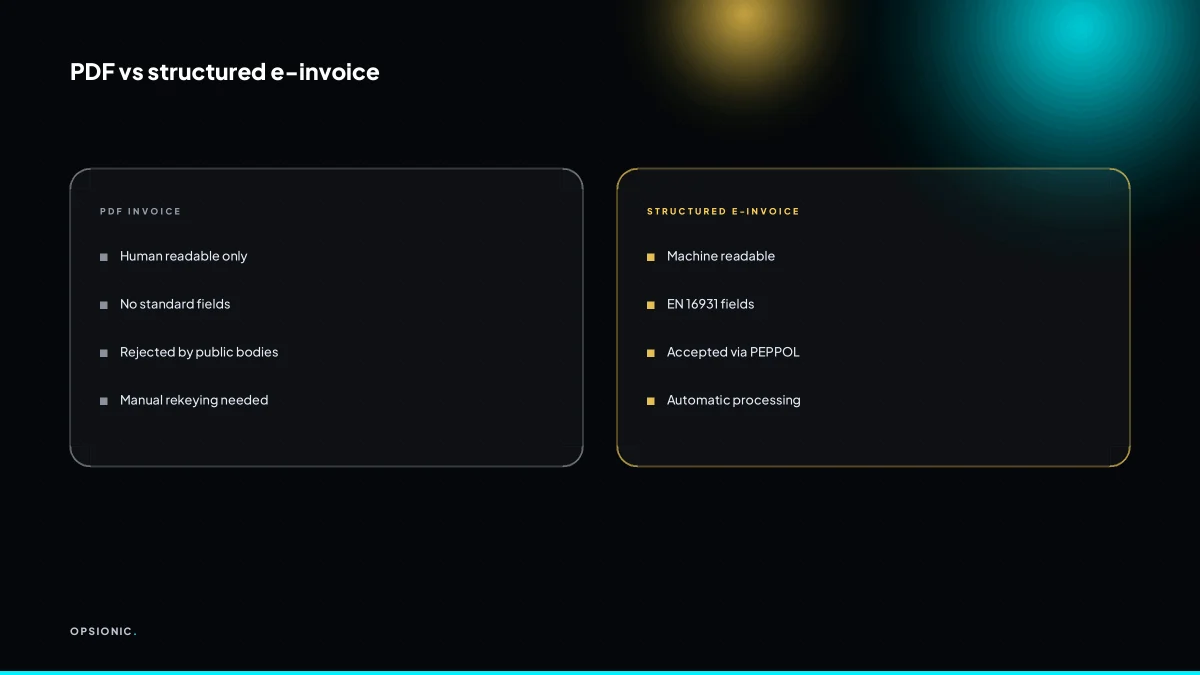
EN 16931 is the European standard that defines a common semantic data model for e-invoices. It ensures that an invoice created in one country can be processed automatically in another. Software must output one of the accepted syntaxes like UBL 2.1, CII, or ZUGFeRD. Your current PDF or paper invoice is not compliant.
The standard specifies which fields must exist and what they mean, not how the file is coded. The two main syntaxes are UBL 2.1 and UN/CEFACT CII. ZUGFeRD is a hybrid: a PDF a person can read with an embedded XML file a machine can read. A plain PDF is just a picture of an invoice. A structured invoice is data.
At minimum, a compliant invoice carries the supplier’s name and VAT number, the buyer’s name and VAT number, a unique invoice number, the issue date, line items with quantity and unit price, and a VAT breakdown by rate. If any of those are missing or inconsistent, the receiving system rejects the file before payment is even considered.
Check your current software by asking one question: can it export UBL 2.1 or CII, or a ZUGFeRD PDF, without you manually re-entering anything? If the answer is no, you will be retyping invoice data into a portal or a converter. That retyping is exactly the kind of task you should automate data entry between your apps to remove.
| Format | Machine readable | Human readable | EN 16931 compliant |
|---|---|---|---|
| Paper or scanned PDF | No | Yes | No |
| Digital PDF | No | Yes | No |
| ZUGFeRD hybrid | Yes | Yes | Yes, if the XML matches the visible text |
| UBL 2.1 or CII | Yes | No, needs a viewer | Yes |
The table gives you the decision rule. If you send digital PDFs today, you have a compliance gap. If your software exports ZUGFeRD or a pure structured format, you are closer, but the data inside still has to be correct. A wrong VAT code in a structured invoice fails just as fast as a missing one.
Not sure which of these applies to you?
Answer six questions and see what we would automate first in your business, and what it is worth.
Do I need to join PEPPOL or can I keep emailing PDFs?
If you invoice a public body in the EU, you cannot email a PDF. You must send a structured e-invoice through an access point, usually PEPPOL. For B2B without a mandate, you can still email PDFs, but you will soon need to switch for B2B in France, Germany, and Poland. PEPPOL is the most practical route.
PEPPOL is a delivery network, not a format. You connect through an access point, a service provider that routes your invoice to the recipient’s access point. Both sides register with a participant ID. The invoice travels as structured data, so the buyer’s system reads it without retyping.
Several countries force PEPPOL for business-to-government invoicing. Some EU member states already require it for public bodies. Germany mandates e-invoicing for federal contracts. If you keep emailing PDFs to a mandated entity, the invoice is rejected before payment processing. You then resend in the correct format, which delays payment and adds manual work.
Joining PEPPOL as a small business is straightforward:
- Pick an access point provider or ask your accounting software whether it has one built in.
- Register your business and receive a PEPPOL participant ID.
- Configure your invoicing tool to send through that access point.
- Send a test invoice to a known receiver before your first real one.
Cost varies by provider. Some accounting platforms include PEPPOL sending in their subscription. Standalone access points often charge a small monthly fee plus a per-invoice amount. Setup takes an afternoon if your software already supports it. Before you commit, ask an automation agency what to check in the contract, especially around volume limits and support for the formats your buyers require.
What does ViDA change and when do its requirements actually bite?
ViDA (VAT in the Digital Age) introduces EU-wide digital reporting and e-invoicing for cross-border transactions. Its requirements are still being finalised, with a proposed start from 2028. From 2030, intra-EU e-invoicing is expected to become mandatory. Until then, national B2B mandates like France and Germany take effect first.
The timeline matters because businesses confuse the two layers. ViDA sets the EU-wide floor: digital reporting of cross-border B2B transactions from 2028, then mandatory intra-EU e-invoicing from 2030. National mandates are separate and earlier. France and Germany will require domestic B2B e-invoicing before ViDA’s EU-wide rules apply. A German firm selling to a French firm faces the national rules first, then ViDA’s reporting on top.
What goes wrong is treating ViDA as a single deadline. A small business that waits for 2030 will miss France’s and Germany’s earlier requirements. The fix is to map your current invoicing flows by buyer country now. List which EU countries you invoice, check their published national timelines, and separate domestic from cross-border transactions. Before you build anything, work out the ROI of the automation so you do not buy a system that only solves half the problem.
Preparation means two things. First, confirm your accounting software can send structured invoices in a format like PEPPOL or the French Factur-X. Second, stop producing PDF invoices for EU buyers by hand. The moment a buyer country flips to mandatory e-invoicing, a PDF becomes a rejected document, not an invoice. The businesses that struggle most are those still exporting a PDF from Word and typing the data into their accounting tool afterwards.
What is this costing you now?
Based on removing half of that time.
Which parts of my invoice process can I automate without breaking compliance?
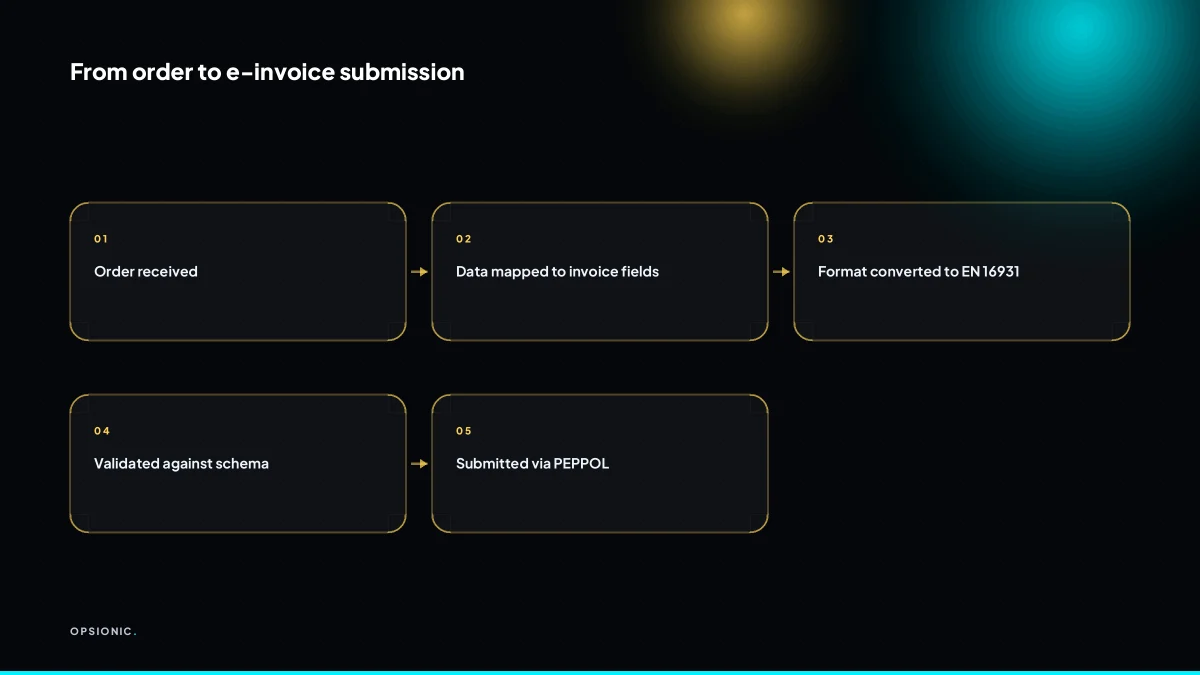
You can automate invoice generation, format conversion, validation against EN 16931, and submission via PEPPOL. Human review is still needed for tax decisions, unusual transactions, and final approval. Automation reduces manual data entry and missing deadlines, but it does not remove your legal responsibility for invoice correctness.
The automated steps are the repetitive ones. Data extraction pulls line items from a sales order or CRM record. Mapping places each field into the correct invoice element: buyer VAT number, quantity, unit price, tax category. Validation checks the result against EN 16931 rules before sending, so a missing buyer identifier fails at your desk rather than at the tax authority. Submission then pushes the file through your PEPPOL access point to the buyer’s registered endpoint.
The human steps stay where judgement lives. You approve the final invoice, decide the VAT treatment on a mixed supply, and handle exceptions like a disputed line or a credit note. No automation should sign those off for you.
Connecting the pieces means your accounting software holds the source data, your CRM holds the customer identifiers, and a middleware tool or your accounting package’s built-in connector talks to the PEPPOL network. The chain only works if each system carries the same buyer legal name and VAT number.
As a worked example, suppose a small firm sends 40 invoices a month. Each one takes 12 minutes to type, check the VAT number, convert to the right format, and submit. That is 480 minutes, or 8 hours a month. If automation handles extraction, mapping, validation and sending, and a person still spends 3 minutes per invoice on approval and exceptions, the monthly total drops to 120 minutes. The saving is 6 hours a month. That is time you can put back into the work you actually bill for.
What happens if I send a non-compliant invoice to a government body?
A non-compliant invoice to a government body will be rejected by their system. You will not get paid until you resend it in the correct format. Repeated failures can lead to penalties or exclusion from future tenders. The same will apply to B2B mandates once they start. Automated validation prevents most rejections.
Rejections are rarely mysterious. The most common causes are a wrong format, a missing field, or a VAT number that does not validate against the national register. In Italy, for example, invoices that fail the SDI checks are refused outright, and the sender is notified through the exchange system. France applies a similar logic as its mandate rolls out. Fines vary by country. Italy has published penalty ranges for late or incorrect e-invoicing, and Spain can impose fixed fines per invoice. Do not treat a rejection as a warning. Treat it as an unpaid invoice.
Before you send anything to a public body, run this checklist:
- Confirm the exact format the receiving country accepts, such as FatturaPA in Italy or FacturaE in Spain.
- Check that your own VAT number and the buyer’s VAT number both validate in the relevant national database.
- Confirm every mandatory field is present: invoice number, issue date, line totals, tax rate, and legal entity identifiers.
- Send a test invoice through the official test environment if one is available, before your first real submission.
- Keep the rejection notice. It usually states the exact field or rule that failed.
If an invoice is rejected, open the notice, fix the stated error, and resend. Do not create a new invoice number unless the rules require it. If rejections repeat, the problem is usually in how your system maps data, not in the invoice itself. That is the point where automated checks and automated invoice reminders stop being a nice-to-have and start keeping you paid on time.
Want this running in your business next week?
A relaxed 20-minute video chat. Camera on or off. You leave with a plan whether or not you hire us.
- No call unless you ask for one
- From EUR 399 a month, no setup fee
- Built and run for you, not handed over as homework
Sources we checked
Questions people ask
Is e-invoicing mandatory for all EU businesses in 2025?
No. Directive 2014/55/EU obliges public bodies to accept e-invoices, so business-to-government invoicing is required in most member states. Business-to-business mandates are set country by country. Italy has run a full mandate since 2019, while France, Germany and Poland have published timelines that phase in by company size.
Can I use my existing accounting software for e-invoicing?
Only if it can export UBL 2.1, CII or a ZUGFeRD hybrid PDF without manual re-entry, and can send through an access point. Ask your vendor directly. If the answer is no, you will be retyping invoice data into a portal or converter, which is the task worth automating first.
What is the difference between e-invoicing and digital reporting?
E-invoicing is sending the invoice itself as structured data to the buyer. Digital reporting is sending transaction data to a tax authority, often at the same time. ViDA introduces EU-wide digital reporting for cross-border business-to-business transactions, while national e-invoicing mandates are separate and generally arrive earlier.
How do I know if my invoice is EN 16931 compliant?
Check three things. The file is a structured syntax such as UBL 2.1, CII or ZUGFeRD rather than a plain PDF. It carries both parties' names and VAT numbers, a unique invoice number, the issue date, line items with quantity and unit price, and a VAT breakdown by rate. Then validate it with a test receiver.
Do I need a separate PEPPOL ID for each country I invoice?
No. A PEPPOL participant ID identifies your business on the network, not per country. One registered ID works for all receivers, provided your access point supports the document formats each buyer requires. What changes by country is the format and the mandate, not your identifier.
What does it cost to join PEPPOL for a small business?
It varies by access point provider. Some accounting platforms include PEPPOL sending in a subscription you already pay for. Standalone access points often charge a small monthly fee plus a per-invoice amount. Check the vendor's own pricing page, since rates change, and watch for volume limits in the contract.