AI Chatbot for Small Business Websites: Grounded and Honest
An AI chatbot for small business website use should answer from your own documents, not invent replies. It must handle common questions, capture leads, and escalate to a human when unsure. Ground it in your FAQ, pricing, and policies, and it becomes a useful assistant instead of a liability.
What can an AI chatbot actually do on a small business website?
A website chatbot can answer common questions, qualify leads, book appointments, and route enquiries to the right person. It works from your own content, so it repeats your policies accurately. The goal is to handle the repetitive work, not to replace every human conversation.
The most useful bots start with a narrow remit. You give the bot a small set of documents: your opening hours, your pricing page, your FAQ, your booking policy. It answers from those and nothing else. That keeps it accurate and easy to test.
Good first use cases include:
- Answering “Do you work in my postcode?” before a lead fills in a form.
- Collecting a name, email, and job type, then sending that to your CRM.
- Offering a booking link only when the visitor matches your service area.
- Explaining your deposit or cancellation terms without a phone call.
A bot that tries to answer every possible question will drift. One that handles five common questions well is more useful than one that guesses at fifty. This is the same logic we apply to what we automate for small businesses: pick the repetitive work first, leave judgement to a human.
How does a grounded chatbot avoid making up answers?
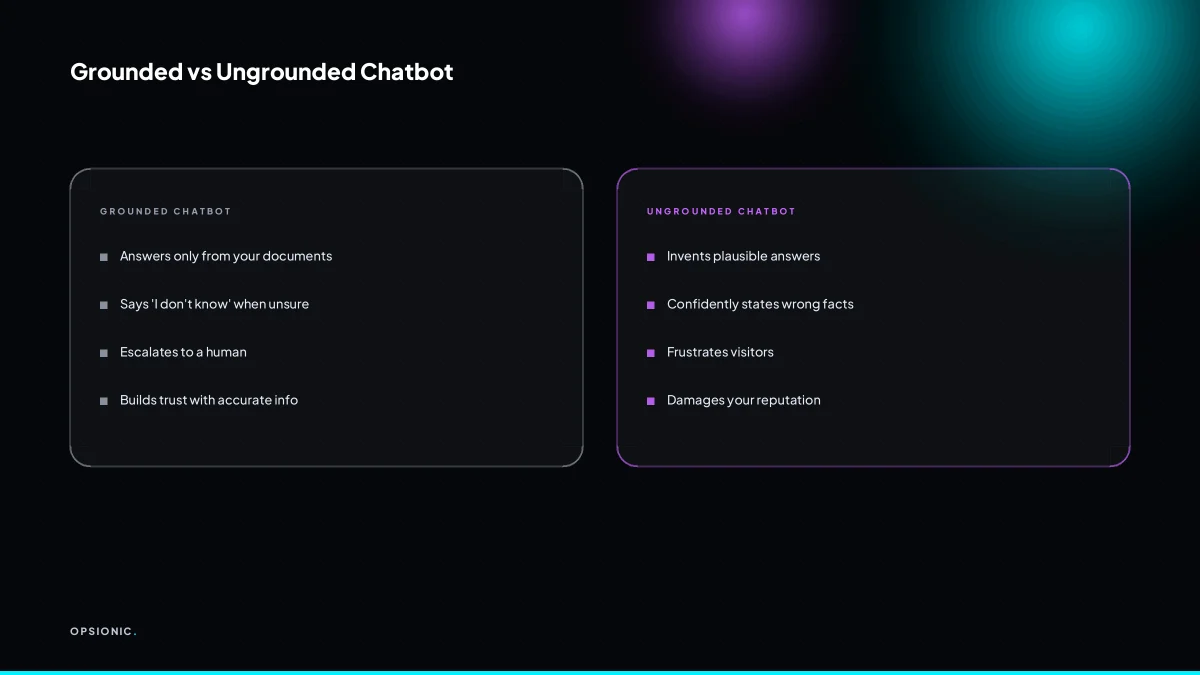
A grounded chatbot retrieves information from documents you provide, like your FAQ page or pricing sheet, and answers only from that material. If the answer is not there, it says so. This retrieval-augmented generation prevents the confident nonsense that ungrounded models produce.
Retrieval-augmented generation, or RAG, works in two steps. First, the bot searches your uploaded documents for passages that look relevant to the question. Second, it writes an answer using only those passages. It does not reach for general knowledge it picked up during training. If your pricing sheet says a call-out costs EUR 90, the bot quotes EUR 90. It will not offer EUR 75 because that sounds more attractive.
Grounding stops hallucination because it removes the need to guess. An ungrounded model fills gaps with plausible-sounding words. A grounded model is told: here is the source material, answer from this or say you cannot. That is a narrow instruction, and narrow instructions produce honest answers.
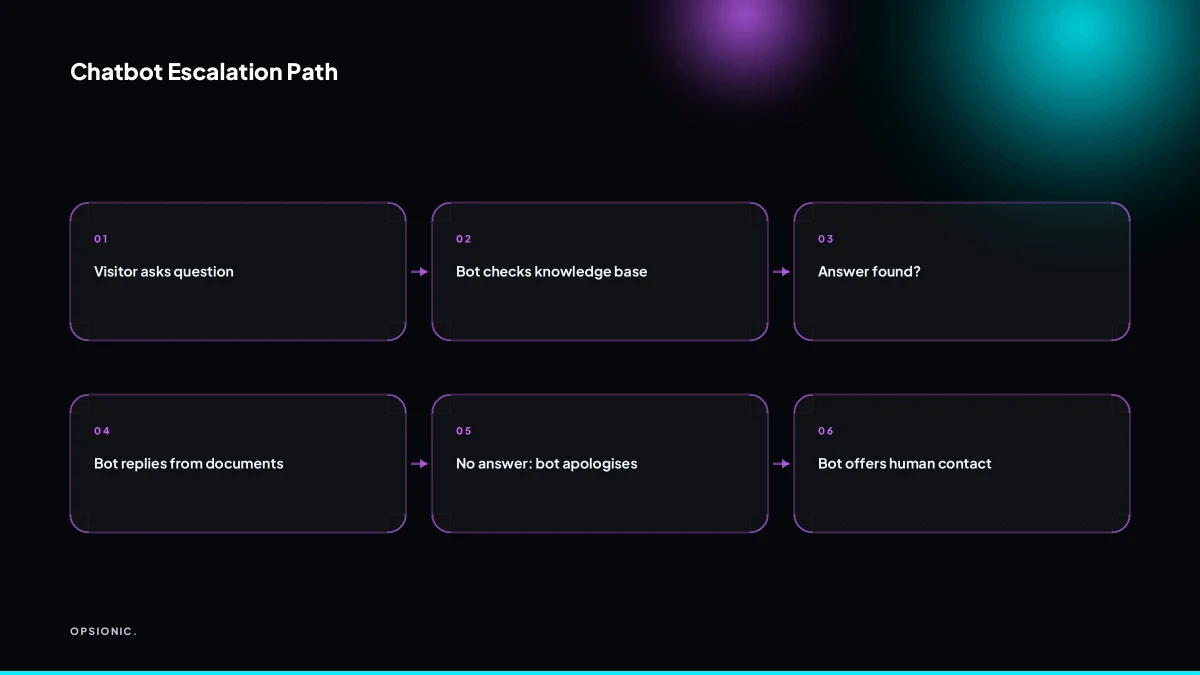
When the bot lacks information, it should do three things:
- Say plainly that it does not know.
- Offer the closest source it does have, if one exists.
- Point to a human, with a phone number, email address, or booking link.
That escalation path matters more than the answer itself. A visitor who hears “I do not know, but Laura can help” is more likely to trust you than one who receives a made-up delivery time.
Not sure which of these applies to you?
Answer six questions and see what we would automate first in your business, and what it is worth.
What do I need to prepare before adding a chatbot?
Prepare a clean FAQ page, your pricing and policies, and a clear escalation path. The chatbot needs source material to ground its answers. Without these documents, it will either refuse to answer or start guessing, which is worse than having no bot at all.
Before you connect anything, gather the documents the bot will read from. The more specific and current they are, the fewer questions it will dodge or answer badly.
Here is a checklist you can print and work through:
- FAQ page. Copy your existing questions and answers into one plain document. Remove marketing phrases. Each answer should stand alone, with no “see above” or “as mentioned earlier”.
- Pricing. List every price, package, and what is included. Include what is not included. If you charge for travel, callouts, or rush jobs, write it down.
- Policies. Cancellation terms, refund rules, opening hours, response times, delivery windows. Anything a customer might ask and you would normally answer from memory.
- Contact details. The phone number, email address, and booking link for the human who takes over. Make sure this person actually answers.
- Common objections. The five questions you hear most often that are not on your FAQ. Write the answers yourself, in your own voice.
When you write answers the bot can use, keep each one under four sentences. State the fact first, then any condition. For example: “We deliver within three working days. Rural postcodes may take one extra day.” Do not bury the answer in a story.
Decide now when a human takes over. A good rule is: any question about a live order, a complaint, or a price negotiation goes straight to a person. If the bot cannot find a matching source, it should not improvise. It should say so and hand over. That rule is the difference between a useful assistant and a liability. If you are not sure which tasks are safe to hand to a bot, start with the ones you would trust a new employee to answer on day one. The same logic applies to what tasks a small business should automate first.
How much does a chatbot like this cost?
A basic AI chatbot can start at around EUR 20 per month for software at the time of writing, but setup and maintenance add cost. Opsionic builds and runs managed automations from EUR 599 per month, or a single workflow from EUR 399 per month, with no setup fee and a six-month term.
Software-only prices look cheap because they cover the licence, not the work. A grounded chatbot needs a source of documents, a way to test answers, and someone to fix it when a page changes or a product is discontinued. Most small business owners find that the real cost is their own evening hours.
| Option | Typical cost | What you actually get |
|---|---|---|
| DIY chatbot software | From about EUR 20 per month | You build, test, and maintain it yourself |
| Opsionic single workflow | From EUR 399 per month | One automation, built and run for you |
| Opsionic managed automation | From EUR 599 per month | Ongoing builds, monitoring, and fixes |
| Hiring a part-time assistant | Varies widely by region and hours | A person who can improvise, but only during work hours |
The managed price covers more than setup. It includes watching the bot after launch, updating its sources when your services change, and adjusting the escalation path so enquiries reach a human at the right moment. That is the part most DIY projects skip, and the part that determines whether the bot stays useful after the first month. If you want to see how that build process works before committing, how we build an automation explains the steps.
What is this costing you now?
Based on removing half of that time.
What happens when the bot does not know the answer?
The bot should say it does not know and offer a human contact, like an email or a callback request. This escalation path is not a failure; it is the safety net that keeps your business trustworthy. Plan the handover before you launch.
Designing the fallback message is the first job. It should be short, plain, and specific. “I cannot answer that from my current notes” is better than a vague apology. Then name the next step: an email address, a phone number, or a form that creates a callback request. The visitor should never have to guess what happens now.
- Write the fallback message in your own tone, with the exact contact detail you want people to use.
- Set the bot to trigger that message whenever its confidence in a source drops below the threshold you chose.
- Route the enquiry to a real inbox or a live chat queue, not a no-reply address.
- Log the unanswered question so you can add it to the bot’s sources later.
- Tell your team which folder or label these escalations land in, and who answers them within one working day.
Routing matters more than the wording. An email address that nobody checks is worse than no bot at all. A phone number that rings to voicemail with a week-long delay breaks the promise the fallback just made. If you already run an AI receptionist that books jobs, wire the chatbot’s fallback into the same routing rules so every handover lands in one queue.
Honesty builds trust because it matches what the visitor already suspects. When a bot admits it does not know, the business looks organised, not weak. The alternative is a confident wrong answer about pricing, availability, or compliance, and that costs you more than any missed chat.
Does a chatbot create GDPR problems if I serve European customers?
Yes, a chatbot processes personal data, so GDPR applies. You need a lawful basis, usually legitimate interest or consent, and you must minimise data collection. Tell visitors the bot is automated, and give them a way to reach a human.
Mistake one: treating every chat as legitimate interest. The symptom is a bot that asks for a name, email, and phone number before it will answer a simple question about opening hours. The fix is to split the conversation. Answering a factual question does not need consent. Collecting contact details for follow-up does. If you cannot show why the data is necessary for the service the visitor asked for, ask for consent before you collect it.
Mistake two: keeping chat logs forever. The symptom is a searchable database of conversations from three years ago, including names, order numbers, and complaints. The fix is a retention rule. Delete raw chat logs after a set period, for example 90 days, unless the conversation became a support ticket or a sale. If you keep a transcript for training the bot, strip names and contact details first. Follow the same logic you would for any other customer record, and see gdpr compliant automation small business for a checklist that applies beyond chat.
Mistake three: hiding the machine. The symptom is a bot with a human name and no disclosure, so a visitor asks for a refund and thinks a person is ignoring them. The fix is a plain first message: “I am an automated assistant. I can answer questions about our services, or I can pass you to a person.” That one line satisfies transparency and sets expectations before the visitor types anything personal.
Want this running in your business next week?
A relaxed 20-minute video chat. Camera on or off. You leave with a plan whether or not you hire us.
- No call unless you ask for one
- From EUR 399 a month, no setup fee
- Built and run for you, not handed over as homework
Sources we checked
Questions people ask
Can I use a free chatbot on my small business website?
Free tiers exist, but they usually limit message volume, remove your branding, or give the bot no access to your documents. An ungrounded free bot will guess at your prices and policies. Budget from around EUR 20 a month for software at the time of writing, plus the hours you spend writing and testing its source material.
How long does it take to set up an AI chatbot?
Most of the time goes on preparing documents, not on technical setup. Gathering your FAQ, pricing, and policies into clean plain-text answers is the slow part. Testing against real questions you have been asked takes another pass. A narrow bot covering five questions can be live within days if the source material is ready.
What if the chatbot gives a wrong answer to a customer?
Grounding reduces this sharply, because the bot answers only from documents you supply. You should still log every conversation and review the first weeks closely. Where an answer was wrong, either the source document was unclear or the question needed a human. Fix the source, or add the question to the escalation rules.
Can the chatbot book appointments directly into my calendar?
Yes, if you connect it to your booking tool rather than letting it invent slots. The bot should check live availability and confirm only what the calendar confirms. If your calendar is not connected, the safer design is to offer a booking link and let the visitor choose a slot themselves.
Do I need a developer to add a chatbot to WordPress?
Most chatbot tools give you a script snippet to paste into your site, and WordPress plugins exist that do the same job without code. The harder work is not installation. It is writing source documents the bot can answer from and deciding when a human takes over.
Will a chatbot replace my need for customer service staff?
No. It removes the repetitive questions so your team spends its time on the ones that need judgement. Complaints, live orders, and price negotiations should always reach a person. Treat the bot as a first responder that routes well, not as a replacement for anyone.
How do I measure if my chatbot is actually helping?
Track four numbers: how many conversations it handles, how many it escalates, how many enquiries become booked jobs or replies, and how many unanswered questions repeat. A rising escalation rate is not failure if those handovers convert. A growing list of the same unanswered question means your sources need work.