Connect Google Forms to WhatsApp the Right Way
To connect Google Forms to WhatsApp, you need a bridge like Zapier, Make, or n8n, plus the WhatsApp Business API, not the free app. The API requires a Meta developer account, a phone number ID, and approved message templates. The free WhatsApp Business app cannot receive automated form submissions.
Do I need the WhatsApp Business API or can I use the free app?
You need the WhatsApp Business API. The free WhatsApp Business app has no public webhook or trigger for Google Forms, so no automation tool can push new responses into it. The API is the only supported way to receive form submissions as automated WhatsApp messages.
The two products look similar but behave differently. The WhatsApp Business app is designed for a person tapping out replies on a phone. It has labels, quick replies and a product catalogue, but it does not expose an interface for another service to send messages on your behalf. The API is built for software to send messages without a human pressing send each time.
A Google Forms submission is a machine event. A customer fills in the form, Google records the response, and some system has to notice and act. That system needs a way to hand the message to WhatsApp. The free app offers no such handover point, so every tutorial that claims to connect Google Forms to the free app is describing a manual step in disguise.
Using the API means setting up a few things in Meta’s developer environment:
- A Meta developer account, which is free to create
- A WhatsApp Business Account linked to that developer account
- A phone number ID, which identifies the number that will send your messages
- An access token, which proves to Meta that your automation is allowed to send on that number’s behalf
None of this requires a separate phone. The API number can be a landline or a number already used elsewhere, though Meta may ask you to verify it. The setup takes longer than the free app, but it is the only route that survives contact with a real form submission.

What are the exact steps to connect Google Forms to WhatsApp?
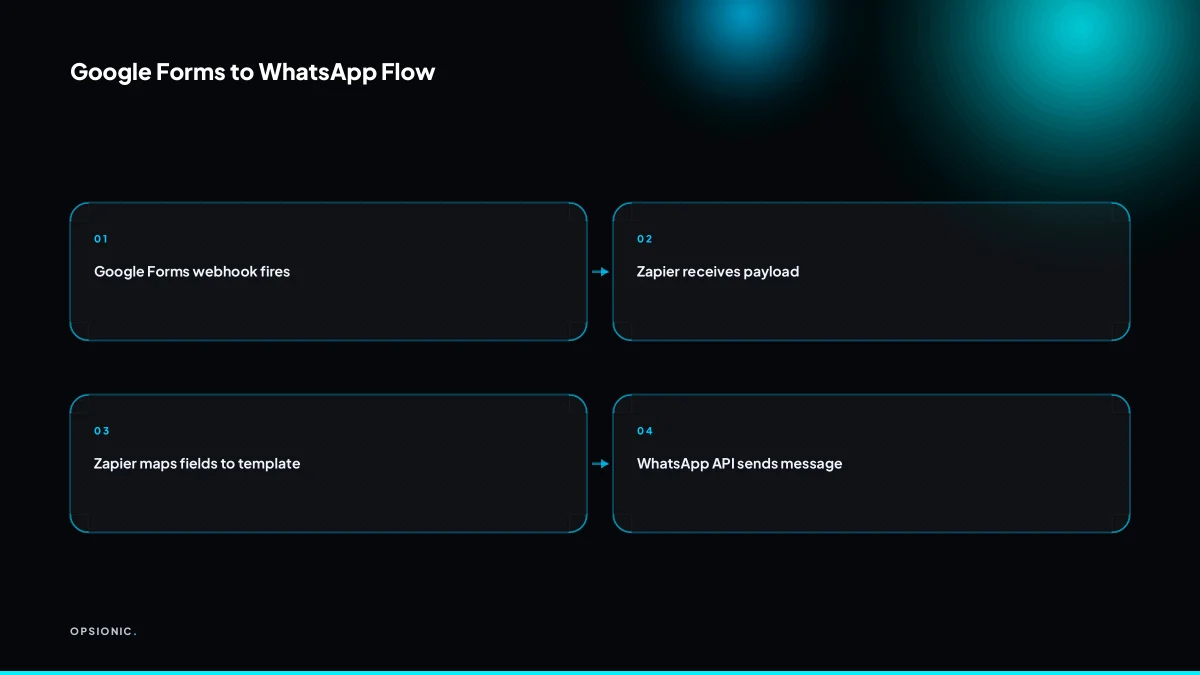
Create a webhook trigger in Google Forms, then send the payload to a bridge like Zapier, Make, or n8n. The bridge formats the data and calls the WhatsApp Business API with a pre-approved template. You must configure a phone number ID, access token, and template name.
- Open the form’s script editor. In Google Forms, go to the extensions or add-ons area and open Apps Script, or install a forms add-on that can send HTTP requests on submit.
- Add a submit trigger. Create a function that fires when the form is submitted, and have it collect the response values into named fields.
- Send the payload to your bridge. Use a URL fetch call in the script to POST the form data to a Zapier webhook, a Make webhook, or an n8n webhook URL.
- Map the fields in the bridge. Match each form question to a variable you will use later, such as name, phone number, and appointment time.
- Call the WhatsApp Cloud API. In the bridge, add an HTTP request step that sends a POST to the Meta endpoint for your phone number ID, with the access token in the header.
- Reference a template name and its variables. In the request body, include the approved template name and fill the template’s parameters with the mapped form fields.
Not sure which of these applies to you?
Answer six questions and see what we would automate first in your business, and what it is worth.
Which paid tiers do I need on Google Forms and WhatsApp?
Google Forms itself is free for this use, but the bridge may require a paid plan. Zapier’s free tier may not support multi-step zaps or webhooks. WhatsApp Business API charges per conversation, with rates depending on region and message type. Check current pricing pages before committing.
Google Forms costs nothing, no matter how many responses you collect. The bridge is where you are most likely to hit a paywall. Zapier’s free plan limits you to simple two-step zaps, which may not be enough once you add the HTTP request step for the WhatsApp Cloud API. Make’s free tier includes more operations but still caps monthly usage. n8n is free if you host it yourself, which suits anyone already running a server. WhatsApp Business API has no setup fee from Meta, but every conversation is billed. Utility templates, such as an appointment confirmation, cost less than marketing messages, and rates vary by the recipient’s country.
| Component | Free tier | What you pay for |
|---|---|---|
| Google Forms | Yes | Nothing |
| Zapier | Limited | Multi-step zaps and webhooks |
| Make | Limited | Monthly operations |
| n8n self-hosted | Yes | Your own server |
| WhatsApp Business API | Trial only | Per conversation, by region and type |
Before you commit, work out what a typical month of messages would cost. The conversation-based pricing is the part most people miss, and it is the same reason a simple integration can quietly become expensive. If you are comparing bridge tools, what Zapier really costs for a small business is worth reading before you pick a plan.
What is a WhatsApp message template and why does it matter?
A WhatsApp message template is a pre-approved message format that businesses can send outside the 24-hour customer service window. Meta must approve the template before you can use it. Without an approved template, your automation cannot send proactive messages from form responses.
Think of the 24-hour window as a countdown that starts when a customer messages you. Inside that window, you can reply freely. Outside it, the Business API only accepts messages that match a template Meta has already approved. A Google Form submission is not a message from the customer, so the countdown never starts. That is why every automated notification needs a template.
You submit templates inside Meta Business Manager. Look for the WhatsApp section, then the area for message templates or template management. Name the template, pick a category such as utility or marketing, and choose a language. Meta reviews each one, usually within minutes but sometimes longer.
Variables make one template reusable. Write a template like “Hi {{1}}, your booking for {{2}} is confirmed.” The placeholders pull the respondent’s name and date from the form row. Formatting is plain text by default, with limited support for bold, italics and line breaks. Keep the wording specific. A template that says “Hi, thanks for your enquiry” without any detail is more likely to be rejected as too generic.
Common rejection reasons:
- Spelling or grammar errors in the template text.
- Placeholders without a clear purpose, or too many of them.
- Marketing language in a utility category, or vice versa.
- Content that looks like spam, such as excessive punctuation or all caps.
If a template is rejected, Meta usually states the reason. Fix that one thing and resubmit. Do not submit a near-identical version hoping for a different reviewer, because the same rule will catch it again.
What is this costing you now?
Based on removing half of that time.
How does the 24-hour customer service window work?
The 24-hour window opens when a customer messages you. Within that window, you can send free-form messages. After 24 hours, you can only send approved templates. Since a Google Forms submission does not open the window, you must use a template for the first automated message.
WhatsApp counts the window from the moment a customer sends your business a message on WhatsApp. It is not tied to your working hours, your timezone, or any action you take. For 24 hours after that incoming message, you can reply with any text, image, or file without pre-approval.
A Google Forms submission happens on Google’s servers. WhatsApp has no record of it as a conversation. The customer has not messaged you, so no window opens. Your automation is therefore starting a conversation from your side, which WhatsApp treats as business-initiated contact.
If you send a free-form message outside the window, the API rejects it. The message never reaches the customer. You will see an error code in your logs, but the customer sees nothing. Repeated attempts do not help; the rule is enforced on Meta’s side.
To get customers to message you first, put your WhatsApp number on the form’s confirmation page or in the email receipt. A short line like “Reply to us on WhatsApp if you need this sooner” often turns a passive form fill into an open window. You can also add a WhatsApp click-to-chat link in the form’s description, so a customer can start the conversation before or just after submitting.
What breaks in the real world with this automation?
Common failures include template rejection, silent disconnection of the bridge, duplicate messages on retries, and timezone drift causing late sends. You may also hit API rate limits or find that the webhook stops firing after a form edit. Monitor logs weekly.
Template rejection. The symptom is an error in your automation history saying the message was not delivered, while the form response looks normal. A stray emoji, a line break in the wrong place, or a variable name that does not match the one you submitted will get it refused. The fix is to rebuild the template exactly as WhatsApp wants it: plain text, variables in double braces, no marketing language. Test with your own number before pointing a live form at it.
Bridge disconnection. The symptom is that everything looks fine, but no messages arrive for three days. Most bridges rely on a token that expires or a session that logs out. When that happens, the form keeps collecting responses and the bridge quietly drops them. The fix is a scheduled check, not a one-off test. Open the bridge’s log once a week and confirm the last run timestamp is recent. If you would rather not babysit a connection, this is the kind of failure a provider should catch before you do, which is worth asking about before you sign with any automation partner.
Duplicate messages. The symptom is a customer replying “you already sent me this.” A retry after a timeout can resend the same response because the bridge never got a confirmation the first time. The fix is to store the form response ID in the bridge and check for it before sending. If your bridge cannot do that, you will need a deduplication step in the middle.
Timezone drift and rate limits. The symptom is a reminder arriving at 3am or a batch of messages failing after the first few. Google Forms stores timestamps in the form owner’s timezone, but your bridge may run on UTC. If you schedule sends based on the raw timestamp, everything shifts by the offset. The fix is to convert the timezone explicitly in the automation before scheduling. Rate limits show up as a burst of failures partway through a list. WhatsApp Business API accounts have a messaging limit that grows with your sending history. If you are new, sending to fifty people in one minute can trip it. The fix is to space sends out or upgrade your limit through normal use.
When is this not worth automating?
If you receive fewer than 10 form responses per month, manual copying into WhatsApp is cheaper and more reliable. The setup and monitoring time for the API and bridge exceeds the minutes saved. At that volume, a simple email notification or manual check is sufficient.
Run the arithmetic before you build. Say a solo trainer gets six enquiries a month through a Google Form. Copying each one into WhatsApp takes four minutes, so 24 minutes a month. Setting up the connection properly means a Meta Business account, a phone number, a bridge, and testing. Realistically that is four to six hours of fiddling, plus half an hour a month checking the thing has not silently stopped. At even EUR 25 an hour for your own time, the build costs around EUR 125 and the first year of monitoring costs EUR 150. That is over 11 hours of manual copying. You would need to run the automation for more than two years before the payback sum in how many hours automation can save your small business turns positive.
For low volume, use the free options. Turn on Google Forms email notifications and forward the email to your phone. Or check the responses sheet once a day. The job gets done, nothing breaks, and you spend no money.
Automation starts to earn its keep somewhere around 30 to 50 responses a month, or when replies must go out within minutes rather than hours. At that point the manual work is a real chore and the monitoring time is a small fraction of the hours saved.
How do I check the connection actually worked?
Submit a test response to your Google Form, then verify the WhatsApp message arrives on the target number within a few minutes. Check the bridge’s run history for errors, and confirm the template was used. Set up a weekly log review to catch silent failures.
Run the test with a phone you can see. A message should land within two to five minutes, though a first run can take slightly longer while the bridge wakes up. If nothing arrives after ten minutes, do not resubmit the form. Check the run history first, because a retry will often create a duplicate message.
Print this list and keep it next to the machine that owns the connection:
- Submit one test response using a real phone number you control.
- Wait five minutes, then confirm the WhatsApp message arrived on that handset.
- Open the bridge’s run history and confirm the latest run shows a success status, not a warning or failure.
- Check that the message body matches the approved template, including any variable fields filled from the form.
- Confirm the recipient number in the run history is the one you submitted, with no extra digits or missing country code.
- Once a week, open the run history and scan for any failed or skipped runs since the last check.
- If a run failed, note the error message before retrying, so you can see whether it is a one-off or a pattern.
A weekly check takes two minutes. The failure you catch early is a message that never went out, which is far cheaper to fix than a customer asking why nobody replied.
Want this running in your business next week?
A relaxed 20-minute video chat. Camera on or off. You leave with a plan whether or not you hire us.
- No call unless you ask for one
- From EUR 399 a month, no setup fee
- Built and run for you, not handed over as homework
Sources we checked
Questions people ask
Can I use Google Forms with WhatsApp without any coding?
Not fully. You need a small Apps Script function or a form add-on to POST the response to a bridge, and the bridge then calls the WhatsApp Cloud API. No-code tools handle the second half, but some setup on the Google side is always required.
Does Zapier have a direct WhatsApp integration?
Zapier offers WhatsApp Business actions, but they still require a Meta developer account, a phone number ID, an access token and an approved template. Zapier removes the coding, not the Meta setup. Check Zapier's own app directory for current support.
How long does WhatsApp template approval take?
Meta often reviews templates within minutes, but it can take longer, sometimes up to a day. Rejections come with a stated reason. Fix that specific issue and resubmit rather than sending a near-identical version.
What happens if I send a message outside the 24-hour window without a template?
The API rejects the request and the message never reaches the customer. You will see an error in your automation logs, but the recipient sees nothing. Since a form submission does not open the window, the first message must always be an approved template.
Can I connect Google Forms to WhatsApp using IFTTT?
IFTTT can trigger on a Google Forms response, but it has no supported path into the WhatsApp Business API for sending approved templates. In practice you would still need a bridge that can make a raw HTTP request to Meta's endpoint.
Is there a free way to send Google Forms responses to WhatsApp?
Google Forms is free and self-hosted n8n costs nothing beyond your server. The WhatsApp Business API itself is billed per conversation, so there is no fully free route once real messages are sent. Expect a small per-message cost.