No-Code vs Custom Automation: Where the Line Sits
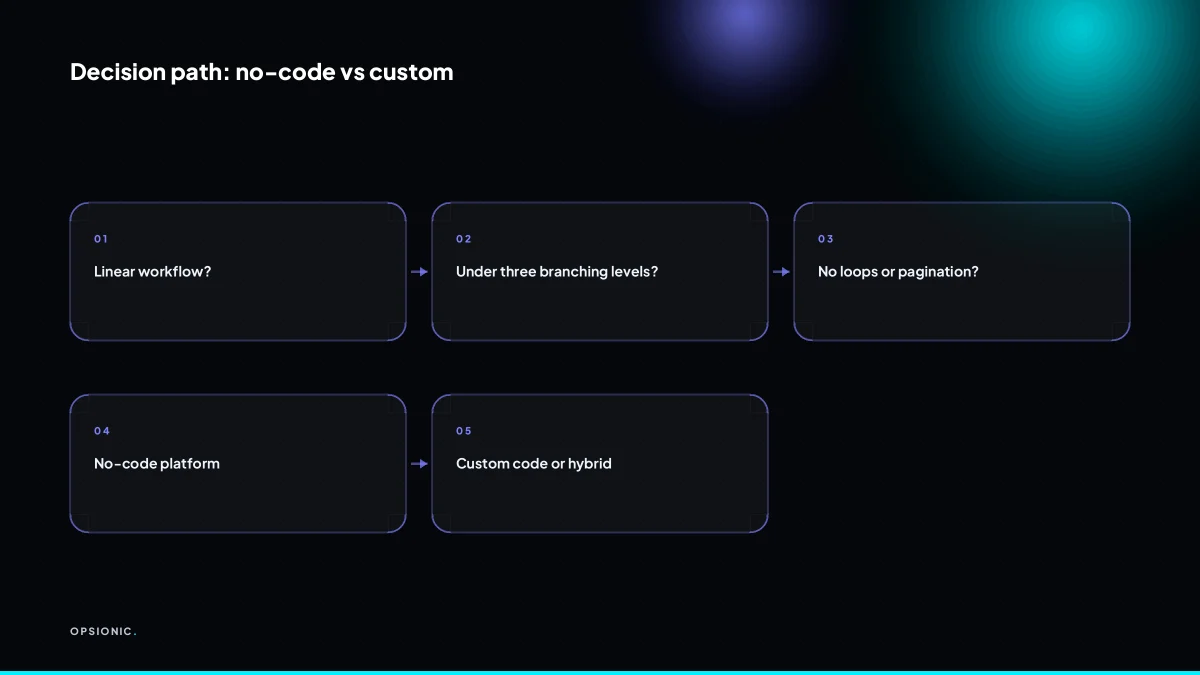
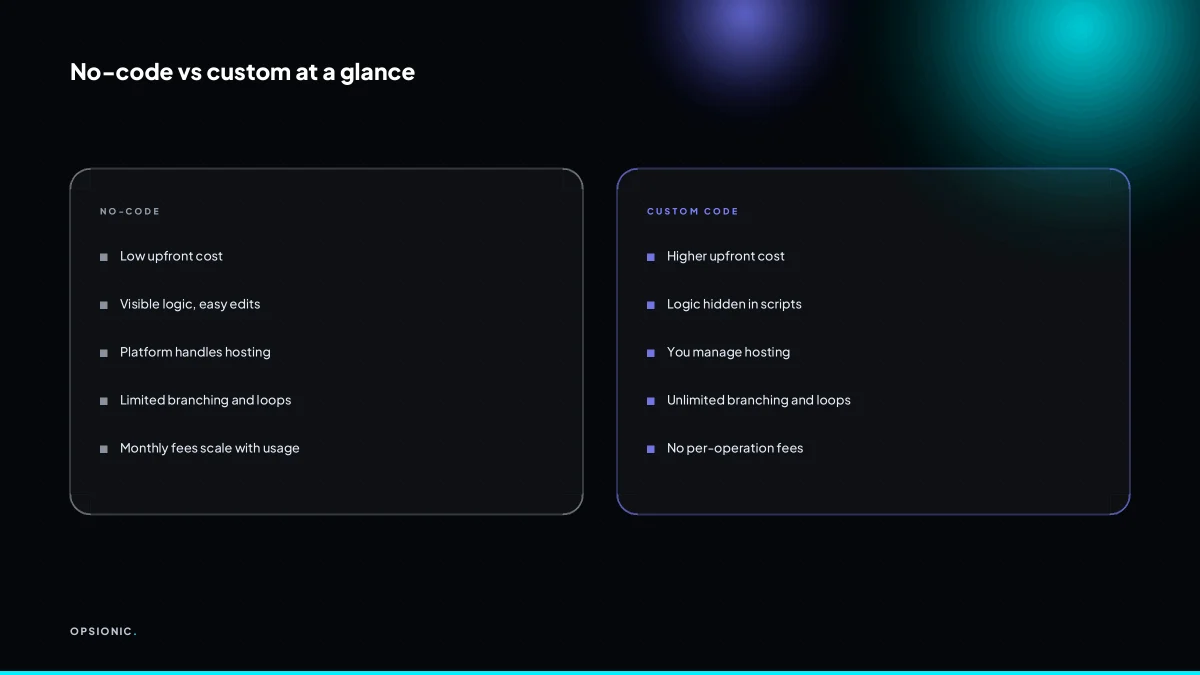
No-code vs custom automation is less about features than branching depth. Drag-and-drop tools like Zapier, Make and n8n handle linear workflows well. Once a process has more than two levels of conditional logic, loops, or error handling, a canvas becomes hard to read and maintain. Custom code then often costs less over 12 months.
What actually counts as no-code automation?
No-code automation means building workflows on platforms like Zapier, Make or n8n using visual triggers, actions and conditions rather than writing scripts. The platform runs the logic on its servers. You configure steps in a browser. It suits small businesses without a developer on staff because changes happen in minutes, not sprints.
Low-code sits one step to the right. It still gives you a visual canvas, but lets you drop in small snippets of JavaScript, Python or SQL when a built-in step cannot do the job. No-code refuses that escape hatch. If the platform does not offer a step for it, you do not do it.
Typical no-code platforms handle three kinds of work well. They move data between apps, such as a new form entry creating a CRM contact. They transform data, such as formatting a date or splitting a full name into first and last. They trigger actions, such as sending an email or posting to Slack. The visual builder shows each step as a card, and you can click into any card to see exactly what it does.
The limits appear quickly once logic branches. A workflow that checks three conditions in sequence, then routes records down four different paths, becomes hard to read on a canvas. You end up with a screen full of lines crossing each other. At that point you are fighting the tool, not using it. The line is not about technical skill. It is about whether the workflow reads like a list or like a flowchart with nested decisions. Our automation services start from that same observation: most small business admin is linear enough to stay no-code.
When do branching conditions make a no-code canvas painful?
Branching conditions become painful when a workflow has more than two levels of nested if-then logic. At that point, the visual map looks like spaghetti. Debugging means tracing lines across a screen. Custom code expresses the same rules in a few readable functions, and a developer can change one condition without breaking three others.
The two-level rule is a decent boundary. One decision, then a second decision inside it, stays readable on most canvases. A third level starts hiding the logic. You scroll, you zoom, you lose the thread.
Take a quote approval as an example, with three decision points. A builder quotes 30 jobs a month. If the quote is under EUR 2,000, send it straight to the client. If it is between EUR 2,000 and EUR 10,000, check whether it includes structural work; if yes, route to an engineer; if no, send to the office manager. If it is over EUR 10,000, check the margin first: if margin is under 15 percent, flag for director review; if over, send to the estimator. That is three nested levels. On a canvas, you now have 30 jobs times up to four branches, so roughly 120 paths to trace when something goes wrong. In a script, it is one function with a few conditions, and the sum of 30 times 4 is arithmetic you never have to do by hand.
Visual tools obscure logic at depth because the structure is spatial, not sequential. You read a function top to bottom. You read a canvas by following arrows. When an arrow doubles back or crosses three others, the order stops being obvious. Zapier and Make both let you nest paths, and both become hard to maintain once you do. Changing a filter condition inside the third branch means opening each step, checking what feeds it, and hoping you have not broken a later step that depended on the old value. The maintenance cost is not the change itself. It is the verification. You end up testing the whole flow because you cannot see which parts are independent.
That is the practical question behind whether you need a CRM or just three automations: if the logic reads like a list, keep it visual. If it reads like a decision tree, write it down before you build it.
Not sure which of these applies to you?
Answer six questions and see what we would automate first in your business, and what it is worth.
What can Zapier, Make and n8n handle reliably without code?
These platforms reliably handle linear data movement: form to sheet, sheet to email, webhook to CRM. They manage scheduled syncs, simple filters and single-level conditions well. Native integrations cover hundreds of tools. When a workflow stays under three steps with no loops, no-code is usually faster and cheaper to build and run.
Form capture is the clearest case. A WPForms submission becomes a Slack message, a Google Sheets row, or a CRM contact without anyone touching a keyboard. Notifications follow the same pattern: a new booking in Mindbody triggers an email or SMS reminder. Syncs between two tools, like Jotform to Google Sheets or Stripe to Xero, sit comfortably here as long as the fields map one to one.
The walls appear when data stops being a flat list. Loops that iterate over line items, JSON with nested arrays, and API pagination all push a visual canvas past its comfort zone. Platform execution time caps matter too. A workflow that hits a platform’s timeout limit will fail, where a script running on your own server might finish in seconds. The same applies to rate limits: a sync touching 2,000 records can trip a vendor’s API ceiling before the no-code platform even reports an error.
One middle path exists. Make and n8n allow a small code step inside a larger visual flow, so you can parse a webhook payload or flatten an array without rebuilding the whole thing. That works when the code is a single function, not a system. If you are writing three functions and managing retries yourself, you have crossed the line. The hidden costs of automation nobody quotes you often live exactly there: in the workarounds that make a no-code canvas behave like code.
| Workflow type | No-code fit | Custom code fit |
|---|---|---|
| Form to sheet or CRM | Strong | Overkill |
| Simple notifications | Strong | Overkill |
| Scheduled two-way sync | Good, if fields map cleanly | Better when data is large |
| Loops over line items | Weak | Strong |
| Nested JSON parsing | Weak | Strong |
| API pagination | Very weak | Strong |
What are the real cost differences over 12 months?
No-code platforms charge monthly per workflow or operation. A small business might pay somewhere in the region of EUR 20 to EUR 100 per month for platform fees, depending on the provider and usage. Custom code costs more upfront, often in the low thousands of EUR for a small application. But if no-code needs constant manual intervention or hits usage limits, custom code can break even within a year.
Platform subscriptions vary widely, so check the vendor’s current pricing page before you commit. Developer rates for custom automation also vary by region and experience; a small script that takes two days might cost around EUR 1,000, but that is only a rough guide.
Take a worked example. Suppose a workflow processes 500 tasks per month. On a no-code platform, the monthly fee might be around EUR 20, so the annual cost is about EUR 240. A custom script might cost EUR 1,500 to build and EUR 10 per month to host on a small server, so EUR 1,620 over the first year. The no-code route looks cheaper until the workflow breaks. If each failure needs an hour of manual repair at EUR 25 per hour, and failures happen twice a month, that adds EUR 600 per year. Error monitoring, retries and manual patching are the costs nobody puts in the brochure, which is why the hidden costs of automation deserve a line in your own calculation.
What is this costing you now?
Based on removing half of that time.
Who maintains a custom automation, and what if the developer leaves?
Custom automation maintenance falls to whoever wrote the code unless you arrange otherwise. If a freelancer disappears, you are left with a server you may not understand. No-code platforms keep the logic visible and editable by any staff member. That difference in ownership often matters more than the initial build cost.
Maintenance burden: custom scripts rot quietly
Custom code needs dependency updates, API key rotation and fixes when a vendor changes a field name. A no-code workflow built on a maintained platform gets most of that patching from the vendor. The custom script gets none of it unless you pay someone monthly to watch it.
Documentation: handover fails without it
A freelancer who leaves without written notes takes the mental model with them. Fix: require a runbook before final payment. It must name the server, the credentials vault, the retry logic and the failure alerts. No-code canvases are self-documenting enough that a colleague can read the flow without a developer, which is why who owns the automation you paid for should be settled before the first build.
Hosting and security: nobody is watching
A custom script on a cloud server means you hold the keys: OS updates, firewall rules, backups. A no-code platform carries most of that liability. If you choose custom code, host it on infrastructure you control and set calendar reminders to patch it. Otherwise the automation becomes a quiet security hole.
Exit strategy: keep the code on your own server
Never let a contractor host your automation on their personal account. Insist on your own server, your own repository, your own API credentials. Then a departing developer is an inconvenience, not a hostage situation.
Can you start with no-code and move to custom later?
Yes, you can start no-code and migrate parts to custom code later. The cleanest path is to keep data sources separate from logic. Use webhooks and APIs so a future script can call the same endpoints. Avoid building critical rules inside a platform that cannot export them. Plan the exit before you need it.
Migration works when each tool talks through a stable boundary, not a shared memory. A webhook that posts a new order to your endpoint is the same webhook whether Zapier listens today or a Python script listens tomorrow. The logic on either side can change without breaking the other.
- Put every trigger behind a webhook or API call, never a platform-specific event that only exists inside one vendor.
- Store business rules in a place you can export: a sheet, a database, a JSON file. Not in a drag-and-drop canvas that dies with the subscription.
- Keep the no-code tool as a thin router: it receives, decides nothing important, and forwards.
- Replace one rule at a time with a short code step. Run both in parallel for a week before switching off the old path.
- Move the orchestration only after the individual steps are stable in code.
A hybrid pattern works well for months: no-code handles the visual flow and the approvals, while a code step does the calculation or the API call that the canvas cannot express cleanly. You stop building in no-code when a rule needs three nested conditions, when you are copying the same ten steps across five workflows, or when debugging means clicking into twelve collapsed nodes. That is the signal to migrate the logic, not the whole system. The same reasoning applies to self-hosted vs cloud automation: the boundary matters more than where the boxes live.
Want this running in your business next week?
A relaxed 20-minute video chat. Camera on or off. You leave with a plan whether or not you hire us.
- No call unless you ask for one
- From EUR 399 a month, no setup fee
- Built and run for you, not handed over as homework
Sources we checked
Questions people ask
Is no-code automation secure for customer data?
It can be, but the platform carries most of the security work: encryption, access control and patching. You still decide which fields leave your systems and who inside the business can open the workflow. Check where the vendor stores data, whether it processes records inside the EU, and what your own privacy obligations require before sending customer details through it.
How much does a custom automation cost for a small business?
There is no single figure. A small script taking a developer two days might land around EUR 1,000, plus hosting. Larger applications run into the low thousands of EUR. Get a fixed quote in writing, ask what maintenance costs monthly, and compare it against platform fees over twelve months before deciding.
Do I need to know Python to use custom automation?
Not if you are the business owner. You need someone who can read and change the code, and a written runbook naming the server, credentials and failure alerts. If you plan to maintain it yourself, basic Python or JavaScript helps. Otherwise budget for a retainer or choose a low-code tool where small code steps sit inside a visual flow.
What is the difference between low-code and no-code?
No-code gives you a visual canvas and no scripting escape hatch: if the platform has no step for it, you cannot do it. Low-code keeps the canvas but lets you drop in short JavaScript, Python or SQL snippets when a built-in step falls short. Low-code covers the awkward middle ground, such as parsing a nested payload.
Can I use no-code tools with my own database?
Often yes, if the database has an API or a supported connector. Platforms like Make and n8n connect to common databases directly. Watch two things: how many records each run touches, since large queries can trip rate limits, and whether the connection exposes more of the database than the workflow needs.
How long does it take to build a custom automation?
It depends on scope, and anyone quoting a fixed number of weeks before reading your process is guessing. A single script can be days. A multi-step system with retries, logging and handover documentation takes longer. Ask for the build broken into stages so you can see progress before the final invoice.
What happens if a no-code platform changes its pricing?
Your monthly cost moves with it, and so may your operation limits. Before committing, note which plan tier your task volume needs and how close you sit to the ceiling. Keep an export of your workflow logic and a list of the fields each step uses, so moving to another platform or to code stays possible.