Self-Hosted vs Cloud Automation: Who Fixes It at 2am?
Self hosted automation vs cloud is a choice between running your own automation server and paying a service to run it for you. Cloud costs more per month but includes maintenance and support. Self hosting costs less in fees but demands your time for updates, security, and fixing failures. The real difference is who is accountable when a workflow breaks at 2am.
What is the actual difference between self-hosted and cloud automation?
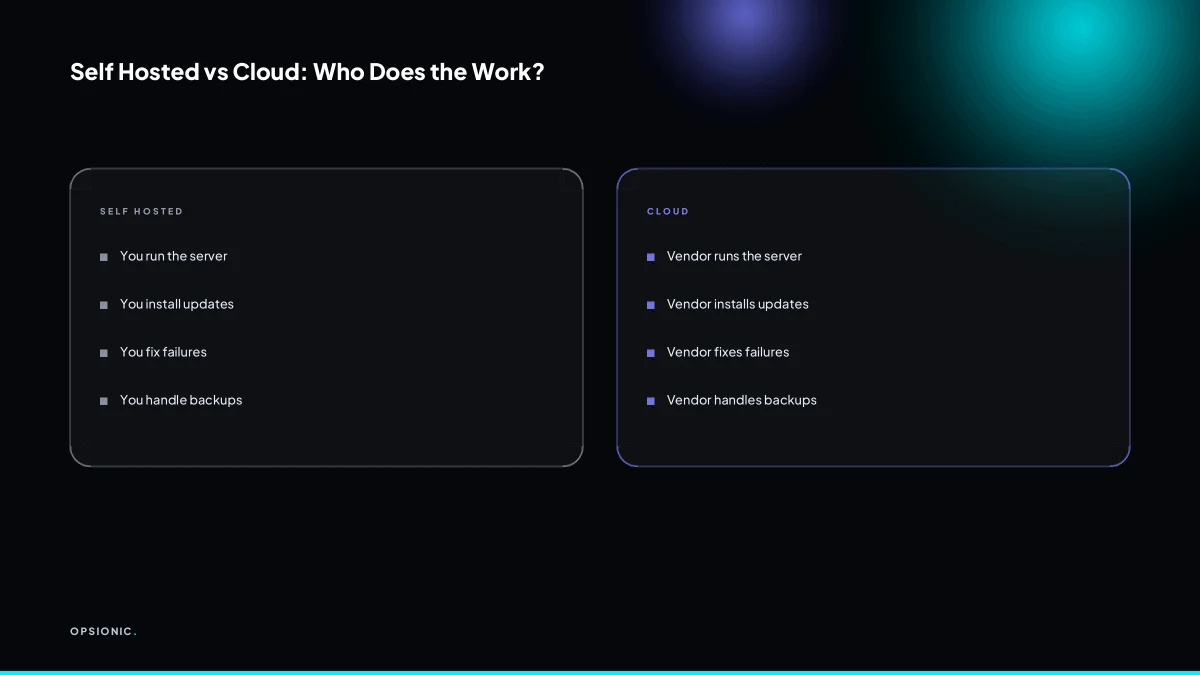
Self-hosted automation runs on a server you control, using software like n8n or Activepieces that you install and maintain. Cloud automation is a service like Zapier or Make that runs the software on their infrastructure. The core difference is not features but responsibility: with self hosting, you own the server, updates, security, and uptime; with cloud, the vendor does.
Think of it as the difference between owning a house and renting a flat. If the boiler breaks in a house you own, you call a plumber and pay the bill. If it breaks in a rented flat, you call the landlord. Cloud automation is the rented flat. Zapier and Make run the servers, apply the patches, and answer when something stops working. You pay a subscription and get on with your week.
Self-hosted tools are not worse. n8n and Activepieces are capable, and on your own server you get more control over data and cost. But the trade is real. You, or someone you pay, must handle the work behind the server. That means updates, backups, monitoring, and the 2am moment when a workflow silently stops. For a small business owner, this is the part that gets forgotten until an invoice does not send.
The practical question is not which software is better. It is who fixes it when it breaks. If you want to run n8n yourself, read what that actually involves: self host n8n for business. Otherwise, the cloud option means the vendor carries the operational load, and you carry the subscription.
What are the true costs of self hosting beyond the software licence?
Self hosting automation software like n8n is free, but the server is not. You pay for a VPS, domain, SSL certificate, and backups. Then you pay with time: installing updates, monitoring uptime, and fixing things when they break.
Let us put numbers on each part. A small VPS with enough memory for n8n and a database starts at around EUR 10 to EUR 15 a month at the time of writing. A domain costs roughly EUR 10 a year, which is under EUR 1 a month. A basic SSL certificate is often free through Let’s Encrypt, but managed certificates on some hosts cost a few EUR monthly. Automated backups to a separate location add another EUR 5 to EUR 10 a month. That is the infrastructure bill.
The time cost is less visible but usually larger. Updates do not install themselves. You need to check for new n8n releases, test them on a staging copy, and apply them without breaking a live workflow. Uptime monitoring means someone notices when the server stops. If a workflow fails at midnight, you are the one who gets woken up. For a non-technical owner doing this alongside running the business, a few hours a month is a realistic expectation.
Compare that with a typical cloud automation subscription. Vendor-managed plans often start at around EUR 20 to EUR 30 a month for a basic tier, with higher tiers at EUR 50 to EUR 80 at the time of writing. You pay more than the raw VPS cost, but you do not pay with your evenings. The vendor runs updates, monitors the service, and carries the pager.
Here is a worked example for a five-person firm. Suppose you value your own time at EUR 40 an hour, which is modest for an owner. Self hosting costs EUR 35 a month for infrastructure, plus four hours of maintenance at EUR 40, which is EUR 160. Total: EUR 195 a month. A cloud plan at, say, EUR 50 a month with no maintenance time costs EUR 50. The gap is EUR 145 a month, and that is before anything breaks badly enough to need outside help. How pricing models treat this trade varies, so read automation agency pricing models before you assume self hosting is the cheap option.
Not sure which of these applies to you?
Answer six questions and see what we would automate first in your business, and what it is worth.
What happens when an automation fails in the middle of the night, and who fixes it?
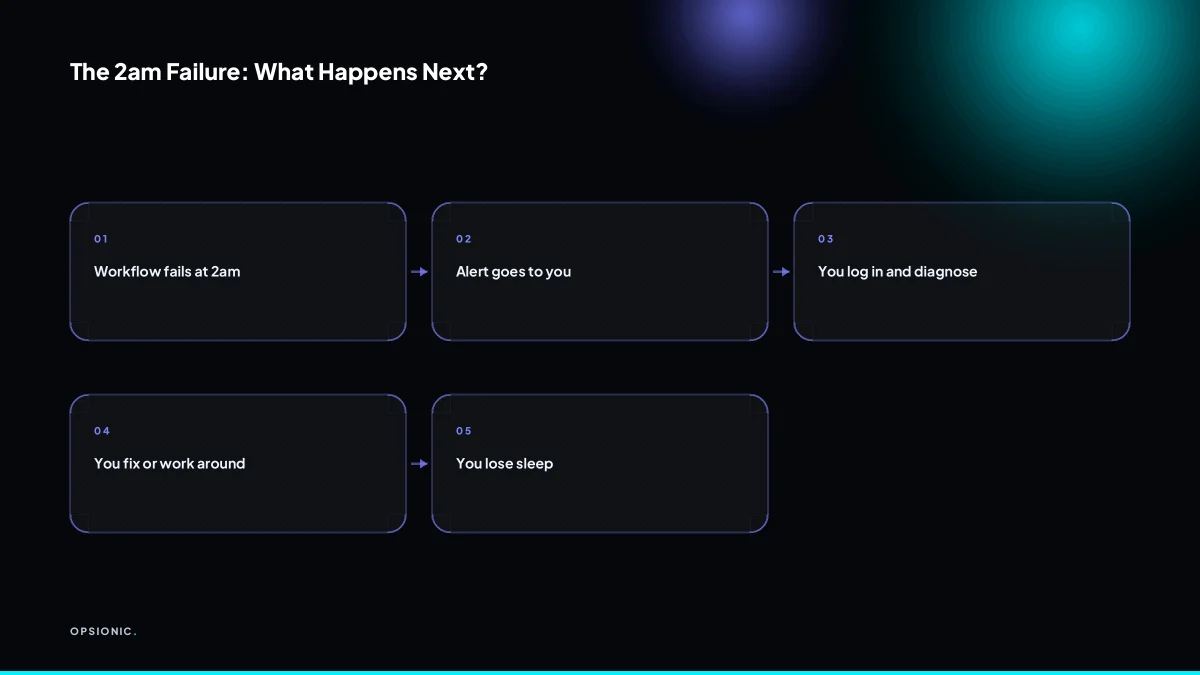
Consider a booking form that stops forwarding enquiries to your CRM at 2am on a Tuesday. With cloud automation, the vendor’s monitoring pings their on-call engineer. The failed webhook gets retried, the queue drains, and you wake up to a resolved incident note. With self hosting, you wake up to a phone full of missed enquiries and a server log you have to read before your first coffee.
The alerting burden is the part nobody prices in. Self hosters must configure uptime checks, set notification channels, and decide what counts as urgent. Miss one alert and a silent failure becomes a revenue leak. The person who set up the automation is often the only person who knows where the logs live, which makes every incident a single point of failure.
Managed self hosting changes who carries the pager. You still own the server and the data, but the agency holds the monitoring, the runbooks, and the escalation path. A maintainer patches the runtime, watches the queues, tests the backups, and gets woken up instead of you. Before you sign anything, run through the questions to ask an automation agency before you sign, especially the ones about out-of-hours response and who has root access.
Is self hosting automatically more private or secure than cloud?
Self hosting can be more private because your data stays on your server, but it is not automatically more secure. Cloud vendors have dedicated security teams and compliance certifications. A self-hosted server that is not updated regularly is far more vulnerable than a well-run cloud service. Security depends on maintenance, not just location.
Privacy is the easier half of the question. On your own server, you decide who has shell access, where backups are stored, and whether any third party can read a database. A cloud tool means your data passes through someone else’s infrastructure, and their staff may have administrative access under specific conditions. For some businesses, that distinction matters. For most, the practical question is not where the data sits but whether it is encrypted in transit, backed up properly, and deleted when you ask.
Security is harder. A cloud provider patches its platform continuously and employs people whose only job is to watch for intrusions. A self-hosted box needs the same discipline: operating system updates, dependency patches, firewall rules, rate limiting, and log review. Miss one critical patch and the whole machine can be taken over. The false assumption is that owning the hardware makes you safer. It does not. It makes you responsible.
For EU businesses, GDPR adds a layer. A self-hosted server in Frankfurt keeps data inside the EU by default, which simplifies some questions. But GDPR also demands that you keep the software secure and document that effort. Running an unpatched n8n instance on a VPS is not a compliance strategy. If you plan to automate customer data, work through the gdpr compliant automation small business checklist before choosing either path.
What is this costing you now?
Based on removing half of that time.
Can a small business run n8n on its own without a dedicated technical person?
A technically confident owner can set up n8n on a VPS using Docker, but keeping it running is a different job. You need to handle updates, backups, SSL renewals, and troubleshooting. For most small businesses, this becomes a recurring task that eats into evenings and weekends. If you do not enjoy server administration, it is a poor use of your time.
The setup is the easy part. A patient person can follow a Docker guide and have n8n running in an afternoon. The maintenance is where it gets sticky. You need to read release notes before updating, because n8n sometimes changes how nodes behave. You need to know enough Linux to read logs when a workflow stops firing. You need to understand how your VPS provider’s firewall works when a webhook suddenly returns a 403.
Plan for a few hours a month, not counting the first month of learning. Some months will be ten minutes. Some months a failed update will cost you a full evening.
A realistic maintenance checklist looks like this:
- Check n8n for available updates and read the changelog before applying.
- Run a full backup of the n8n database and workflow files, then test restoring it to a clean instance.
- Verify that SSL certificates are renewing and that the renewal process has not silently broken.
- Review the VPS logs for failed login attempts, disk space warnings, or memory spikes.
- Run each critical workflow once in test mode and confirm it still reaches its destination tool.
- Check that API keys and tokens used by workflows have not expired or been rotated.
- Apply operating system security updates to the VPS itself, not just to n8n.
Doing it yourself makes sense when you already enjoy running servers, you have the time to do the checklist properly, and your workflows are simple enough that a day of downtime would annoy you but not hurt revenue. If any of those is false, read the self host n8n for business breakdown before you commit. The honest version is that self-hosting without a maintainer is not a saving. It is a second job you have given yourself for free.
When is self hosting actually a sensible choice, and when is it a liability?
Self hosting is appropriate when three things are true at once. Someone on the team knows how to run a Linux server, apply security updates, and read a log file without panicking. The data is sensitive enough that keeping it on hardware you control is a genuine requirement, not a preference. And the workflows are stable enough that a few hours of downtime per month would not affect revenue.
The risks of unmaintained self hosting compound quietly. An expired SSL certificate stops a form from submitting. A full disk takes the whole automation offline. A missed security patch becomes an entry point. None of these announce themselves until a customer complains or a deadline passes. The person who set it up leaves, and suddenly the business has a server nobody understands.
Managed self hosting bridges the gap. You keep the data on your own infrastructure, but someone else applies patches, monitors disk space, and answers when the automation stops at 2am. It costs more than raw hosting and less than a full-time admin. For a small firm with one technical person who is already busy, it is the difference between owning a server and being owned by one.
The table below is the short version. If you are not sure which row you are in, read when to hire an automation agency before you commit to either path.
| Your situation | Self host | Managed self host | Cloud |
|---|---|---|---|
| In-house Linux skills, stable workflows | Reasonable | Unnecessary cost | Overkill |
| Strict data residency rules | Yes, if staffed | Best fit | Check vendor region |
| No technical staff, simple automations | Liability | Worth considering | Safest default |
| Revenue depends on the automation running | Risky | Sensible | Sensible |
| One-person business, no time for upkeep | Do not | Only if required | Yes |
Want this running in your business next week?
A relaxed 20-minute video chat. Camera on or off. You leave with a plan whether or not you hire us.
- No call unless you ask for one
- From EUR 399 a month, no setup fee
- Built and run for you, not handed over as homework
Sources we checked
Questions people ask
Can I use n8n cloud instead of self hosting?
Yes. n8n runs a hosted cloud version where the vendor handles servers, updates and uptime, and you pay a monthly subscription. You get the same workflow editor without the maintenance. Check n8n's own pricing page for current tiers before comparing it with a VPS plus your own time.
What is the cheapest way to self host n8n?
A small VPS with enough memory for n8n and its database, paid annually, is usually the cheapest route, with a free Let's Encrypt certificate and backups to separate storage. The licence costs nothing, but your maintenance hours are the real expense, so price those in before calling it cheap.
Do I need a domain name for self hosted automation?
You need a stable address that webhooks and APIs can reach. A domain name pointed at your server is the practical option, and it costs roughly EUR 10 a year at the time of writing. A bare IP address works in theory but breaks when you move servers and cannot hold a proper SSL certificate.
How do I update n8n when self hosted?
Read the changelog first, back up the database and workflow files, then pull the new Docker image and restart the container. Test critical workflows afterwards. Never update a live instance without a tested backup, because node behaviour sometimes changes between versions and a silent break can cost you a day of missed data.
Is Zapier more secure than self hosted n8n?
Not automatically, but Zapier employs a dedicated security team and holds compliance certifications, while a self hosted server is only as secure as its patching routine. An unpatched n8n instance is far more exposed than a managed cloud service. Security follows maintenance discipline, not location.
Can I migrate from cloud to self hosted later?
Usually yes, but the work is in rebuilding rather than exporting. Workflow logic rarely transfers cleanly between Zapier, Make and n8n, so expect to recreate each automation and retest every connection. Plan the migration as a project with a parallel run, not a switch you flip in an afternoon.
What happens if my self hosted server goes down?
Workflows stop running and queued events may be lost unless you have retries and monitoring in place. Nobody is paged except you. Recovery depends on your backups and how quickly you can rebuild the instance, which is why uptime monitoring and a tested restore procedure matter more than the server spec.