What Zapier Really Costs for a Small Business
Zapier cost for small business depends on task volume, not just the plan price. The free plan covers 100 tasks a month, but a small business quickly exhausts that. Paid plans start at around EUR 20 a month, yet multi-step Zaps and premium apps can push the real cost past EUR 100. Self-hosting n8n on a private server often becomes cheaper at 10,000 tasks.
What does Zapier’s free plan actually include?
Zapier’s free plan gives you 100 tasks a month, two-step Zaps only, and no access to premium apps like QuickBooks Online or Shopify. It works for testing or a single low-volume workflow, but it stops being useful the moment you need multi-step logic or business-critical integrations.
A task is one action Zapier performs. If a Zap has one trigger and one action, each completed run costs one task. Most real business processes need more than one action. A lead comes in, you want to add them to your CRM, send a welcome email, and notify a team member in Slack. That is a three-step Zap, and the free plan will not let you build it.
Premium apps are the second wall. QuickBooks Online, Shopify, Xero, and many other tools small businesses rely on are locked behind paid plans. If your accounting or ecommerce stack runs on those, the free plan is not a trial. It is a dead end.
Even within the allowed limits, 100 tasks disappear quickly:
- A form that creates one new row in a Google Sheet: 100 submissions a month, then nothing.
- An invoice reminder Zap that runs once per invoice: 25 invoices with a four-step sequence, gone in a week.
- Two or three active Zaps handling a modest flow of leads and orders: the counter hits zero before the month is half over.
For anyone past the “just testing” stage, the free plan is less a starting point and more a prompt to compare Zapier alternatives for small business before committing to a paid tier.
How does Zapier count a task, and why does it matter?
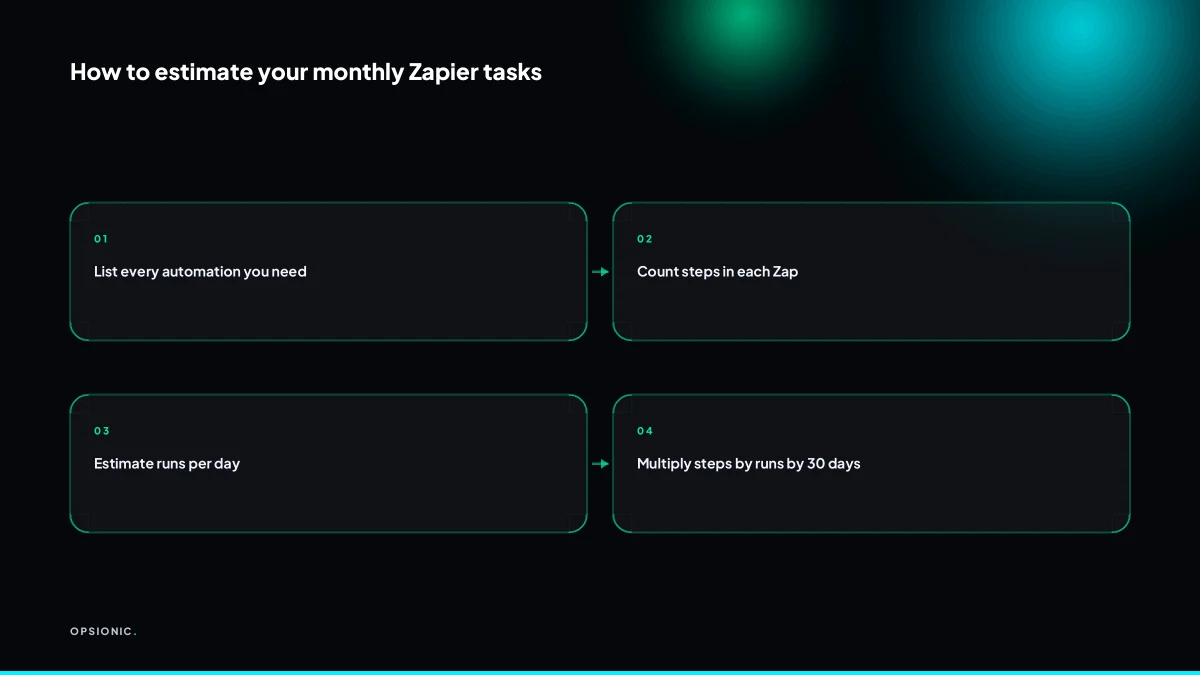
Zapier counts one task as one action step inside a Zap that runs successfully. A three-step Zap that triggers on a new WooCommerce order and then updates Google Sheets and sends a Slack message uses three tasks per order. Small businesses routinely underestimate this multiplier, which is why their monthly usage grows faster than expected.
A task is not one Zap run. It is one action step inside that run. If a step fails and the Zap retries it, the retry counts as another task. If a Zap has five steps and runs forty times, that is two hundred tasks, not forty. This distinction matters because Zapier’s pricing tiers are built on tasks, and every extra step in a workflow pushes you closer to the next price band.
Polling triggers add another layer. With a polling trigger, Zapier checks an app on a schedule, often every fifteen minutes, to see if anything new has appeared. Each check that finds no new data still counts as a task on many plans. A Zap that watches for new rows in a Google Sheet and polls every fifteen minutes can burn through ninety-six tasks a day before it processes a single real row. That is nearly three thousand tasks a month spent on looking, not doing.
Real workflows are rarely one step. Take a small online shop as an example, not a client, just arithmetic. The shop gets forty orders a day. The owner builds a Zap that triggers on each new order, creates a row in Google Sheets, sends a confirmation email, and posts a message to a Slack channel. That is three action steps after the trigger, so three tasks per order. Forty orders a day times three tasks is one hundred and twenty tasks a day. Over a thirty-day month, that is three thousand six hundred tasks. Add a second Zap that watches for abandoned carts and sends one follow-up email per event, and the total climbs past four thousand tasks without anything exotic happening.
Multi-step Zaps are the norm because a single action rarely finishes a job. An order needs recording, confirming, and notifying. A lead needs capturing, tagging, and assigning. Each of those verbs is a task. When you want to automate data entry between apps and also notify someone and also log the outcome, the task count multiplies quietly in the background.
Not sure which of these applies to you?
Answer six questions and see what we would automate first in your business, and what it is worth.
What does 1,000 tasks a month cost on Zapier?
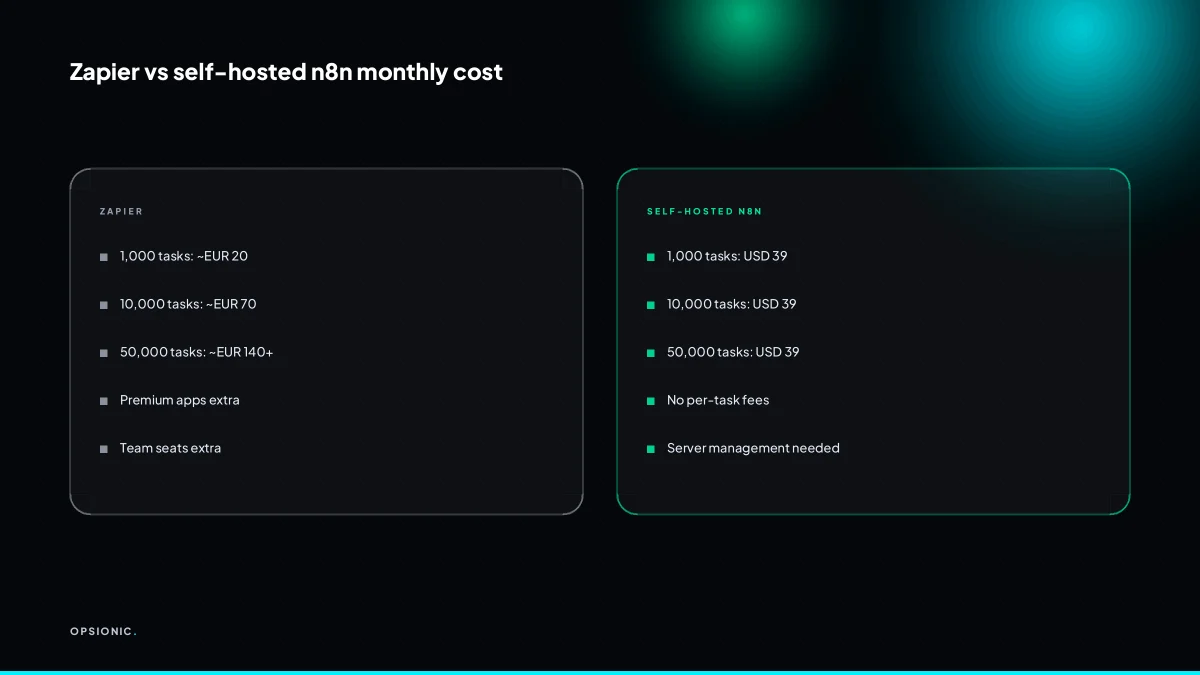
At 1,000 tasks a month, Zapier’s Starter plan costs around EUR 20 a month at the time of writing. That includes multi-step Zaps, but not premium apps or team seats. For a solo business running a few simple automations, this is often enough, but the price rises steeply once you cross the tier.
The Starter plan gives you 750 tasks for about EUR 20 a month. To reach 1,000 tasks, you either buy extra task packs or step up to the next tier. Extra tasks are sold in blocks, so the real monthly cost sits slightly above the headline price.
What you do not get at this level matters more than the task count. Premium apps such as QuickBooks, Shopify, or Xero are locked out. Advanced logic like paths, webhooks, and auto-replay is missing. Shared workspaces are absent, so a second person cannot see or edit your Zaps without their own seat.
A solo consultant might run 1,000 tasks comfortably. One Zap adds new Calendly bookings to a Google Sheet. Another sends a Slack message when a form is submitted. A third logs Stripe payments to Airtable. Each runs a handful of times a day. The total lands under the cap.
But 1,000 tasks runs out fast once a Zap polls frequently or a business has more than one moving part. A single order synced to three apps burns three tasks. Add a follow-up email and a spreadsheet row, and one sale costs five tasks. Two hundred sales a month wipes out the entire allowance before you start automating your business beyond the basics.
What does 10,000 tasks a month really cost?
At 10,000 tasks a month, Zapier’s Professional plan costs around EUR 70 a month at the time of writing, and that is before premium apps or extra team seats. A small business with two or three people running order-to-sheet and reminder automations can hit this volume within months. The per-task price falls, but the total bill becomes a fixed line item.
The Professional plan buys you 10,000 tasks, multi-step Zaps, and access to premium apps, but the apps themselves are not included. QuickBooks Online, Shopify and Xero each add roughly EUR 20 a month at the time of writing. Connect two of them and your bill has already jumped from EUR 70 to around EUR 110.
Team seats push it higher. Professional includes one seat. A second person who needs to edit or monitor the same Zaps adds another paid seat. For a two-person agency sharing the automation workspace, that is an extra monthly charge on top of the plan and the premium apps. The cost is no longer a rounding error; it is a line item you defend each month. The fuller comparison sits in our breakdown of what one automation actually costs.
| Item | Monthly cost at 10,000 tasks |
|---|---|
| Professional plan | EUR 70 |
| One premium app (e.g. QuickBooks) | EUR 20 |
| Second premium app (e.g. Shopify) | EUR 20 |
| Extra team seat | EUR 20 to EUR 30 |
| Total | EUR 130 to EUR 140 |
A two-person agency syncing client orders to QuickBooks and sending reminders could reach 10,000 tasks in a quiet month. The plan feels generous until the premium apps and the second seat land on the invoice. At that point the question stops being whether automation saves time, and becomes whether this particular stack is the cheapest way to get it.
What is this costing you now?
Based on removing half of that time.
What does 50,000 tasks a month cost, and when does it break?
At 50,000 tasks a month, Zapier’s Team plan costs over EUR 140 a month at the time of writing, plus premium apps and extra seats. For a business running dozens of multi-step Zaps across sales, support and finance, the per-task model stops being predictable. This is the point where self-hosting n8n on a private server becomes cheaper.
The Team plan includes 50,000 tasks and starts at around EUR 103 a month at the time of writing. That number looks firm until you add the things a real small business needs. Three premium apps, things like QuickBooks, Xero or a decent CRM, add roughly EUR 60. Two extra team seats so a colleague can edit Zaps without borrowing your login add another EUR 50 or so. The invoice lands closer to EUR 210 a month before you have automated anything unusual.
Compare that with self-hosting n8n on a private server. A managed server starts at USD 39 a month at the time of writing, and n8n itself is free to run. The task count is limited only by the server, not by a pricing tier:
| Item | Zapier Team | Self-hosted n8n |
|---|---|---|
| 50,000 tasks a month | Included | Included, server permitting |
| Three premium apps | Around EUR 60 extra | No per-app charge |
| Three team seats | Around EUR 50 extra | No per-seat charge |
| Typical monthly total | Around EUR 210 | USD 39 for the server |
The per-task model fails hardest with high-frequency workflows. A WooCommerce store that fires a Zap for every order, every inventory change, every abandoned cart check and every review request can burn 1,500 tasks on a slow Tuesday. A support team that logs every ticket update into a sheet multiplies the same problem. You stop seeing tasks as a unit of work and start seeing them as a meter running against you. That is the moment the real cost of business automation stops being the software and becomes the pricing model itself.
When does self-hosting n8n become cheaper than Zapier?
Self-hosting n8n on a private server starts at USD 39 a month at the time of writing, and that cost is fixed regardless of task volume. For businesses consistently running 10,000 or more tasks a month, self-hosting is usually cheaper by the second or third month. The trade-off is that you manage the server, or pay someone to.
The maths is straightforward. Zapier’s Professional plan includes 2,000 tasks and multi-step Zaps, with extra tasks billed in bundles. At 10,000 tasks a month you are buying roughly 8,000 extra tasks on top of the base subscription. At 50,000 tasks the overage alone can exceed EUR 300 a month. The self-hosted n8n server still costs USD 39. The gap widens every month and never narrows.
What you give up is real. Zapier maintains the infrastructure, patches the platform and keeps thousands of app connections working. Self-hosting n8n means you own the updates, the backups, the security patches and the 2 a.m. alert when a queue stalls. For a solo owner, that time has a cost too.
If you want the flat pricing without the server chores, a managed automation plan sits between the two. You get the workflows built and run for you, but the task meter stops driving the bill. Before you commit to either path, run the numbers on your own volume:
- Pull your Zapier task history for the last three months and average it.
- Multiply that average by the per-task overage rate on your current plan.
- Compare the monthly total against USD 39 for a self-hosted n8n server.
- Estimate the hours you would spend on server maintenance each month and price them at your own rate.
- Add the maintenance hours to the USD 39 and compare that figure against Zapier again.
If the self-hosted total still wins at 10,000 tasks or more, the decision is mostly made. If the maintenance estimate scares you, read the fuller comparison in n8n vs Zapier for small business before you switch.
Want this running in your business next week?
A relaxed 20-minute video chat. Camera on or off. You leave with a plan whether or not you hire us.
- No call unless you ask for one
- From EUR 399 a month, no setup fee
- Built and run for you, not handed over as homework
Sources we checked
Questions people ask
Does Zapier charge for failed tasks?
Zapier does not count a failed action step as a task, but it does charge for retries that succeed. A step that errors and then runs again on a retry counts once. Polling triggers that find no new data can still consume tasks on many plans, so quiet Zaps are not always free.
Can I share a Zapier account with my team without paying extra?
No. Team seats are billed per person on paid plans, and the free plan has no shared workspace at all. If a colleague needs to see or edit your Zaps, they need their own seat. Budget roughly EUR 20 to EUR 30 a month per extra seat.
What happens if I exceed my monthly task limit?
Your Zaps stop running until the next billing cycle or until you buy extra task packs. Zapier sells additional tasks in blocks, so the real monthly cost ends up slightly above the headline tier price. Nothing is lost, but nothing new processes either.
Are there discounts for annual Zapier billing?
Zapier advertises a discount when you pay annually rather than monthly, typically a percentage off the monthly rate. The exact figure changes, so check Zapier's own pricing page before you commit. The saving is real but it does not change the per-task model underneath.
Which apps count as premium and why do they cost more?
Premium apps are integrations Zapier has built and maintains on a commercial agreement, including QuickBooks Online, Shopify and Xero. They are locked out of the free and Starter plans. Each premium app adds roughly EUR 20 a month at the time of writing, on top of your plan.
Is Zapier free plan enough for a one-person business?
Only for testing or one very simple workflow. The free plan gives 100 tasks a month, two-step Zaps and no premium apps. A single order synced to three tools burns three tasks, so 100 tasks disappears within days for any business with real volume.
Can I migrate my existing Zaps to n8n easily?
Not automatically. n8n is a different platform, so each workflow is rebuilt as a node-based flow rather than imported. Simple two-step Zaps take minutes, multi-step Zaps with filters and paths take longer. The rebuild is usually a one-off cost against a lower monthly bill.