When to Hire an Automation Agency (And When Not To)
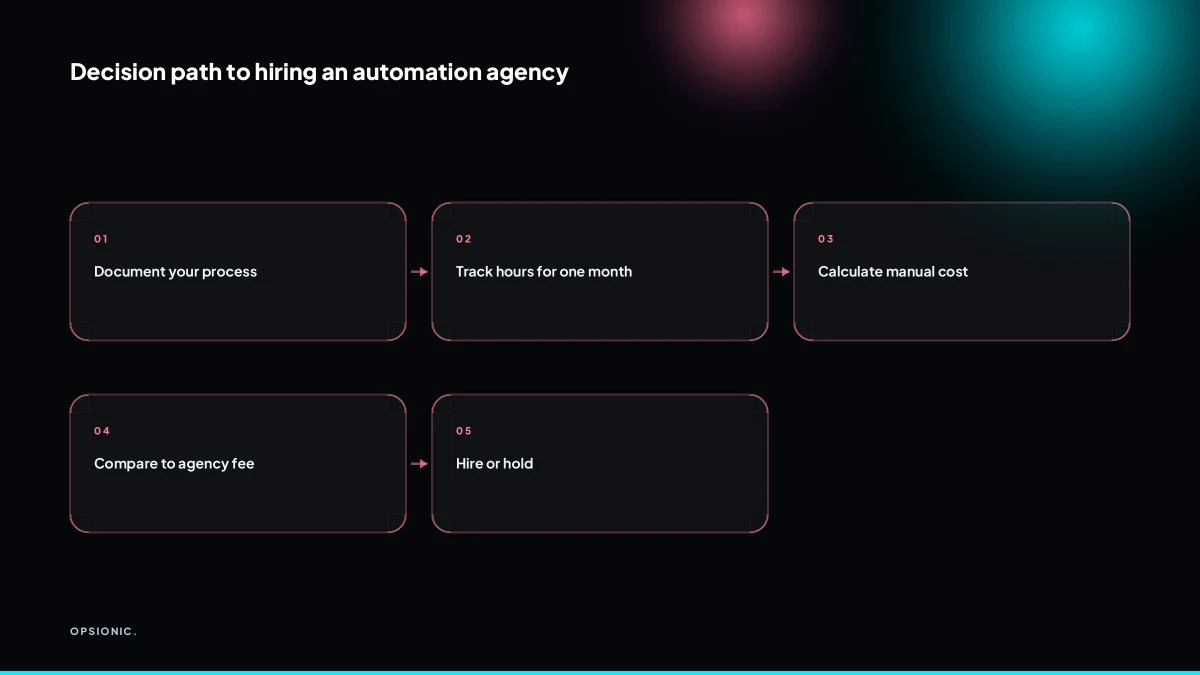
Hire an automation agency when a stable, high-volume process costs you more in manual hours each month than the agency fee, and when DIY or freelancer fixes have failed or stalled. If the process is still changing, volume is low, or you haven't measured the time it eats, don't hire yet. You need a clear, repeatable workflow with a payback period under six months.
What does an automation agency actually do that you can’t do yourself?
An agency builds, tests, documents, and maintains automations across multiple tools, handling edge cases, error handling, and changes. You can DIY simple one-step automations, but agencies bring experience with APIs, webhooks, and complex logic, plus accountability when something breaks.
DIY tools like Zapier or Make are fine for a single trigger and action. A new form entry creates a spreadsheet row. A paid invoice sends a thank-you email. But when a workflow splits into branches, retries a failed API call, or checks a second system before proceeding, the visual builder starts to fight you. You end up maintaining the automation instead of the work it was meant to remove.
A freelancer can build the same thing an agency can, on day one. The gap appears in February when the software changes, or in June when you add a new product line. Freelancers move on to other clients. Agencies have a documented build, a test log, and a named person who owns the fix.
The technical line is also real. APIs and webhooks let systems talk without a human copying data. Custom code steps cover what no prebuilt connector handles: a weird date format, a legacy database, a conditional approval chain. Most small businesses will never write that code, and should not have to.
Maintenance is where the agency model earns its fee. Payment providers change their API. Google Sheets hits a rate limit. A supplier renames a field. An agency watches for those failures, alerts you when something matters, and patches the workflow before a customer notices. That ongoing monitoring is part of the automation services we run, not an optional extra bolted on later.
At what point does hiring an automation agency make financial sense?
It makes sense when the monthly cost of manual work exceeds the agency fee. If a process takes 20 hours a month and you value your time at EUR 50 per hour, that’s EUR 1000. An agency at EUR 599 per month saves you money from month one.
Here is a worked example, not a client. A bookkeeping firm manually copies Stripe payouts into Xero and reconciles each one against invoices. That takes a staff member 15 hours a month. At a loaded cost of EUR 35 per hour, the manual cost is EUR 525. A managed automation at EUR 599 per month costs EUR 74 more than the labour it replaces. But the same person also fixes mismatches when a payout lands without a matching invoice. Those corrections average six hours a month, another EUR 210. Total manual cost: EUR 735. The agency fee is EUR 136 cheaper, and the errors stop.
The formula is simple. Multiply the hours a process takes each month by what an hour of your or your team’s time is worth. Compare that to the fee. If the number is lower than EUR 599, do it yourself or leave it alone. If it is higher, the automation ROI calculation is already positive before you count the mistakes that stop happening.
Error costs change the sum quickly. A missed invoice reminder costs a late payment. A wrong data entry costs an hour of unpicking. Those are real money, and they sit on top of the hours. Opportunity cost matters too: every hour spent copying data is an hour not spent quoting, selling, or serving a customer.
Volume is the other side. If a task takes two hours a month, even a high hourly rate rarely justifies a EUR 599 fee. At EUR 50 per hour, two hours is EUR 100. The agency costs five times that. In that case, a single workflow from EUR 399 may still be too much. The honest answer is to wait until the volume grows or bundle several small tasks into one engagement.
Not sure which of these applies to you?
Answer six questions and see what we would automate first in your business, and what it is worth.
What should you have in place before you hire anyone to build automations?
You need a documented, stable process with clear inputs and outputs, and you must know the monthly volume and time spent. If the process changes every week, no automation will stick. Also, map the tools involved and confirm they have APIs or integrations. Without this, you’ll pay for discovery work that may not lead anywhere.
Before you book a planning chat, run through this checklist. Each line is a check you can actually perform this afternoon.
- Write the process down as numbered steps, from trigger to final output.
- Run the process twice in one week and confirm the steps are identical both times.
- Record how many times the process runs in a typical month.
- Time one full run, including the small pauses between steps.
- List every app, spreadsheet or inbox the process touches.
- For each tool, search its website for an API, a Zapier integration or a webhook option.
- Mark any step that relies on judgement, a phone call or a person reading between the lines. Those steps need a human decision before they can be automated.
Tool compatibility is where most plans stall. If your CRM has no API and no integration, an agency cannot connect it to your invoicing software without brittle workarounds like screen scraping. That costs more and breaks often. Checking API availability before you pay for discovery work saves you from funding an investigation that ends in “we can’t reach this system.”
Automating a broken process is the fastest way to scale mistakes. If your quoting step already misses details or your invoice reminders go out late by hand, an automation will send the same bad outputs faster and more often. Fix the sequence first, then automate it. The article on starting with one process walks through picking a process that is stable enough to automate. One afternoon of writing steps and checking integrations will tell you whether you are ready to hire or need to tidy the process first.
What are the signs you should not hire an automation agency yet?
Don’t hire if your process is still being defined, if monthly volume is under 10 hours of manual work, if you haven’t tried a simple DIY tool, or if you can’t name the specific pain point. Also avoid hiring if you expect the agency to design your business process; that’s consulting, not automation.
The first warning sign is an unstable process. The symptom: you do the task differently each week, or two staff members follow different steps. The fix is to write the current sequence down, even if it is rough, and get the people who do the work to agree on one version. Automating a process that changes every fortnight means rebuilding the automation every fortnight.
The second sign is low volume. If a task takes two hours a month, an agency build will not pay for itself for years. You are better off with a DIY tool or simply leaving it manual. The fix is to track actual hours for a month before you commit.
The third sign is no clear ROI. If you cannot point to the specific hours saved or errors removed, you are not ready. The article on what tasks to automate first helps you spot the work where volume and stability overlap.
Process design and automation build are different jobs. Designing a process means deciding who approves what, what counts as a completed job, and which fields are mandatory. Building an automation means connecting tools so those decisions happen without clicking. If you need the first, hire a consultant or do the thinking yourself. Then hire for the second.
What is this costing you now?
Based on removing half of that time.
How do you calculate whether a specific automation will pay for itself?
Take the hours you spend on the task each month, multiply by your hourly rate or the cost of the person doing it, then compare to the automation cost. For a one-off build, divide the build cost by monthly savings to get payback months. For a managed service, subtract the monthly fee from savings. Aim for payback in under six months.
- List the task and its owner. Name the exact process, such as chasing unpaid invoices, and the person who does it today.
- Time one full cycle. Use a stopwatch for a week. Record minutes per occurrence, not guesses.
- Multiply to a monthly figure. Occurrences per month times minutes per occurrence, divided by 60.
- Put a rate on that time. Use the employee’s loaded hourly cost, not their take-home pay.
- Add hidden costs. Late invoices mean delayed cash. Manual entry means typos that take another hour to fix. Repetitive clicking is why good staff look elsewhere.
- Compare against the build or monthly fee. A one-off build at EUR 1,200 that saves EUR 300 a month pays back in four months. A managed service at EUR 599 a month only makes sense if the saving is clearly above that.
Invoice chasing is the easy example. Five hours a month at EUR 35 an hour is EUR 175. A one-off build that removes those five hours pays back quickly. But if the same chasing also causes one late payment a quarter because a reminder slips, the real cost is higher. That is the number worth comparing against the payback sum before you decide between a one-off build and an ongoing service.
How do you know if you need a one-off build or an ongoing managed service?
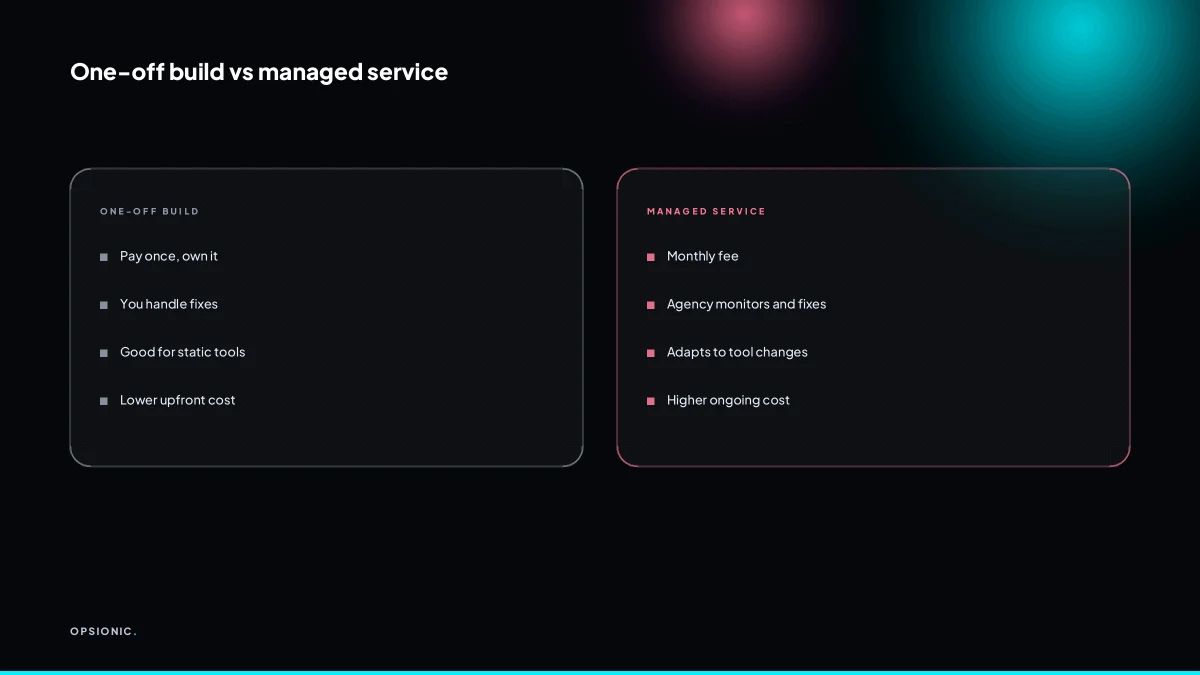
Choose a one-off build if your process is stable, your tools rarely change, and you have someone technical to fix minor issues. Choose a managed service if automations are mission-critical, you lack in-house technical skills, or your tools update frequently. Managed service includes monitoring, fixes, and adjustments, which a one-off does not.
| Factor | One-off build | Managed service |
|---|---|---|
| Best when | Process is stable and rarely changes | Automation is mission-critical or tools change often |
| Monitoring | None after handover | Included, with alerts and checks |
| Fixes and updates | You handle them or pay per fix | Included in the monthly fee |
| Technical skill needed | Someone on your side must troubleshoot | None required from you |
| Typical cost shape | Lower upfront, unpredictable later | Predictable monthly cost from EUR 599 |
Stability matters more than most owners expect. A one-off build for a process that breaks every time a CRM updates its API becomes a recurring invoice. Tool volatility is the hidden variable: if your stack includes apps that push changes without warning, the maintenance burden lands on you.
Cost implications are straightforward in the short term. A one-off build costs less to start, but every fix, update, or small adjustment after handover is a new expense. A managed service costs a fixed amount each month and includes that work. If you expect more than two or three interventions a year, managed usually comes out cheaper and calmer. The full comparison sits in the real cost of business automation.
Maintenance is not optional. Every automation touches at least two systems, and at least one of those systems will change. Expect small breakages, expired tokens, or a field renamed in an update. A realistic plan means either budgeting for those fixes or paying someone to absorb them.
Want this running in your business next week?
A relaxed 20-minute video chat. Camera on or off. You leave with a plan whether or not you hire us.
- No call unless you ask for one
- From EUR 399 a month, no setup fee
- Built and run for you, not handed over as homework
Sources we checked
Questions people ask
How much does it cost to hire an automation agency?
Opsionic charges EUR 599 per month for managed automation, or from EUR 399 per month for a single workflow, with no setup fee and a six-month initial term. Larger projects get a fixed quote after a free planning chat. Other agencies price differently, so ask each one what maintenance includes.
What's the difference between an automation agency and a freelancer?
A freelancer builds the workflow and moves on. An agency keeps a documented build, a test log, and a named person who owns fixes when an API changes or a field gets renamed. The build can be identical on day one; the difference shows up months later.
Can an automation agency work with my existing tools?
Usually, if each tool has an API, a webhook, or a prebuilt connector. Before paying for any discovery work, check each vendor's site for API or integration documentation. A tool with no API can only be connected through brittle workarounds, which cost more and break often.
How long does it take to build an automation?
It depends on the number of tools, the branching logic, and how stable the process is. A single trigger-and-action workflow is quick; a multi-step process with approvals and error handling takes longer. Ask for a written scope with stages before you commit.
What if the automation breaks after the agency leaves?
That risk is why maintenance sits inside a managed plan rather than beside it. A managed service watches for failures, alerts you when something matters, and patches the workflow. A one-off build leaves you owning that work, so ask who fixes it and how fast.
Do I need to know coding to work with an automation agency?
No. You need to describe the process, name the tools, and give realistic monthly volumes. The agency handles APIs, webhooks, and any custom code steps. What you cannot outsource is knowing how the process actually runs today.
Is it worth automating if I only have a few hours of manual work a month?
Often not. Two hours a month at EUR 50 an hour is EUR 100, well below a managed fee. Wait until volume grows, or bundle several small tasks into one engagement so the combined saving clears the cost.