Dental Practice Automation: Recalls, Reminders, GDPR
Automation for dental practices means turning the recall cycle, appointment reminders and routine front-desk follow-up into workflows that run themselves, without moving patient data into unsafe places. It fills next month's diary, cuts no-shows and keeps GDPR compliance intact, so your team stops chasing patients manually.
What should a dental practice automate first?
Start with the recall cycle, appointment reminders and no-show follow-up. These are repetitive, time-sensitive and directly tied to revenue. Automating them frees front-desk hours without touching clinical decisions.
The recall list is the clearest starting point. Most practice management systems can flag patients who are due a check-up, but someone still has to turn that list into phone calls or messages. An automation can pull the due list each morning, group patients by preferred contact method, and send the first nudge without a receptionist touching the phone.
Appointment confirmations work the same way. A short SMS or email sequence, sent two days before and again on the morning of the visit, cuts the calls that begin with “I’m just checking my appointment.” The patient replies to confirm or cancel, and the diary updates itself.
No-shows are where the money leaks. When a patient cancels late or simply does not arrive, the gap rarely fills itself. An automated rebooking flow can offer the freed slot to patients on a short-notice list, or send a follow-up to the no-show patient with a link to pick a new time. This is one of the first places to look when you are deciding what tasks should a small business automate first.
Clinical work stays manual for good reason. Treatment planning, charting and diagnosis need a dentist’s judgement. Automating those too early creates risk without saving much time. Get the front-desk admin running first, then review what is left.
How does the recall cycle work once it is automated?
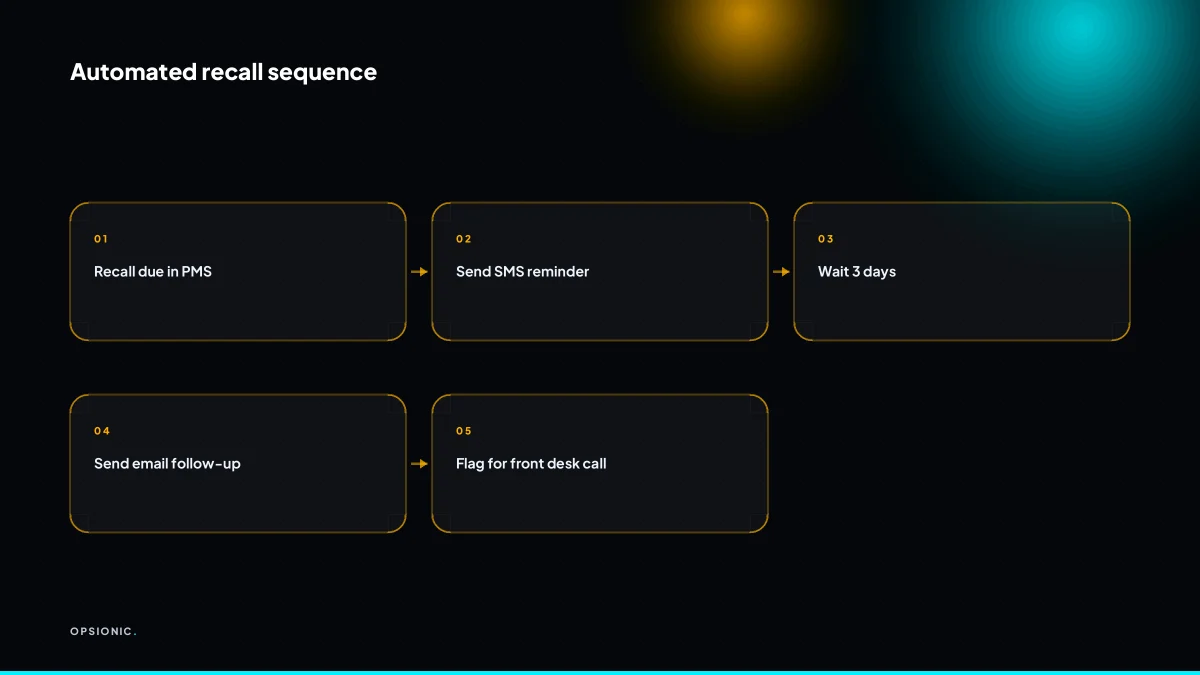
The system checks your practice management software daily for patients whose recall interval has passed, then sends a personalised message offering a booking link or phone number. If there is no response within a set period, a second message goes out, and the patient is flagged for a personal call after that.
- Pull the recall due date from your PMS. The automation reads the recall field for every patient, once per day, and builds a list of anyone whose interval has passed.
- Send the first recall message. A short SMS or email goes out the same day, using the patient’s first name, the treatment type and a booking link.
- Wait three working days. The automation checks whether the patient opened the message, clicked the link or booked an appointment.
- Send a second message with a softer tone. The follow-up acknowledges they may be busy and offers the direct phone number for the front desk instead of the link.
- Escalate to the front desk after two attempts. If neither message gets a response, the patient’s name lands on a daily call list with their last treatment date and preferred contact number.
Each step runs without a person touching the practice management system. The recall cycle is self-contained: one trigger, one sequence, one handoff. That is why starting with one process first makes sense here.
Not sure which of these applies to you?
Answer six questions and see what we would automate first in your business, and what it is worth.
What patient data may leave the practice management system?
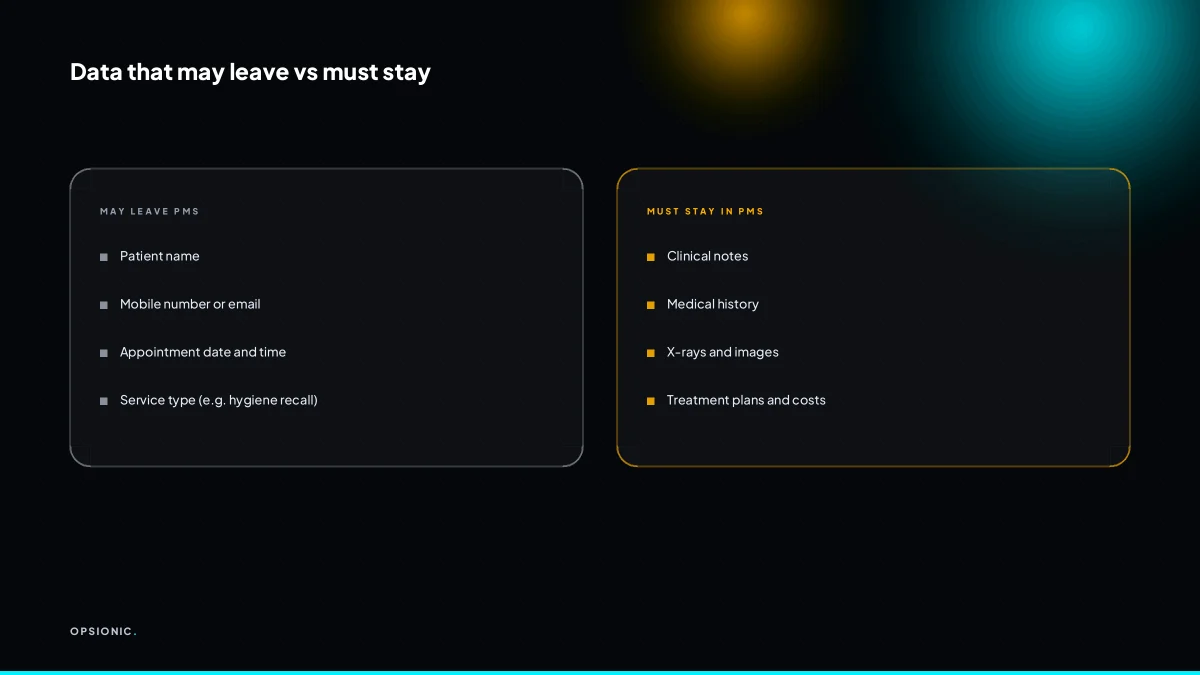
Only the minimum needed for a reminder: name, mobile number or email, appointment date and time, and a non-clinical service type like “hygiene recall”. Never export clinical notes, medical history, X-rays or treatment plans to a generic cloud tool. Keep the PMS as the system of record.
Allowed fields are narrow for a reason. A recall message needs a name so the patient knows it is for them, a contact channel, a date and time, and a service label. That is enough to fill a diary without touching anything sensitive.
Clinical notes, treatment plans, medical history, X-rays, prescription details and payment card data must stay inside the PMS. GDPR treats health data as a special category, which means you need a lawful basis and strong safeguards before moving it anywhere. A generic automation tool is rarely the right home for it.
Data minimisation is the rule: collect and process the least you need, for the purpose you stated. If a field does not help the patient show up on time, leave it out of the export.
| Field | May leave the PMS for reminders | Must stay inside the PMS |
|---|---|---|
| Name | Yes | No |
| Mobile number or email | Yes | No |
| Appointment date and time | Yes | No |
| Service type, e.g. hygiene recall | Yes | No |
| Clinical notes | No | Yes |
| Medical history and X-rays | No | Yes |
Exporting clinical data to a generic cloud tool can trigger a breach notification, a regulator complaint, or a patient losing trust. The practical fix is the same one behind automated review requests: define the exact fields upfront, then build the automation so it cannot pull anything else.
How do GDPR consent and legitimate interest apply to dental reminders?
For appointment reminders, legitimate interest usually applies because the patient has a booked appointment and expects a reminder. For recall messages about treatment due, legitimate interest can apply if the patient is active and the message is necessary for care. Marketing messages about whitening or new services need explicit consent.
Think of it as three separate lanes. A reminder confirms something the patient already agreed to. A recall continues care the patient has already received. Marketing starts a new conversation the patient never asked for.
Legitimate interest is valid when three tests pass. The purpose is specific, such as reducing missed hygiene appointments. The processing is necessary, meaning there is no less intrusive way to achieve it. And the patient’s interests do not override yours, which is usually true for a short SMS about an existing booking.
Explicit consent is required the moment the message promotes something elective. That includes whitening offers, new patient referral schemes, or seasonal promotions. Silence is not consent. A pre-ticked box is not consent.
Document your lawful basis in one short internal note per message type. State the purpose, the lawful basis, and the retention period. This takes minutes and makes any future regulator question far easier to answer.
What is this costing you now?
Based on removing half of that time.
Which practice management systems and tools can be connected without breaking compliance?
Open Dental, Dentrix, Eaglesoft and Sensei Cloud all offer APIs or integrations, but each requires careful field mapping and access control. Use a GDPR-compliant automation platform like n8n on your own server, or Zapier with EU data processing agreements, and never send patient data to a tool that cannot guarantee EU residency.
Open Dental has the most open API of the main systems, which makes custom recall and reminder workflows practical. Dentrix and Eaglesoft rely more on partner integrations, so you may need a middleware step. Sensei Cloud is newer and API-first, but the field names differ, so map them once and test with dummy records before any live patient data moves.
For the automation layer, the choice between n8n vs Zapier for small business matters more in dentistry than in most trades. n8n can run on a private server in the EU, which keeps patient data under your control. Zapier is easier to start with but you must confirm the data region and sign the EU processor terms before connecting any PMS.
Check every tool in the chain. The PMS, the automation platform, the SMS gateway and any spreadsheet or database must all offer EU data residency or approved transfer safeguards. Ask each vendor for their data processing agreement before the first test run. If one link cannot confirm it, replace that link.
For SMS reminders, use a gateway with GDPR-compliant contracts and EU hosting, such as Twilio with EU region settings or a specialist healthcare messaging provider. Avoid free consumer messaging apps for patient contact. They are not built for this.
What does automation cost for a dental practice, and when does it pay back?
A managed automation service for recalls and reminders starts at EUR 599 per month, or a single workflow from EUR 399 per month. A five-dentist practice spending 30 staff hours a month on manual recalls can break even if automation saves 10 hours, before counting extra filled appointments.
At Opsionic, the EUR 599 monthly plan covers the recall cycle, reminder sends and the front desk handoffs that sit around them. You are not buying software licences. You are buying the setup, the hosting and someone who fixes the workflow when a practice management system changes its export format.
Take a worked example, with invented figures. A practice pays a receptionist EUR 18 per hour. Manual recalls, no-show follow-ups and reminder chasing take 30 staff hours a month. That is EUR 540 in wages. Automation cuts the work to 8 hours a month: checking exceptions and handling replies. Saving: 22 hours, or EUR 396, plus roughly EUR 60 in message costs. Against the EUR 599 fee, the practice is down about EUR 143 in month one. But each recovered hygiene appointment is worth EUR 90 to EUR 150 in revenue. Two extra filled slots a month covers the shortfall, and the receptionist now has 22 hours for patients in the room, treatment plan explanations and the phone calls that actually need a human.
The honest comparison is what one automation actually costs when you build it yourself. A freelancer might charge EUR 1,500 to EUR 3,000 for the first workflow, then you own the maintenance. In-house only makes sense if someone on the team can read API logs and sit on hold with your practice management system’s support line. Most dental teams cannot spare that person. Most practices outsource the build and keep the daily checks in the surgery.
Want this running in your business next week?
A relaxed 20-minute video chat. Camera on or off. You leave with a plan whether or not you hire us.
- No call unless you ask for one
- From EUR 399 a month, no setup fee
- Built and run for you, not handed over as homework
Sources we checked
Questions people ask
Can I automate recall messages for patients who haven't visited in over a year?
Yes, provided the patient is still considered active and the message relates to their ongoing care. Pull the recall due date from your practice management system, send a short message offering a booking link, then escalate to a personal call after two attempts. Document your lawful basis before the first send.
What happens if a patient replies STOP to an SMS reminder?
The gateway should suppress that number immediately and the automation must record the opt-out against the patient record so no further messages go out. Keep a record of when and how consent was withdrawn. Reminders already booked may still need a phone call instead.
How do I handle patients who prefer phone calls over SMS?
Store a preferred contact method on the patient record and let the automation branch on it. Patients flagged for phone calls land on a daily front-desk list with their last treatment date and number, rather than receiving an automated message. The recall cycle still runs, the channel just changes.
Is it safe to use WhatsApp for dental appointment reminders under GDPR?
Only with care. WhatsApp Business can be used if you have a lawful basis, a data processing agreement covering the transfer, and a clear notice telling patients the channel is in use. Many practices prefer an EU-hosted SMS gateway instead, because the data residency position is simpler to document.
Can automation help fill last-minute cancellations from a waiting list?
Yes. When a slot frees up, the automation can message patients on a short-notice list in order, offering the time with a first-come booking link. Set a cut-off so the offer expires before the appointment. This is usually the fastest payback from dental automation.
Do I need a Data Protection Officer to automate dental recalls?
Not automatically. A DPO is required where processing is large-scale or involves special category data as a core activity, and a small practice may not meet that threshold. Check your national regulator's guidance, and in any case keep a short internal note per message type stating purpose, lawful basis and retention.
How do I keep patient contact details up to date for automated reminders?
Ask at every visit and let patients update details through a booking link or reply. Bounce-backs and failed SMS deliveries should flag the record for front-desk review rather than being retried silently. A stale mobile number is the most common reason a recall message never lands.