Small Law Firm Automation: Intake, Conflicts and Matter Updates
Automation for law firms small means building workflows that handle intake, conflict checks and matter updates without exposing client data to public cloud tools. The safest approach runs on a private server, uses pre-screening forms to cut bad leads, and sends proactive updates that reduce client calls. Start with one high-volume admin task, not a full system overhaul.
What can actually be automated in a small law firm without breaking confidentiality?
You can automate intake pre-screening, conflict check lookups, document generation, appointment reminders, and matter status updates without breaching confidentiality if you keep client data off public cloud automation tools. Use a private server or self-hosted n8n, and design workflows so only staff see sensitive fields. Automation handles the repetitive clicks; a human still reviews anything touching privilege.
Confidentiality changes the design before you build anything. Client names, matter details and case notes never pass through a shared automation platform where the vendor can read them. That means a private server or a self-hosted instance, not the free tier of a public tool. Least access is the second rule: a workflow that sends appointment reminders should read the client’s name, phone number and appointment time, and nothing else. It should not have credentials to the matter file.
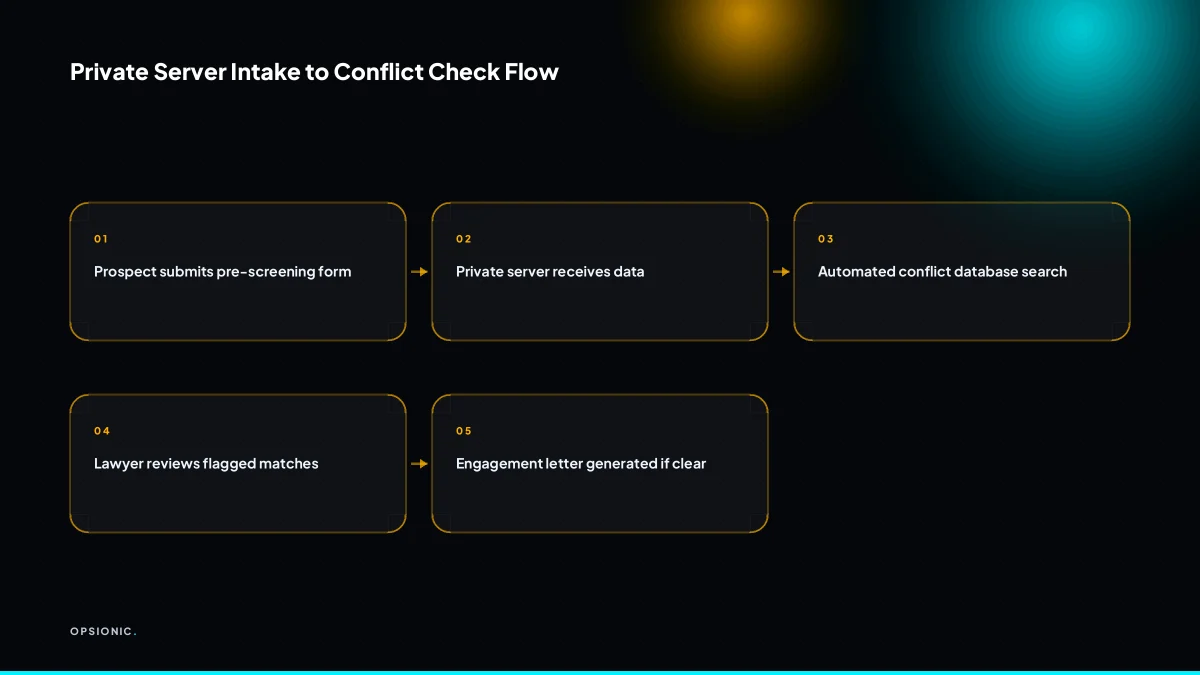
Some processes are safe to automate almost fully. Intake pre-screening can collect the other party’s name, the matter type and a short description, then run a conflict check against your existing client list. If there is no match, the enquiry lands in a queue for a solicitor to review. If there is a possible conflict, the workflow stops and flags it. Document generation for standard letters works the same way: the template pulls only the fields it needs, and a person checks the output before it goes out.
Other processes need human judgment at the decision point. Anything touching legal advice, settlement terms or privilege stays with a solicitor. Automation can prepare the draft, gather the attachments and schedule the follow-up, but it does not decide what the letter says. The same applies to matter updates: a workflow can compile the last week’s activity from your practice management system and send a plain-language summary, but a fee earner approves it first.
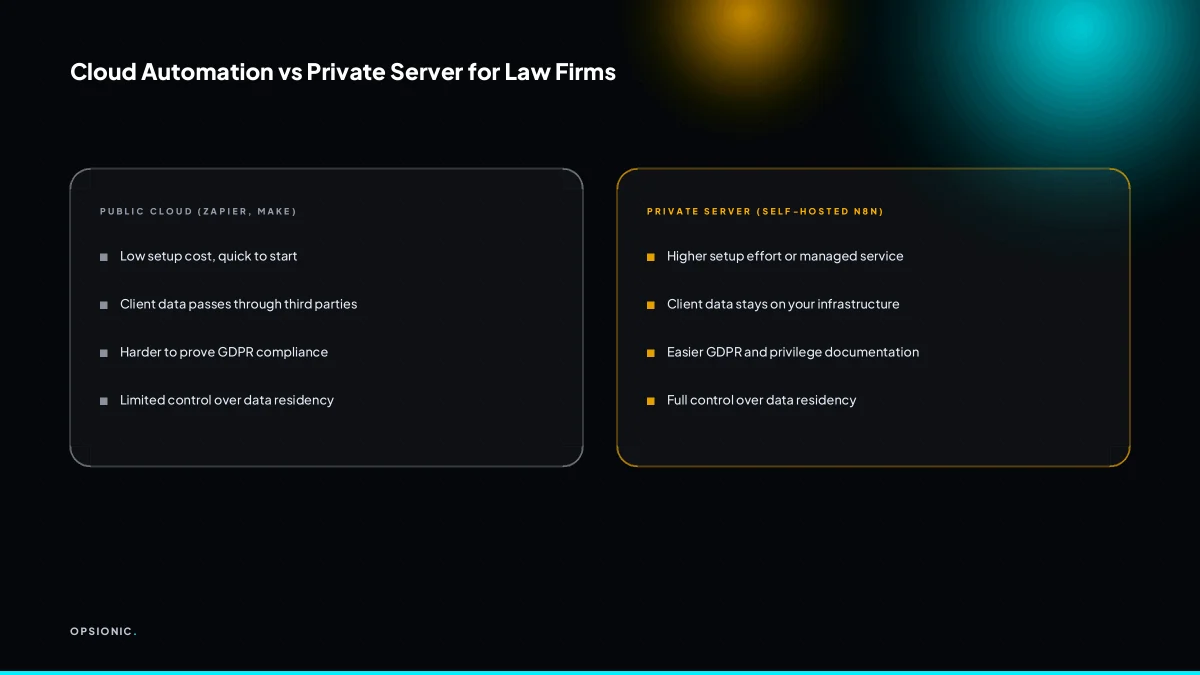
The tooling matters as much as the workflow. Running n8n on your own server keeps client data inside your control, which matters for GDPR and for your professional obligations. Self-hosting n8n means you decide where the data sits, who can access the server, and how logs are kept. A public cloud automation tool might process the same data on infrastructure you cannot audit. For a law firm, that is the difference between a defensible system and a risk you cannot explain to a client or a regulator.
GDPR adds a second layer. You need a lawful basis for processing, data minimisation in every workflow, and a documented record of what each automation touches. Legal professional privilege adds a third: nothing in your automation should create a new copy of privileged material in a place you cannot retrieve or delete it from. Keep logs short, keep access narrow, and keep a human in the loop wherever judgment or privilege is involved.
Which parts of intake, conflicts, and matter updates are safe to automate first?
Start with intake pre-screening, because it is low risk and high volume. A form that asks disqualifying questions before a call saves hours weekly. Then automate conflict check lookups against a private database, keeping a human to assess nuanced results. Finally, automate matter update emails from your practice management system, using templates the lawyer approves.
- Build an intake form that filters, not just collects. Ask for the opposing party name, matter type, jurisdiction, and a short deadline. Route only viable matters to a call slot.
- Connect the form answers to a private conflict database. A lookup runs the names against past and current matters. The lawyer sees flagged matches and decides, because a surname overlap is not always a conflict.
- Set up matter update templates in your practice management system. The lawyer writes three or four versions: case filed, date set, documents received. The system pulls the client name and matter reference into the right template.
- Sequence the rollout in that order. Intake first, because it stops the most admin. Conflicts second, because it protects the firm. Updates third, because they keep clients quiet once the work is underway.
Each step builds on the previous one, and none of them removes the lawyer from a decision that needs judgment. If your intake form currently dumps every enquiry into an inbox, connecting a website form to a private sheet and email is a sensible first move.
Not sure which of these applies to you?
Answer six questions and see what we would automate first in your business, and what it is worth.
How do I keep client data off public cloud automation tools?
Run your automation on a private server you control, using self-hosted n8n or a managed private server. Connect only to tools that encrypt data in transit and at rest. Avoid Zapier or public cloud connectors for anything containing client names, matter details, or privileged information. If you must use a cloud form, collect only non-sensitive pre-screening data.
Self-hosting n8n gives you a clean answer: the workflow logic and the data it touches stay on a server you nominate. You decide the operating system, the backup schedule, and who holds an SSH key. The trade-off is upkeep. Someone has to patch the server, watch the disk, and renew certificates. A small firm can buy that as a service instead. Managed private server hosting removes the routine maintenance while keeping the machine yours in the sense that matters: no other tenant shares it, and data does not pass through a third party’s multi-tenant automation cloud.
Managed private servers start at around EUR 39 per month at the time of writing. That is the hosting layer. The automation itself still needs someone to build and run it, which is where a fixed monthly plan or a one-off build may fit.
Encryption and data residency are not extras. Data in transit should use TLS. Data at rest should sit on encrypted volumes. If your regulator or insurer expects client files to stay in a specific country, choose a server region that matches and write that choice down.
A cloud form can still be useful if you limit what it asks. Name, phone number, and a broad matter type are usually low risk. Anything privileged, anything that names the other party, or anything a client would not want read aloud in a café should never enter a public form. Keep the pre-screening shallow and move the sensitive conversation to a channel you control.
What does a pre-screening intake form need to ask to reduce calls and bad leads?
A pre-screening form should ask about legal matter type, jurisdiction, opposing party, urgency, and budget range. Include questions that would disqualify a lead: statute of limitations issues, conflict potential, or practice area mismatch. Keep it under ten questions, and make it clear no attorney-client relationship is formed by submitting the form.
Most calls that waste a morning are not legal problems. They are people checking whether you do their kind of case, whether you work in their area, and whether they can afford you. A short form answers all three before the phone rings.
Essential fields for legal intake pre-screening
- Matter type. Use a dropdown, not a free text box. Family, employment, property, probate, commercial. If someone types a paragraph, you have already lost the filtering benefit.
- Jurisdiction. Ask for the city or postcode where the matter sits. A client in Lyon is useless to a solicitor who only practises in England and Wales.
- Opposing party. Ask for a name or company. This is the single fastest way to surface a conflict before you spend twenty minutes on a call.
- Urgency. Offer three options: this week, this month, no fixed deadline. Urgency is a useful proxy for whether the lead is real.
- Budget range. Give bands such as under EUR 1,000, EUR 1,000 to EUR 5,000, over EUR 5,000. This removes the leads who expect a solicitor for the price of a takeaway.
Disqualifying questions that weed out bad leads
- Is there a court date already set? If yes, ask for the date. A hearing in three days is a different job from a dispute that has not been filed.
- Have you already spoken to another solicitor about this matter? This catches shoppers and people whose previous solicitor withdrew.
- Roughly when did the events happen? A form that asks for a year, not a story, lets you spot limitation problems without reading a narrative.
Disclaimer language to avoid unintended representation
One sentence below the submit button is enough: “Submitting this form does not create a solicitor-client relationship and nothing you write is confidential until we confirm in writing that we can act.” Keep it visible, not buried in a terms link.
Example form structure
- Full name
- Phone number
- Matter type (dropdown)
- City or postcode
- Opposing party name
- Approximate date the issue began
- Urgency (three options)
- Budget range (three bands)
- One optional line: “Anything else we should know?”
That is nine fields. If you want help building a form that feeds straight into your diary and conflict list, book a free plan and we will map the flow with you.
What is this costing you now?
Based on removing half of that time.
How do I automate conflict checks without losing the nuance a human review provides?
Automate the lookup, not the decision. Build a private conflict database of client names, related parties, and matter keywords. When a new enquiry arrives, the workflow searches the database and flags potential matches for a lawyer to review. The human then assesses the context and decides.
Start with a simple table or spreadsheet: one row per matter, with columns for client name, opposing party, related companies, and a few keywords describing the subject. Keep it on a server you control, not a shared cloud drive, because the contents are privileged. When the intake form submits, the workflow checks each new name and keyword against this list and returns any rows that overlap. A partial match is enough to flag; the system should not try to score severity.
The flag goes to the responsible lawyer as a short email or task: “New enquiry from X. Possible overlap with matter 0142, opposing party Y. Please review before the consult.” The lawyer opens the old file, reads the context, and either clears the conflict or declines the work. The decision and the reason get logged back against the enquiry, so there is a dated record if a question ever arises later.
As an example, a five-person firm taking 30 new enquiries a month might spend 10 minutes per enquiry checking names and old files by hand. That is 300 minutes, or five hours, each month. With the lookup automated, the lawyer only reviews the flagged ones. If 6 of the 30 get flagged and each review takes 15 minutes, that is 90 minutes. The saving is 5 hours minus 1.5 hours, or 3.5 hours a month, and the review is more consistent because the database is checked the same way every time. This kind of lookup is one of the services we automate for small businesses, built so the final call always stays with the lawyer.
Can I automate client matter updates without sounding impersonal?
Yes, if you use templates with merge fields for client name, matter name, and next step. Set triggers based on case milestones or time elapsed. Send updates from the lawyer’s email address, not a no-reply. Add a personal sentence when possible. The goal is to reduce status-check calls by proactively telling clients what is happening.
A template works when it sounds like a draft the lawyer would type, not a mass email. Start with the client’s first name as a merge field, then the matter name, then one sentence about the current stage. The next step field should be specific: “We are waiting for the Land Registry search” rather than “Your matter is progressing.” Leave one blank line for an optional personal note. The lawyer can add “I spoke to the surveyor this morning” in ten seconds, or leave it out.
Triggers should be quiet and event-based. A milestone update goes out when a document is filed, a hearing date is confirmed, or a deadline passes. A time-based update goes out when nothing has happened for a set period, usually 14 or 21 days. The time-based one matters most, because silence is what drives clients to call. A short note that says “No news yet, here is what we are waiting for” stops the phone ringing.
Send every update from the lawyer’s own email address, not a generic office account. Clients reply to a person. If the matter is handled by a paralegal for routine steps, send those from the paralegal. Never use a no-reply address for client updates.
Keep the tone plain. No “we hope this email finds you well.” One update per trigger, not three. If the lawyer would not say a sentence on the phone, the template should not say it in writing. Build the workflow once, then review the first five sends before letting it run. This is the same logic as any recurring client email, like the five numbers in a weekly report, where the structure stays fixed but the content stays human.
Want this running in your business next week?
A relaxed 20-minute video chat. Camera on or off. You leave with a plan whether or not you hire us.
- No call unless you ask for one
- From EUR 399 a month, no setup fee
- Built and run for you, not handed over as homework
Sources we checked
Questions people ask
Is it ethical to use automation in a law firm?
Yes, provided you keep client data confidential and a qualified lawyer reviews any decision that affects legal advice or privilege. Automation should handle repetitive admin, not replace professional judgment. You remain responsible for compliance with your regulator's rules and data protection law.
How much does a private server for legal automation cost?
Managed private server hosting starts at around EUR 39 per month at the time of writing. That covers the hosting layer only; building and running the automation itself may cost extra, either as a fixed monthly plan or a one-off project fee. Check the vendor's pricing page for current rates.
Can I use Zapier for law firm automation if I avoid client names?
Avoiding client names reduces risk but does not eliminate it. Zapier processes data on shared cloud infrastructure, which may not meet your confidentiality obligations. For any workflow that touches sensitive client information, use a private server or self-hosted n8n instead.
What is the best practice management software for small firm automation?
There is no single best option; it depends on your jurisdiction and existing systems. Choose software that offers an API or webhooks so you can connect it to your automation workflows. Popular choices include Clio, MyCase and Actionstep, but verify data residency and security features.
How do I handle client consent for automated communications under GDPR?
Identify your lawful basis for processing, which may be legitimate interests or consent depending on the communication. Provide clear information about automated updates in your engagement letter and privacy notice. Allow clients to opt out of non-essential messages and keep a record of their preferences.
Can automation help with legal document assembly without risking errors?
Yes, if you use templates with fixed fields and require a lawyer to review the output before it is sent. Automation can pull data from your practice management system into standard letters, reducing typing errors. It should never generate legal advice or final documents without human approval.
What is the first automation a solo lawyer should set up?
Start with intake pre-screening. A short online form that asks about matter type, jurisdiction, opposing party and urgency filters out unsuitable enquiries before they reach your phone. Connect it to a private sheet or database, and review the results daily.