Nine Signs Your Business Has Outgrown Doing It By Hand
The clearest signs your business needs automation are repetitive tasks done by hand, data copied between apps, follow-ups that depend on memory, and errors from manual entry. If you recognise these patterns, automation can remove the routine work, reduce mistakes, and free hours each week without hiring more staff.
What does a manual process look like when it has outgrown doing it by hand?
A manual process has outgrown doing it by hand when the same steps repeat unchanged, the volume makes errors likely, and the task no longer needs human judgement. You see the same copy-paste, the same status chase, and the same correction loop every week, and no amount of care stops the mistakes.
Repetition without variation
The clearest sign is a task that never changes. A booking comes in, you copy the name and time into a calendar, then into an invoice, then into a reminder. The fields are identical every time. If you could write the instructions once and follow them forever, the work is already a script waiting to exist.
Volume leading to errors
Ten of anything a week is manageable. Fifty is where fatigue sets in. You start missing the second email address, the VAT number, the note left in the wrong field. The errors are not carelessness. They are what happens when a person is asked to behave like a machine for hours at a stretch. The cost is the correction loop: finding the mistake, apologising, redoing the entry.
Lack of human judgement required
Ask what you actually decide during the task. If the answer is nothing, or only “which field does this go in”, then the process has no reason to occupy your time. Judgement belongs where a customer needs a considered reply, or where a price depends on context. Moving data from one app to another is not that. The question of how many hours automation can save your small business starts here, with the hours spent on steps that never needed a person in the first place.
Which specific tasks are the strongest automation candidates for a small business?
The strongest candidates move data between named tools, trigger on a schedule or event, and follow clear rules. Examples include copying form submissions into a CRM, sending appointment reminders, generating weekly reports, and reconciling payment data to accounting software.
Data transfer between apps is the clearest starting point. When a booking made in Calendly has to be typed into a CRM, or an order in WooCommerce has to be pasted into a spreadsheet, the work is pure copying. The source and destination are fixed, the fields are known, and the transfer happens every time the trigger fires. Automating data entry between your apps removes the step entirely.
Scheduled or event-triggered actions are equally strong. A reminder sent 24 hours before an appointment, a weekly report assembled every Monday morning, a follow-up email sent when a form is submitted: each one has a defined moment to run and a defined output to produce.
Rule-based decisions without nuance round out the list. If the rule is clear and does not change, such as “when the invoice value exceeds EUR 5,000, flag it for review”, a machine can apply it faster and more consistently than a person. The moment the decision requires judgement, it stops being a candidate.
| Task type | Example | Strong candidate? |
|---|---|---|
| Data transfer between apps | Form submission to CRM | Yes. Fixed fields, fixed tools. |
| Scheduled action | Weekly report every Monday | Yes. Repeats on a known cycle. |
| Event-triggered action | Reminder 24 hours before a booking | Yes. Clear trigger, clear output. |
| Rule-based decision | Flag invoices over EUR 5,000 | Yes. No nuance required. |
| Judgement call | Reply to a complaint | No. Needs a person. |
Not sure which of these applies to you?
Answer six questions and see what we would automate first in your business, and what it is worth.
How can a business tell the difference between a busy week and a structural manual work problem?
A busy week is temporary. A structural manual work problem is the same task recurring on a fixed schedule, regardless of workload. If you can predict which admin tasks will eat your time every Monday, or which follow-up will slip if you are out, that is structural. Busy weeks end; structural problems repeat.
Three tests separate the two. First, predictability: a structural task arrives on a known day or after a known trigger, not because a client happened to call. Second, dependence on memory or presence: if the work only happens because you remember it, or stalls the moment you take a day off, it is structural. Third, recurrence independent of volume: the task appears whether you had two orders or twenty. That is the clearest sign the process itself, not the workload, is the bottleneck.
Print this checklist and tick honestly:
- I can name the task that will be waiting for me every Monday morning.
- If I am away for two days, at least one follow-up or update does not happen.
- The task repeats even in a quiet month, when there is no backlog to blame.
- I rely on remembering to do it, rather than on a system that does it.
- Two different staff members would do the task two different ways, or one would forget entirely.
If three or more boxes are ticked, you are not having a busy week. You are carrying a recurring manual process, which is exactly the kind of work that tends to fail for predictable reasons, as why automation projects fail in small businesses explains.
What are the hidden costs of manual data entry, copying between apps and chasing status updates?
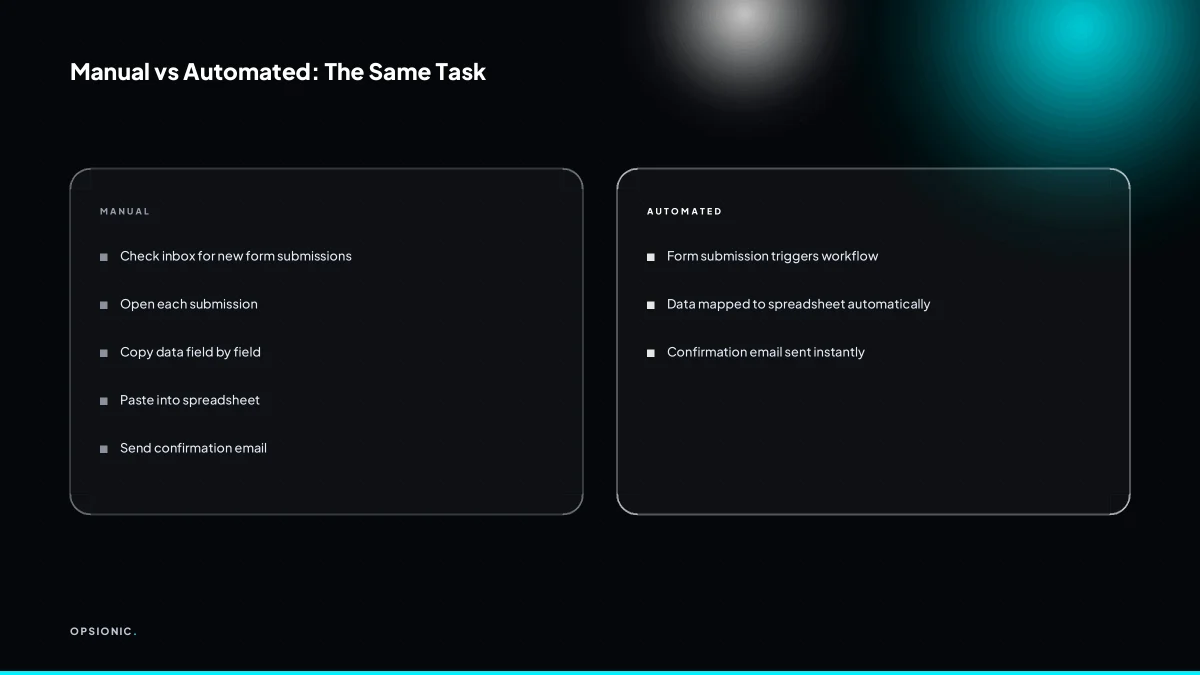
The hidden costs are not just time. Manual data entry introduces errors that require correction, copying between apps creates version conflicts, and chasing status updates delays decisions. A single misfiled invoice or missed follow-up can cost more than a month of automation. These costs compound quietly every week.
Error correction is the first tax. A mistyped figure in an invoice means someone has to find the original, re-enter it, and explain the mistake to the customer. That is rarely one email. It is a chain of messages, a corrected document, and a dent in trust.
Delayed decisions hit cash flow directly. When a quote sits waiting for a manager to approve it in a spreadsheet, the customer waits too. A slower quote means a slower signature, which means slower payment.
Lost opportunities are the quietest cost. A lead that gets a reply on Thursday afternoon is still warm. One that gets a reply on Monday morning has often booked someone else. The delay was not a choice. It was the queue.
Worked example: a small service business quotes 30 jobs a month. Each quote takes 45 minutes to prepare by hand. That is 22.5 hours a month. If errors force five quotes to be redone at 20 minutes each, that adds 1.7 hours. If chasing approvals delays five invoices by four days each, and each invoice is worth EUR 1,200, the business sits on EUR 6,000 longer than it needs to. If three leads go cold because replies took two days, and each job is worth EUR 900, that is EUR 2,700 in lost work. Before you fix the process, it helps to work out the ROI of an automation before you build it.
What is this costing you now?
Based on removing half of that time.
When is hiring another person a better answer than automation?
Hiring is better when the work requires judgement, creativity, or human interaction that cannot be reduced to rules. Automation handles the repetitive parts so a person can focus on those higher-value activities.
Tasks requiring human judgement
A person should own anything where the right answer changes with context. Deciding which client gets a fee waiver, whether a supplier dispute is worth escalating, or how to phrase a difficult project update all need judgement. Automation can gather the facts and prepare the options. It should not make the call.
Customer-facing nuance
Some conversations are transactional and easy to automate: booking confirmations, payment receipts, appointment reminders. Others are not. A client who is unhappy, confused, or asking for something outside your standard offer needs a human who can read tone and adjust. Automating that interaction usually makes it worse.
Cost comparison with a part-time hire
If you need roughly ten hours a week of judgement-based work, a part-time person may cost less than you think once you compare it honestly. A 10-hour weekly hire at around EUR 18 an hour at the time of writing is about EUR 780 a month before employment costs. Automation that removes ten hours of repetitive work can cost far less, which is why the two are not rivals. The useful question is whether hiring or automating costs less for the specific hours you want to remove. Often the answer is both: automate the repetitive ten hours, hire for the judgement-based five.
What should a business automate first if it recognises only one or two signs?
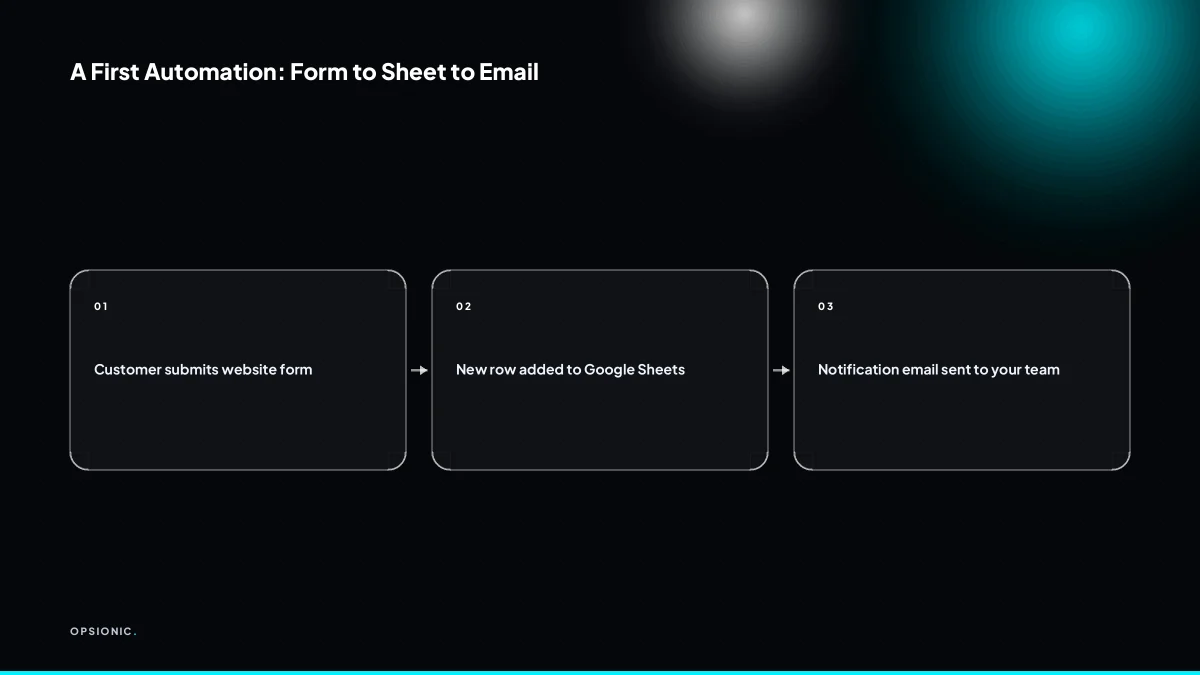
Start with the single most repetitive, rule-based task that touches two or more tools and costs you at least an hour a week. A common first automation connects a website form to a Google Sheet and sends an email notification. That removes manual copying and gives you a quick, measurable win before expanding.
Choose a process that meets three conditions: it happens at least weekly, it follows fixed rules without judgement calls, and it moves data between tools you already use. Avoid anything that needs a human decision at the core.
- List every task that forces you to copy information from one app to another.
- Pick the task that appears most often in that list and time it for one full week.
- Draw the flow: which tool sends the data, which tool receives it, and what notification should fire.
- Build that one connection first, such as sending every new website enquiry to a Google Sheet and emailing yourself the row.
- Run it for two weeks, then compare the time spent against your earlier measurement.
If the task took ninety minutes a week and now takes five, you have a clear number to justify the next step. That is the moment to look at how to start automating your business one process at a time rather than trying to fix everything at once.
Want this running in your business next week?
A relaxed 20-minute video chat. Camera on or off. You leave with a plan whether or not you hire us.
- No call unless you ask for one
- From EUR 399 a month, no setup fee
- Built and run for you, not handed over as homework
Sources we checked
Questions people ask
How do I know if my task is too complex to automate?
If the task requires judgement, context, or a different answer each time, it is too complex for simple automation. Start with tasks that follow fixed rules and move data between named tools. Complex decisions can still be supported by automation that gathers facts, but a person should make the final call.
Can automation work if I use different software than my team?
Yes, most automation tools connect to hundreds of apps via APIs, so different software is rarely a barrier. The key is that each tool has an API or a supported integration. If one does not, you may need a workaround like email parsing or a spreadsheet bridge.
What if I only need one process automated, not a whole system?
That is the best place to start. Pick the single most repetitive, rule-based task that costs you at least an hour a week. Automating one process gives you a quick win and shows you how automation works before you expand to others.
How long does it take to set up a simple automation?
A simple automation, such as connecting a form to a spreadsheet and sending an email, can be set up in a few hours. More complex workflows with multiple steps and conditions may take a few days. The timeline depends on the number of apps and the clarity of your rules.
Do I need to know how to code to automate my business?
No. Most small business automations are built with no-code tools that use visual interfaces. You can connect apps, set triggers, and define actions without writing code. For advanced needs, a developer can help, but many useful automations require none.
What happens if the automation breaks while I am away?
Good automation includes error notifications, so you or your provider are alerted if a step fails. Some tools also have built-in retries. It is wise to have a manual fallback for critical processes. Regular monitoring and maintenance reduce the risk of silent failures.
Is automation safe for customer data under GDPR?
Automation can be GDPR-compliant if you use tools with proper data processing agreements, limit data transfer to what is necessary, and ensure data is stored securely. Avoid sending personal data to unsupported apps. A practical checklist helps you stay compliant.