Automate Social Media Posting for Your Small Business
To automate social media posting for your small business, start with a weekly batching session where you turn one real activity into several posts. Use Meta Business Suite or Buffer to schedule them, but keep replies, comments and direct messages manual. This keeps your feed active without sounding robotic or ignoring customers.
Which social media tasks can you safely automate?
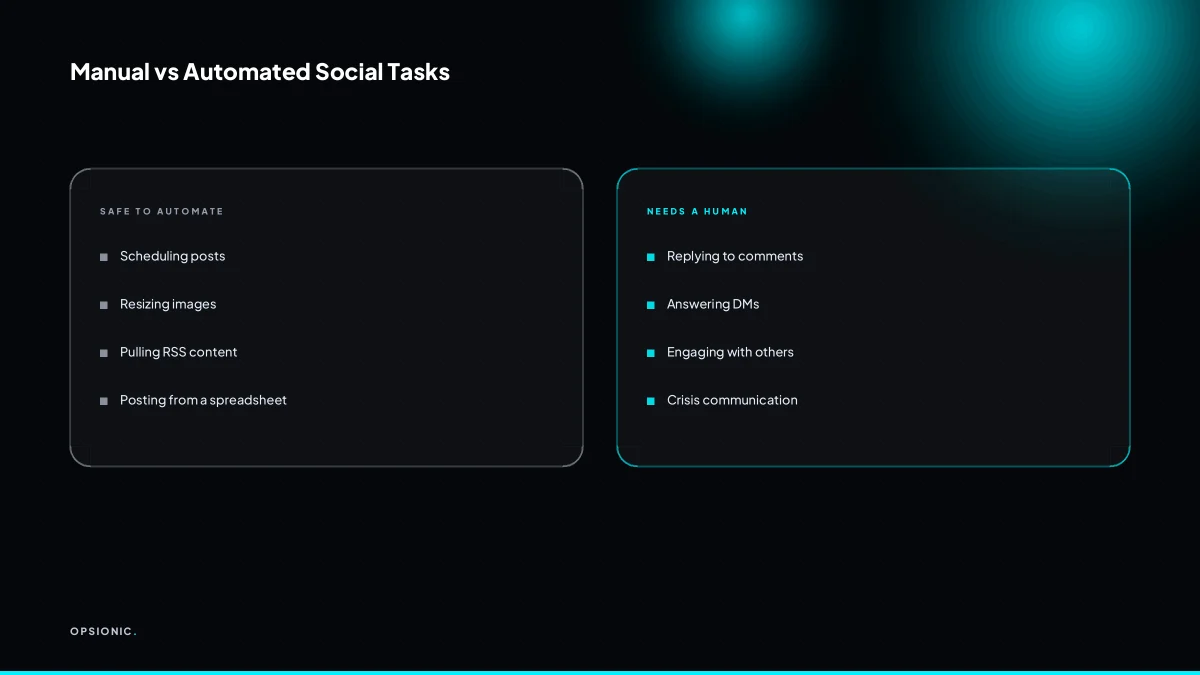
Safe to automate: drafting post ideas from a template, resizing images, scheduling posts to publish later, and pulling in content from an RSS feed or spreadsheet. Never automate: replying to comments, answering direct messages, or engaging with other accounts. Those need human judgement to avoid sounding tone-deaf or missing a sales opportunity.
The split is simpler than it looks. Anything that prepares or queues content before it reaches a person is fair game. Anything that responds to a person after they have spoken is not.
- Safe: turning a new blog post into three social captions, cropping a photo to the right aspect ratio, publishing at 08:00 on Tuesday, pulling a product update from a spreadsheet into a scheduled post.
- Unsafe: replying to a comment, answering a DM, thanking someone for sharing your post, jumping into a thread about your industry.
Automated replies damage trust because they are visible. A customer who writes a genuine question and gets a generic response in six seconds knows they have been processed, not heard. The cost is not just one lost reply. It is the quiet conclusion that your business does not read what people say.
The one exception is a first touch only. An automated thank-you when someone follows you is acceptable as a single, clearly scripted message. It sets no expectation of a conversation. Anything after that first touch belongs to a human.
This is the same boundary that separates a rule from a judgement call. An AI agent that drafts a reply for a human to approve is fine. An agent that sends the reply itself has crossed the line.
What does a weekly batching workflow actually look like?
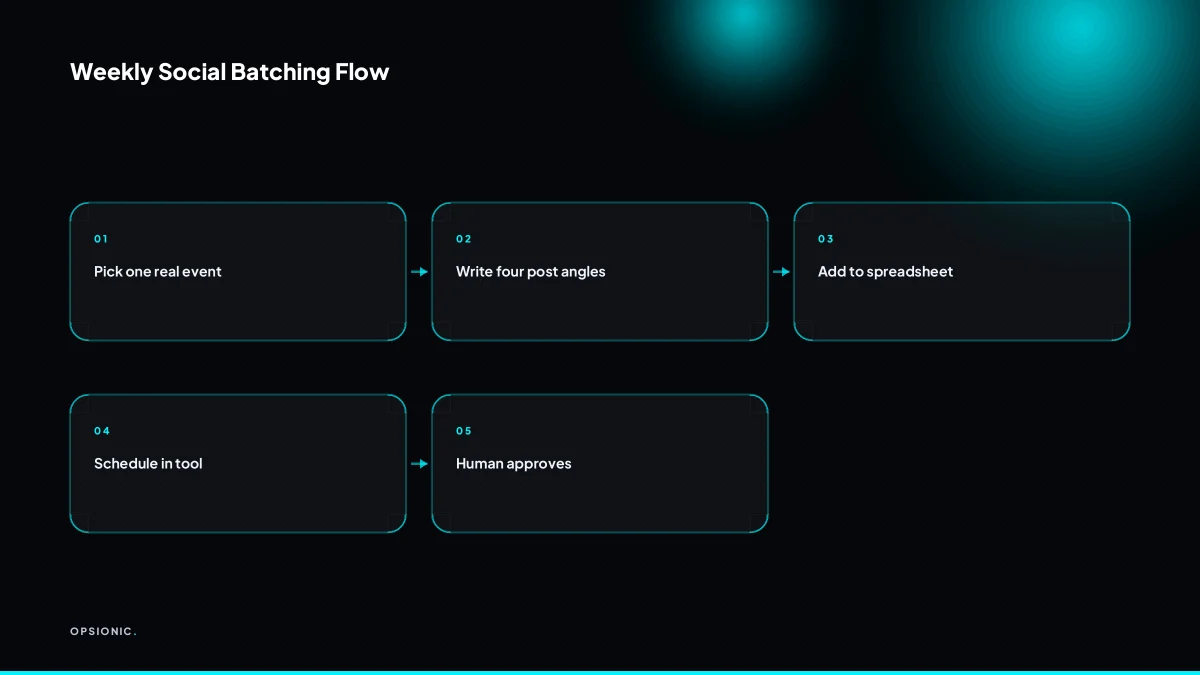
Block 45 minutes once a week. Open a simple spreadsheet with columns for date, platform, post text, image link and status. Fill it using a prompt like: “What did we finish this week?” Then schedule everything in Meta Business Suite or Buffer. You now have five to seven posts ready without daily effort.
Here is the exact sequence that makes this repeatable:
- Open the spreadsheet and duplicate last week’s tab, then clear the post text and status columns while keeping the date and platform structure.
- Write the prompt in a fresh cell: “What did we finish this week? List jobs completed, questions answered, mistakes fixed and anything photographed.”
- Answer the prompt in plain sentences, one row per thought, without editing for tone.
- Turn each answer into a post by filling the post text column with one specific detail, one customer problem and one next step.
- Drop image links into the image link column from your phone gallery or a shared drive, matching each row to the post it illustrates.
- Set the status column to “scheduled” only after the post exists in Meta Business Suite or Buffer, never before.
- Save the sheet with the week’s date in the tab name so next week’s batch starts from a clean copy.
One finished job becomes four posts: a before photo with the problem stated, a during photo with the method, an after photo with the result, and a short text post answering the question the customer asked most often. You are not inventing content. You are transcribing the week you already had. Before you build this, document the process once so the prompt stays honest and the columns stay fixed.
Not sure which of these applies to you?
Answer six questions and see what we would automate first in your business, and what it is worth.
How do you turn one real business activity into four posts?
Take one completed job, customer win, or new product. Write four posts: the before-and-after story, a tip the customer learned, a behind-the-scenes photo, and a question for your audience. Each post stands alone but links to the same real event, so your feed feels consistent and honest.
Here is a worked example, invented but with realistic figures. A cleaning company finishes a deep clean of a three-bedroom flat that took two staff and four hours. The job was quoted at EUR 240. The owner writes four posts from that one job. Post one is the story: the flat had not been deep cleaned in nine months, and the team spent the first hour on the kitchen alone. Post two is the tip: the customer asked how to stop limescale returning, so the post explains a weekly wipe-down routine that takes ten minutes. Post three is the photo: the same corner of the bathroom before and after, side by side. Post four is the question: “What is the one room you always leave until last?” That is four posts from EUR 240 of work and one afternoon.
To avoid repeating yourself across platforms, change the angle, not the event. On Instagram, the photo leads. On LinkedIn, the tip leads. On Facebook, the question leads. The underlying fact stays the same, so you are not writing four separate campaigns. You are re-framing one true thing. This works well for service businesses where the week already produces a stream of real jobs, which is why automation for cleaning companies often starts with the posting pipeline rather than the scheduling tool.
Which scheduling tools actually work for a small business?
Meta Business Suite is free and covers Facebook and Instagram. Buffer’s free plan handles a limited number of channels and scheduled posts. Later focuses on Instagram but also does Facebook and LinkedIn. Hootsuite starts at around EUR 20 per month at the time of writing. All let you schedule in advance; none should auto-reply for you.
| Tool | Free plan | Channels on free plan | Paid from |
|---|---|---|---|
| Meta Business Suite | Yes | Facebook, Instagram | Free |
| Buffer | Yes | Limited channels and scheduled posts | Around EUR 5 per month |
| Later | Yes | Instagram, Facebook | Around EUR 15 per month |
| Hootsuite | No | Not applicable | Around EUR 20 per month |
A one-person business posting only to Facebook and Instagram needs nothing beyond Meta Business Suite. It is free, native to the platforms, and handles scheduling without a third login. If you want LinkedIn in the same queue, Buffer’s free plan is the cheapest way to get there, but the limited scheduled posts run out quickly once the pipeline from the previous section starts producing four posts per week.
Free plans are a test, not an operating model. They cap channels, scheduled posts, or both, and they rarely include the analytics that tell you whether the posting is worth the effort. Pay when you hit the cap every week, when you need LinkedIn and Instagram together, or when you want one calendar view across all channels without switching tabs. Hootsuite earns its higher price only if you manage several brand accounts or need team approvals.
What is this costing you now?
Based on removing half of that time.
What is the approval step you are probably skipping?
Before any post goes live, one other person should check it for tone, typos and factual errors. If you are solo, read it aloud or wait an hour and re-read. This five-minute check stops embarrassing mistakes and keeps your voice consistent. Automation can queue posts, but a human should press the final button.
A scheduling tool does not know that you typed “pubic” instead of “public”, or that the offer you queued last month ended yesterday. It posts what you gave it. The approval step catches the errors that sit between writing and publishing, and it also forces a second look at whether the post still makes sense on the day it goes out.
If two people are involved, keep the checklist short. The reviewer is not rewriting the post. They are checking four things.
- Facts: Is the date, price, link and offer still correct today?
- Tone: Does it sound like us, or like a template?
- Typos: Read it once slowly, then once aloud.
- Fit: Does it belong on this channel, at this time?
Working alone, the same list applies, but you need distance. Write the post, close the tab, and come back after an hour. Read it aloud. If you cannot wait, paste it into a different font or a plain text editor so your eye stops skipping over familiar words. A simple one-page checklist pinned next to your screen turns this from a vague intention into a habit that takes five minutes.
What goes wrong when you automate social posting badly?
The classic failure is a scheduled post going out during a crisis, like a product recall or a personal tragedy. Automated replies can also answer a complaint with “Thanks for your feedback!” which infuriates customers. Other pitfalls: posting the same content to every platform without adapting, and letting a feed go silent because the tool broke and nobody noticed.
The tone-deaf queue. You scheduled a cheerful post for 9am. At 8:40am, something serious happened in your industry or your town. The post still went out, and now you look oblivious. The fix is a pause switch. Most scheduling tools let you stop the whole queue with one click. Before you automate anything, write down where that button is and who has permission to press it. If you run the account yourself, put a reminder in your calendar to check the queue each morning before it fires.
The canned reply to a real complaint. A customer writes a detailed grievance. Your bot answers “Thanks for your feedback!” within seconds. That reply reads as contempt. The rule is simple: never automate a reply to a message that contains a question, a complaint, or a name you do not recognise. Route those to a human, and if you cannot staff it, turn the auto-reply off entirely. A slow human answer beats a fast wrong one.
The silent feed. The tool broke, the card expired, or the API changed. Nobody noticed for three weeks. Your last post is now a month old, and regular readers assume you closed. The fix is a weekly check that takes two minutes: did the scheduled posts actually publish, and did anyone comment? If you cannot commit to that check, you are not ready to schedule at all. A feed that goes quiet costs more than one that was never automated. This is one of the hidden costs of automation nobody puts in the quote.
Want this running in your business next week?
A relaxed 20-minute video chat. Camera on or off. You leave with a plan whether or not you hire us.
- No call unless you ask for one
- From EUR 399 a month, no setup fee
- Built and run for you, not handed over as homework
Sources we checked
Questions people ask
Can I automate Instagram posts without using a third-party tool?
Yes. Meta Business Suite is free and lets you schedule posts to Instagram and Facebook directly, without a third-party tool. You need a professional account and a linked Facebook page. It covers scheduling and basic insights, but not LinkedIn or other networks.
How do I keep my automated posts from sounding like a robot?
Write from a real event, not a template. Describe one specific job, the problem it solved, and the detail a customer would recognise. Keep a human approval step before anything publishes, and never automate replies to comments or messages.
What is the cheapest way to schedule posts on Facebook and Instagram?
Meta Business Suite is free and covers both platforms natively. If you need LinkedIn in the same queue, Buffer's free plan is the cheapest option, but it caps scheduled posts and channels. Pay for a tool only when you hit those caps every week.
Is it against platform rules to auto-post to multiple networks at once?
No. Scheduling tools are permitted by Facebook, Instagram, LinkedIn and others. What platforms and audiences object to is automated engagement, such as auto-replies to comments or unsolicited messages. Posting the same content to several networks is allowed, though you should adapt the angle for each.
How many posts per week does a small business actually need?
There is no universal number. A workable starting point is three to five posts a week, built from one real job or customer question. Consistency matters more than volume. If a week produces nothing worth saying, post less rather than inventing filler.
Can I automate posting from a Google Sheet without coding?
Yes. Tools such as Buffer and Meta Business Suite accept scheduled posts you prepare in advance, and you can keep the plan in a Google Sheet. Fully automatic publishing from a sheet usually needs a connector such as Zapier or Make, which involves some setup but no coding.