Cleaning Company Automation: Rotas, Reminders and Recurring Invoices
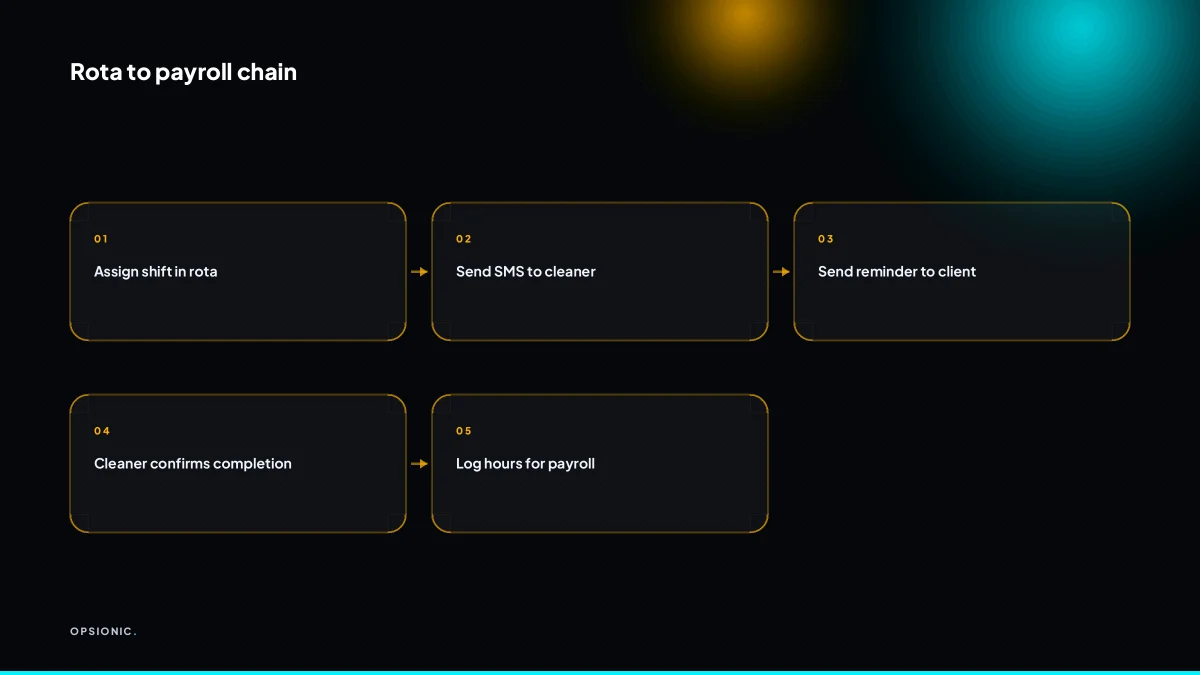
Automation for cleaning companies connects the rota, client reminders and recurring invoices so the office stops retyping the same information every week. A shift assigned in a calendar can trigger an SMS to the cleaner, a confirmation to the client, and a line on payroll. Recurring contracts bill themselves on schedule without a human remembering.
Which admin in a cleaning company is actually automatable?
The repetitive admin is automatable: building the weekly rota from recurring contracts, reminding cleaners and clients of upcoming jobs, confirming completion, creating the same invoices each month, and tracking hours for payroll. Anything that follows a rule or repeats on a schedule can be handled by software, leaving humans to handle exceptions and last-minute changes.
Start with the chain that runs every week without fail. A customer on a Tuesday morning contract needs a cleaner assigned, a reminder sent the day before, a completion note logged, and an invoice raised on the first of the month. None of that needs a person to remember it. The software can read the contract once, then repeat the sequence until told to stop.
- Building the rota from standing contracts and staff availability
- Sending job reminders to cleaners and clients by SMS or email
- Confirming job completion with a photo or a tap
- Creating recurring invoices from contract terms
- Collecting hours worked into a payroll-ready sheet
- Flagging missed visits or unsigned completion notes
The line to draw is between rule-based work and judgment-based work. A rule is “every Thursday, Mrs Ali gets a two-hour clean at 9am.” A judgment is “Mrs Ali called to say her mother is ill, so we should send someone else or reschedule.” Automate the first. Keep a human on the second.
Recurring contracts are the easiest starting point because the pattern already exists. You are not inventing a workflow; you are removing the manual steps from one that repeats monthly. That is the kind of work we automate for small businesses without asking anyone to change how they sell or serve.
How do you automate cleaning staff rotas and shift reminders?
Use a scheduling tool that holds recurring shifts and sends reminders by SMS or WhatsApp. When you assign a cleaner to a job, the system can automatically notify them with the address, time and checklist. Last-minute changes trigger a new message. Cleaners do not need an app; they can receive a link to confirm or decline.
Tools like Deputy, Connecteam and When I Work are built for non-desk staff. They handle recurring shifts, availability and confirmation without expecting cleaners to log into a dashboard every day.
- Create the weekly rota once in the scheduling tool, marking each shift as recurring so it repeats every month or fortnight.
- Set a reminder rule so each cleaner receives an SMS or WhatsApp message a set number of hours before their shift, with the address, time and any notes.
- Connect the scheduling tool to an SMS or WhatsApp gateway. Send SMS reminders from a Google Calendar event using a tool like Twilio or a WhatsApp Business API connector, so the message leaves automatically when the rota is published or changed.
- Enable shift confirmation so cleaners reply with a tap or a short message, and the rota records who has accepted and who has not.
- Allow shift swaps only through the tool. A cleaner requests a swap, the other cleaner accepts, and the rota updates without you retyping anything.
- Trigger a new notification whenever a shift is reassigned or cancelled, so nobody arrives at an old address or misses a same-day change.
The rota stays the single source of truth. Swaps do not break it because the tool rewrites the assignment and re-sends the reminder with the new details.
Not sure which of these applies to you?
Answer six questions and see what we would automate first in your business, and what it is worth.
How do you automate client reminders for recurring cleaning appointments?
Client reminders are triggered by the schedule. A calendar event can send an email or SMS a day before the visit, with the cleaner’s name and expected arrival window. If the client needs to confirm, include a one-tap link. This reduces no-shows and stops the office from sending the same message manually every week.
Google Calendar handles the trigger well because it already holds the rota. Set a default notification for each recurring event, or use a tool that watches the calendar and fires when an event starts in 24 hours. The reminder goes out whether the job repeats weekly, fortnightly or monthly, and you never touch it after setup.
For clients who ignore email, connect the calendar to WhatsApp or SMS. Send SMS reminders from a Google Calendar event using Twilio, or push a WhatsApp template message through the Business API. Many cleaning firms find SMS gets a faster reply than email, especially from clients who are out during the day.
Keep the message short. Include the date, the arrival window, the cleaner’s first name, and a one-tap confirm or reschedule link. Do not ask them to call unless something changed. A client who confirms with one tap is far less likely to forget the visit or leave the house locked.
How do you set up recurring invoices so a contract clean is billed without a human remembering?
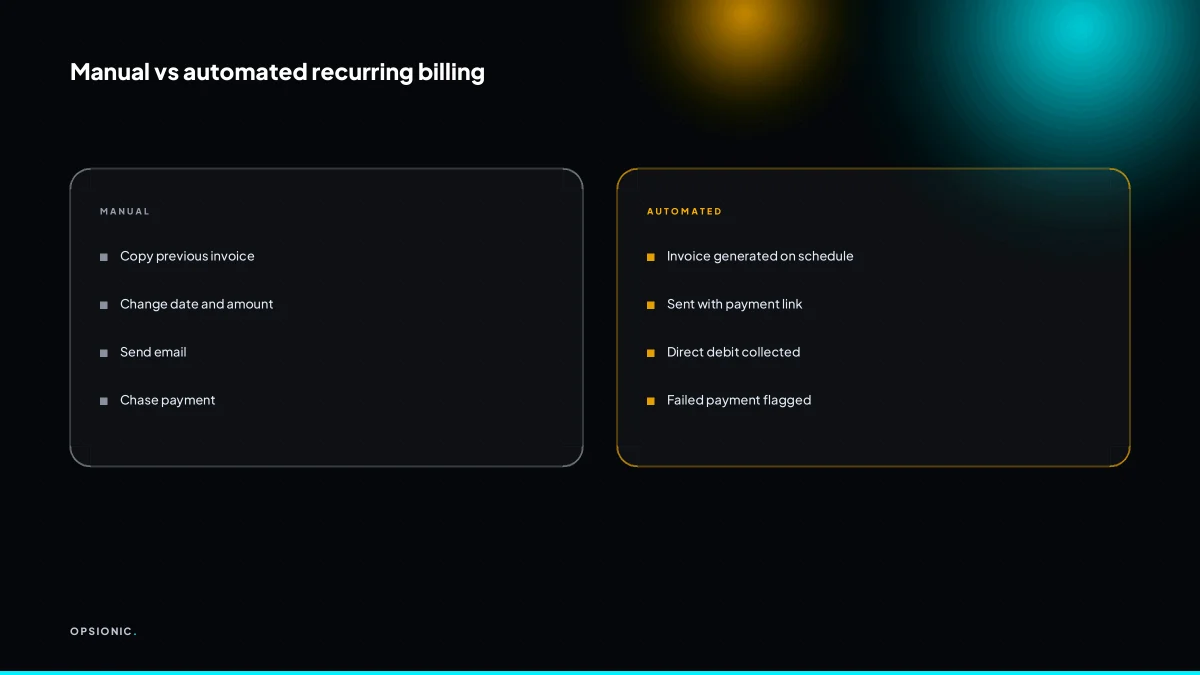
Recurring invoices are created by a billing system that copies the previous month’s invoice and adjusts the date. The system sends the invoice by email, with an online payment link. For clients on direct debit, the payment is collected automatically. The office only intervenes when a payment fails or a service changes.
QuickBooks, Xero and Stripe all handle repeating invoices natively. You set the schedule, the amount and the client, then leave it alone. The invoice goes out on the same day each month and the payment link stays live until it is paid. If you already take card payments through Stripe, connecting Stripe to your accounting software means the payment and the invoice reconcile without a manual step.
Direct debit changes the rhythm. GoCardless lets a client authorise a mandate once, then you collect the agreed amount each month without chasing. This suits contract cleans, where the price rarely changes. The money arrives on the day you set, and the client never has to open an email or click a link.
When a client pauses or changes service, the automation stops being helpful unless you step in. A paused clean means pausing the schedule in QuickBooks, Xero or Stripe, and pausing the GoCardless mandate if one exists. A changed price means editing the recurring invoice, not just the next one. The office still has to make these edits, but only when something actually changes. The default state is that the invoice goes out and the payment lands, with no one touching it.
| Tool | Best for | What you still do by hand |
|---|---|---|
| QuickBooks | Firms already using it for bookkeeping | Pause or edit when a service changes |
| Xero | Firms wanting clean repeating invoice templates | Handle failed payments |
| Stripe | Card payments with an online payment link | Chase cards that expire |
| GoCardless | Direct debit for stable contract cleans | Set up the mandate once per client |
What is this costing you now?
Based on removing half of that time.
How do you connect completed shifts to payroll or time tracking?
When a cleaner marks a job as complete in the scheduling app, the system can log the hours and send them to payroll. Some tools integrate directly with QuickBooks or Xero. If not, a simple automation can copy the data into a Google Sheet that payroll reads. This removes manual timesheet entry and reduces errors.
The first decision is how your cleaners confirm a job is done. A mobile app with a big “complete” button is the cleanest option, but it assumes every cleaner has a smartphone and will actually open the app. SMS works better for staff who ignore app notifications: they reply “DONE 3.5” and the automation records 3.5 hours against that job. WhatsApp is similar, though you need a business account and a clear message format so replies stay consistent.
If your scheduling tool already talks to QuickBooks or Xero, the completed shift flows straight into a timesheet or payroll batch. You approve it and run payroll as normal. When no direct integration exists, a Google Sheet is the bridge. The automation appends one row per completed job: cleaner name, client, date, hours, and rate. Your payroll person or accountant reads that sheet once per period.
Here is a worked example. A firm pays cleaners EUR 14 per hour. One cleaner completes 22 jobs in a week, averaging 2.5 hours each. That is 55 hours. At EUR 14 per hour, gross pay is EUR 770. Without the automation, the office manager retypes 22 rows from the scheduling app into payroll software, maybe 40 minutes of work. With the automation, those rows land in the sheet automatically and the manager spends five minutes checking for anomalies. The saving is about 35 minutes per cleaner per week. With four cleaners, that is over two hours weekly that no longer disappears into data entry.
The point is not that every tool must integrate directly. The point is that the confirmation step and the payroll step should touch each other without a human in between. How you build that connection depends on the tools you already run, and how we build an automation is usually a short chain of triggers rather than a new platform.
What goes wrong when you automate a cleaning company’s admin?
The most common mistakes are forcing field staff to use a complicated app, automating a broken process, and ignoring high turnover. Cleaners will not update their availability if it takes five taps. Automation that depends on one person’s login breaks when they leave. Start with one recurring task and build from there.
Mistake one: the app nobody opens. You introduce a scheduling portal where cleaners mark availability, log supplies, and confirm jobs. Within a week, half the team is texting the office instead. The symptom is a rota that looks current but is actually a guess. The fix is to meet staff where they already are. A WhatsApp message with a one-word reply, or an SMS reminder tied to a Google Calendar event, beats a login screen every time.
Mistake two: automating a process that was never right. If your current invoicing has missing line items, wrong addresses, or rates that vary by client without a written rule, automation will produce those errors faster. The symptom is a recurring invoice that goes out wrong every month, and a client who stops trusting the bill. The fix is to write down the correct sequence first, even as a one-page list, then automate that sequence.
Mistake three: building around a person, not a role. A workflow that uses the manager’s personal Gmail or the bookkeeper’s login dies the day they hand in notice. The symptom is a silent failure: reminders stop sending, and nobody notices until a client complains. The fix is to use shared accounts, documented access, and a handover step built into the automation itself. Before you spend anything, read the hidden costs of automation nobody quotes you.
Want this running in your business next week?
A relaxed 20-minute video chat. Camera on or off. You leave with a plan whether or not you hire us.
- No call unless you ask for one
- From EUR 399 a month, no setup fee
- Built and run for you, not handed over as homework
Sources we checked
Questions people ask
Can I automate cleaning quotes and follow-ups?
Yes. Use a form or CRM to capture quote requests, then automate a follow-up email or SMS if there is no reply after a set time. Tools like HubSpot or Pipedrive can send sequences. You still set the price and handle negotiations, but the reminder goes out without you remembering.
What is the best software for a small cleaning business with no office?
There is no single best tool. A scheduling app such as Deputy or Connecteam handles rotas and shift confirmations. Pair it with QuickBooks or Xero for invoicing and a payment tool like GoCardless for direct debit. Choose tools that work on a phone, since you and your cleaners are mobile.
How do I get cleaners to actually use the scheduling app?
Keep it simple. Send shift reminders by SMS or WhatsApp with a link to confirm or decline. Do not require a login for basic actions. Offer a short video guide and explain that using the app means fewer calls and faster pay. If adoption is slow, start with one team and expand.
Can automation handle last-minute cancellations and rescheduling?
Yes, if your scheduling tool supports it. When a client cancels, the automation can notify the cleaner, free the slot, and offer the job to another cleaner via SMS. The rota updates automatically. You still decide whether to charge a cancellation fee, but the admin steps happen without manual intervention.
Is it legal to send SMS reminders to clients under GDPR?
You need a lawful basis, usually consent or legitimate interest. For existing clients, a reminder about an upcoming appointment is often covered by legitimate interest, but you must offer an opt-out in every message. Keep a record of consent and check your local rules. This is not legal advice.
How much time does it save to automate recurring invoices?
For a firm with 30 contract clients, creating and sending invoices manually might take 5 minutes each, so 2.5 hours per month. Automation reduces that to near zero, aside from checking failures. The exact saving depends on your client count and how many changes occur each month.