Construction Admin, Automated: Photos, Variations, Retention
Automation for construction companies means moving the admin that happens after the work is done into a repeatable system. For most small builders, the money leaks are site photos that never get filed and variation records that never get approved. Automating those two workflows first stops the end-of-month scramble and protects your margin on every job.
Which construction admin tasks should you automate first?
Start with the two workflows where lost paperwork directly costs money: site photo documentation and variation approvals. These are repetitive, happen on every project, and currently rely on someone remembering to file things after a long day.
When choosing your first automations, three criteria matter. Frequency comes first: a task done daily hurts more than one done monthly. Cost of error comes second: a misfiled photo or an unsigned variation can mean an unpaid invoice. Team resistance comes third: pick something that removes a hated chore rather than adding a new app.
That is why site photos and variations beat payroll or CRM as starting points. Payroll is already handled by software most firms trust, and a CRM only pays off once your pipeline data is clean. Site documentation, by contrast, sits in WhatsApp threads and camera rolls. The gap between what happened on site and what you can prove is where money leaks.
For other admin tasks, score each one from 1 to 5 on frequency, cost of error, and how much the team dislikes doing it. Add the three numbers. Anything scoring 12 or higher is a candidate. Anything scoring 9 or below can wait. This is a simple version of the signs your business needs automation checklist, and it stops you automating something impressive but irrelevant.
How do site photos get from WhatsApp to the right job folder automatically?
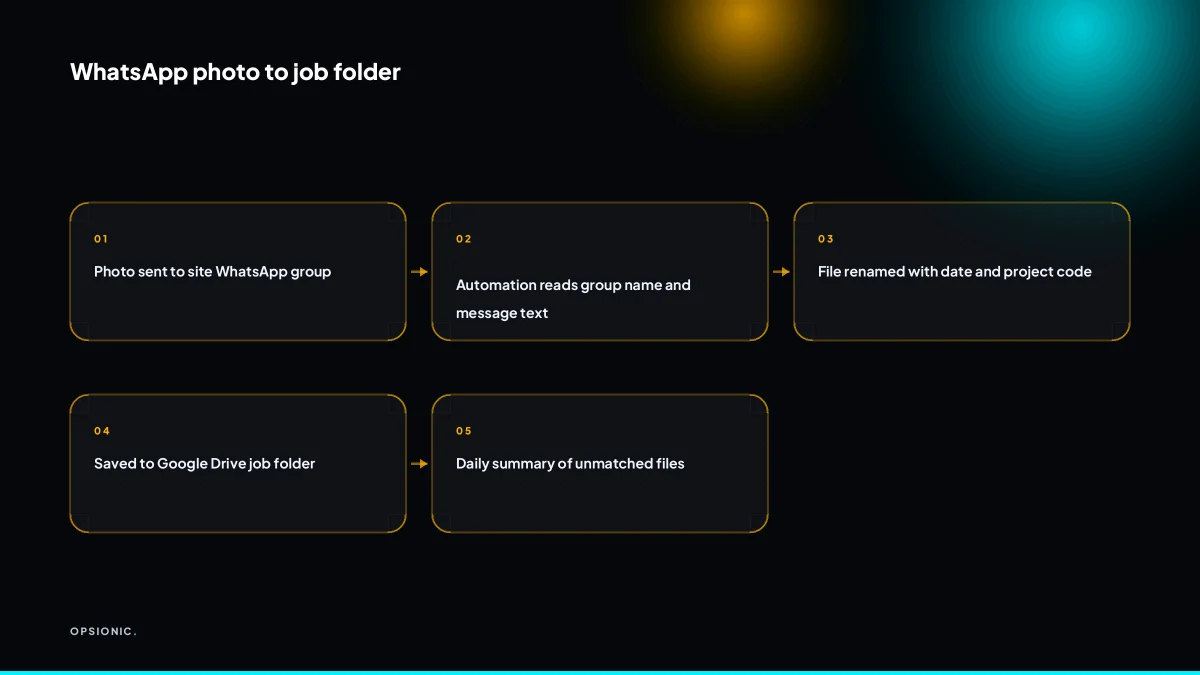
Set up a rule that watches your site WhatsApp group. When a photo arrives, the automation reads the group name or message text to identify the job, renames the file with the date and project code, and saves it to that job’s Google Drive folder. You get a notification only if the job cannot be matched.
The practical route is WhatsApp Business connected to Make or n8n, which then writes to Google Drive. You do not need a shared phone or a second number to connect WhatsApp to your CRM or storage; the automation listens to the group you already use.
- Create a Google Drive folder per active job and name it with the project code, for example 2407-Hawthorn-Extension.
- Connect WhatsApp Business to Make or n8n using the official API trigger for incoming messages in a specific group.
- Set a routing rule that reads the group name or the first word of the message caption and matches it to an existing Drive folder.
- Rename each incoming file as YYYY-MM-DD_projectcode_sequence before saving, so photos sort chronologically without manual renaming.
- Split multi-photo messages into individual files rather than one bundled attachment, so each image lands in the job folder separately.
- Convert voice notes to text or flag them for a human, because a site manager dictating “north wall tie spacing” cannot be filed by filename alone.
- Send a daily summary of unmatched files to the office admin, listing anything the rule could not route, with a link to the original message.
That daily summary is the human check. The automation files the obvious cases without anyone touching them. The unmatched ones become a short morning task, not a lost photo discovered during a variation dispute three months later.
Not sure which of these applies to you?
Answer six questions and see what we would automate first in your business, and what it is worth.
What should a variation record contain so it survives a dispute?
A variation record needs five things: the original scope, the change requested, the price difference, the client’s written approval, and the date the work started. If any one is missing, the variation is just a conversation.
The five fields of a dispute-proof variation
The original scope matters because it anchors the change. Without it, the client can later claim the extra work was always part of the job. The change requested should be written in plain words, not shorthand. The price difference must be a number, not “a bit more”. Written approval means an e-signature or a reply from the client’s own email address. The start date stops a client arguing the work was already underway before they agreed to pay for it.
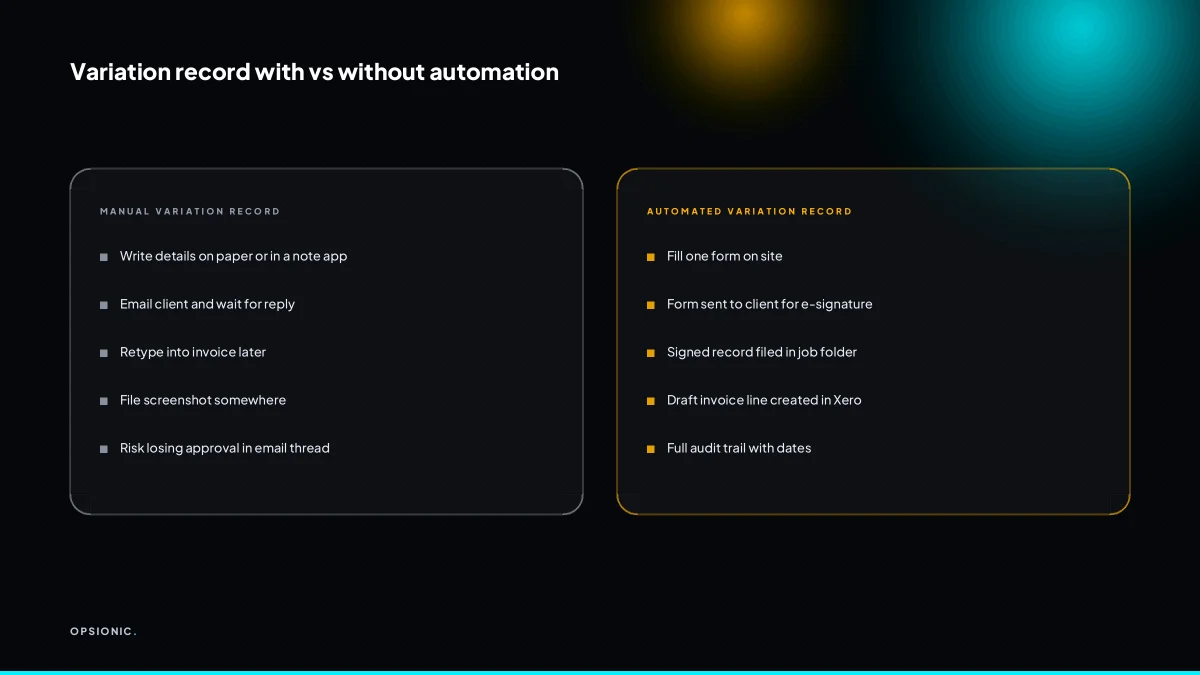
On site, a simple Google Form or Jotform works better than a notebook. The site manager opens the form, picks the job from a dropdown, types the change, adds the price difference, and uploads a photo of the area. The form timestamps the entry automatically. That timestamp becomes the start date if the client approves the same day.
Route for approval, file the signed record
The form submission triggers an email to the client with a link to sign. Nothing starts until the signature comes back. This is the same pattern you would use to automate contract signing, but applied to a single variation rather than a full contract. Once signed, the record lands in the job folder with the original scope, the change, the price, the approval, and the date. No one renames a file or forwards an email thread.
As a worked example, say a builder quoted EUR 4,200 for a ground floor extension. The client asks for an extra socket ring in the kitchen. The form captures the change, the price difference of EUR 380, and the approval. The job folder now holds a record showing EUR 4,200 plus EUR 380, approved before the electrician touched the wall. If the client questions the final invoice of EUR 4,580, the signed variation answers it.
Can you track progress claims and retention without a full ERP?
Yes. A Google Sheet with one row per claim can hold the contract value, claimed to date, retention percentage, and due date. An automation can send a reminder when a claim is due, calculate the retention amount, and create a draft invoice in Xero for your review. No ERP needed.
Set up a tab called Claims with columns for job number, contract value, claimed to date, retention rate, and next due date. Add a formula column for retention held: contract value times the rate, minus retention already released. Another column subtracts retention from the gross claim to show the payable amount. When the due date arrives, the automation emails the project manager a summary row and creates a draft invoice in Xero for the net figure. You check it, then send it. Retention release works the same way in reverse: a row for the release date, a calculated amount, and a draft credit note or invoice line for approval.
The same pattern applies to ServiceM8 to Xero syncs that miss retention, because native integrations rarely carry retention logic across. A sheet that owns the calculation keeps the numbers where you can see them.
| Option | What you get | What you give up |
|---|---|---|
| Google Sheets tracker | Retention maths, due dates, one-click Xero drafts | No multi-currency, no job costing depth |
| Xero alone | Invoices and bills in one ledger | No claim scheduling, manual retention memory |
| Full ERP | Everything in one system | Setup cost, training, monthly fees per seat |
What is this costing you now?
Based on removing half of that time.
What goes wrong when builders try to automate this themselves?
A common failure is starting with a tool instead of a process. A firm buys a job management app, gets the team to use it for a week, then everyone drifts back to WhatsApp. Another failure is automating the wrong step, like sending variation approvals without a human check, which can burn a client relationship.
App-first rollouts. You see the symptom on day three: the site supervisor stops updating the app because it takes longer than a voice note. The fix is to map the existing WhatsApp-to-file pipeline first, then automate the bits that already happen, not introduce a new system the crew has to learn.
Fully automated client communication. The symptom is a client receiving a variation quote at 7am before you have checked the quantities. The fix is a human approval step between the site photo and the email. One wrong automated message costs more trust than a month of manual admin.
Hidden maintenance costs. The symptom is a self-built n8n workflow that breaks when a supplier changes their API, and you spend a Sunday fixing it instead of quoting work. The fix is to count maintenance hours as a real cost. A managed build is often cheaper than learning the platform, reading changelogs and owning every failure, which is exactly the trade-off covered in the hidden costs of automation.
Learning n8n instead of building. The symptom is three evenings spent on a webhook that a specialist would wire in an hour. The fix is to price your own time at your charge-out rate. If the learning curve costs more than a fixed quote, the managed route wins before the first workflow goes live.
What does managed automation for construction cost, and what do you get?
Opsionic builds and runs construction automations from EUR 599 per month, with no setup fee and a six-month initial term. That includes the automation, hosting, monitoring, and fixes when something breaks. A single simpler workflow, like photo filing alone, starts at EUR 399 per month.
For the EUR 599 plan you get a workflow designed around your actual site processes, not a template. We build it, host it on a private server, watch it run, and repair it when a supplier changes an API or a form breaks. Larger projects, such as a variation pipeline that spans WhatsApp, Google Drive and your accounting package, get a fixed quote on the planning chat.
The monthly fee covers:
- Building the workflow and connecting the tools you already use
- Hosting the automation so it runs without your laptop being open
- Monitoring for failures and fixing them without you chasing us
- Changes as your process evolves, within reason
For comparison, a part-time admin in a city like Berlin or Manchester might cost more than EUR 599 a month, and that person still takes holidays, gets sick, and types the same site address into three systems. The automation does not. You can book a free plan to map what should be automated first, with no obligation and no setup fee.
Want this running in your business next week?
A relaxed 20-minute video chat. Camera on or off. You leave with a plan whether or not you hire us.
- No call unless you ask for one
- From EUR 399 a month, no setup fee
- Built and run for you, not handed over as homework
Sources we checked
Questions people ask
Will my site team actually use a new app for photos?
Usually not, which is why the better route is to automate the WhatsApp group they already use. Photos arrive as normal, and a rule files them into the right job folder. Nobody learns a new app, and the office only sees the unmatched exceptions.
Can I automate variation approvals without a client portal?
Yes. A form submission can trigger an email to the client with a signing link. The signed record then lands in the job folder with the original scope, the change, the price, the approval and the date. No portal login is needed on either side.
How do I handle retention release at the end of a project?
Keep a row per claim in a sheet with the contract value, retention rate and release date. A formula calculates the amount held and what is due back. The automation can create a draft invoice or credit note for your review when the release date arrives.
What if my subcontractors don't use WhatsApp?
The pipeline can watch email or a shared drive folder instead. The principle stays the same: one intake point the crew already uses, a routing rule that matches files to jobs, and a daily list of anything that could not be matched for a human to sort.
Is it possible to connect Jobber or ServiceM8 to Xero automatically?
Native syncs exist and cover invoices and contacts well. Retention logic is often missed, so many firms keep a sheet that owns the retention calculation and let the integration handle the rest. Check what your own plan includes before relying on it.
How long does it take to set up automation for a small construction firm?
It depends on how many workflows you start with and how clean your job naming is. A single workflow such as photo filing is quicker than a full variation and retention build. The free planning chat maps the order before any build begins.
Can I keep using my current spreadsheet for progress claims?
Yes. A sheet with one row per claim can hold the contract value, claimed to date, retention rate and due date. Automation adds reminders and draft invoices in Xero, so the spreadsheet stays the source of truth rather than being replaced.