Connect WhatsApp to Your CRM Without a Shared Phone
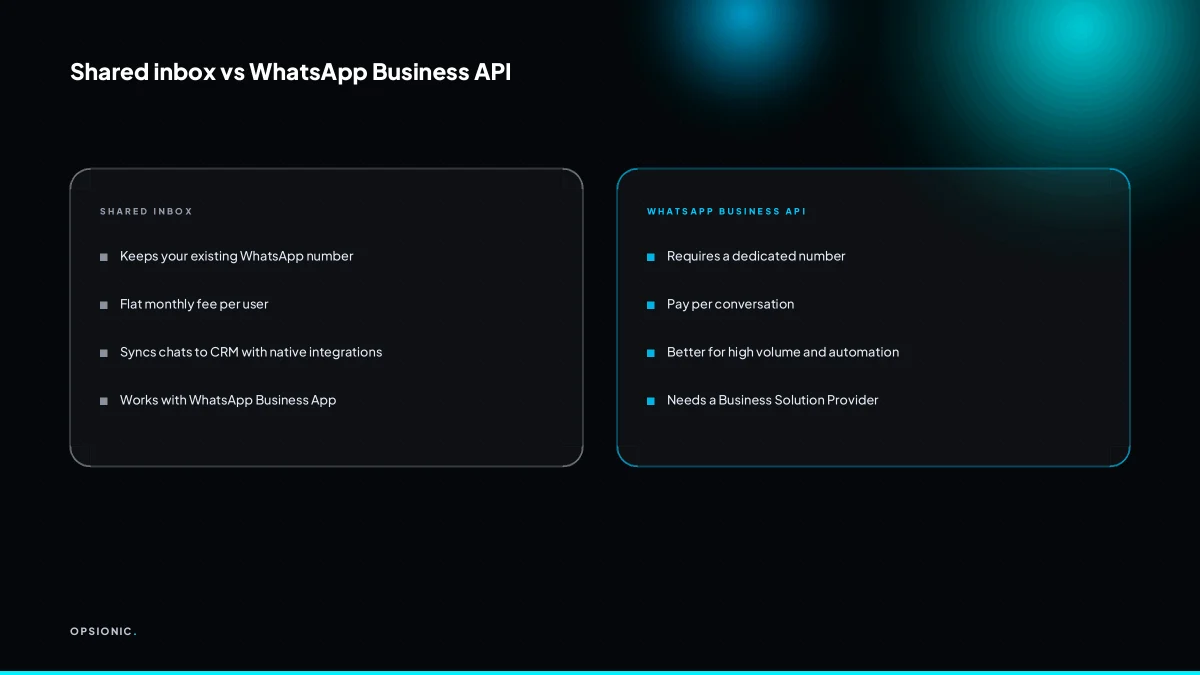
To connect WhatsApp to CRM for a small business, you either use a shared inbox that syncs conversations, or you build an integration through the WhatsApp Business Platform. The shared inbox route keeps your existing number and is simpler. The API route gives cleaner data but needs a new or migrated number and more setup.
Can I use my existing WhatsApp number or do I need a new one?
With a shared inbox tool, you can keep your existing WhatsApp number and still have messages appear in your CRM. With the WhatsApp Business API, you usually need a dedicated number that is not already active on the WhatsApp app. Check the provider’s migration rules before you commit.
A shared inbox works as a layer on top of your current WhatsApp account. Your number stays on the phone you already use. The tool connects to that account and copies conversations into your CRM or team dashboard. Your customers keep messaging the same contact they already have saved.
The Business API is different. Meta treats it as a separate product with its own number rules. A number already registered on the consumer WhatsApp app or the WhatsApp Business app usually cannot be moved to the API without first deleting the account attached to it. That means losing your chat history on that number. Some providers offer a migration path, but it is not universal and it can take days.
Before you commit, check three things with the provider:
- Does their API route accept numbers currently active on the WhatsApp Business app?
- If migration is possible, is your chat history preserved or wiped?
- How long does the migration take, and is there downtime where messages cannot be received?
If keeping your existing number and its history matters more than API features like bulk messaging or deep CRM automation, a shared inbox is the lower risk choice. If you need the API, plan the number change as a customer communication task, not just a technical setup.
What is the WhatsApp Business API and do I actually need it?
The WhatsApp Business API is Meta’s interface for larger or automated messaging. It lets software send and receive messages on your behalf, with better CRM integration. Small businesses often do not need it. A shared inbox that syncs chats to your CRM is cheaper and keeps your current number.
The API is built for companies sending many templated messages: booking confirmations, delivery updates, support tickets at scale. It runs on a separate number, which usually means giving up the one your customers already know. Messages can be automated end to end, and a CRM can read and write to conversations directly without a human forwarding anything.
The WhatsApp Business App, by contrast, is the free phone application. It supports quick replies, labels and a simple away message. It does not connect to a CRM on its own, and only one device can be signed in at a time. For a team of two or three people, that constraint hurts more than any missing API feature.
If you answer maybe twenty customer chats a day and your main goal is having the history inside your CRM, a shared inbox is the better choice. You keep your number, your team can all see the same thread, and there is no approval process with Meta. The API earns its place when you need automated outbound messages tied to orders, or when volume is high enough that a human reading every reply is the bottleneck. Before committing to either route, check what WhatsApp currently permits for order confirmations, because the rules around templated messages change and catching up later is expensive: WhatsApp order confirmations and what is actually allowed.
| Factor | Business App | Business API | Shared inbox with CRM sync |
|---|---|---|---|
| Keeps your current number | Yes | Usually no | Yes |
| Multiple team members | No, one device | Yes | Yes |
| CRM reads and writes chats | No | Yes | Yes, via sync |
| Automated outbound messages | No | Yes | Limited |
| Setup effort | None | High, Meta approval | Low to medium |
If you are still unsure which side of that table you sit on, map your actual chat volume and what you need the CRM to do with it before paying for anything.
Not sure which of these applies to you?
Answer six questions and see what we would automate first in your business, and what it is worth.
What are the real costs on both sides?
A shared inbox tool usually has a flat monthly fee per user, often starting at around EUR 20 to EUR 40. The WhatsApp Business API charges per conversation, with rates set by Meta and passed on by your provider. Your CRM may also need a higher tier for integrations.
Shared inbox tools are the predictable option. You pay per seat, so a three-person team on a EUR 25 plan costs EUR 75 a month. Some tools charge extra for WhatsApp-specific features or for storing chat history beyond a set period. Check whether archiving and export are included before you commit.
The Business API is metered. Meta defines a conversation as a 24-hour message thread, and each one costs a small amount depending on the country and whether it is user-initiated or business-initiated. A firm sending 300 conversations a month might pay EUR 15 to EUR 30, but a quiet month costs less and a busy one costs more. Your provider may also add a markup or a monthly platform fee.
The CRM side is where people get surprised. Native WhatsApp integrations are usually locked to higher plans, sometimes double the entry tier. If you build through a tool like Zapier or Make, that adds its own subscription. The honest way to compare routes is to price the whole stack, not one line item, which is exactly what automation agency pricing models tend to obscure.
How do I actually connect WhatsApp to my CRM without a developer?
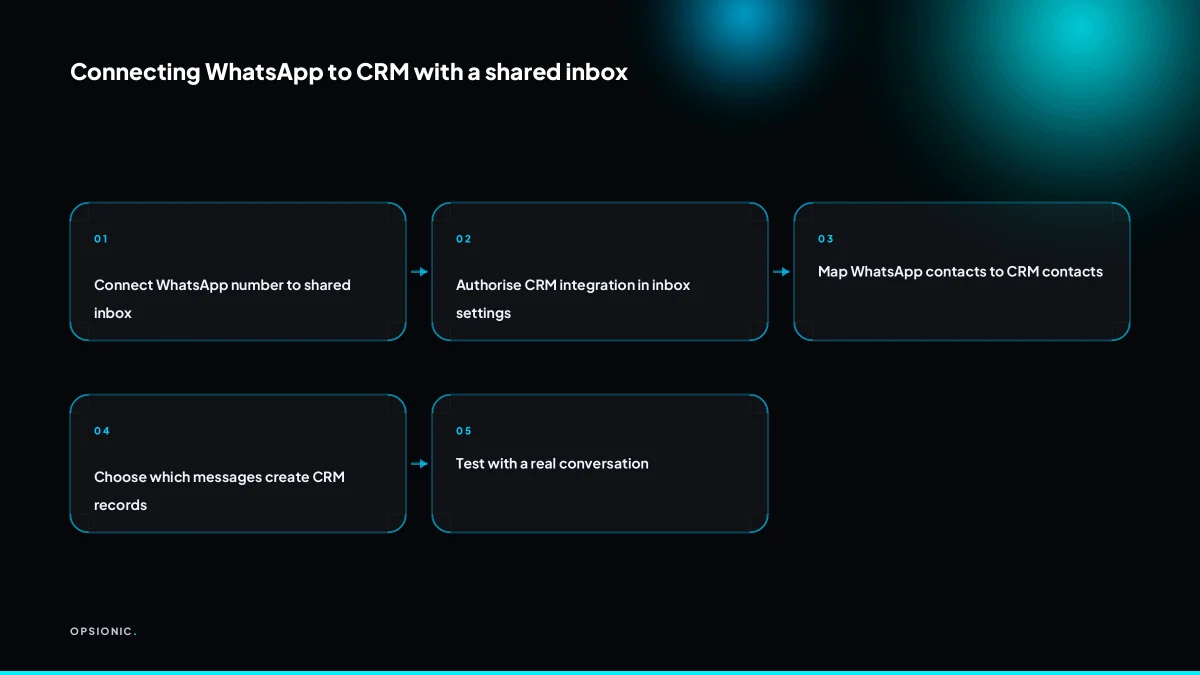
The simplest path is to use a shared inbox tool that has a native integration with your CRM. You connect your WhatsApp number to the inbox, then connect the inbox to your CRM. Messages appear as contacts, deals or notes depending on the tool. No code is needed.
- Open the shared inbox tool’s settings and find the section for channels or messaging platforms.
- Select WhatsApp and follow the prompt to link your business number. This normally means scanning a QR code from WhatsApp Business on your phone.
- Open the integrations or connections section of the same tool and choose your CRM from the list.
- Authorise the connection with your CRM login and pick which object new chats should create, such as contact, deal or note.
- Open the field mapping screen and match WhatsApp sender name, phone number and message body to the CRM fields you actually use. Some tools also let you map a chat label to a pipeline stage.
- Send a test message from a second phone and confirm it lands on the right record before you rely on it.
If no native integration exists, Zapier or Make can bridge the gap. The trigger is a new incoming WhatsApp message in the inbox tool, and the action is find or create a record in your CRM. You will need a paid tier on the automation platform once your volume passes the free allowance, so check that before building. The same field mapping logic applies, and it is worth writing down your mapping rules the way you would for sending form entries straight to your CRM, so a colleague can fix it later without guessing.
What is this costing you now?
Based on removing half of that time.
What breaks first in a WhatsApp to CRM integration?
The most common failures are duplicate contacts, missed messages when the connection drops, and timezone mismatches on timestamps. Duplicate contacts happen when the CRM creates a new record for every incoming message instead of matching the phone number. Silent disconnects are worse because you only notice when a customer asks why nobody replied.
Duplicate contacts. The symptom is one customer appearing three times, each with a fragment of the conversation. This happens when the CRM treats every inbound message as a new lead rather than searching by phone number first. The fix is to make the automation run a lookup on the sender’s number before creating anything. If no match exists, create the contact. If one exists, attach the message to that record. Test with the same number twice before going live.
Silent connection failures. The symptom is a queue of unanswered WhatsApp messages while your CRM shows nothing new. The webhook token expires, a password changes, or the automation platform pauses the workflow after a failed run. You notice days later. The fix is a heartbeat check: a scheduled task that sends a test message through the connection once a day and alerts you if it fails. This is one of the hidden costs of automation nobody puts in the quote.
Timezone drift. The symptom is a message sent at 09:00 showing as 17:00 in the CRM, or worse, landing on yesterday’s record. The fix is to set the timezone explicitly in the CRM’s field mapping, not to rely on the WhatsApp server or the automation platform’s default. Check a message sent at a known time and compare what the CRM stores.
Is storing WhatsApp chat history in a CRM allowed under GDPR?
Yes, if you have a lawful basis such as contract performance or legitimate interest, and you tell customers what you store and why. You must also give them a way to access or delete their chat history. Avoid storing unnecessary personal data and set retention limits.
Contract performance covers messages needed to deliver what the customer bought, like confirming an address or chasing a missing payment. Legitimate interest can cover keeping a record of what was agreed so you can resolve a dispute later. Either way, you need a documented decision, not a feeling. If you are unsure whether AI handling of that data is safe, see how GDPR applies to AI and customer data.
Customers can ask what you hold, correct a wrong phone number or address, and demand deletion once there is no legal reason to keep the record. That means your CRM must let you find one conversation without exporting the whole database.
- Name the lawful basis for each type of chat you store.
- Write one sentence in your privacy notice saying that WhatsApp chats are saved to the CRM and why.
- Switch off automatic capture of messages that are not needed for the job.
- Set a retention rule, for example delete closed chats after 12 months.
- Test that a single contact’s history can be found and deleted within a day.
- Check that deleted chats also disappear from backups or are excluded from restore.
When is this not worth building?
If you receive fewer than about 20 WhatsApp conversations a week, manual copying into your CRM is often cheaper and less fragile. The integration only pays off when the volume is high enough that copying takes real time, or when you need every message logged for compliance.
Take a worked example, clearly invented but realistic. Suppose a small kitchen fitter gets 15 WhatsApp enquiries a week. Each one takes about two minutes to copy the contact, the job details and the agreed date into the CRM. That is 30 minutes a week, roughly two hours a month. At a modest internal cost of EUR 25 an hour, manual copying costs about EUR 50 a month in time. A Business API setup, a connector tool and the hosting needed to keep it running typically starts at around EUR 20 to EUR 40 a month, plus several hours of setup and the ongoing job of watching it. At 15 conversations a week, the integration saves an hour or two but adds a new thing that can break. The arithmetic only starts to favour automation when the volume climbs past roughly 30 to 40 conversations a week, or when copying is not two minutes but ten because the messages carry quotes, measurements and follow-up dates.
Compliance overrides the volume test. If you are a law firm, an accountant or a clinic that must prove what was said and when, a patchy manual habit is a liability even at low volume. A conversation missed from the CRM is a record you cannot produce. If that describes you, the question is not whether automation is cheaper, but whether manual copying is safe enough. It often is not. For a clearer sense of what automation actually saves at different volumes, see how many hours automation can save your small business.
Want this running in your business next week?
A relaxed 20-minute video chat. Camera on or off. You leave with a plan whether or not you hire us.
- No call unless you ask for one
- From EUR 399 a month, no setup fee
- Built and run for you, not handed over as homework
Sources we checked
Questions people ask
Can I connect my personal WhatsApp number to a CRM?
You can connect a personal WhatsApp number to a CRM using a shared inbox tool that syncs chats. The WhatsApp Business API usually requires a dedicated number, so if you want to keep your existing number, a shared inbox is the simpler route.
Will my customers know I am using a shared inbox?
Customers see the same WhatsApp interface and your business number. They will not know whether you are using a shared inbox or the API unless you tell them. The experience on their end remains unchanged.
Can I keep using WhatsApp on my phone while messages sync to the CRM?
With a shared inbox tool, you can keep using WhatsApp on your phone. The tool connects to your WhatsApp account and copies conversations to the CRM. With the Business API, you typically cannot use the same number on your phone.
How do I stop duplicate contacts from WhatsApp messages?
Make your automation look up the sender's phone number before creating a contact. If a match exists, attach the message to that record. If not, create a new contact. Test with the same number twice to confirm.
Does the WhatsApp Business API allow me to send marketing messages?
The WhatsApp Business API allows marketing messages only if you have opted-in consent and use approved templates. Meta has strict policies, and violating them can get your number banned. Check WhatsApp's current rules before sending.
What is a Business Solution Provider and do I need one?
A Business Solution Provider (BSP) is a Meta-approved vendor that gives you access to the WhatsApp Business API. You need one to use the API unless you become a direct partner, which is rare for small businesses.
Can I delete WhatsApp chats from my CRM if a customer asks?
Yes, under GDPR you must be able to delete personal data on request. Most CRM and shared inbox tools allow you to delete or anonymise chat history. Set up a process to handle deletion requests promptly.