Automate Lead Routing: Answer in Five Minutes, Not Five Hours
Automate lead routing so every enquiry reaches the right person in minutes, not hours. Set rules for service type, postcode, and working hours. A new lead triggers an instant acknowledgement and assignment to the correct rep or queue. Small teams can build this with everyday tools like Zapier, Make, or n8n, no developer needed.
What is lead routing and why does speed to first reply matter?
Lead routing is the automatic assignment of each new enquiry to a specific person, queue, or follow-up sequence based on rules you define. Speed to first reply matters because a lead that hears back within five minutes is far more likely to convert than one that waits until the next morning. For a small business, that speed is fully within your control.
Think of lead routing as the sorting desk for your inbox. A new enquiry arrives from your website form, your booking page, or a social ad. Instead of sitting in a general inbox until someone gets around to it, the lead is sent straight to the right place. That might be the salesperson who handles that postcode, the technician who covers that service type, or a holding sequence that acknowledges the message and promises a reply by 9am.
First response time is the metric that matters most because it decides whether the conversation starts at all. A lead who has already emailed two competitors will not wait for you to finish a job, drive back to the office, and open your laptop. They will book with whoever answered first. The five-minute window is not a marketing slogan. It is the difference between a warm conversation and a cold chase.
The cost of slow response is easy to work out. Picture a cleaning business that receives 20 quote requests a week. If the owner replies the same evening, perhaps half of those leads are still shopping around. If she replies the next morning, most have already booked someone else. Losing even five jobs a week at an average job value of EUR 180 is EUR 900 a week in revenue that simply evaporates. No amount of advertising fixes that. The leads arrived. They just left again.
Automation removes the manual forwarding step entirely. When a form is submitted, a rule checks the service type or postcode and sends the lead to the right person in seconds. If the business is closed, the lead gets an immediate acknowledgement that sets expectations. Nobody has to monitor the inbox. Nobody has to copy and paste an email to a colleague. The routing happens before the lead has closed the browser tab.
Which tools can automate lead routing without custom code?
Zapier, Make, and n8n are the most common no-code tools for lead routing. They connect your lead source to your CRM, spreadsheet, or messaging app and run your assignment rules automatically. You can also use built-in routing features in HubSpot or Pipedrive, but a dedicated automation tool gives you more flexibility across different lead sources.
All three tools work on the same basic idea: a trigger starts the automation when a new lead arrives. The trigger might be a form submission on your website, a new row in a Google Sheet, or an email landing in a shared inbox. From there, the tool reads the lead’s details, checks your routing rules, and sends the lead to the right person or place.
A spreadsheet can act as a simple routing table. You keep one column for postcodes or service types and another for the name or email of the person who handles that segment. The automation looks up the incoming lead against that sheet and forwards it. When your team changes, you edit the sheet, not the automation.
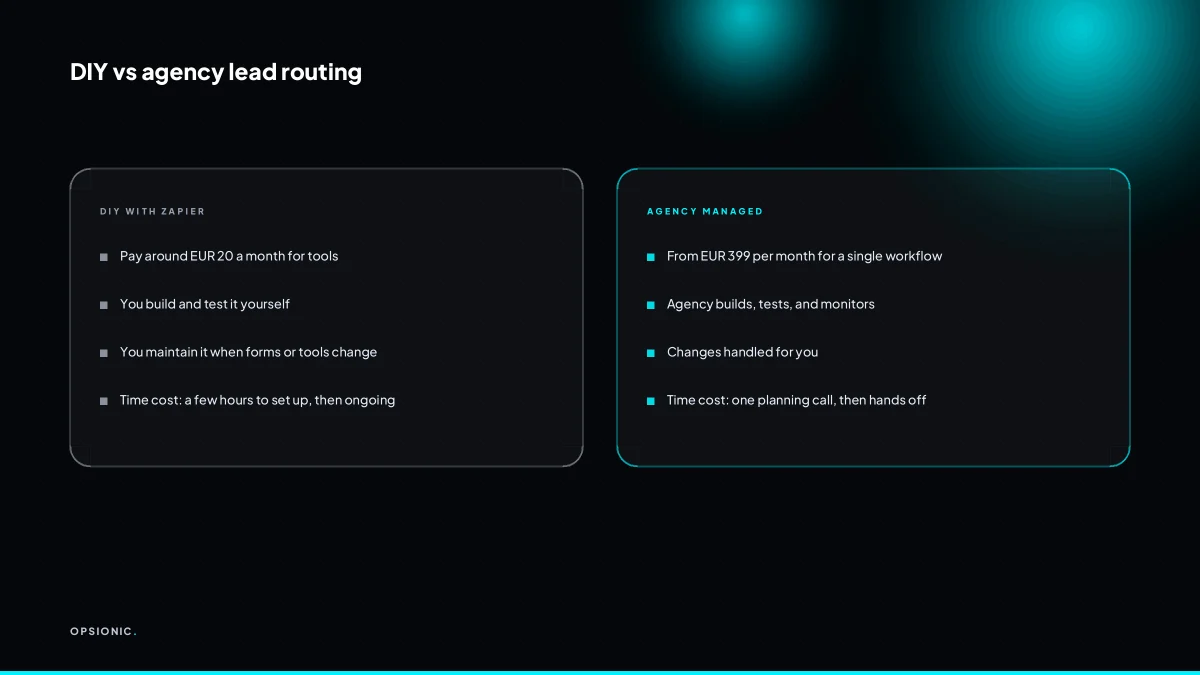
Costs vary by tool and volume. Zapier’s paid plans start at around EUR 20 a month at the time of writing, Make has a free tier with paid plans from around EUR 9 a month, and n8n can be self-hosted for free with paid cloud plans from around EUR 20 a month. Check each vendor’s pricing page before you commit, as limits on tasks or operations matter more than the headline number. If you are weighing up which platform fits, our comparison of Zapier alternatives for small business walks through the trade-offs.
| Tool | Best for | Free tier | Typical starting cost |
|---|---|---|---|
| Zapier | Widest app support, fastest setup | Yes, limited | Around EUR 20 per month |
| Make | Visual multi-step routing, more control | Yes, generous | Around EUR 9 per month |
| n8n | Self-hosting, complex logic, lower cost at scale | Self-hosted free | Cloud from around EUR 20 per month |
Not sure which of these applies to you?
Answer six questions and see what we would automate first in your business, and what it is worth.
How do I route leads by service type when different reps handle different services?
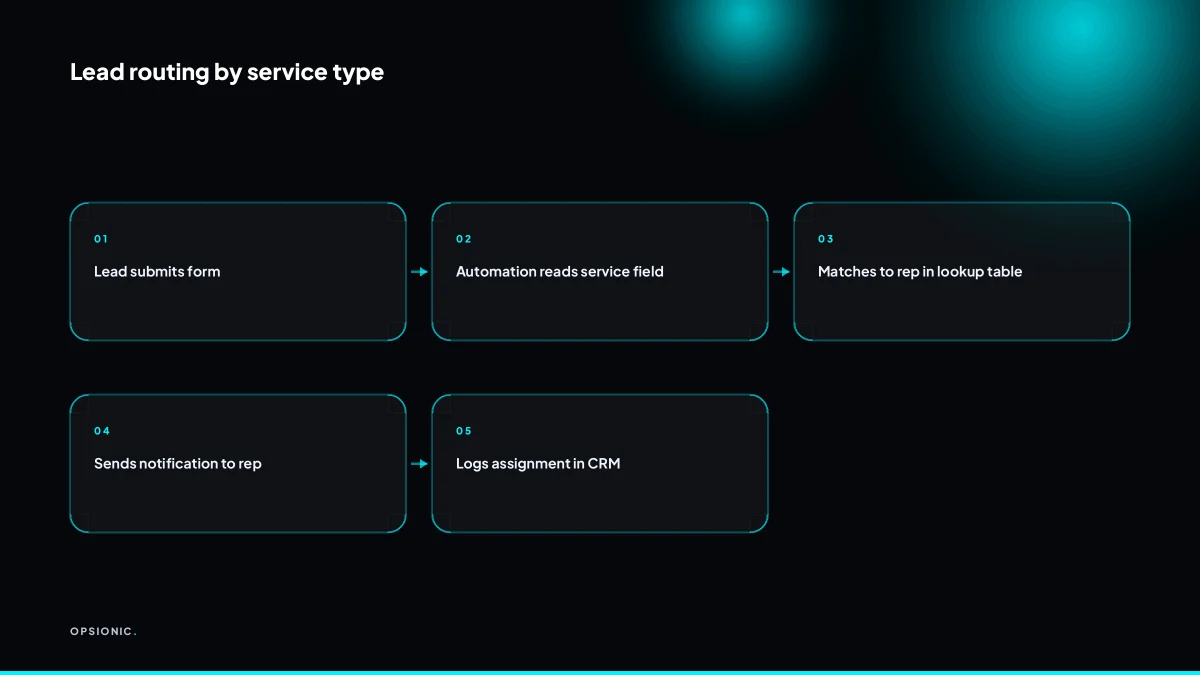
Route leads by service type by setting up a rule that checks a field in the lead form, like a dropdown for “Service needed”, and then sends the lead to the rep assigned to that service. For example, if the form says “Boiler repair”, the lead goes to the heating engineer; if it says “Bathroom fitting”, it goes to the bathroom specialist.
- Add a required “Service needed” dropdown to your lead form. Keep the options to the three or four services you actually sell. A free text field will break routing the moment someone writes “boiler” instead of “boiler repair”.
- Create a routing step that reads the dropdown value. Most form tools and automation platforms let you branch on a field value. Each branch points to a different rep’s email, Slack channel, or CRM queue.
- Set a fallback branch for “Not sure” or a blank value. Send these to a coordinator or a shared inbox. A lead with an unspecified service still needs a first reply, not a dead end.
- Assign one owner per lead, not a group. If the notification goes to two people, both assume the other will reply. Name the rep in the routing rule and write the notification so it says “Assigned to you”, not “New lead”.
Here is a worked example. A home services firm offers boiler repair, bathroom fitting, and electrical work. The form dropdown has three options plus “Not sure”. When a lead picks “Boiler repair”, the routing step sends an email to the heating engineer and creates a task in the CRM under their name. “Bathroom fitting” goes to the bathroom specialist. “Not sure” goes to the office manager, who replies within the hour and asks one qualifying question. The lead never sees the handoff. If you want to see the mechanics of moving data between a form and your other tools, automate data entry between your apps covers the basics without the jargon.
How do I route leads by postcode or territory?
Route leads by postcode or territory by mapping postcode prefixes or full postcodes to a rep or region in a lookup table. The automation reads the postcode from the lead, checks the table, and assigns the lead to the matching person. This works well for service businesses that cover specific areas and want to avoid sending a rep across town.
Build the table as a simple spreadsheet with two columns. Column A holds the postcode prefix or full postcode. Column B holds the rep or region name. For example, a plumbing firm covering three areas might use the first half of each postcode: M1 to M9 goes to the city team, SK1 to SK16 goes to the south team, and OL1 to OL16 goes to the north team. The automation reads the lead’s postcode, strips it back to the prefix, and looks it up in the table.
Prefix matching beats entering every full postcode. Take a firm quoting 30 jobs a month. If each quote needs a full postcode entry, the table holds 360 rows a year. With prefix matching, the same firm holds perhaps 12 rows covering 12 prefixes. The lookup runs in under a second either way, but maintaining 12 rows takes minutes a month. Maintaining 360 rows takes an afternoon.
When a postcode is not in the table, send the lead to a default owner. That owner might be the office manager or the rep with the lightest diary. The automation should also flag the lead as “unmatched” so someone can add the missing prefix. A lead sitting in “unmatched” for a day is a lead that has gone cold.
Territories shift when a rep leaves, a new hire starts, or a van gets a new patch. Update the table in one place and every new lead follows the new rule from that moment. Old leads keep their original assignment, which is correct: you do not want a rep losing a lead they have already quoted. Review the table once a quarter. Ten minutes spent checking prefixes against your current team beats an hour untangling a lead that went to a rep who left in March.
What is this costing you now?
Based on removing half of that time.
What happens to a lead that arrives outside business hours, and how do I keep it warm?
When a lead arrives outside business hours, an automated acknowledgement should be sent immediately to confirm receipt and set expectations for a reply. You can also route the lead to a queue for the next working day, or trigger a follow-up sequence that starts when the office opens. This keeps the lead warm without requiring a human to be on call.
Set up an out-of-hours auto-reply on the same form or inbox that captures the lead. A simple rule checks the time and day, then sends a short message within a minute. The wording can be plain: “Thanks, we have your enquiry. We reply between 8:00 and 17:00 on working days, so you will hear from us by 10:00 tomorrow.” State the window, not a vague “soon”.
Queue the lead for the next morning rather than leaving it in a shared inbox. Tag it “out-of-hours”, add it to a list sorted by arrival time, and notify the right person at 8:05. If the lead included a preferred service or postcode, the same routing rules from the previous section still apply. The only difference is the delayed handoff.
For businesses that take bookings directly, add a calendar link to the acknowledgement. A lead who wants a slot can book one themselves at 11pm, and the appointment lands on your calendar without a human touching it. This works well for services with defined time slots. For more complex work, the queue is enough. If you already use scheduling software, you can extend the same logic to automate appointment reminders in Acuity so the overnight booking also gets its confirmations without extra effort.
How do I avoid double assignment or leads falling through the cracks?
Avoid double assignment by making one person or system the clear owner of each lead from the moment it arrives. Use a single source of truth, like a CRM or a shared spreadsheet, and have the automation write the assignment there. Add a check to see if the lead already exists before creating a new record, and set up alerts for any lead that remains unassigned after a set time.
Two reps calling the same lead. The symptom is simple: a prospect tells you they already spoke to someone, and your team looks disorganised. The fix is centralising ownership. The automation writes the lead to one place and assigns one owner before anyone sees it. If your team works from a shared inbox, stop. The inbox is not a source of truth.
Duplicate records for the same person. A lead fills in your form twice, or emails and calls. You end up with two entries, two owners, two follow-ups. The fix is a deduplication check. Before the automation creates a record, it searches by email or phone. If a match exists, it updates the existing record and leaves the owner unchanged.
Leads sitting in “new” for a week. This happens when the person meant to assign is off sick, or the rule does not cover a new postcode. The fix is an unassigned lead alert. If no owner is set after, say, 15 minutes, the automation messages the manager or a fallback person. The alert fires every hour until someone claims it.
The quiet failure. The automation looks fine but stops mid-run because a field name changed or a spreadsheet tab was renamed. You only notice when a lead asks why nobody replied. Test this by submitting a dummy lead weekly and checking it reaches the right owner. If you are building this yourself, work through how we build an automation so each step fails loudly rather than silently.
Want this running in your business next week?
A relaxed 20-minute video chat. Camera on or off. You leave with a plan whether or not you hire us.
- No call unless you ask for one
- From EUR 399 a month, no setup fee
- Built and run for you, not handed over as homework
Sources we checked
Questions people ask
Can I route leads from Facebook Lead Ads without a CRM?
Yes. The ad platform sends each new lead to an automation tool such as Zapier, Make or n8n, which reads the form fields and forwards the lead by email, Slack message or spreadsheet row. You can add a CRM later without rebuilding the routing rules.
What is round-robin lead assignment and when should I use it?
Round-robin sends each new lead to the next person in a fixed list, so the work is shared evenly. Use it when reps cover the same services and areas. Use service or postcode rules instead when only one person is qualified to handle the enquiry.
How do I handle a lead that matches two different rules?
Set a priority order and let the first matching rule win. Most tools run steps top to bottom, so place your most specific rule, such as a named postcode, above the general one. Add a fallback branch so nothing lands nowhere.
Can I change the routing rules myself after the automation is built?
Yes, if the rules live in a spreadsheet you control. Editing a rep name or postcode prefix in that sheet changes every future assignment within seconds. Rules buried inside the automation itself need a rebuild, so keep the lookup table separate.
Does lead routing automation work with GDPR?
It can. You need a lawful basis for processing the enquiry, a clear privacy notice on the form, and a data processing agreement with each tool that touches the lead. Keep the data minimal and delete leads that go nowhere. Our GDPR checklist covers the practical steps.
What if my lead form doesn't have a field for service type?
Add one. A required dropdown with three or four options is enough, and it takes minutes in most form builders. Without it, routing falls back to postcode or round-robin, and free text answers will break the rules the first time someone types something unexpected.
How quickly can I set up a basic lead routing workflow?
A single rule that sends form submissions to one person takes under an hour in Zapier, Make or n8n. Branching by service type and postcode, with an out-of-hours reply, is usually an afternoon of work once the lookup table is written.