Connect Stripe to Xero So Payouts Reconcile
To connect Stripe to Xero automatically, choose a native integration, a paid connector like A2X or Synder, or middleware such as Zapier. The key is mapping Stripe charges, fees, and payouts to Xero using a clearing account, so each net payout matches the bank line and reconciliation works without manual adjustments.
What do I need before connecting Stripe to Xero?
Before you connect Stripe to Xero automatically, check your Stripe account has API access, which usually needs a paid or business tier, and your Xero plan allows bank feeds and third-party app connections. You also need a clear chart of accounts: a clearing account, a Stripe fees expense account, and your normal sales and bank accounts.
Stripe may restrict API access on some entry-level plans, so open your Stripe settings and look for a developers or API keys section. If it is locked, your plan is the blocker. On the Xero side, bank feeds and connections to third-party apps are not on every subscription tier. Search Xero’s own plan comparison for the words “bank feeds” and “app connections” before you build anything.
Your chart of accounts does the real work. The clearing account holds gross Stripe sales before the payout lands in your bank. The fees account absorbs Stripe’s charges so your sales invoices still match what customers paid. Without those two accounts, every payout arrives as a mystery number.
Print this checklist and work through it:
- Open Stripe settings and confirm you can see an API keys or developers area.
- Check your Stripe plan allows API access, not just dashboard exports.
- Open Xero’s plan page and confirm bank feeds are included on your tier.
- Confirm your Xero tier allows connections to third-party apps.
- Create a clearing account in Xero under current assets.
- Create a Stripe fees expense account in Xero.
- Confirm your sales account and bank account already exist and are active.
- Check you have administrator or equivalent permissions in both Stripe and Xero.
- Confirm the person doing the setup can authorise the connection in both systems.
What are the realistic ways to connect Stripe to Xero?
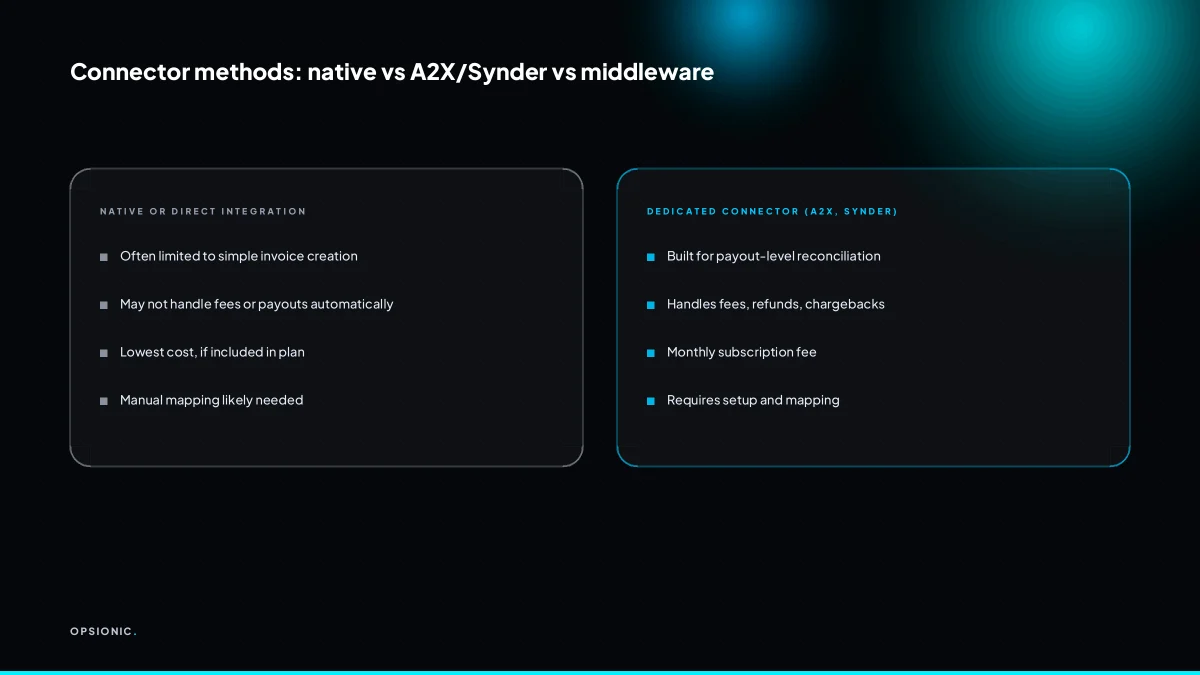
You can connect Stripe to Xero automatically using a dedicated third-party connector like A2X or Synder, or middleware such as Zapier or Make. Each method differs in cost, setup effort, and how it handles fees and payouts, so choose based on your transaction volume and accounting requirements.
Stripe does not offer a first-party Xero integration. At the time of writing, Stripe’s own app marketplace does not list Xero as a built-in connector, and Xero’s app store points you to third-party tools instead. The practical result is that you will be choosing between a dedicated connector and middleware.
Dedicated connectors like A2X and Synder exist specifically for this job. They read your Stripe account, group transactions by payout, and post a single journal or invoice batch into Xero so the bank line matches. Before you pick one, check three things: whether it posts payouts net of fees with the fee as a separate expense line, whether it handles partial refunds and disputes without manual fixes, and whether its monthly cost scales with transaction volume or stays flat. The real cost of a small business connector is rarely just the sticker price.
Middleware such as Zapier or Make sits one level lower. You build the logic yourself: a trigger on a Stripe payout, a step to split fees, a step to create a Xero invoice or bank transaction. It is cheaper at low volume but you own the failure modes, including duplicate entries when a webhook retries.
| Method | Setup effort | Typical cost | Payout handling |
|---|---|---|---|
| Native integration | Low, if it exists | Included in subscriptions | Often gross only |
| Dedicated connector | Low to medium | Varies by provider | Built for net payouts and fees |
| Middleware | Medium to high | Varies by task volume | You build the fee split yourself |
If your volume is low, a dedicated connector may cost more than the time it saves. If you process many payouts and are still exporting CSV files, the arithmetic flips.
Not sure which of these applies to you?
Answer six questions and see what we would automate first in your business, and what it is worth.
How should Stripe charges, fees, and payouts map to Xero?
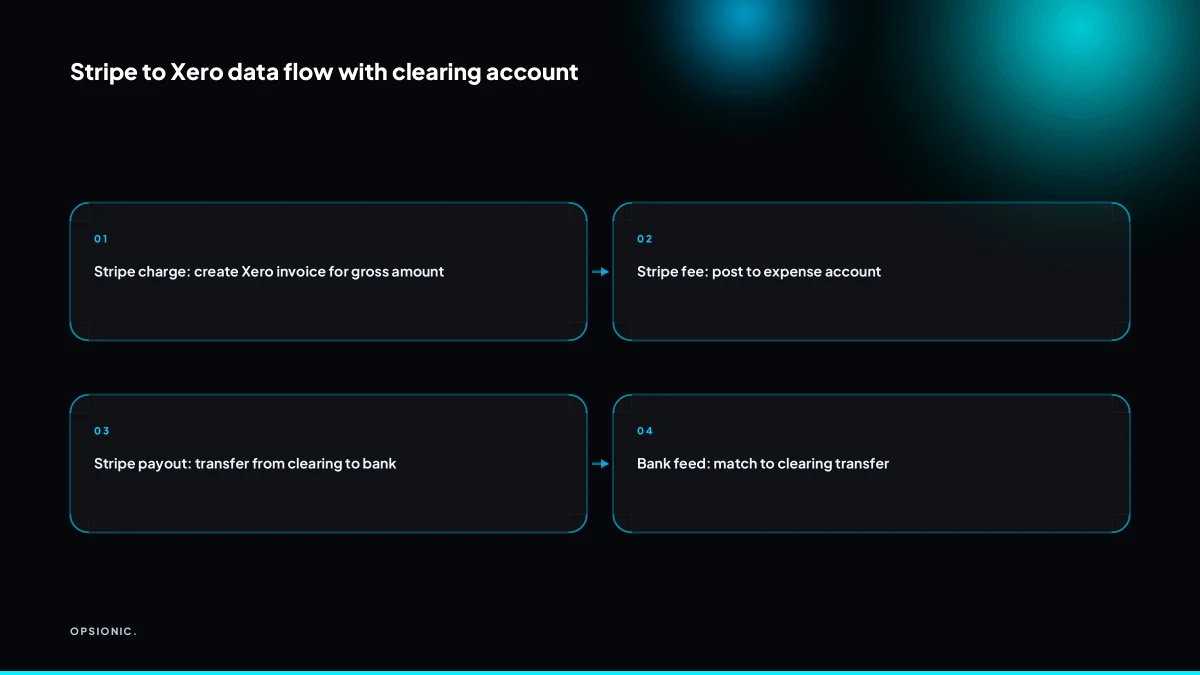
Map each Stripe charge to a Xero invoice for gross revenue, each Stripe fee to an expense account, and each payout to a transfer into your bank account via a clearing account. This keeps revenue, fees, and cash separate, so the bank feed line matches the payout amount and reconciliation is automatic.
- Create the invoice for the gross charge amount, not the net deposit. If a customer paid EUR 100 and Stripe kept EUR 2.90, the Xero invoice is for EUR 100. Netting it down to EUR 97.10 understates turnover and confuses your VAT return.
- Record the Stripe fee as an expense on a dedicated account, something like “Payment processing fees”. Do not post it against sales as a contra-revenue line. An expense account keeps gross profit clean and makes the fee visible as a real cost of taking payment.
- Post the payout as a transfer from a Stripe clearing account to your bank account. When Stripe sends EUR 97.10, that single line moves from clearing to bank. The bank feed matches it exactly, because the clearing account already holds the gross charge minus the fee.
- If you take payments in more than one currency, create a clearing account per currency. Stripe settles each currency separately, and Xero cannot reconcile a USD payout against a EUR clearing balance. A separate account per currency keeps each payout line matched to its own balance.
This fee-as-expense pattern is the same logic covered in our guide to sending WooCommerce orders to Xero automatically, where the order total and the payment fee must stay on separate lines for the books to balance.
Why does a clearing account make reconciliation easier?
A clearing account holds the gross amount of each Stripe charge and then releases the net payout to your bank account. The balance shows fees and pending payouts separately, so when the bank feed imports a Stripe deposit, you can match it to the clearing account transfer instead of hunting through invoices.
In practice, the clearing account sits between Stripe and your bank account in Xero. Each Stripe charge becomes a transfer into the clearing account at the gross amount. Each payout becomes a transfer out of the clearing account at the net amount, dated to the payout, not the original sale. The difference left behind is the fee, which you record as a separate expense line. That separation is what makes the bank feed line match something real.
Here is a worked example with invented but realistic figures. Suppose a customer pays EUR 100 by card. Stripe charges a fee of EUR 1.75, so the payout arriving in your bank account is EUR 98.25. In Xero, you record EUR 100 as a transfer into the clearing account, then EUR 98.25 as a transfer out to the bank account, then EUR 1.75 as a Stripe fee expense. The clearing account balance after those three entries is zero: EUR 100 in, EUR 98.25 plus EUR 1.75 out.
The clearing account balance should show zero after every completed payout, or a small positive figure for charges that have not yet been paid out. If it shows a negative balance, a payout was recorded without its underlying charges. If it creeps upward week after week, charges are being recorded but payouts are not.
A common mistake is recording the payout directly from the invoice to the bank account and then adding the fee as an afterthought. That leaves the bank feed line with nothing to match. Another is dating the clearing account transfer to the sale date instead of the payout date, which breaks the bank reconciliation. There is no need to build this by hand across dozens of transactions; the logic is exactly the sort of recurring transfer pattern covered in how we build an automation.
What is this costing you now?
Based on removing half of that time.
What breaks in the real world with Stripe to Xero sync?
Duplicate invoices from retries, timezone drift on payout dates, partial refunds and chargebacks, and silent connection failures are common. Without a unique transaction ID and a regular reconciliation check, you end up with mismatched bank lines and extra manual work, which defeats the purpose of automation.
Duplicate records on retries. Stripe retries a webhook when your endpoint does not confirm receipt quickly enough. Xero creates the invoice, the confirmation gets lost, Stripe sends the event again, and Xero creates the same invoice a second time. The symptom is two identical invoices for one payment, often noticed only when a customer asks why they were billed twice. The fix is to store the Stripe event ID or payment intent ID on the Xero invoice, and have the automation check for that ID before creating anything. If it exists, skip the event.
Timezone drift and payout date mismatches. Stripe reports payouts in UTC. Xero dates bank lines in your local timezone. A payout that lands at 11pm UTC on a Friday can appear as Saturday in Xero but Monday in your bank feed, so the lines never match. The symptom is a reconciliation that is out by one day, every time, on certain payouts. The fix is to decide on one date convention and apply it consistently, usually by dating the clearing account transfer to the date shown in your bank feed, not the raw Stripe timestamp.
Partial refunds, chargebacks, and credit notes. Stripe deducts a refund from a later payout, or claws back a chargeback with its own fee. A naive sync that only reads successful charges never sees these deductions. The symptom is a bank feed line that is lower than the invoice total, with no obvious reason. The fix is to sync refunds and disputes as separate transactions, and to post credit notes in Xero against the original invoice rather than editing the invoice total.
Silent connection failure. A token expires, a webhook endpoint is renamed, or Stripe pauses delivery after too many failures. Nothing alerts you. The symptom is that payouts keep arriving in the bank feed but no invoices appear in Xero, and you only notice when a customer asks for a statement or the VAT return looks wrong. The fix is a weekly check that the number of Stripe payouts matches the number of Xero bank lines for the same period. If the numbers drift, the connection has failed. This is the same payback discipline covered in is business automation worth it: an automation you do not check is just a faster way to make the same mistake.
How do I check the Stripe to Xero connection actually works?
After connecting Stripe to Xero automatically, run a small test batch and verify that each charge becomes an invoice, each fee posts to the expense account, and each payout transfers from clearing to bank. Then check weekly that the clearing account balance matches Stripe’s pending payout total and that no sync errors appear.
Print this list and keep it next to the person who does the books. Each line is a check you can actually perform in under a minute.
- Test batch: pick one settled payment from Stripe. Open Xero and confirm the invoice exists, the amount matches the gross charge, and the Stripe fee sits in the expense account you set up.
- Payout match: find the same payout in Stripe. Confirm the Xero bank line equals the net amount that arrived, not the gross invoice total.
- Clearing balance: open the clearing account in Xero. The balance should equal the total of payouts still pending in Stripe. If it does not, something has not moved.
- Sync errors: check the connection’s error log, if your setup exposes one. An empty log is the result you want.
- Weekly count: count payouts in Stripe for the last seven days. Count bank lines in Xero for the same period. The numbers must match.
Silent failures are the real risk. A connection can stop overnight and nobody notices until a customer asks for a statement. Build the weekly count into your normal bookkeeping routine, not a separate task you will skip. If the clearing balance drifts for two weeks running, or you cannot explain a mismatch after an hour of checking, stop guessing. Book a free planning chat and let someone map the failure properly.
Want this running in your business next week?
A relaxed 20-minute video chat. Camera on or off. You leave with a plan whether or not you hire us.
- No call unless you ask for one
- From EUR 399 a month, no setup fee
- Built and run for you, not handed over as homework
Sources we checked
Questions people ask
Can I connect Stripe to Xero without Zapier?
Yes. You can use a dedicated connector like A2X or Synder, which is built for Stripe payouts and fee handling. Alternatively, you can use Make or build a custom API integration. Zapier is one option among several, not the only route. Choose based on your transaction volume and how much logic you want to own.
Does Stripe integrate directly with Xero?
No. Stripe does not offer a first-party Xero integration. At the time of writing, Stripe's app marketplace does not list Xero as a built-in connector, and Xero's app store points to third-party tools. You will need a dedicated connector or middleware to automate the sync.
How do I record Stripe fees in Xero?
Record each Stripe fee as an expense on a dedicated account, such as Payment processing fees. Do not net it against sales as a contra-revenue line. This keeps gross profit clean and makes the fee visible as a real cost. The fee is the difference between the gross charge and the net payout.
What is the best Stripe to Xero integration?
There is no single best option. Dedicated connectors like A2X and Synder handle net payouts and fees automatically, which suits higher volumes. Middleware like Zapier or Make costs less at low volume but you build the fee split yourself. Match the tool to your transaction count and accounting needs.
How do I reconcile Stripe payouts in Xero?
Use a clearing account. Record each Stripe charge as a transfer into the clearing account at the gross amount. Record the payout as a transfer out to your bank account at the net amount. Record the fee as a separate expense. The bank feed line then matches the payout exactly.
Can I automate Stripe invoices in Xero?
Yes. A connector or middleware can create Xero invoices from Stripe charges automatically. Each charge becomes an invoice for the gross amount. The automation should store the Stripe payment intent ID on the invoice to prevent duplicates when webhooks retry.
What if my Stripe payout doesn't match my Xero invoice?
This is expected if you recorded the invoice at gross and the payout at net. The difference is the Stripe fee. Use a clearing account to hold the gross amount, then transfer the net payout to your bank. Record the fee as an expense. The clearing account balance should return to zero after each payout.