Hiring vs Automating: Which Costs Less?
The cost of hiring vs automating depends on the task. A person costs you salary, payroll tax, management time, and training, and they handle judgement and exceptions. An automation costs you setup, a monthly fee, and maintenance, and it handles repeatable steps without judgement. Rule-shaped work favours automation; relationship and judgement work favours hiring.
What does hiring actually cost beyond the salary?
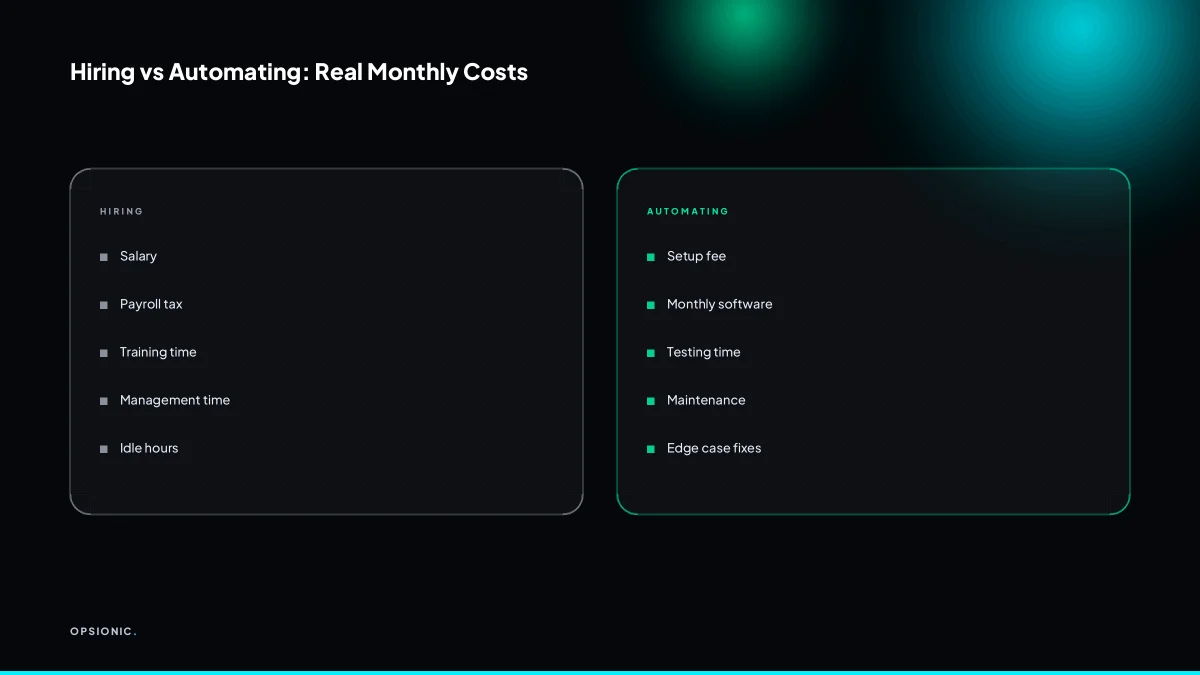
Hiring costs far more than the headline salary. You pay payroll tax, benefits, equipment, training, management time, and idle hours. A EUR 2,500 monthly salary can easily cost EUR 3,500 to EUR 4,000 once you include those extras.
In many European countries, employer payroll taxes and social contributions often add 20 to 35 percent on top of the gross salary. You also provide a laptop, a phone, software licences and a desk. None of that appears in the job advert.
Then comes the slower cost: time before the person is useful.
- Onboarding often takes four to eight weeks before someone handles work without help.
- Training means another person stops their own work to explain yours.
- Mistakes during the learning period still need checking and fixing.
Supervision does not end after onboarding. You review output, answer questions, hold one-to-ones and step in when something goes wrong. A junior hire can easily consume five hours of your week for the first three months.
Finally, idle time and sick leave still cost money. A quiet Tuesday, a holiday, a two-week illness: the salary continues while the output stops. Automation does not take annual leave.
What does automation actually cost beyond the subscription?
Automation costs more than the monthly tool fee. You pay for setup, testing, fixing edge cases, and ongoing maintenance. A EUR 20 per month tool might need EUR 500 of setup and an hour a month of upkeep. If you build it yourself, your time is the biggest hidden cost.
Setup is the first bill. A freelancer might charge a flat fee per workflow. An agency quotes a fixed price after scoping the job. Building it yourself means evenings reading documentation and trial runs that go nowhere.
Testing is where budgets quietly expand. You need to check what happens when a field is empty, a name has an accent, or an invoice is duplicated. Each edge case you ignore becomes a manual fix later.
Maintenance never stops. SaaS tools change their interfaces, rename fields, or alter API limits. A workflow that ran fine in March can break in May without warning.
Your own time is the least visible cost. If you spend four hours building a workflow that saves two hours a month, you are behind for the first two months. For a fuller breakdown of DIY, freelancer and agency costs, see what one automation actually costs.
Not sure which of these applies to you?
Answer six questions and see what we would automate first in your business, and what it is worth.
Which tasks should you automate and which should you hire for?
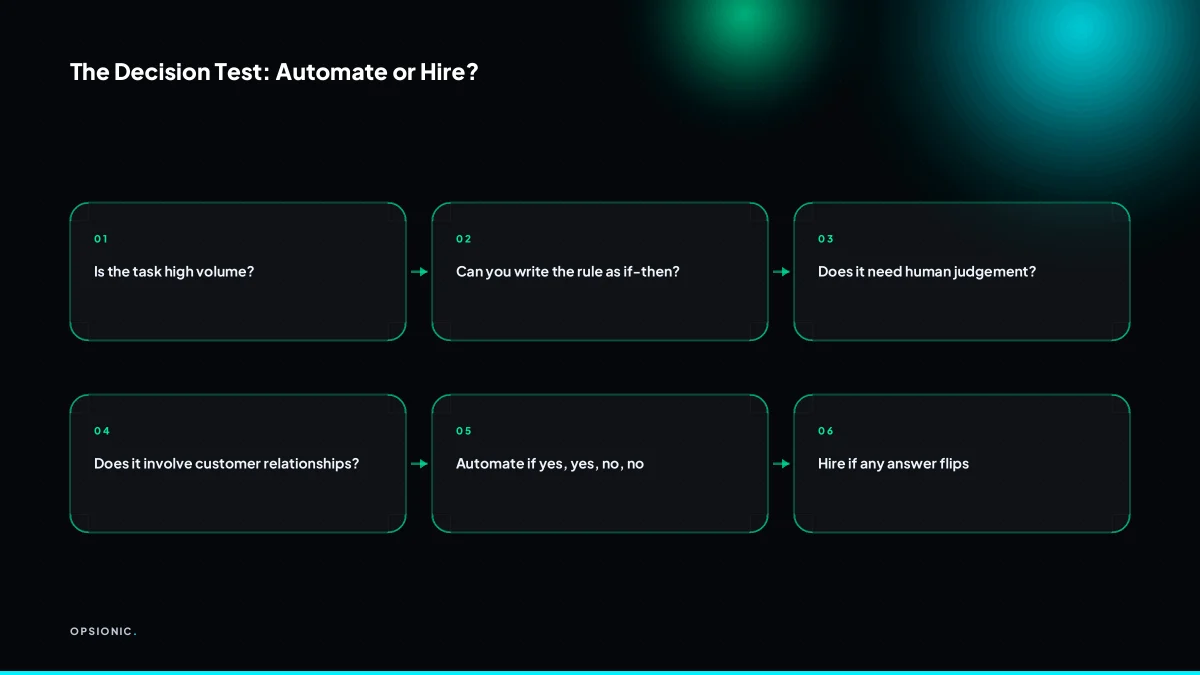
Automate tasks with clear rules, structured data, and high volume. Hire for tasks that need judgement, exceptions, or a human relationship. If you can write the decision as a simple if-then, automate it. If you cannot explain the rule to a new starter, hire a person.
The if-then test works because it forces you to name the trigger, the condition, and the action. “If a booking comes in from Calendly, then create the client record in the CRM.” That is automatable. “If a customer sounds annoyed, then decide whether to offer a discount.” That is not. The second rule has no stable input and no single correct output.
Data entry between apps, appointment reminders, and lead routing are classic automatable tasks. They happen often, follow a fixed sequence, and fail loudly when something breaks. Complaints, sales calls, and custom quotes sit on the other side. A complaint needs tone and context. A sales call needs listening. A custom quote needs you to weigh what the job actually involves, not just what the form says.
Relationship tasks lose value when automated because the human attention is the product. A reminder that sounds like a person wrote it still works. An apology that sounds like a template does not. The rule is not about whether a message goes out, but whether the recipient needs to feel heard.
To audit your week, keep a workload log for five working days. Write down every recurring task, how often it happens, and whether you could explain the decision rule to a new starter in two sentences. Then sort each task with the table below. For a fuller list of starting points, see what tasks should a small business automate first.
| Task | Rule clear? | Volume high? | Needs judgement? | Decision |
|---|---|---|---|---|
| Copy booking into CRM | Yes | Yes | No | Automate |
| Send appointment reminder | Yes | Yes | No | Automate |
| Route new lead to right rep | Yes | Yes | No | Automate |
| Handle a complaint | No | Low | Yes | Hire |
| Quote a custom job | No | Low | Yes | Hire |
| Follow up a stalled deal | Partly | Low | Yes | Hire |
How do you calculate whether automation pays back faster than hiring?
List every task you want to remove, estimate the hours per month, and multiply by a loaded hourly cost for a person. Compare that to the setup cost plus monthly fees and maintenance for automation. If automation breaks even within six months, it is usually the better choice.
Here is a worked example, with invented but realistic figures. A five-person firm quotes 30 jobs a month. Each quote takes 40 minutes of admin time: pulling the enquiry from email, copying details into the quote template, chasing missing information, then filing the reply. That is 20 hours a month.
At a loaded hourly cost of EUR 25 for an employee or virtual assistant, those 20 hours cost EUR 500 a month. A typical automation that captures the enquiry, fills the quote template and logs the job costs around EUR 900 to set up and EUR 40 a month to run.
Month one: EUR 940 spent, EUR 500 saved. Month two: EUR 980 spent, EUR 1,000 saved. The break-even point lands inside the second month. After six months, the automation has cost EUR 1,140 and saved EUR 3,000. The payback is fast because the same 40-minute task repeats 30 times a month without variation. If you want the full method before committing, see automation roi calculation small business.
What is this costing you now?
Based on removing half of that time.
What goes wrong when you automate the wrong task?
Automating a task that needs judgement creates errors, angry customers, and extra work for your team. A bot that sends the wrong invoice or ignores a complaint costs more than it saves. The failure is not the tool; it is picking a task that was never rule-shaped to begin with.
Edge cases that break rigid rules. You write a rule: orders over EUR 500 get free shipping. Then a customer orders EUR 480 of goods and asks for a discount. The bot applies the rule, charges shipping, and the customer walks. The symptom is a rising number of “special cases” your team handles by hand after the fact. The fix is to identify the exception before you build: if more than one in ten cases needs a person, the task is not ready for automation.
Customer-facing automations that sound robotic. A reminder that says “Your invoice is 7 days overdue” works. A follow-up that says “We value your custom” after a complaint does not. The symptom is replies that ignore tone. The fix is to keep automations to facts and dates, and route anything emotional to a person.
Silent failures that no one notices until a customer complains. A sync breaks between your booking tool and your calendar. No error appears. For three weeks, double-bookings happen. The symptom is a customer saying “I booked this twice and nobody called me.” The fix is a weekly check: one report, five numbers, sent to a person. If the numbers stop arriving, something is wrong. This is the same failure pattern covered in why automation projects fail small business.
How to build a human fallback for exceptions. Every automation needs an escape route. Set a rule: if the amount is over EUR 1,000, if the customer replies with certain words, if the address field is blank, stop and send the item to a person. The fallback is not a failure; it is the boundary where the automation hands back control.
How do you start without betting the whole budget?
Pick one high-volume, rule-based process and automate only that. Measure the hours saved and the error rate for a month. If it works, move to the next process. If it does not, you have lost a small amount, not a department.
- List the five tasks you repeat most often each week. Count actual hours, not rough guesses.
- Cross out any task that needs judgement, exceptions or a human relationship. Keep the rule-shaped ones.
- Pick the survivor with the highest weekly volume and the most structured data. Invoice chasing beats complaint handling.
- Write down two success metrics before you build anything: hours saved per week and errors caught per month.
- Run the automation for one month. Compare the numbers against the previous month, not against a hope.
- Decide with the numbers in front of you. If the pilot fails, you have spent a small sum and learned which process not to automate.
If the process touches several tools or has a compliance angle, an agency may cost less than your own trial and error. Before signing, ask the same questions to ask an automation agency you would ask any contractor: what happens when the workflow breaks, who owns the fix, and what the monthly fee covers after launch.
Want this running in your business next week?
A relaxed 20-minute video chat. Camera on or off. You leave with a plan whether or not you hire us.
- No call unless you ask for one
- From EUR 399 a month, no setup fee
- Built and run for you, not handed over as homework
Sources we checked
Questions people ask
Is automation cheaper than hiring a virtual assistant?
It depends on volume and rule shape. A virtual assistant at around EUR 25 a loaded hour costs EUR 500 a month for 20 hours. An automation on the same task might cost EUR 900 to set up and EUR 40 a month to run, so it wins on repeatable work and loses on anything needing judgement.
What is the break-even point for automation?
Divide the total setup cost by the monthly saving to get the number of months. In a worked example where setup is EUR 900 and the task saves EUR 500 a month, break-even lands in the second month. Anything under six months is usually worth doing.
Can automation replace a full-time employee?
Rarely on its own. Automation removes specific rule-shaped tasks from a role, which may mean you need fewer hours rather than no person. Judgement, exceptions and customer relationships still need someone, so treat automation as removing tasks, not whole jobs.
What tasks should never be automated?
Complaints, negotiation, custom quotes and anything where the customer needs to feel heard. If more than roughly one in ten cases needs a person to decide, the task is not rule-shaped enough. Automate the facts and dates, and route anything emotional to a human.
How much does it cost to automate a single process?
A simple workflow starts at EUR 399 per month with no setup fee, and managed automation covering more processes is EUR 599 per month, both on a six-month initial term. DIY and freelancer routes exist but carry hidden costs in setup, testing and maintenance.
Do I need to know how to code to automate my business?
No. Most small business automations run on visual tools that connect apps with triggers and actions. You do need to be able to describe the rule clearly, including the trigger, the condition and the action, which is the same skill as training a new starter.
What happens when an automation breaks?
Most failures are silent: a sync stops, no error appears, and nobody notices until a customer complains. Build a weekly check that sends one report to a person. If the numbers stop arriving, something is wrong, and you can fix it before it costs you.