How Many Hours Can Automation Save Your Small Business?
How many hours can automation save small business? There is no single honest number. The real answer depends on which repetitive tasks you run, how often, and how much of each task is truly automatable. Measure your own baseline per process for one week, subtract build and maintenance time, and you get a defensible estimate.
Which tasks in a small business eat the most repetitive hours?
Recurring admin work usually consumes the most time: copying bookings or orders between apps, chasing unpaid invoices, sending reminders, and compiling reports. These tasks share two traits: they follow fixed rules and happen often. That makes them measurable and automatable, unlike one-off decisions or client conversations.
Look at a typical week and you will see the same handful of jobs repeating. A service business might copy 30 new bookings from a scheduler into its job system. A shop owner might retype 40 online orders into an accounting package. An accountant might send 15 reminders for missing client records, then chase the same 15 again three days later. None of these are hard. They are just frequent.
Rule-based, high-frequency tasks are the easiest to measure because you can count them. You cannot easily count “thinking about a quote” or “talking a nervous client down”. But you can count every invoice reminder, every copied row, every report you pasted together from three screens. Count them for one week and you have a baseline in hours, not impressions.
The trap is the heavy task that happens rarely. Migrating your whole file system feels enormous, but you do it once a year. That is not where automation pays first. What tasks should a small business automate first are the ones that return every single week. If a task feels heavy but only appears quarterly, measure it properly before you build anything around it.
How do I measure my baseline hours for one process in a week?
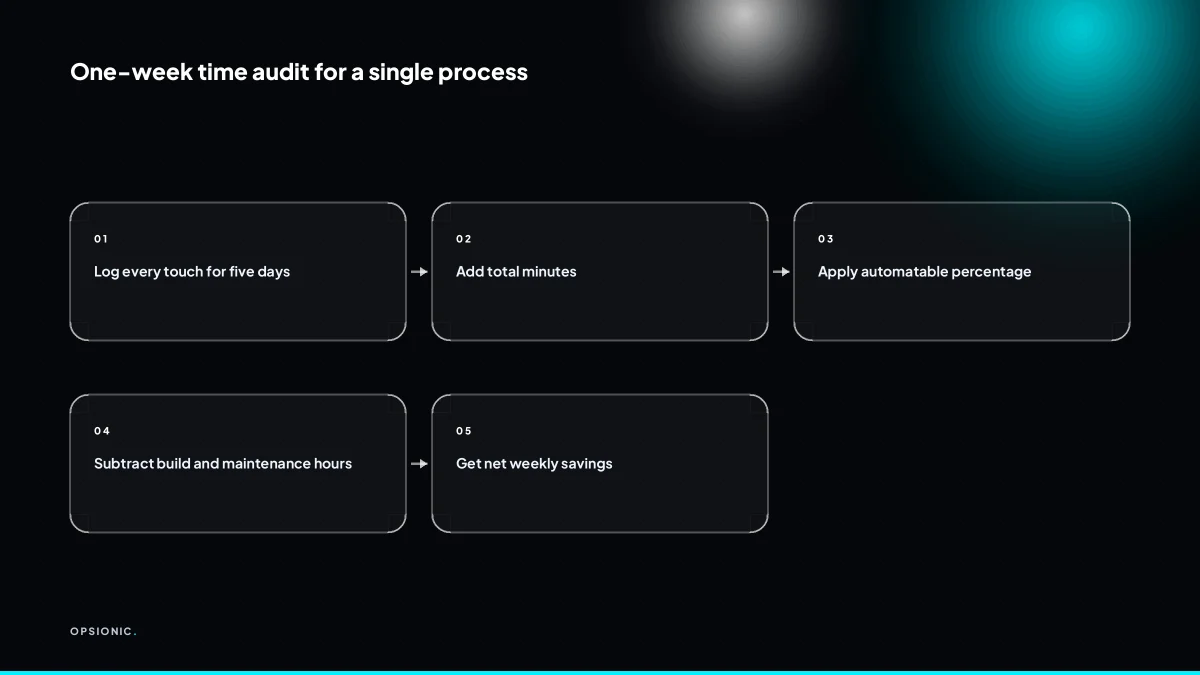
Pick one process. For five working days, note every time you touch it: start time, end time, what you did, and whether a machine could have done that step. Add the minutes. That total is your weekly baseline. It takes a few seconds per entry and gives you a real number instead of a guess.
- Open a spreadsheet or a paper notebook and create four columns: date, start time, end time, and step description.
- Add a fifth column called “machine possible” and mark it yes or no for each entry.
- Keep the log open in a pinned browser tab or on the corner of your desk so logging takes under ten seconds per touch.
- Log only the process you picked, not your whole day, so the habit does not collapse under its own weight.
- Set a daily phone reminder at 17:00 to fill in any entries you missed while working.
- If the week turns unusually busy or quiet, keep logging and note the anomaly in a margin column rather than restarting.
- At the end of Friday, sum the minutes in the “machine possible” column separately from the total.
Do not change how you work just because you are measuring. If you normally answer booking emails between jobs, keep doing that. The point is to capture the real rhythm, not a tidied version of it. A quiet week will understate the baseline, so extend the log for a second week if more than two days were abnormal. Once you have a number, you can compare it against the time it takes to start automating one process and decide whether the build is worth it.
Not sure which of these applies to you?
Answer six questions and see what we would automate first in your business, and what it is worth.
How much of a task can actually be automated?
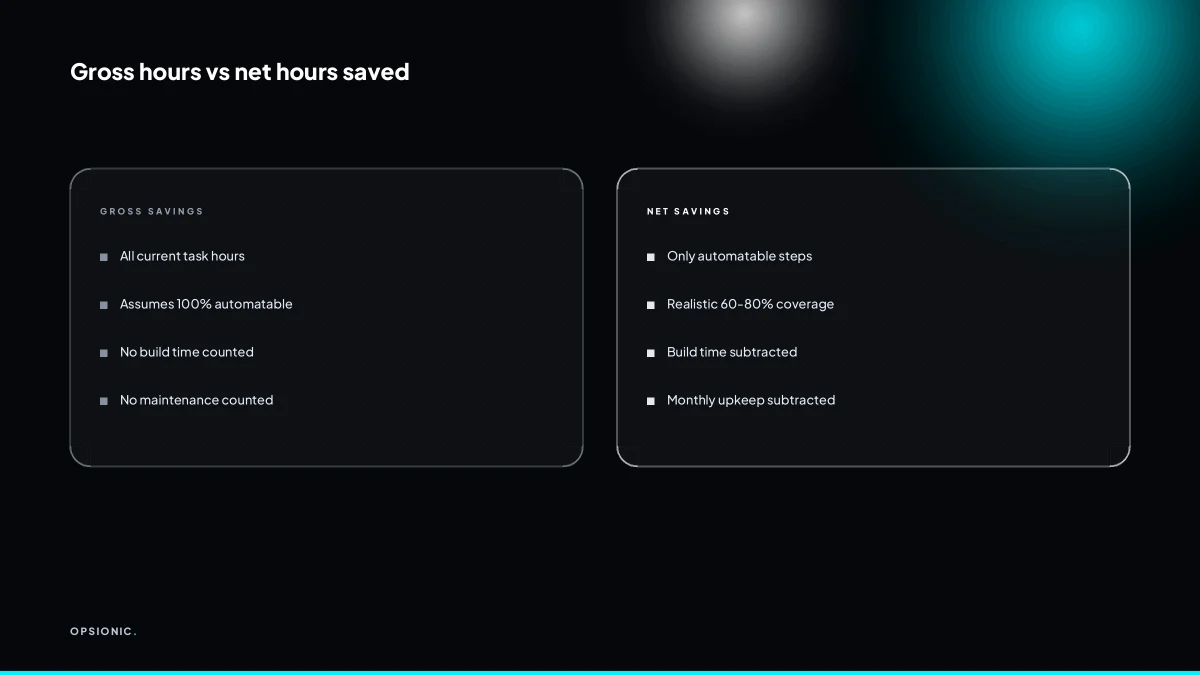
Rarely 100 percent. Most admin tasks are partly automatable. The machine handles data movement, reminders, and standard replies. Human judgement stays for exceptions, approvals, and anything customer-sensitive. Apply a realistic percentage to your baseline hours to get gross savings.
Take invoice chasing as a worked example. The system can read an overdue list from your accounting tool, send a polite reminder, and log the reply. It cannot decide whether a client’s excuse means you should pause the sequence or call them directly. That last step is yours.
You can estimate the split without any technical knowledge. List every step in a task, then mark each one as “same every time” or “depends on the situation”. The first group is automatable. The second is not. If eight of ten steps are identical each week, your realistic ceiling is around 80 percent.
| Task | Automatable steps | Human steps |
|---|---|---|
| New lead follow-up | Send first reply, log source, schedule task | Judge fit, set price, answer specific questions |
| Invoice reminders | Check due dates, send reminders, record replies | Handle disputes, approve payment plans |
| Appointment booking | Show availability, confirm slot, send reminder | Reschedule conflicts, handle special requests |
| Expense entry | Import receipts, match to categories | Confirm ambiguous items, approve large amounts |
Overestimating the automatable share is the biggest planning error. If you assume 95 percent and build for that, every exception becomes a manual fix inside a fragile process. You end up supervising the machine instead of being freed by it. A conservative estimate lets you run the payback sum first on hours you can actually recover.
What reduces the hours saved after the automation goes live?
You lose time building the automation, testing it, and maintaining it when apps change or something breaks. A simple workflow might take a few hours to set up and a little time each month to check. Subtract those from gross savings before you trust the number.
A first simple automation, one that moves data between two apps you already use, might take four to eight hours to build and test properly. That includes writing down the exact steps, setting up the trigger and actions, and running test records through it. Ongoing maintenance is smaller but real. Budget half an hour a month to check logs, confirm the workflow ran, and fix anything the app updates broke. When a step fails, you fall back to doing the task by hand until it is fixed, and that manual time eats into your net figure.
Here is a worked example. A bookkeeper automates invoice reminders and expects to save three hours a week, so twelve hours a month. Build time is six hours once. Maintenance is thirty minutes a month. In month one, a payment gateway change breaks the workflow and the bookkeeper spends two hours fixing it and re-entering three invoices by hand. Net savings that month are twelve minus six, minus half an hour, minus two, which leaves three and a half hours. From month two onward, net savings are eleven and a half hours a month. The gross figure overstates things early on. Before you build, work out what one automation actually costs including these hidden hours, so the payback period is honest.
What is this costing you now?
Based on removing half of that time.
How do I turn saved hours into a decision I can act on?
Multiply net saved hours by your hourly cost or by what you would pay someone else to do the work. If an automation saves five hours a week and your time is worth EUR 50 an hour, that is EUR 250 a week. Compare that to the cost of building and running the automation.
The formula is simple: net saved hours per month, times the value of one hour, minus the running cost of the automation. That gives you the monthly return. Divide the one-off build cost by that monthly return to get the payback period in months.
Here is a worked example, with invented but realistic figures. A bookkeeper spends six hours a week copying invoice data between two systems. An automation cuts that to one hour of checking, so net savings are five hours a week, or about twenty hours a month. At EUR 40 an hour, that is EUR 800 a month back. The build costs EUR 1,200 once, and the tools cost EUR 30 a month. Monthly return is EUR 800 minus EUR 30, so EUR 770. Payback is EUR 1,200 divided by EUR 770, which is just over one and a half months. After that, the saving is real money every month.
If the work you are removing is mostly administrative, compare the monthly return against hiring a part-time assistant instead. A person costs more per month than most automations, but a person can handle exceptions, phone calls and judgement calls that an automation cannot. Run both sums before you commit.
What mistakes make small businesses overestimate automation savings?
The most common mistakes are measuring a task once and multiplying by fifty-two, ignoring exceptions, forgetting maintenance time, and assuming the automation never breaks. A one-week log is not a full year. Run the automation for a month and re-measure before you bank the hours.
The snapshot trap. You time a task on a quiet Tuesday afternoon, then multiply by 52 weeks. The symptom is a saving that looks enormous on paper and never shows up in the bank account. The fix is to log every occurrence for a full week, including the rushed Friday version and the Monday version with three interruptions.
The silent exception. The automation handles the standard case, but you still open every fifth record to fix a format or chase a missing field. The symptom is that the workflow runs, yet you still spend 40 minutes a day in the same app. The fix is to list exceptions before you build, not after, and to count them in the baseline.
The maintenance blind spot. An integration breaks when a vendor changes their API, or a field gets renamed. The symptom is a workflow that quietly stops working and a Tuesday spent tracing the error. The fix is to budget one hour a month for checks and repairs, and to subtract it from the claimed saving.
The seasonal mirage. A one-week log in January shows ten invoices. August shows forty. The symptom is an annual saving calculated from the wrong month. The fix is to sample two contrasting weeks, or to pull a full quarter of data if the records exist.
The double-count. You automate the data entry but still review every row, so the time moves rather than disappears. The symptom is a dashboard that looks automated and a diary that looks unchanged. The fix is to define what “done” means before launch: if a human still checks every output, count the checking time. This is where automation projects quietly fail in small businesses: the workflow runs, the hours do not come back.
Validate the saving by running the automation for a month. Log the time you actually spend on the process, including fixes and reviews. Compare that against the baseline month. Only then is the number worth banking.
Want this running in your business next week?
A relaxed 20-minute video chat. Camera on or off. You leave with a plan whether or not you hire us.
- No call unless you ask for one
- From EUR 399 a month, no setup fee
- Built and run for you, not handed over as homework
Sources we checked
Questions people ask
How many hours can automation save a one-person business?
There is no universal figure. Log one recurring process for five working days, count only the steps that are identical every time, and subtract build and maintenance hours. A solo bookkeeper copying invoice data for six hours a week might recover five of those hours once the workflow runs reliably.
Does automation save more time in service businesses or product businesses?
It depends on repetition, not sector. Service firms save time on bookings, reminders and quote follow-ups. Product businesses save time on order entry, stock updates and invoice matching. Whichever type you run, the process that repeats most often each week is where the hours are.
What is the fastest way to measure automation time savings without a full audit?
Pick one process, then log every touch for five working days with start time, end time and whether a machine could have done that step. Sum the machine-possible minutes. It takes seconds per entry and gives you a weekly baseline in hours rather than an estimate.
Can automation really save ten hours a week for a small business?
Sometimes, but only where several high-frequency processes are automated together. One workflow rarely returns ten hours. Add up net savings across bookings, invoicing, reminders and reporting, subtract maintenance, and see whether the total reaches ten. Measure before you assume it.
Which automation tool saves the most time for a small business?
The tool matters less than the process you point it at. A rule-based task that happens daily will return more hours than a complex one that happens monthly, whichever platform runs it. Choose the process first, then pick a tool that connects the apps you already use.
How long does it take before an automation pays back the time invested in building it?
Divide the one-off build hours by the net hours saved each month. A workflow that takes six hours to build and returns five hours a month pays back in roughly six weeks. Add maintenance time to the build side so the payback figure stays honest.
Is it worth automating a task that only takes ten minutes a day?
Ten minutes a day is about three and a half hours a month. If the steps are identical every time and the build is short, the payback can be quick. If the task varies each day, the automation will need constant fixing and the hours saved shrink.