Do You Need a CRM, or Just Three Automations?
Do I need a CRM or just automation? For most businesses under ten people, automation alone removes the copying and pasting that feels like a CRM problem. A CRM becomes necessary only when you need one shared customer record, enforced pipeline stages, and team-wide visibility that spreadsheets and automations cannot reliably provide.
What’s the real difference between a CRM and automation?
A CRM is a database with a user interface, built to hold one record per customer and show a pipeline. Automation is the plumbing that moves data between tools you already use, like a form to a spreadsheet or a calendar event to an SMS. One stores and displays, the other moves and transforms.
Think of a CRM as a filing cabinet with a screen. Each drawer is a contact, each folder inside holds notes, emails and deal stages. The interface exists so a person can open the drawer, read what is there and decide what to do next.
Automation does not store anything worth keeping. It catches a new enquiry from your website form, copies the name and email into a spreadsheet, then sends a WhatsApp message to the right staff member. The data passes through, but the automation itself is not where you go to look things up.
Here is the contrast in one job. A plumber receives a booking request. A CRM shows that the customer last called in March, owes nothing and lives in a specific postcode. Automation is what took the booking form fields and created that CRM record without the plumber typing anything.
The distinction matters because small teams often buy a CRM expecting it to do the moving. It will not. A CRM waits for data to arrive. Automation is what delivers it. If your problem is that nobody can find a customer’s history, you need the database. If your problem is that someone is copying leads from email into the database by hand, you need automation services that do the copying.
Which problems can automation fix without a CRM?
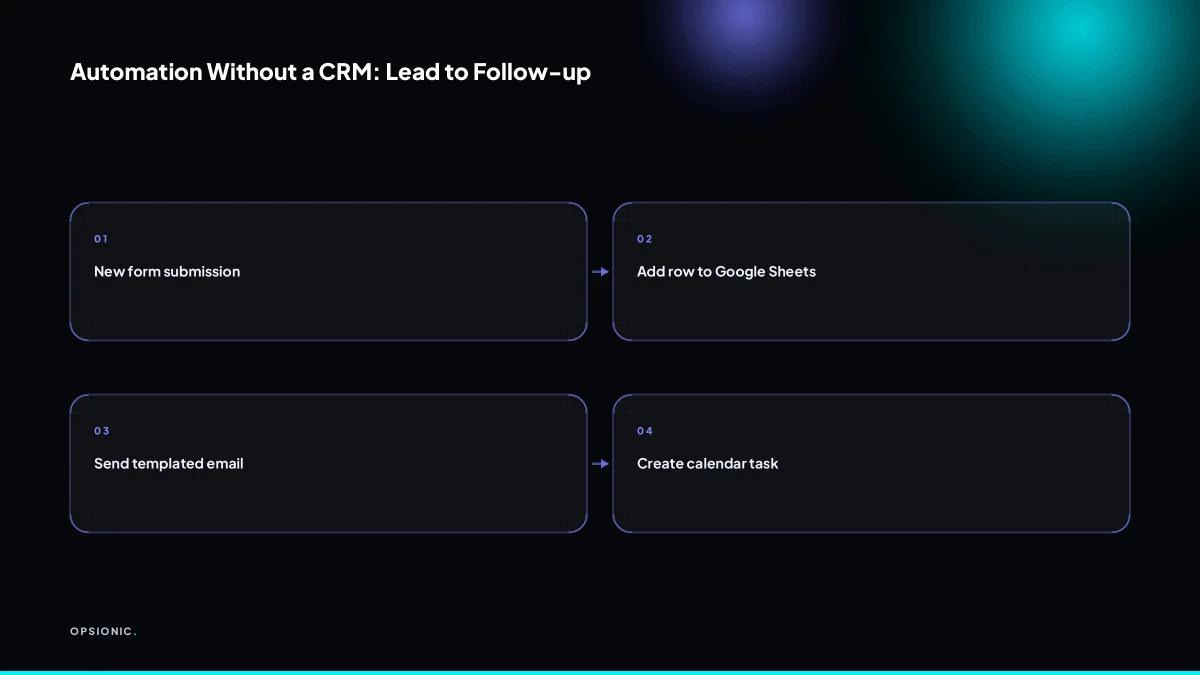
Automation fixes repetitive copying, missed follow-ups, and manual data entry between tools you already use. If a lead comes through a form, lands in a spreadsheet, and you manually email them, automation can send that email and log the reply without any central customer database.
Four sequences cover most of the work. A form submission can connect a website form to Google Sheets and email the lead a reply while you sleep. A calendar event can trigger an SMS reminder the day before, cutting no-shows without anyone touching a phone. A booking or job record in one tool can create an invoice in another, so the number is copied once and never retyped. And incoming email can be sorted into folders and answered with template drafts based on the sender or subject line.
Here is a worked example, not a client. A cleaning firm gets 40 enquiries a month through a website form. Each one takes four minutes to copy into a spreadsheet, paste into an email template, and send. That is 160 minutes a month, roughly 2.7 hours. At a modest EUR 25 per hour of owner time, the copying costs about EUR 67 a month in labour alone, before counting the replies that get forgotten. Automation removes the copy and the send step. The spreadsheet still fills, the email still goes out, and no CRM is involved.
None of that requires a central customer database. It requires a trigger, a step or two, and a place for the result to land. If the result needs to be findable later, that is when the CRM question returns.
Not sure which of these applies to you?
Answer six questions and see what we would automate first in your business, and what it is worth.
When does a CRM actually earn its monthly cost?
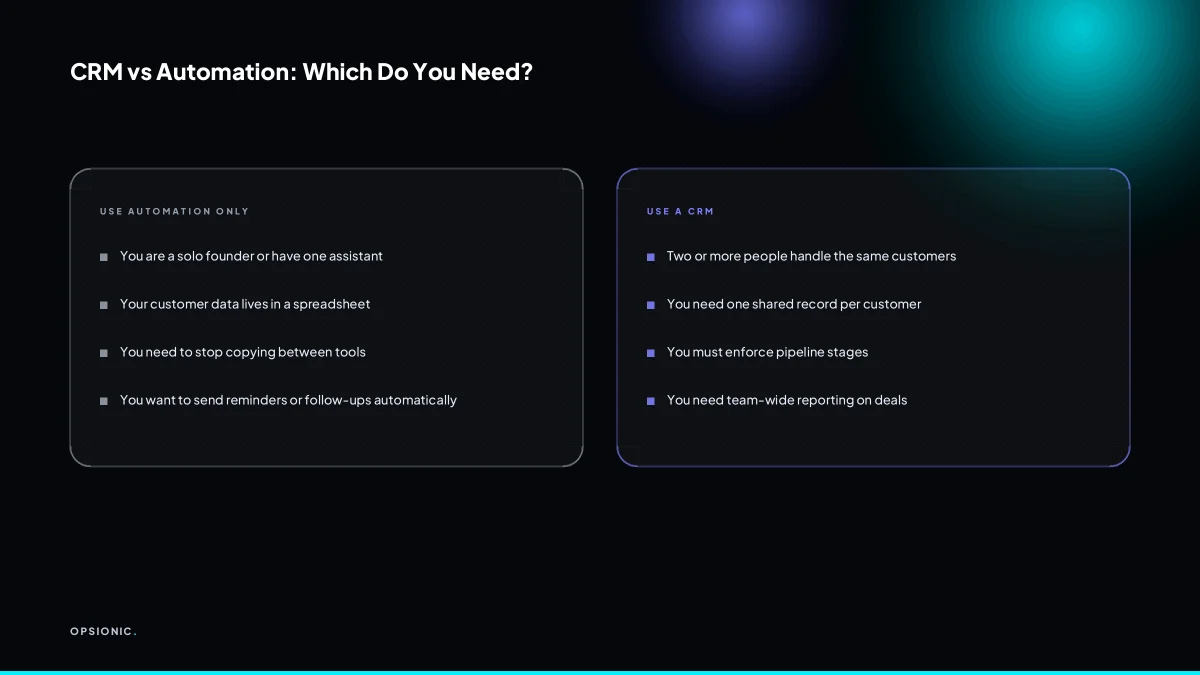
A CRM earns its cost when two or more people need to see the same customer record, know what stage a deal is in, and avoid double-sending or contradicting each other. If you are one person and your spreadsheet answers every question, you are paying for a database you do not need.
Shared pipeline visibility is the first test. When a salesperson, a bookkeeper and a support rep each keep their own notes, the business pays in duplicated questions and mixed messages. A CRM gives everyone one view of the same record. Enforced stages matter next: a quote cannot move to “won” without an approval step, so nobody skips the deposit or the contract. One customer record across email, phone and notes stops the “what did we last tell them” search through three inboxes. Reporting on team activity, not just your own memory, tells you which stage is leaking.
If you already sync calendar with CRM automatically and still lose track of follow-ups, the problem is not the tool. It is that nobody owns the next step.
| Question | Spreadsheet or automation is enough | A CRM earns its cost |
|---|---|---|
| Who sees the customer record? | One person | Two or more, with different jobs |
| How are stages enforced? | By memory or habit | By required fields or approvals |
| Where do notes live? | Email threads, paper, one sheet | One record, all channels |
| What gets reported? | What you remember to check | Pipeline, activity, and stuck deals |
What are the hidden costs of buying a CRM too early?
The hidden costs are setup time, data cleaning, subscription creep, and the ongoing discipline of keeping records current. A CRM that is not updated is worse than a spreadsheet, because it gives false confidence. If you buy one, import messy data, and then stop maintaining it, you end up with an expensive address book.
Setup and configuration time. You can easily spend two full days deciding which fields matter, building pipelines, and setting permissions. Symptom: the CRM works for the person who configured it and confuses everyone else. Fix: before buying, write the five reports you actually need. If you cannot name them, you are not ready.
Data migration and cleaning effort. Your spreadsheet has duplicates, dead leads, and three spellings of the same company. Importing that mess makes the CRM useless from day one. Symptom: you search a customer and get four records. Fix: clean the sheet first, or pay someone to do it. This is the hidden cost nobody puts on the invoice.
Subscription and per-user fees. The base price looks fine until you add a second seat, then a third, then an integration. Symptom: the monthly bill grows while you still use it as an address book. Fix: check the per-user price before you trial, not after.
Ongoing maintenance and user adoption. Someone has to chase the team to log calls, update stages, and attach emails. Symptom: the pipeline says a deal is at proposal stage but the client signed last week. Fix: if you will not enforce the habit, do not buy the tool. The hidden costs of automation are the same pattern: the software is cheap, the discipline is expensive.
What is this costing you now?
Based on removing half of that time.
What is the simplest test to tell if I need a CRM?
Ask three questions. First, can one person answer a customer question without asking someone else? Second, do you know the next action for every open deal without opening five tabs? Third, does your current system show you what is slipping this week? Two or three noes mean a CRM may be justified.
Work through each one honestly.
- Single source of truth for customer contact. Find a customer who emailed you this month. Can you see their last three messages, their phone number, and what you quoted them, all in one place, without searching your inbox, WhatsApp, and a spreadsheet? If the answer lives in someone’s head or in a chat thread you have to scroll through, that is a no.
- Next action visible for every open item. Pick three open jobs or deals at random. For each one, can you state in one sentence what happens next and who is responsible? If you need to open the email chain, check a notebook, or ask a colleague, that is a no.
- See what is slipping across the team. Without asking anyone, can you list every quote sent more than ten days ago that has not been followed up? Every job waiting on a client reply? If the answer is “I would have to check”, that is a no.
Score it simply. One no is an irritation, not a reason to buy software. Two noes mean your current system stops you from answering basic questions about your own business. Three noes mean you are running on memory and chat threads, and the cost is showing up as missed follow-ups and slow replies. That is the point where a CRM earns its keep. If you are still unsure whether the problem is the tool or the process, the list of signs your business needs automation helps you separate the two.
Where do I start if automation is enough for now?
Start with one workflow that repeats at least weekly and costs you obvious time. Document the exact steps, then connect the two or three tools involved. A form to a spreadsheet, a calendar event to an SMS, or a new order to an invoice are all good first candidates. Keep the human check where it matters.
- Pick a task you do at least once a week. Chasing unpaid invoices, copying enquiry emails into a sheet, or sending appointment reminders all qualify. Frequency matters because a monthly task hides the pain.
- Write down the steps as they happen today. Name the trigger, the tool you open, what you type, and where the result lands. If you skip this, you end up automating your memory of the process rather than the process itself. The six fields in how to document a process before automating keep this to one page.
- Choose a connector that fits your comfort level. Zapier and Make are common starting points for visual builders at the time of writing. n8n gives you more control if you are technical or want to host it yourself later.
- Build one connection and run it on a real example. Trigger the form, the calendar event, or the order, and watch where the data lands. Check the fields, the formatting, and the timing before you switch off the manual version.
- Add the next step only after a week of clean runs. Automation should shrink your admin, not become a second inbox of errors to chase.
Want this running in your business next week?
A relaxed 20-minute video chat. Camera on or off. You leave with a plan whether or not you hire us.
- No call unless you ask for one
- From EUR 399 a month, no setup fee
- Built and run for you, not handed over as homework
Sources we checked
Questions people ask
Can Zapier replace a CRM for a small business?
Zapier moves data between tools but does not store customer records or show a pipeline. It can send follow-up emails, log form entries to a spreadsheet and trigger reminders, but if two people need to see the same customer history, you still need a CRM behind it.
Is a spreadsheet a CRM?
A spreadsheet can hold customer records, but it lacks enforced stages, shared permissions and automatic logging of emails or calls. For one person it often works better than a CRM. For a team it breaks down because nothing stops two people editing the same row differently.
How many employees before I need a CRM?
There is no fixed number. The test is whether two or more people need to see the same customer record, know the deal stage and avoid contradicting each other. A team of three with shared leads may need one. A solo trader with a tidy spreadsheet may not.
What is the cheapest CRM for a small team?
Prices change and per-user fees add up, so check each vendor's own pricing page at the time you buy. Free tiers usually cap users or features. Compare the cost of the seats you actually need, plus any integration fees, before committing to an annual plan.
Can I use Airtable or Notion as a CRM?
Yes, both can hold customer records, stages and notes. They work well for small teams that already use them daily. The trade-off is that neither enforces pipeline rules or logs email automatically without extra setup, so the discipline of updating records still falls on you.
What is the difference between a CRM and a sales pipeline?
A CRM is the database that stores customer records, notes and history. A sales pipeline is a view inside it that shows deals moving through stages. You can have a pipeline in a spreadsheet, but a CRM adds shared access, permissions and automatic activity logging.
How long does it take to set up a CRM properly?
Expect at least two full days for configuration, field decisions and permissions, plus extra time to clean your existing data before import. The longer task is adoption: getting the team to log calls and update stages consistently. Without that habit the setup time is wasted.