AI Agents vs Automations: Rules, Judgement, and Which You Need
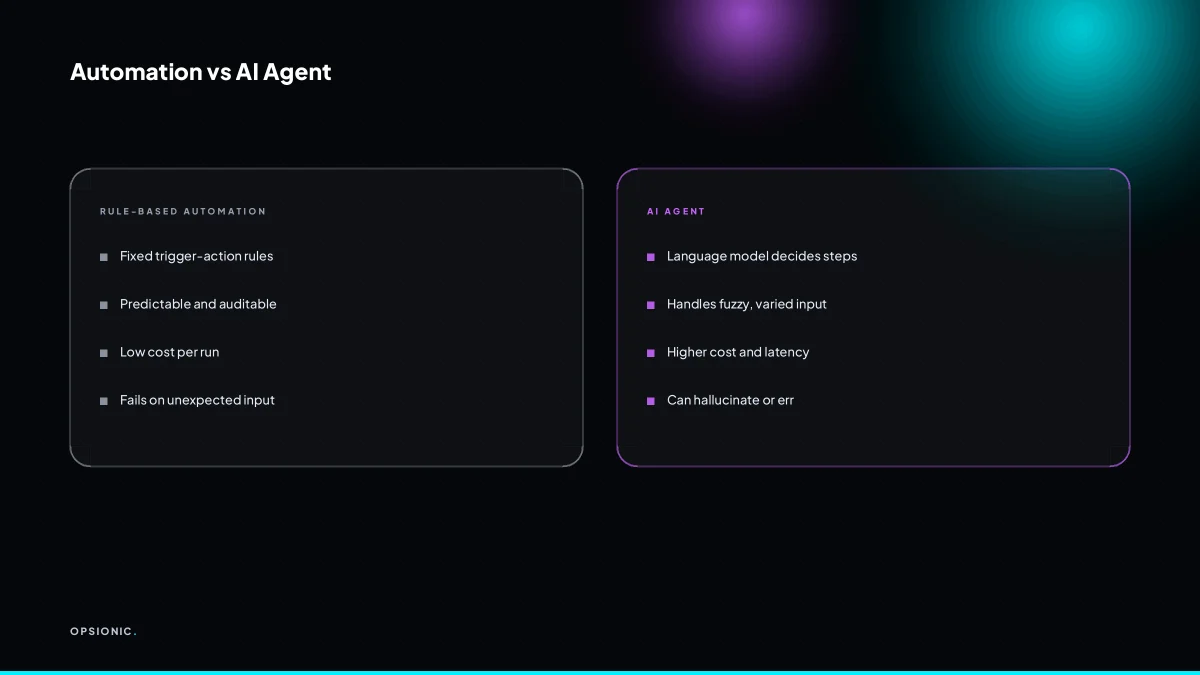
The ai agent vs automation difference comes down to rules versus judgement. Automation follows fixed steps every time, so it is predictable and auditable. An AI agent decides the next step itself using a language model, which makes it flexible but occasionally wrong. Choose automation for repetitive work and agents for messy, variable tasks.
What is rule-based automation, exactly?
Rule-based automation is a set of fixed instructions that run the same way every time. If a trigger happens, the tool performs a defined action. It cannot improvise or handle inputs outside its rules. When a form is submitted, send a standard email and add a row to a spreadsheet.
Think of it as a straight line from cause to effect. A new booking arrives in your calendar, so the system sends an SMS reminder 24 hours before the appointment. An invoice becomes overdue, so the system flags it in your accounting file. The trigger fires, the rule runs, the action happens. Nothing else.
The common tools here are Zapier, Make, and n8n. You connect a trigger to one or more actions, then set conditions that decide when the actions run. No model is making a judgement call. The logic is written by a person, once, and it repeats until someone edits it.
That predictability is the main strength. Rule-based automation is cheap to run, easy to audit, and behaves the same at 3am as it does at 3pm. If a customer asks why they received a particular email, you can trace the trigger, the condition, and the action in seconds. The weakness is equally clear: the moment an input falls outside the expected shape, the rule either ignores it or fails. A form field left blank, a date formatted differently, an email address with a typo. The automation does not pause and think. It just stops or produces a wrong output.
For most small business admin, that limitation is acceptable because the inputs are stable. A booking form has the same fields every time. A payment notification arrives in the same format. When the work is repetitive and the data is clean, rule-based automation services handle it without drama.
What makes an AI agent different from a workflow?
An AI agent uses a language model to interpret a goal, decide what to do, and call tools or APIs to get it done. Unlike a fixed workflow, it can handle variations and new situations. The trade-off is that its choices are not guaranteed to be correct, so you need oversight.
The agent runs a loop: perceive, decide, act, observe. It reads the input, picks a next step, executes it, then looks at the result before deciding again. Memory matters here. The agent keeps the conversation or task state in context, so it can refer back to what it already saw.
Tool calling is what separates an agent from a chatbot. The model can request a specific action, such as searching a CRM, creating a draft, or sending a message. The agent then receives the tool’s output and continues.
Consider an email that says a customer wants to move their appointment from Tuesday to Friday. A workflow might look for the word “reschedule” and fail if the customer wrote “shift my booking” instead. An agent reads the intent, checks the calendar tool, finds Friday at 2pm free, and drafts a reply in the CRM. It does this without a rule for every phrasing.
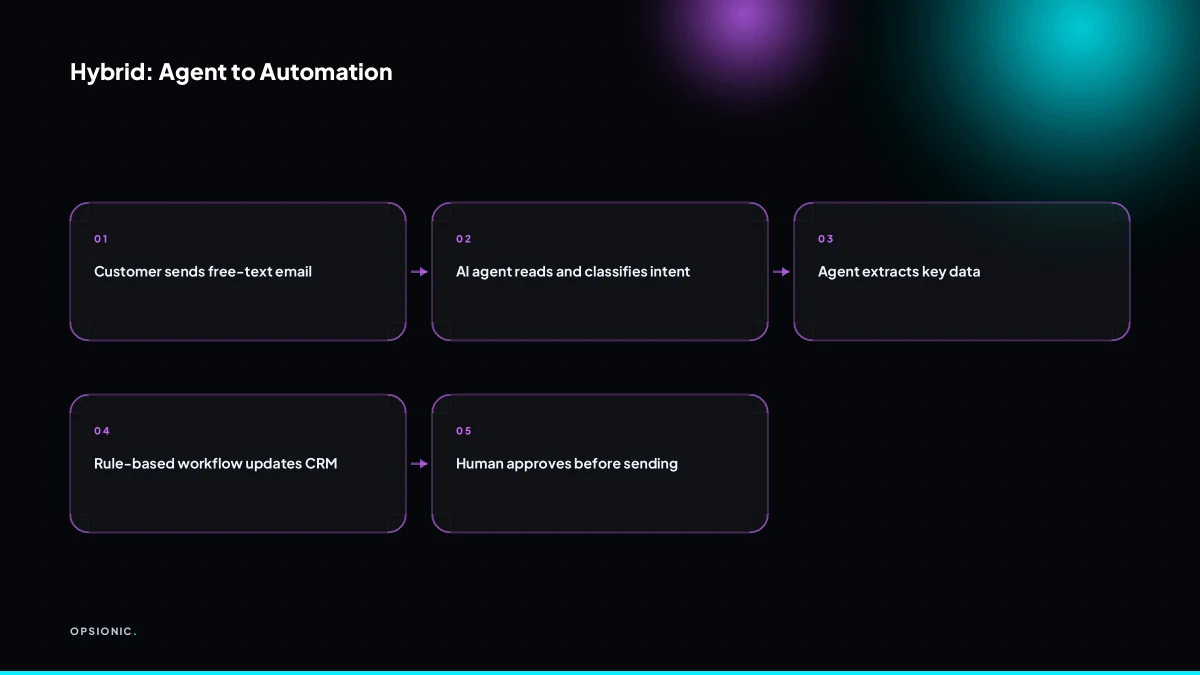
This is not simply an AI step inside Zapier. A workflow with an AI block still follows a fixed path. The AI might classify text or generate a sentence, but the surrounding branches are hard-coded. An agent chooses its own path each run. That flexibility is why AI-drafted replies with a human send work well: the agent proposes, and a person approves before anything goes out.
Not sure which of these applies to you?
Answer six questions and see what we would automate first in your business, and what it is worth.
When does rule-based automation break down?
Rule-based automation fails when the input is messy, unstructured, or outside the expected patterns. A workflow that routes invoices to the right folder breaks if the invoice format changes or the supplier name is misspelled. It has no judgement to fall back on, so the task stalls or produces errors.
Fuzzy inputs are everywhere once you look. A customer replies to a booking email with “actually can we do Thursday instead, and my wife wants the late slot if possible”. A supplier sends a PDF that was clearly retyped by hand. A prospect asks “do you do the thing where it just works with my existing spreadsheet?” None of these fit a tidy rule.
The maintenance burden compounds quietly. Every new edge case means another condition, another branch, another test. A rule set that started with ten steps grows to forty, and someone has to own that. Often that someone is you, at 7pm, wondering why the workflow stopped.
An agent generalises. It reads the intent behind the messy request and acts on it, then asks a human when it is unsure. That is the trade: flexibility for occasional wrongness.
Sometimes the break is acceptable. If you receive three messy invoices a month, a stalled automation that you fix by hand is cheaper than building judgement into the system. The hidden costs of automation only bite when volume turns the exception into the routine.
When is an AI agent actually useful for small business admin?
An AI agent earns its keep when you have moderate volume and high variety. Think triaging inbound emails, extracting data from differently formatted documents, or drafting responses that a human will review. If a task is repetitive but predictable, stick with automation because it is cheaper and safer.
Three criteria make a task a candidate. First, the input is fuzzy: wording changes, formats vary, senders make mistakes. Second, the cost of an error is low because a human reviews the output before it goes anywhere. Third, the volume is high enough that the review takes less time than doing the work from scratch.
Inbox sorting is the clearest example. A rule-based filter can move anything from a known address into a folder, but it cannot read an email and decide whether it is a complaint, a sales enquiry, or a supplier asking for payment. An agent can classify those, draft a reply, and leave it in a queue for you to approve. The same logic applies to automating email inbox sorting when senders do not follow your form.
Document parsing works too. Suppliers send invoices as PDFs, screenshots, and scans. An agent can pull the total, date, and reference from each format and put them into a spreadsheet for checking. A fixed automation would break on the second layout.
Cost is the honest test. Here is a worked example, not a client. Suppose you spend six hours a week sorting and replying to thirty varied emails. At an internal cost of EUR 35 per hour, that is EUR 210 a week, roughly EUR 840 a month. An agent tool might cost EUR 150 a month and save four of those six hours, leaving you two hours of review at EUR 70. You keep EUR 620 a month. The arithmetic only works if the review is genuinely lighter than the original task.
The warning is simple. Never let an agent send money, cancel a service, delete records, or email a customer without a human click. High-stakes irreversible actions belong to rules you can audit, not judgement you cannot fully explain.
What is this costing you now?
Based on removing half of that time.
How do errors and auditability compare?
Automation errors are deterministic: the same wrong rule fails every time, and the log shows exactly what happened. Agent errors are probabilistic: the model might hallucinate or choose the wrong tool, and the reasoning is not fully transparent. For regulated or financial tasks, automation is easier to defend and audit.
| Dimension | Rule-based automation | AI agent |
|---|---|---|
| Error type | Deterministic, repeats identically | Probabilistic, varies per run |
| Predictability | High once tested | Low, can surprise you |
| Audit trail | Clear step-by-step log | Partial, reasoning opaque |
| Reversibility | Easy to trace and undo | Hard if action already sent |
Agents need a human in the loop for any irreversible action. Sending a payment, deleting a record, or emailing a customer should require a person to click approve. The agent can draft, summarise, or recommend. It should not execute alone.
GDPR adds another layer. When an LLM processes customer data, you need a lawful basis, and the model may retain or expose more than you intend. Is AI safe for customer data deserves a straight answer before you route anything sensitive through an agent.
Practical logging means capturing the prompt, the model version, the tool called, and the output. For approval steps, store who clicked and when. Keep a separate log for rules and for agents: one is a receipt, the other is a best effort.
Do AI agents replace automation tools, or work alongside them?
AI agents do not replace automation tools; they extend them. Most businesses still need reliable pipelines for payments, file sync, and notifications. An agent can sit at the edge, handling messy inputs and then handing off to a rule-based workflow for the final, auditable steps.
The hybrid pattern that holds up is simple: let the agent do classification and extraction, let the automation do execution. An agent reads a supplier email, pulls out the invoice number, amount, and due date, then triggers a Zapier step that updates your CRM. The agent handles the fuzzy part. The automation handles the part that must never fail silently.
You keep Zapier, Make, or n8n for core operations because they are predictable. A rule that says “when a Stripe payment succeeds, create an invoice” runs the same way every time. An agent might misread a currency or invent a field. You do not want that anywhere near your books.
A practical first step is to add one agent step to an existing workflow rather than rebuilding anything. Here is a sequence that works for most small teams:
- Pick one workflow you already run, such as new enquiries arriving by email.
- Add an agent step that reads each email and extracts the sender name, service requested, and preferred date.
- Pass those extracted fields into your existing automation as structured input.
- Keep the downstream steps unchanged: create the lead, notify the owner, log the source.
- Run both paths for a week and compare the agent’s extraction against your manual notes.
This keeps your core automation intact while the agent proves itself on the messy edge. If the agent makes a mistake, the workflow still runs; only the extracted fields are wrong, and you can correct them before anything reaches the customer. That is the way we build an automation: start with the reliable part, then add judgement where it earns its place.
Want this running in your business next week?
A relaxed 20-minute video chat. Camera on or off. You leave with a plan whether or not you hire us.
- No call unless you ask for one
- From EUR 399 a month, no setup fee
- Built and run for you, not handed over as homework
Sources we checked
Questions people ask
Can an AI agent replace Zapier for my business?
No, an AI agent does not replace Zapier. Zapier and similar tools run fixed, auditable rules for payments, file sync, and notifications. An agent can handle fuzzy inputs like email classification, then hand off to a Zapier workflow for the final, reliable steps. Most businesses need both.
What is the cheapest way to try an AI agent?
Start with a single low-risk task, such as sorting incoming email or extracting data from documents, using a pay-as-you-go API or a free tier from a provider. Keep a human review step so errors are caught before they reach a customer. Costs scale with usage, so begin small.
How do I stop an AI agent from making mistakes?
Put a human approval step before any irreversible action: sending money, deleting records, or emailing customers. Log the prompt, model version, tool called, and output. Test with real examples. Keep the agent's scope narrow, and route its output through a rule-based workflow for execution.
Is an AI agent safe to use with customer data under GDPR?
It can be, if you have a lawful basis and a data processing agreement with the model provider. Avoid sending sensitive data unless necessary. Check whether the provider retains or trains on your data. For regulated tasks, rule-based automation is easier to audit and defend.
Do I need to know coding to set up an AI agent?
Not necessarily. Many agent platforms offer no-code or low-code interfaces for building workflows. However, some technical understanding helps with tool calling, API limits, and error handling. For complex integrations, a developer or an automation agency can set it up.
Which tasks should I never give to an AI agent?
Never let an agent execute irreversible high-stakes actions alone: sending payments, cancelling services, deleting records, or emailing customers without review. Also avoid using agents for tasks requiring strict audit trails, such as financial reporting, unless a human approves every step.
How much does an AI agent cost per month compared to automation?
Rule-based automation tools like Zapier or Make typically cost around EUR 20 to EUR 100 per month for small businesses. AI agents add model usage costs, often USD 10 to USD 100 per month depending on volume, plus any platform fees. A worked example in the article shows potential savings.