Automation for Hair Salons: Fill Chairs, Cut No-Shows
Automation for hair salons means connecting the booking system you already use to messages and actions that run themselves. The highest-value workflows are rebooking clients at the chair and filling last-minute gaps from a waitlist. Both reduce empty chairs and repetitive chasing without adding another complicated app or making your salon sound impersonal.
What can I actually automate in my salon with the booking system I have?
Most salon booking platforms include triggers for new bookings, cancellations, and reschedules. You can automate reminder messages, waitlist offers, rebooking prompts, and review requests. Build around the fields and events your system already produces, not around a replacement for it.
Start with four automations that reduce admin and protect revenue:
- Reminders by SMS or WhatsApp the day before, with a one-tap confirm or cancel.
- Waitlist offers that fill a cancelled slot automatically, sending the first available client a booking link with a short expiry.
- Rebooking prompts that fire six weeks after a colour or cut, when the client is due back.
- Review requests sent the evening after a visit, while the result is still fresh.
Before you build anything, check whether your booking system exposes webhooks or a native integration. A webhook is a simple signal your system sends when something happens, like a new booking. If it has one, you can connect it to Make or n8n and send messages through SMS, email, or WhatsApp without manual copying.
If webhooks are missing, look for a Zapier or Make integration instead. Many salon platforms offer one. That still lets you run the same flows, just with a few more steps. What matters is that the trigger comes from the system your team already uses, so nobody retypes a phone number. That is the kind of work we cover under what we automate for small businesses.
How do I reduce no-shows without sounding robotic?
Reminders and deposits can help reduce no-shows. Send a short SMS or WhatsApp reminder from your own number, using the client’s first name and service details. Automate the reminder so it goes out at the same time every day.
A reminder that reads “Hi Sarah, your cut with Mia is tomorrow at 10:30. Reply C to cancel” feels written by a person. A reminder that reads “Dear valued client, this is a notification of your upcoming appointment” does not. Keep the template under two sentences. Use the service name, not a booking code. Send it from the salon’s existing number so replies land with the front desk, not a dead inbox.
Deposits can also help. A small deposit taken at booking, deducted from the final bill, may reduce impulse bookings. For repeat offenders, a cancellation fee, charged to the card on file, can change behaviour. Your booking system likely supports both. If it does not, the workflow is simple: booking comes in, a payment link goes out, and the appointment is only confirmed once the deposit clears.
Before you send anything, get consent. Add a tick box at booking: “I agree to receive appointment reminders by SMS or WhatsApp.” Store that consent against the client record. If you already have a calendar that sends reminders, you can send SMS reminders from a Google Calendar event and keep the consent check inside the same flow.
Not sure which of these applies to you?
Answer six questions and see what we would automate first in your business, and what it is worth.
How do I fill a last-minute cancellation automatically?
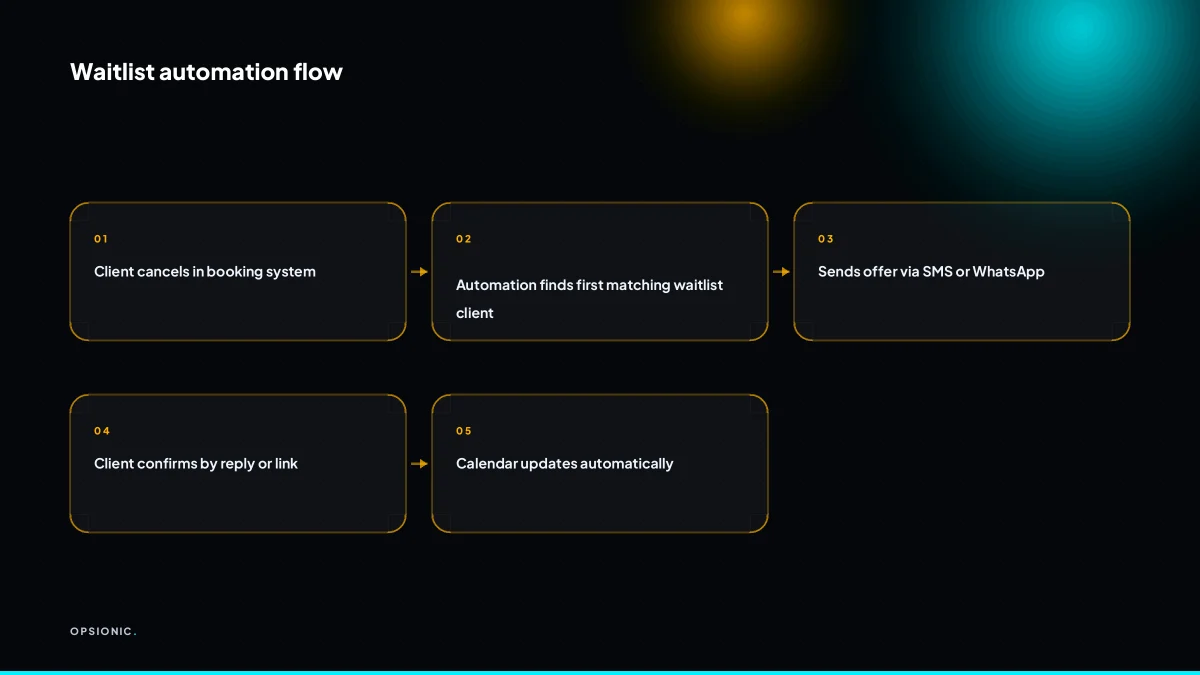
A waitlist automation watches for cancellations in your booking system, then messages the first matching client on your waitlist with an offer to take the slot. The client confirms by replying or clicking a link, and the system updates the calendar. This runs without the front desk touching anything.
- Watch the booking system for a cancelled slot. The automation checks your booking system for cancellations and compares the calendar against its last known state.
- Match the freed slot against the waitlist. Filter clients by service type, staff member, and time window. A 45-minute colour slot at 14:00 only goes to clients waiting for that service with that stylist.
- Send the offer to the first matching client. The message includes the exact time, stylist and a confirm link. The client replies yes or clicks, and the system records the response.
- Move to the next client if the first does not answer. The automation waits a set period, for example 20 minutes, then offers the slot to the second match. No manual chasing.
- Write the confirmed booking back to the calendar. The system creates the appointment and removes the client from the waitlist, so the slot cannot be offered twice.
The booking system remains the single source of truth. The automation never holds its own copy of the diary; it reads and writes the same calendar the front desk sees. That stops double bookings when a client calls in while an offer is still pending. If you want the build sequence behind a flow like this, see how we build an automation step by step.
How do I get clients to rebook before they leave the salon?
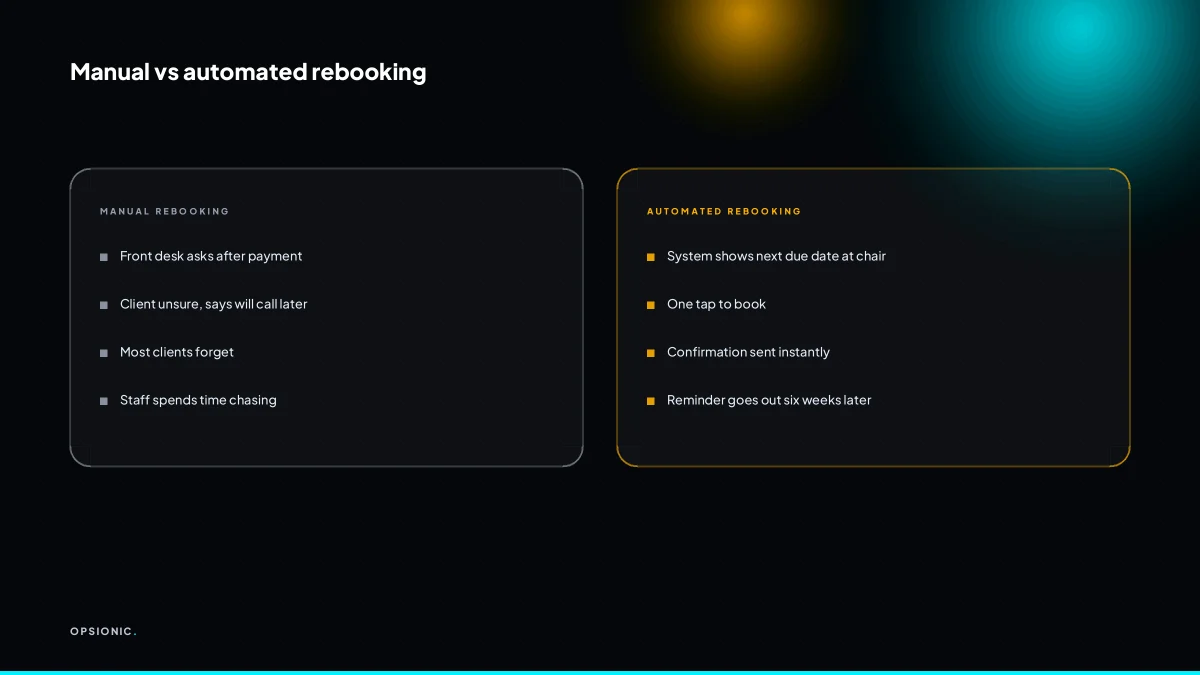
The best time to rebook is at the chair, not by text later. Your booking system can show the client’s next recommended appointment date based on their service interval. The front desk or stylist taps to book, and the system sends a confirmation and a reminder later.
Start by setting a service interval for each treatment in your booking system. For example, a cut and colour might be six weeks, a men’s cut four weeks, a root touch-up three weeks. When a client checks out, the system calculates the next date and shows it on screen. One tap puts the booking in the diary. No scrolling, no asking the client when they are free next month.
The reminder then runs on its own. After the interval you set, the client gets a message with a reschedule link. If they do not open it, you can send a second nudge a few days later. The front desk can then see who has not rebooked and call the few names left, instead of calling everyone.
Staff training is the part most salons skip. The rebook prompt only works if the stylist mentions it while the client is still in the chair, with the mirror in front of them and the next date on the screen. Make it one sentence: “Same time in six weeks?” That is the whole script.
Here is a worked example. A salon has four stylists, each seeing six clients a day, five days a week. That is 120 appointments a week. If half of those rebook at the chair, that is 60 future bookings locked in before the client reaches the door. Without the prompt, the salon might rebook 20 by text later. The difference is 40 extra confirmed appointments a week, or roughly 160 a month, without a single extra phone call. That is why the chair beats the reminder. If you already use a tool like Calendly for some bookings, the same logic applies when you send Calendly bookings to your CRM automatically instead of retyping them.
What is this costing you now?
Based on removing half of that time.
What does automation for hair salons cost, and is it worth it for one location?
Automation for hair salons starts at around EUR 399 per month for a single workflow, or EUR 599 per month for managed automation across your whole front desk. For a single location, the cost is usually justified by filling two or three extra chairs a month or saving ten hours of admin time.
Managed automation at EUR 599 per month covers the booking system, reminders, waitlist filling and rebooking nudges as one service. You are not paying per message or per seat. You pay a flat rate and we run the automations on your behalf, including fixes when a booking tool changes its interface or a reminder stops sending.
Here is a worked example, not a client result, to make the arithmetic plain. Say a salon charges EUR 65 for a cut and colour. A no-show costs the full EUR 65 because the chair sits empty and the stylist is already paid. If the salon averages 12 no-shows a month, that is EUR 780 in lost revenue. One extra rebooking per day, at EUR 65, adds roughly EUR 1,300 a month. Managed automation at EUR 599 a month leaves about EUR 700 better off before you count the admin hours saved. The no-shows alone nearly pay for it.
If your front desk is already fairly tight and the main leak is one thing, such as clients forgetting to rebook after six weeks, start with a single workflow at EUR 399 per month. You can add the waitlist and reminder automations later. Understanding automation agency pricing models helps you avoid paying for a full package when one workflow would do.
What can go wrong with salon automations, and how do I avoid it?
Common problems include double bookings, messages going to the wrong client, and GDPR breaches from unsolicited SMS or WhatsApp. Avoid these by using the booking system as the single source of truth, testing every automation with a dummy client first, and collecting explicit consent for each channel.
Double booking. The symptom: two clients arrive for the same chair at 14:00 because one booked through Instagram and the other through your website, and the two calendars never spoke. The fix is boring but non-negotiable. One calendar. Every booking channel feeds into the salon’s booking system, and the automation only ever reads from that calendar. If a channel cannot write to it directly, the automation copies the booking in within seconds and rejects anything that clashes. A waitlist that fills gaps by reading a different calendar is worse than no waitlist.
Consent drift. The symptom: a client who booked once in 2023 gets a WhatsApp rebooking nudge and replies “why are you texting me?”. The fix is a consent check built into the workflow itself. Before any automated SMS or WhatsApp message goes out, the automation checks what the client agreed to, on which channel, and when. A ticked box at booking is not consent for marketing six months later. If you are unsure how far consent stretches, work through the GDPR compliant automation checklist before you build anything.
Testing on live clients. The symptom: the first real reminder goes out with the wrong time, or the wrong name, or to the wrong person, and now you are apologising instead of cutting no-shows. The fix is a dummy client with a real phone number you control, run through the full flow twice: book, confirm, remind, rebook. Only when the dummy receives every message correctly do you switch the automation on for real clients.
Want this running in your business next week?
A relaxed 20-minute video chat. Camera on or off. You leave with a plan whether or not you hire us.
- No call unless you ask for one
- From EUR 399 a month, no setup fee
- Built and run for you, not handed over as homework
Sources we checked
Questions people ask
Does automation work with Fresha?
Fresha offers integrations and an API, so you can connect it to tools like Make or n8n. Check Fresha's own developer documentation for current webhook and API support. If a direct connection is not available, Zapier or Make may offer a Fresha app. The key is to trigger automations from Fresha's events, not a separate calendar.
Can I automate WhatsApp reminders legally?
Yes, if you have explicit opt-in and comply with WhatsApp's Business Policy and local privacy laws. Use a WhatsApp Business API provider, collect consent at booking, and include an opt-out in every message. Avoid sending unsolicited messages; they can get your number blocked and breach GDPR.
How do I collect GDPR consent for SMS reminders?
Add an unticked box at booking that clearly states the client agrees to receive appointment reminders by SMS. Record the consent against the client's record, including the date and time. Offer an easy way to withdraw consent, such as replying STOP, and keep a log of opt-outs.
What if my booking system doesn't have webhooks?
Look for a native Zapier or Make integration first. If neither exists, you can use scheduled polling: the automation checks for new bookings or cancellations every few minutes. This is less immediate but still removes manual copying. Alternatively, ask your booking system's support team if an API is available.
How long does it take to set up salon automation?
A single workflow, such as SMS reminders, can be set up in a few hours once you have access and consent. More complex flows like waitlist filling may take a day or two to test thoroughly. The timeline depends on your booking system's integration options and how clean your client data is.
Do I need a developer to connect my booking system to Make or n8n?
Not necessarily. Make and n8n offer visual builders and pre-built connectors for many apps. If your booking system has a Zapier or Make integration, you can often set up basic flows yourself. For custom API connections or complex logic, a developer or an automation service can help.
Will automation make my salon feel impersonal?
Automation handles repetitive admin, not the client conversation. A well-written reminder with the client's name and service details feels personal. The front desk still handles replies and exceptions. Use automation to free up time for the in-person experience, not to replace it.