Automation Mistakes That Cost Small Businesses Money
The automation mistakes to avoid are automating a broken process, skipping field mapping, ignoring silent failures, and removing human checks too early. Each one creates wrong data, duplicate records, or missed steps that cost more to fix than the automation saved. Fix the process first, map every field, monitor outputs, and keep a human review where judgement matters.
Why do automations fail even when the test run works?
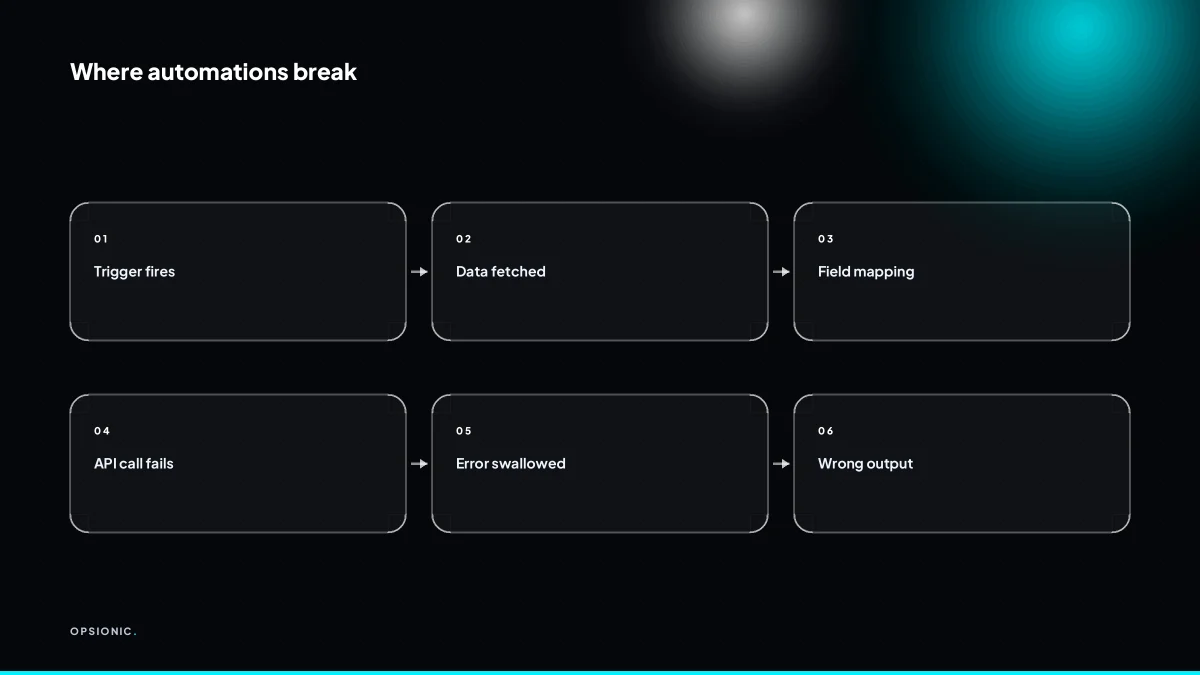
A test run only proves the happy path. Real data brings edge cases: empty fields, duplicate entries, timeouts, and unexpected formats. A workflow that cannot reach the accounting software may log the error and stop, which you notice. A workflow that catches the error and carries on fails silently. The invoice never syncs. The reminder never sends. Nobody checks because the dashboard shows green.
A successful test means the logic is correct for one clean example. Reliable operation means the logic holds when a customer submits a form with no phone number, when two identical invoices arrive within a minute, or when the CRM’s API takes forty seconds to respond instead of two. These are not rare events. They are the normal texture of live data.
You need monitoring from day one, not as a later add-on. That means an error queue you actually look at, alerts for repeated failures, and a retry rule for timeouts. It also means thinking about the hidden costs of automation before you trust a workflow with real money. A test run is a proof of concept. Operation is a different job.
Should you fix the process before automating it?
Automating a broken process is worse than doing nothing because the tool now repeats the mistake at scale, without the human judgement that used to catch it. A wrong invoice format sent to one client becomes a wrong invoice format sent to fifty clients before anyone notices. The cost of the error grows, and so does the cleanup.
Start with a simple SOP. The point is not perfect documentation. The point is forcing the steps out of someone’s head and onto a page where they can be questioned. You can document a process before automating with six fields: trigger, inputs, steps, decision points, outputs, and owner. That is enough to expose steps that exist only because one person once found a workaround.
The biggest risk is undocumented tribal knowledge. If only one employee knows that client X needs a PDF, not a spreadsheet, or that the Wednesday report pulls from a different folder, the automation will miss it. That employee goes on holiday, and the workflow runs wrong for a week.
Here is the order to follow:
- Write down every step as it actually happens today, including the workarounds people are embarrassed to mention.
- Mark any step that exists only because the last tool forced it, not because the business needs it.
- Remove duplication: two people entering the same address, two spreadsheets tracking the same job.
- Define the decision points in plain words: if the order is over EUR 500, it needs approval; if the client is on a retainer, skip the invoice reminder.
- Test the simplified process by hand for one week before you build anything.
Some processes need this more than others. Quote follow-ups with three different templates depending on the salesperson need one clean rule. Client onboarding where the account manager, the bookkeeper, and the support team each create their own record needs a single source of truth. Anything involving payment terms, VAT treatment, or contract dates deserves the extra hour of fixing before the first workflow runs.
Not sure which of these applies to you?
Answer six questions and see what we would automate first in your business, and what it is worth.
What are the most common field mapping mistakes?
A single mismatched field rarely fails loudly. It writes quietly. A date arrives as text, so your reminder automation fires three days late. A currency value drops its decimal, so a EUR 19.90 invoice becomes EUR 1990 in your accounting package. One bad field in a workflow that runs fifty times a day is fifty corrupted records by lunchtime. The damage compounds because downstream automations trust the data they receive.
Before connecting any two tools, list every field that moves between them. For each one, write the source field name, the destination field name, the data type, and the transformation needed. This is your data mapping sheet. Ten minutes of this prevents hours of cleanup later. The sheet also gives you something to hand a developer or an agency, so nobody has to guess what “amount” means.
Format mismatches are the most common failure point. Dates written as 03/04/2025 mean 3 April in the UK and 4 March in the US. Phone numbers with spaces, country codes, or leading zeros often fail validation in tools that expect E.164 format. Currencies lose precision when a tool treats them as plain numbers. Decide one format per field and enforce it at the source.
| Field type | Common mismatch | What breaks | Fix |
|---|---|---|---|
| Date | DD/MM vs MM/DD | Reminders fire on wrong day | Store as ISO 8601 |
| Currency | Decimal dropped or comma vs dot | Invoices overstate amounts | Map to decimal field, set currency code |
| Phone | Spaces, leading zero, no country code | SMS or WhatsApp fails | Normalise to E.164 at entry |
| Name | Full name into first name field | Personalised emails look wrong | Split at source or use parser |
| Status | “Paid” vs “paid” vs “PAID” | Filters and triggers miss records | Use a fixed list of values |
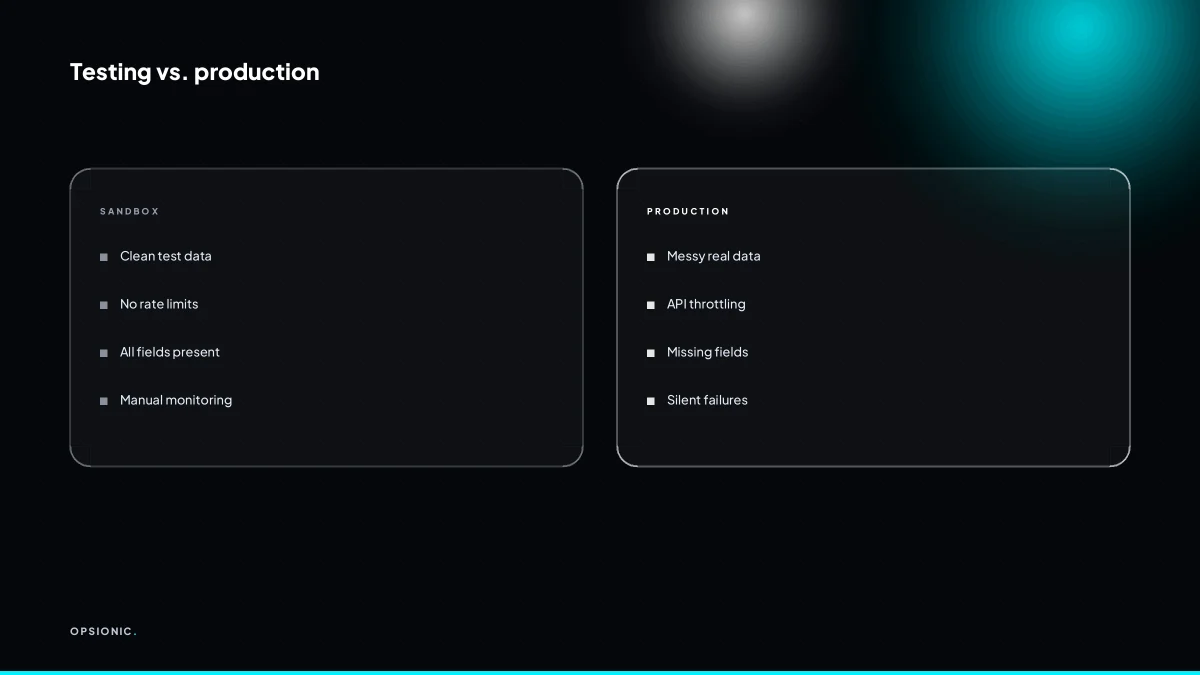
Testing with sample data means using the ugly real stuff, not clean examples. A test record called “Test Test” with a round number and today’s date tells you nothing. Use a name with an apostrophe, a phone number with a leading zero, an invoice amount with two decimals, and a date from a different month. Run the workflow end to end and check the record in the destination tool. When you connect Stripe to your accounting software, test a refund, a partial payment, and a failed charge before you trust the mapping. The fields that break are rarely the ones you thought to check.
How much testing is enough before going live?
A sandbox is not a luxury. It is a copy of your live tools where a wrong action costs nothing. If you test in production, a misconfigured step can email every customer, overwrite a real invoice, or delete a row you needed. Build the staging copy first, point the automation at it, and let it run against real records from last month. That catches data problems your made-up test rows will not.
Edge cases are where most automations die. A customer with two email addresses, an order with a zero quantity, a file name with a slash in it, a time zone one hour off. Write these down as test cases before you start, then run each one and check the result in the destination tool. Also test what happens when a step fails: does the workflow stop cleanly, retry forever, or send a half-written record onward?
The silent pilot is the last defence. Run the automation in parallel with your manual process for one full business cycle, typically a week or a month depending on your volume. Do the work by hand as usual, let the automation do its copy, and compare the two outputs every day. Only when they match for a full cycle do you switch off the manual way.
Print this checklist and tick every line before you go live:
- Run the automation in a staging copy, not production, for at least one full business cycle.
- Test every branch: the happy path, the empty field, the duplicate record, the failed payment.
- Open the destination tool and confirm each output row matches the source data.
- Test a deliberate failure and confirm the workflow stops or alerts correctly.
- Run a silent pilot in parallel with manual work for a full cycle and compare daily.
- Ask the person who does the job by hand to review the pilot outputs and sign off.
- Write down the switch-off date for the manual process and the rollback plan if it goes wrong.
If you are not sure what a full cycle looks like for your business, the way we build automations starts with mapping that cycle before any tool is connected. Testing against a guessed cycle is how a workflow passes on Tuesday and fails on Friday.
What is this costing you now?
Based on removing half of that time.
When should a human stay in the loop?
The first mistake is treating approval as a bottleneck rather than a checkpoint. The symptom: a manager sits on forty pending approvals every Monday, so the workflow quietly gets bypassed. The fix: only route the steps that genuinely need a second pair of eyes. A refund over EUR 500 needs sign-off. A refund of EUR 12 does not.
The second mistake is automating judgement calls. The symptom: a canned apology goes to a client who just lost a family member, because the trigger word “sorry” fired the wrong template. The fix: let the machine draft and a person send. For customer-facing messages where tone matters, the pattern in AI-drafted replies with a human send keeps the speed without the embarrassment.
The third mistake is hiding the human check inside a chat thread. The symptom: an invoice was “approved” in Slack, but nobody can find the record when the accountant asks. The fix: make the approval live in the system of record. One click, logged, dated, done.
Design the loop so the human only sees the delta: what changed, what it will do, and why it was flagged. If reading the context takes longer than doing the task by hand, the automation has failed.
What hidden dependencies break automations later?
API rate limits are the quiet killer. A workflow that syncs 200 records fine on a Tuesday fails on Friday when the vendor caps you at 100 calls per hour. Token expiry is worse: an OAuth refresh silently stops, and every run returns a 401 you never see. Format changes sit in the same bucket. A supplier adds a field, renames a column, or switches “date” from text to ISO, and your mapping breaks without a single error email.
Time zones are less obvious. A booking made at 23:30 in London is already tomorrow in Sydney. If your automation stamps it with the server’s clock, reminders fire a day early or late. Always store a time zone with every timestamp and convert at the edge, not in the middle of a workflow.
Retry logic and a dead-letter queue are not optional. As an example, suppose a workflow pushes 1,000 invoices a month to an accounting API that fails 2% of the time. That is 20 failed invoices a month, roughly one per working day. With three retries at escalating intervals, you recover 18 of them. Without retries, a person is hand-keying 20 invoices a month and wondering why the automation “mostly works.”
Then keep an audit log: what ran, what it sent, what came back, and where it stopped. Silent failures are the ones that cost you. A log turns “the client never got the quote” into “step 4 returned a 429 at 14:02, retried twice, then queued.” That is the difference between a fix and a blame session. If you run automations on your own server, who fixes it at 2am is a question worth answering before the first token expires.
Want this running in your business next week?
A relaxed 20-minute video chat. Camera on or off. You leave with a plan whether or not you hire us.
- No call unless you ask for one
- From EUR 399 a month, no setup fee
- Built and run for you, not handed over as homework
Sources we checked
Questions people ask
How do I know if my automation is failing silently?
Look for missing records in the destination tool, not just error logs. Set up an error queue and alerts for repeated failures. Run a silent pilot in parallel with manual work for a full business cycle and compare outputs daily. If the dashboard shows green but records are missing, the workflow is failing silently.
Can I automate without any coding knowledge?
Yes, many small business automations can be built with no-code tools. But you still need to understand the process, map fields correctly, and test edge cases. If the workflow touches payments, customer data, or accounting, get help with the setup and monitoring rather than guessing.
What is the best tool for small business automation?
There is no single best tool. The right choice depends on which apps you already use, your budget, and whether you need self-hosted control. Start by listing the tools you need to connect, then check which automation platform supports them natively. Avoid picking a tool before you know your process.
How often should I review my automations?
Review them after any change to your tools, pricing, or process, and at least once a quarter. Check error logs, confirm records still match, and test one edge case. Automations drift when the business changes around them, so a short scheduled review catches problems before they reach a client.
Is it safe to automate tasks involving customer data?
It can be, if you limit what data moves, store credentials securely, and follow GDPR rules for consent and retention. Avoid sending personal data to tools you have not vetted. For customer-facing messages, keep a human check before sending. Data safety depends on how you configure the workflow, not on automation itself.
What should I do if an automation sends wrong information to a client?
Stop the workflow first, then contact the client with a correction and an apology. Log what happened, identify the field or rule that failed, and fix it before restarting. Add a test case for that scenario and consider a human approval step for similar messages in future.