Estate Agency Automation: Enquiry to Viewing in Minutes
Automation for estate agents means connecting your portal leads, viewing diary, and vendor updates so they flow without manual retyping. A new Rightmove or Zoopla enquiry can be qualified, booked, and confirmed in minutes, while vendors receive a weekly update email automatically. It removes the repetitive admin that eats evenings, not the personal judgement you bring to valuations and negotiations.
Which estate agency tasks should you automate first?
Start with the tasks that repeat daily and have a clear trigger: responding to portal enquiries, scheduling viewings, and sending vendor updates. These three consume the most admin time and directly affect lead conversion.
Enquiry response matters because a portal lead who waits an hour often books with another agent. An automation can send a qualification message within a minute, ask for buying position and budget, and drop the answers into your CRM. Viewing scheduling then runs against one shared diary, so a buyer picks a slot without a phone call. Vendor updates are the third quick win: a short automated email every Friday, showing viewings, feedback and next steps, removes the call most vendors make when they hear nothing.
To find the next candidate, look for any task with an obvious trigger and a predictable outcome. If you can describe the first step in one sentence and you do it more than twice a week, it is worth considering. The work of deciding what tasks should a small business automate first is mostly separating those clear cases from the messy ones.
The risk is automating too much too soon. If you connect ten tools in month one, a single broken step can stop every lead flow at once and you will not know which part failed. Start with the three above, run them for a few weeks, then add one more process at a time.
How do you capture and qualify portal enquiries automatically?
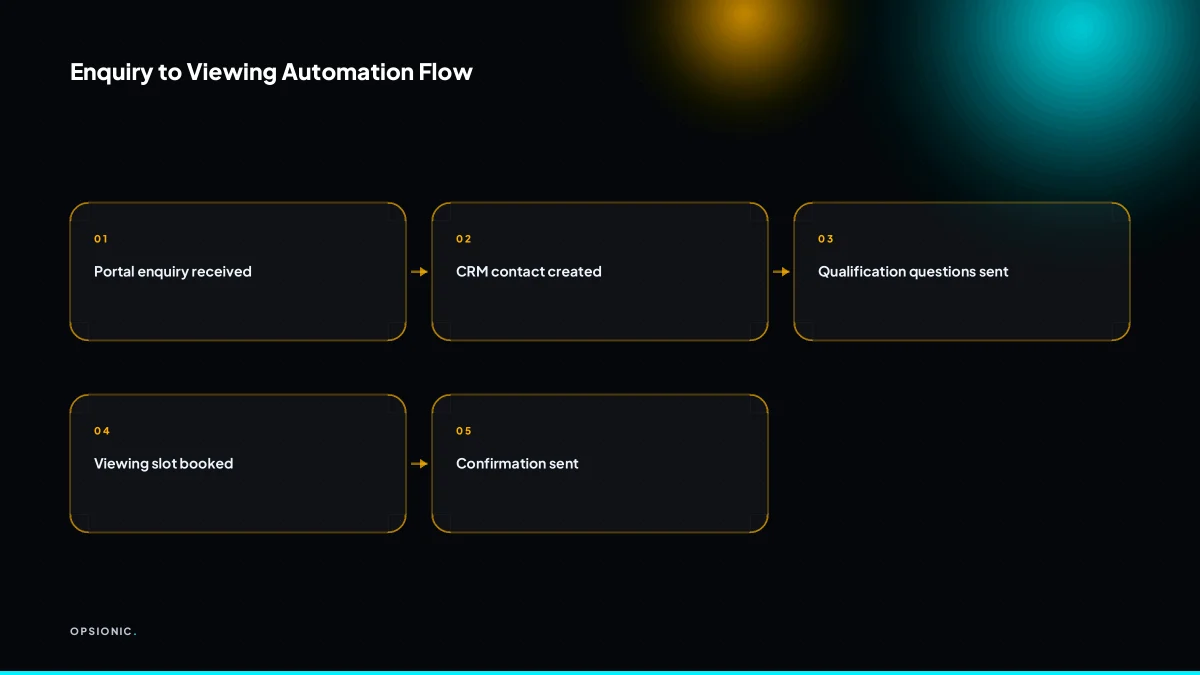
Use a tool like Zapier, Make, or n8n to connect your portal’s email alerts or API to your CRM. When a new enquiry arrives, the automation creates a contact, sends an instant acknowledgment, and asks qualifying questions.
- Connect each portal’s lead feed to your CRM. Rightmove, Zoopla, and OnTheMarket can send enquiries by email or API. Point that feed at one shared inbox or webhook so every lead lands in the same place, no matter which portal produced it.
- Create the contact and a task in your CRM. The automation fills in name, phone number, email, and the property they asked about. It also sets a follow-up task for a specific agent, with a due time measured in minutes, not days.
- Send an acknowledgment within two minutes. The buyer gets a short email or SMS that confirms receipt, names the property, and tells them what happens next. This reply goes out even at 9pm or on a Sunday.
- Ask the two qualifying questions that matter. A second automated message asks whether they have a property to sell and when they want to view. Their answers update the CRM record, so the first human conversation starts with context instead of cold questions.
- Store the data with a clear legal basis. You need consent or legitimate interest before keeping buyer details. Record where each enquiry came from and what they agreed to, and add an unsubscribe link to every automated message so you stay inside GDPR rules.
This is the same logic as automating lead routing in any service business: the first reply is the one that wins the viewing.
Not sure which of these applies to you?
Answer six questions and see what we would automate first in your business, and what it is worth.
How do you book viewings without double-booking?
Use a scheduling tool like Calendly integrated with your Google Calendar and CRM. When a buyer qualifies, they receive a link to choose a viewing slot from your availability. The booking is added to the shared diary and CRM automatically.
- Set up viewing slots in Calendly for each property or agent, with buffer times for travel between appointments.
- Connect Calendly to the Google Calendar you share with colleagues so booked slots disappear from everyone’s availability at once.
- Create a workflow that sends each new booking to your CRM with the buyer’s name, email, phone number and chosen property attached.
- Add an automatic confirmation email that includes the address, meeting point and a link to reschedule if needed.
- Configure cancellation rules so a freed slot reopens immediately and notifies the assigned agent by email or SMS.
- Set a reminder sequence: one message 24 hours before the viewing and one two hours before, both sent without you touching a screen.
When a buyer cancels, the slot returns to Calendly and the CRM record updates with the new status. When they reschedule, the old diary entry is replaced rather than duplicated. This is the same pattern as connecting Calendly to your CRM automatically, so no one has to retype a booking that already exists.
How do you send vendor update emails without writing each one?
Create a template in your CRM that pulls data like viewings, enquiries, and offers. Schedule the automation to send a weekly email to each vendor with this information.
Build the template once using merge fields from your property records. A typical layout includes:
- Number of viewings this week
- New enquiries received
- Offers made or rejected
- Any price or listing changes
Each field maps to a column or property in your CRM, so the email reads as if you wrote it for that vendor. If a field is empty, the automation skips the line rather than showing a blank space.
Schedule the send per vendor, not as one bulk email. A weekly trigger at a set time, say Friday at 16:00, pulls only the records that are active listings. Vendors who sold or withdrew are excluded automatically.
Let replies come back to your normal inbox. The automation should not try to answer vendors. A reply lands with you, and you handle it like any other email. This keeps the update informative without pretending to be a conversation. The pattern is the same one used to automate weekly reports, so you are sending one number set, not thirty separate messages.
What is this costing you now?
Based on removing half of that time.
What does this actually save you in a month?
Consider a worked example with invented but realistic figures. Suppose a five-person agency handles 50 new enquiries and 30 viewings weekly. Before automation, the team might spend 15 hours on admin: copying portal leads into the CRM, phoning buyers to qualify them, coordinating diaries, and writing vendor updates. After automating enquiry capture, booking, and vendor updates, that could drop to 5 hours. That is 10 hours saved weekly, or 40 hours monthly.
Now suppose your agency values a negotiator’s time at EUR 25 per hour. The 40 hours saved each month is worth EUR 1,000 in staff time alone. If a managed automation service costs EUR 599 per month, the arithmetic is simple: EUR 1,000 saved minus EUR 599 spent leaves EUR 401 in your favour every month. That is before counting the extra viewings booked because replies go out in minutes rather than hours, or the vendor who stays with you because the Friday update email arrives without fail.
In this example, the savings break down unevenly. Enquiry capture and qualification is the biggest block, often six hours a week when someone copies details from portals into a CRM and then phones or emails each lead. Booking viewings against a shared diary eats another four hours. Vendor updates take three hours, and the remaining two hours vanish into chasing missing phone numbers, correcting typos, and re-sending emails that bounced.
To run the sum for your own agency, list every repetitive admin task around enquiries, viewings, and vendor contact. Estimate the hours per week each one takes. Multiply by your hourly cost per staff member, then by four for a monthly figure. Compare that against the price of a managed service. If you want a fuller method, the same logic applies to how many hours can automation save small business. The number that matters is not the hours themselves. It is what those hours cost you now, and what you would do with them instead.
Should you build this yourself or hire an automation agency?
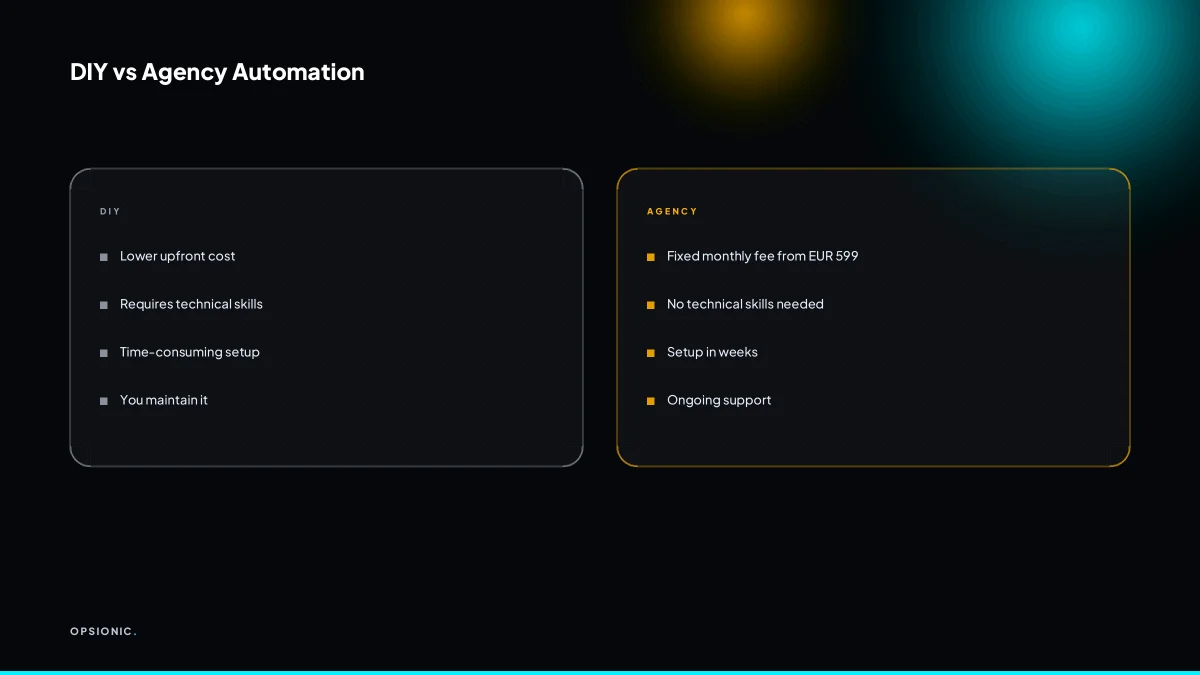
If you are comfortable with tools like Zapier and have time, you can build basic automations yourself. But connecting portals, CRM, and scheduling reliably, while staying GDPR compliant, is fiddly. An agency can map and build the whole chain, with ongoing support, for a fixed monthly fee.
DIY suits agents who enjoy tinkering and have slack in the week. The tool costs are low, often starting at around EUR 20 to EUR 50 a month at the time of writing, but check each vendor’s pricing page for current rates. The hidden cost is your time. A portal to CRM to calendar chain has at least four moving parts. Each one can break when a vendor changes an API or a field name. You fix it, or leads sit unanswered.
An agency costs more per month, but you are buying a working system, not a learning project. You also get someone who has built similar chains before and knows where they snap.
What to look for in an automation agency
- They ask about your current process before quoting anything.
- They name the tools they would use and why.
- They tell you what stays manual and what does not.
- They offer ongoing support, not just a handover document.
Questions to ask before signing
- Who owns the automation if we part ways?
- What happens when a connected app changes its API?
- How do you handle errors and retries?
- Can you show me a similar build, even without client names?
If the answers are vague, walk away. A good agency will also be honest about scope. Before you commit, run through the questions to ask an automation agency so the contract matches the work you actually need.
Want this running in your business next week?
A relaxed 20-minute video chat. Camera on or off. You leave with a plan whether or not you hire us.
- No call unless you ask for one
- From EUR 399 a month, no setup fee
- Built and run for you, not handed over as homework
Sources we checked
Questions people ask
Can automation handle phone enquiries as well as portal leads?
Yes, with a call-tracking or voice tool that transcribes or logs the call, then pushes the caller's details into your CRM and starts the same qualification sequence. Portal leads arrive as structured data, so they are simpler. Phone enquiries need a tool that captures the number, records consent and creates the contact record.
What if a buyer wants to book a viewing outside the set slots?
Leave a fallback. Add a line to the booking confirmation inviting the buyer to reply if none of the slots suit them, and route that reply to the assigned negotiator. The automation handles the standard bookings, and a human handles the exceptions without the diary being touched twice.
How do you ensure GDPR compliance when automating vendor updates?
Send vendor updates to the vendor about their own property, which rests on the contract you already have. Keep buyer details out of those emails, or only include them where the buyer has been told and agreed. Record your lawful basis, limit what each email contains, and check the ICO guidance for your situation.
Which CRM works best with Rightmove and Zoopla for automation?
There is no single best CRM. What matters is whether it has an open API or accepts incoming webhooks, and whether your portal feed can be pointed at it. Estate agency CRMs with published APIs connect most cleanly. If yours only sends email alerts, an automation tool can still read that inbox and create the contact.
Can automation help with property matching and sending new listings to buyers?
Yes. Store each buyer's budget, area and must-haves as fields, then trigger an email whenever a listing matches. The risk is volume. Send matches in a daily or twice-daily digest rather than one email per listing, and let buyers set how often they hear from you.
What happens if the automation breaks? Who fixes it?
That depends on who built it. A DIY build means you watch for failures and repair them. A managed service should monitor the workflows, alert on errors and fix broken steps as part of the monthly fee. Ask any provider exactly this before you sign, and get the answer in writing.
Is there a risk of appearing impersonal to buyers and vendors?
There is, if every message reads like a receipt. Keep automated replies short and specific, name the property, and make it obvious a person will follow up. Vendor updates should carry real numbers from that vendor's listing. The automation removes the delay, not the human contact that follows it.