Self Host n8n for Business: The Work Behind the Server
Self host n8n for business means running the automation tool on your own server instead of a cloud subscription. It can cut monthly software costs, but you take on security, backups, updates, and monitoring. Most small businesses underestimate the time and risk. This page explains what proper self-hosting requires and when paying for management is smarter.
What does n8n need to run properly on my own server?
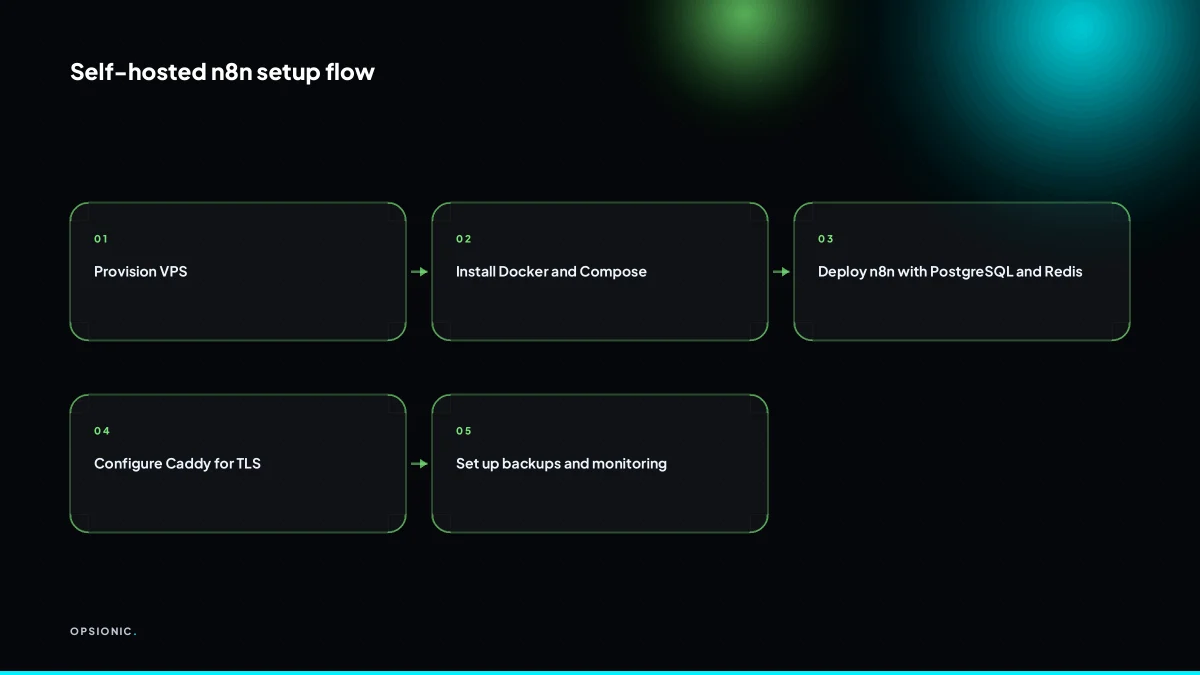
A production n8n instance needs a virtual private server with at least 2 GB RAM and 2 vCPUs, running Docker and Docker Compose. You also need PostgreSQL for reliable storage, Redis for queueing, and a reverse proxy like Caddy or Nginx for TLS. Without these, you risk data loss and downtime.
For a small business running a handful of workflows, 2 GB RAM and 2 vCPUs is the floor, not the target. Once you add a few active workflows, webhooks and scheduled jobs, memory fills up fast. A 4 GB instance gives you room for Redis, PostgreSQL and n8n without swapping to disk. Disk space matters less: 30 GB is usually plenty unless your workflows write large files.
SQLite is the default database, and it works for a laptop test. It does not belong in production. PostgreSQL handles concurrent writes properly, survives restarts without corrupting the workflow table, and makes backups a known quantity. Redis holds jobs waiting to run, so a short n8n restart does not lose the email that was about to go out.
Docker Compose is what makes the stack reproducible. One file defines n8n, PostgreSQL, Redis and your reverse proxy. When you rebuild the server or move to a bigger one, you run two commands and the whole thing comes back. Without Compose, you are reinstalling each piece by hand and hoping the versions still match.
A realistic VPS for this starts at around EUR 8 to EUR 15 per month at the time of writing, depending on the provider. That gets you 4 GB RAM and a managed kernel. If you want someone else to run the server, patch it and watch it overnight, that is a different service. We offer managed server hosting for exactly this reason, because the server is the part most owners should not be thinking about at 2am.
How do I secure n8n with TLS and access controls?
Secure n8n by putting it behind a reverse proxy that terminates TLS, using a free Let’s Encrypt certificate. Then restrict access with a strong password, SSH key-only server login, and optionally IP allowlisting or a VPN. Never expose n8n directly to the internet without TLS, because workflow credentials travel over that connection.
The practical route for a small business is Caddy, because it handles certificates automatically. The steps below assume n8n is already running on your VPS.
- Install Caddy on the same server as n8n.
- Point your domain’s A record at the server’s IP address.
- Create a Caddyfile that proxies your domain to n8n’s local port, usually 5678.
- Start Caddy and confirm it obtains a Let’s Encrypt certificate for your domain.
- Disable password login over SSH and require an SSH key instead.
- Set the firewall to allow ports 22, 80 and 443 only, and block everything else.
- Set a strong n8n owner password and disable public user registration.
- Protect webhook endpoints with n8n’s built-in authentication or a shared secret header.
SSH keys and firewall rules matter because the server is the weakest point. If someone gets shell access, your workflows, credentials and customer data are all readable. The firewall also stops n8n’s own port from being reached directly, which forces every request through TLS.
For GDPR, treat the server as a data processor you control. Store customer data only on that server, keep access logs, and document who can reach it. If you process EU customer data, the automation itself must follow the same rules as any other system. Our guide on GDPR compliant automation for small businesses walks through the checklist without the usual noise.
Not sure which of these applies to you?
Answer six questions and see what we would automate first in your business, and what it is worth.
What backups do I need and how often should I test them?
Back up your n8n database, workflow files, and the .n8n folder daily. Store them off-site using restic to an S3-compatible bucket. Test a restore at least monthly. A backup you have never restored is a hope, not a backup.
Three things hold your automations together: the PostgreSQL database that stores workflow definitions and execution history, the workflow files themselves, and the .n8n folder where n8n keeps credentials and encryption keys. Lose the database and you lose every workflow. Lose the .n8n folder and you lose the keys that decrypt your saved API tokens. Back up all three, not just the pretty workflow JSON.
restic handles this cleanly. Point it at the database dump, the workflow directory, and the .n8n folder, then schedule a daily run with cron. restic encrypts everything before it leaves your server and deduplicates snapshots, so a year of daily backups costs little storage. Send the repository to an S3-compatible bucket from a provider you do not host on. If your server dies, your backups must live somewhere else.
Print this checklist and work through it once a month:
- Confirm the restic cron job ran in the last 24 hours without errors.
- Check the backup repository size and snapshot count in your S3 bucket.
- Spin up a clean test server or container with n8n installed.
- Run restic restore to pull the latest snapshot onto that test machine.
- Start n8n and open the dashboard. Confirm every workflow appears and one test workflow runs end to end.
- Verify a saved credential still authenticates, not just that the field looks populated.
- Delete the test server.
If a restore test fails, treat it as a production incident. A broken backup is worse than no backup because it gives you false confidence. This is the point where many self-hosted setups quietly fall apart, and it is a common reason automation projects fail in small businesses: the automation works until the server does not, and then there is nothing to restore.
How do I update n8n without breaking existing workflows?
Update n8n by pulling the new Docker image and restarting the container, but first read the release notes for breaking changes. Keep a staging instance or at least a full backup. Test critical workflows after updating. Skipping updates leaves security holes, but careless updates can silently change how nodes behave.
The three ways an update goes wrong
Silent node changes. A workflow still runs, but a node now formats dates differently or returns an extra field. You notice days later when a client asks why their invoice says 03/04 instead of 04/03. Read the release notes before updating, not after, and test one workflow per node type you rely on.
Deprecated credentials. An OAuth app n8n used is no longer supported, so a workflow that ran every morning now fails with an auth error. Check the breaking changes section for credential changes and reauthorise affected connections immediately after the update.
Database migration stall. n8n needs to migrate its internal database, but the container restarts before it finishes. Symptoms are a half-loaded UI or workflows that vanish from the list. Stop the container fully, pull the image, then start it once and wait. Do not interrupt the first boot.
If a workflow fails after updating, roll back the image tag, restore the backup from before the update, and confirm it works again before retrying. The update itself is not the problem. Skipping the checks is. This is the same trade-off you face when comparing n8n vs Zapier for small business: self-hosting gives you control, but that control includes the obligation to update carefully.
What is this costing you now?
Based on removing half of that time.
What monitoring do I need so failures get noticed fast?
Set up Uptime Kuma to ping your n8n webhook endpoints every minute and alert you by email or Telegram. Also monitor server CPU, memory, and disk. A broken automation can go unnoticed for days if no one checks.
Webhook monitoring matters because n8n workflows usually start when another service calls a URL. If that endpoint stops answering, every workflow behind it goes quiet. You will not see an error in a dashboard you never open. You will see a customer asking why the invoice did not arrive.
- Install Uptime Kuma on a separate small server or container, never on the same machine as n8n itself.
- Add a monitor for each production webhook URL and set the check interval to 60 seconds.
- Configure a Telegram or email alert so two failed checks in a row trigger a message.
- Enable server monitoring for CPU load, memory use, and disk space, with an alert at 85 percent disk usage.
- Write a short incident checklist: check Uptime Kuma history, open the n8n execution log, restart the failed workflow, and confirm the next run succeeds.
This is the discipline behind how to start automating your business without adding a new full-time job. The automation saves hours. The monitoring saves the automation.
When is self-hosting n8n a false economy?
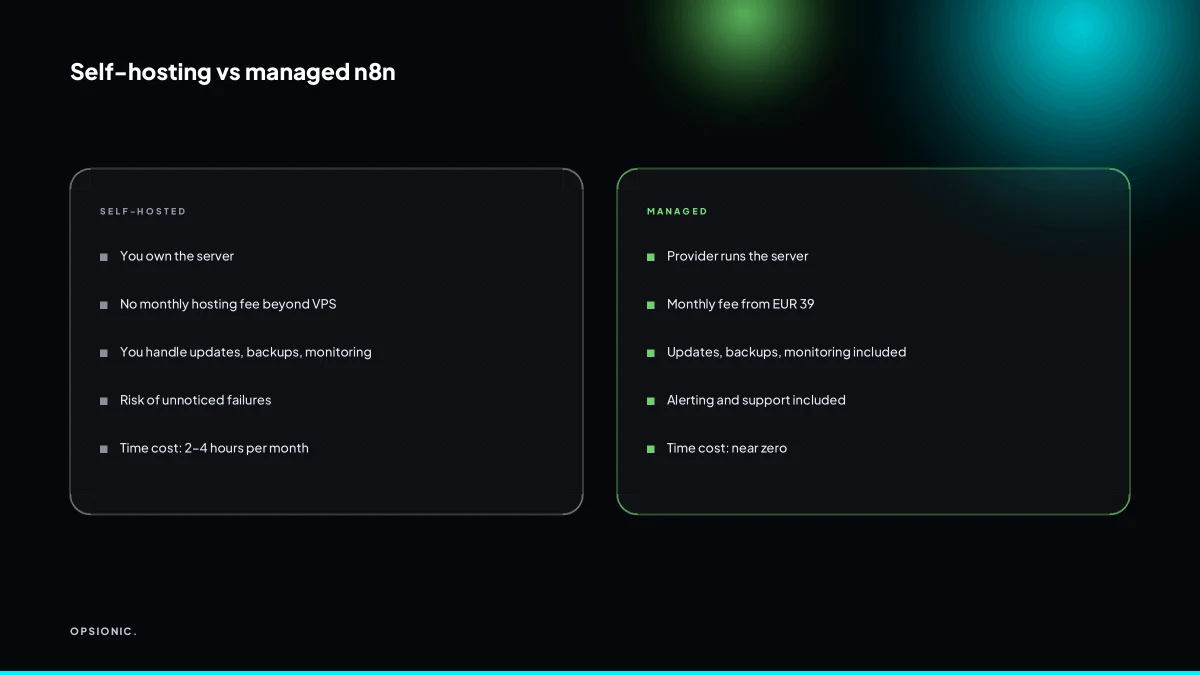
Self-hosting becomes a false economy when your time costs more than the savings. If you spend four hours a month on updates, backups, and fixes, at EUR 50 per hour that is EUR 200. Managed n8n hosting starts at EUR 39 per month. For many owners, paying someone is cheaper than doing it yourself.
Take a worked example, not a client. A small bookkeeping firm runs five workflows on a EUR 12 per month VPS. The owner handles updates, renews the TLS certificate, checks backups, and investigates one failed run per month. That is three hours at EUR 60 per hour, so EUR 180 of owner time. Add the VPS cost and the total is EUR 192. Managed hosting at EUR 39 per month removes the three hours. The owner gets EUR 141 back in usable time.
Hidden costs stack up. SSL renewals fail silently. Security patches need testing before you apply them to a live server. Monitoring tools need configuring and someone has to read the alerts. A small team rarely has a person whose job includes server upkeep, so it falls to the owner after hours.
When the business depends on the automations, the rational choice is to buy the maintenance. That is the same logic as is business automation worth it: compare the hourly cost of your attention against the flat fee, then pick the cheaper one.
Want this running in your business next week?
A relaxed 20-minute video chat. Camera on or off. You leave with a plan whether or not you hire us.
- No call unless you ask for one
- From EUR 399 a month, no setup fee
- Built and run for you, not handed over as homework
Sources we checked
Questions people ask
Is n8n free if I self-host it?
The n8n software is free to self-host under its fair-code licence, but the server is not. Budget around EUR 8 to EUR 15 a month for a 4 GB VPS at the time of writing, plus your own time for updates, backups and monitoring. Check n8n's own pricing page for current licence terms.
Can I run n8n on a Raspberry Pi for my business?
You can run n8n on a Raspberry Pi for testing, but it is a poor fit for production. SD cards fail, memory is tight once PostgreSQL and Redis are added, and power cuts corrupt databases. A small VPS costs less than the time you would spend recovering from a failed card.
What happens if my n8n server goes down at night?
Webhooks stop answering and queued jobs wait. Nothing runs until the server returns. Without monitoring you find out when a customer asks why their confirmation never arrived. Uptime Kuma pinging each production webhook every minute, with an alert after two failures, turns a silent outage into a message on your phone.
How do I migrate from Zapier to self-hosted n8n?
Rebuild one workflow at a time in n8n rather than all at once. Export your Zapier data, map each step to the equivalent n8n node, and run both systems in parallel for a week before switching off the Zap. Start with the workflow that saves the most hours, and keep a backup before each change.
Do I need a static IP address for n8n webhooks?
No. Webhooks need a stable domain name, not a static IP. Point a DNS A record at your server and let a reverse proxy such as Caddy handle TLS. If the server's IP changes, update the DNS record and the webhook URLs stay the same because they use the domain.
Can I use n8n self-hosted with GDPR?
Yes, if you treat the server as a data processor you control. Keep EU customer data on that server, restrict access with SSH keys and a firewall, log who can reach it, and document your retention. The automation must follow the same rules as any other system handling personal data.
What is the cheapest VPS that can run n8n reliably?
A 4 GB RAM, 2 vCPU instance is the sensible floor for production, at around EUR 8 to EUR 15 a month at the time of writing depending on provider. A 2 GB server runs n8n alone but struggles once PostgreSQL, Redis and a few active workflows share the memory. Check each vendor's pricing page.