Automate Your Employee Onboarding Checklist
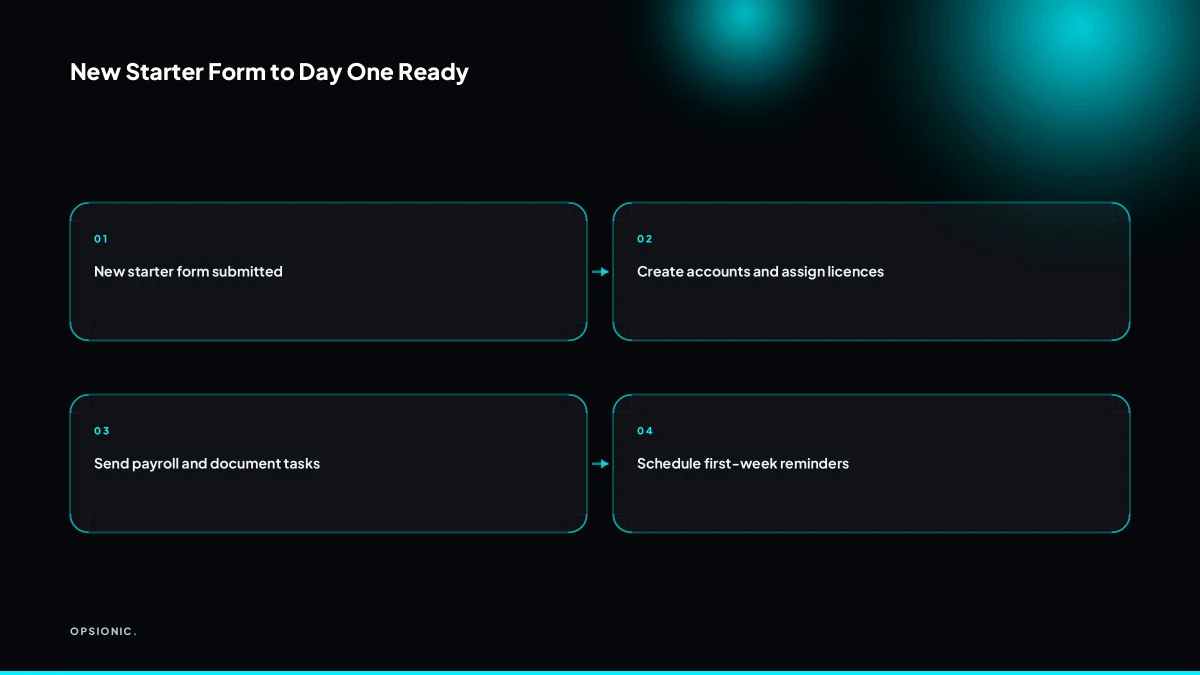
To automate an employee onboarding checklist, start with one new starter form that captures name, role, start date, and equipment needs. That single submission then triggers conditional tasks: account creation, payroll setup, document signing, and first-week reminders. Instead of you chasing each item, a workflow routes and tracks every step, leaving an audit trail you can show.
Which onboarding steps can you automate, and which must stay human?
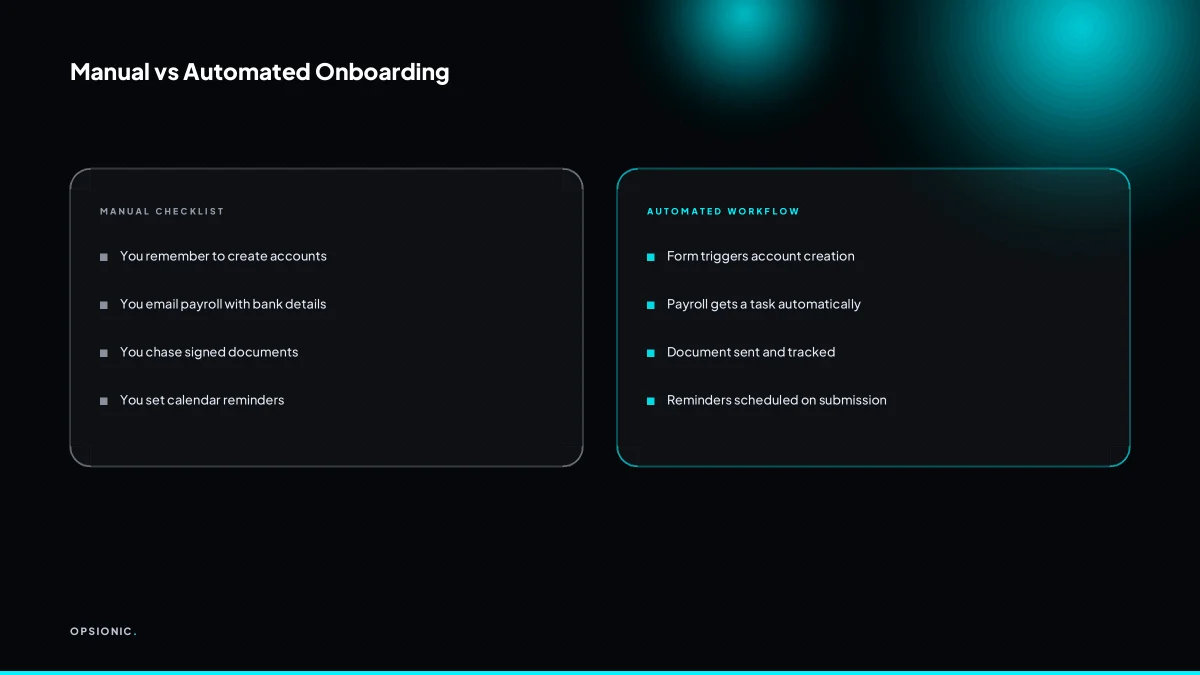
Automate anything that follows a rule: account creation, licence assignment, document sending, calendar invites, and reminders. Keep human the steps needing judgement: a welcome call, a buddy introduction, or a role-specific training plan. The split is not about importance. It is about whether a decision or a personal touch is required at that moment.
Rule-based steps are the easiest wins. A single starter form can trigger account creation in your email system, assign software licences, send the employee handbook, and create tasks for IT. Reminders for the first-week check-in run themselves. Ticket creation for a laptop or desk setup follows the same logic.
Judgement-based steps stay with people. A welcome call sets the tone in a way a template cannot. Buddy assignment depends on personalities and current workloads. Role-specific training needs a manager who knows what the new starter must learn first. The cultural introduction works best as a conversation, not a PDF.
The rule is simple: if a step needs a decision, keep it human. If it needs a series of clicks, automate it. That distinction matters more than the tool itself. For a clearer picture of where automation ends and human judgement begins, see the difference between rules and judgement in automations.
A warning: do not automate the personal welcome. An automated email that says “we are excited to have you” lands as noise. Sensitive conversations about probation, salary, or role expectations must never sit inside a workflow. Automate the logistics. Leave the relationship to a person.
How do you design one form that triggers accounts, paperwork, payroll and training?
Build a single new starter request form with fields for name, personal email, start date, role, manager, location, and equipment needs. Use conditional logic so a contractor sees different fields than an employee. On submission, the form sends data to your automation platform, which then creates tasks in payroll, IT, and the manager’s inbox, all from that one entry.
- Create the form in Jotform or Google Forms. Add fields for full name, personal email, start date, role, manager, location, and equipment needs. Keep every field required unless you have a reason not to.
- Add a conditional section for contractor or employee. If the person selects contractor, show fields for invoicing details and contract end date. If employee, show fields for payroll bank details and tax information.
- Add a conditional section for office or remote. If office, show a desk and access badge request. If remote, show a shipping address for equipment.
- Connect the form to Make or Zapier. Set the trigger as a new form submission. Map each form field to a variable the automation can reuse.
- Route the data to three places. Create a payroll task with the bank and tax details, an IT task with the equipment and location, and an email to the manager with the start date and role.
- Log the submission in Airtable. Add a row with the new starter’s name, role, start date, and the timestamp of the form. This becomes your audit trail for who requested what and when.
One submission, one timestamp, one row in Airtable. That row is your record that the request happened, which matters when a manager says they never asked for a laptop. The same pattern works for moving form data into a sheet without manual copying, as covered in setting up Jotform to Google Sheets properly.
Not sure which of these applies to you?
Answer six questions and see what we would automate first in your business, and what it is worth.
How do you handle account creation and SaaS licences without security mistakes?
For each new starter, create accounts using a standardised naming convention and assign licences based on role. Avoid shared credentials; use your identity provider or Google Workspace/Microsoft 365 groups. Set up single sign-on where possible, and record every account in a central log. When offboarding, that same log tells you exactly what to revoke.
Start with the naming convention. Firstname.lastname works until you hire two people with the same name, so decide the rule once and stick to it. Licences follow role, not person. A finance hire gets Xero and approval access in your bank portal. A marketing hire gets Canva and the social scheduler. Nobody gets a licence “just in case” because every unused seat is a monthly cost and a potential entry point.
Provision access through groups in Google Workspace or Microsoft 365, not by adding individuals to each tool. When someone moves teams, you change one group membership and their permissions update everywhere. When they leave, you remove them from the group and the access disappears. Single sign-on means one password reset, one place to enforce two-factor authentication, and one place to cut off a departing employee.
Keep a central log with one row per account: the service, the username, the licence tier, and the date it was created. During offboarding, you work down that list and revoke each entry. A log also shows you which accounts were never actually used, so you can stop paying for them. This is part of the wider question of whether AI is safe for customer data under GDPR, because minimising accounts and controlling access are the same habits that keep employee and customer data separate.
How do you route tasks to HR, IT, payroll and the line manager without another project tool?
Use your existing communication tool, usually Slack or Microsoft Teams, to receive task notifications. Your automation platform can post a message to a dedicated onboarding channel, mention the responsible person, and include a link to the relevant form or document. No new project management software is needed; the workflow itself tracks completion.
The automation posts to a channel named something like #new-starters. Each message mentions the person who owns that step: payroll for bank details, IT for the laptop, the line manager for the first-week check-in. The message links straight to the item they need to action, so nobody has to search a shared drive or ask in a group chat what they are supposed to do.
Completion tracking stays inside the automation. When payroll marks the bank details as entered, the workflow updates a simple spreadsheet row for that starter. When IT closes the equipment request, the row changes again. You can see at a glance which steps are done and which are still waiting, without logging into a separate project tool. The same pattern works for any form that feeds a process, the way you would send WPForms submissions to Slack with a claim button and then track who actually claimed each one.
As a worked example, suppose a new starter needs three things on day one: payroll setup, a laptop, and an induction call. Your automation sends three messages. Payroll marks their task complete in 10 minutes, IT takes 45 minutes because they have to image the machine, and the line manager books the call for day two. The spreadsheet shows two completed rows and one pending. That is the whole routing system, and it cost you nothing beyond the automation you already run.
What is this costing you now?
Based on removing half of that time.
What does a worked example look like for a five-person firm hiring one new starter?
A five-person consultancy hires a junior analyst. The office manager fills one Google Form with name, start date, laptop choice, and role. Zapier triggers: a Gmail welcome with handbook attached, a Slack message to the manager to schedule a buddy call, a Trello card for payroll, and a calendar invite for the first-week check-in. Total setup time: under two hours. Before automation, the office manager spent three hours per hire chasing these items. With automation, that drops to fifteen minutes of review.
Here is the arithmetic for that example. Manual onboarding means the office manager writes the welcome email, messages the line manager, creates the payroll request, and books the check-in. Each task involves finding the right template or person, then waiting for a reply. Three hours per hire is a realistic figure when you include the back-and-forth. Automated onboarding means the manager fills in four fields and clicks submit. The review time is fifteen minutes: open the Trello card to confirm payroll has it, glance at Slack to see the buddy call is scheduled, and check the calendar invite landed. Three hours minus fifteen minutes is two hours and forty-five minutes saved per hire. If the firm hires four people a year, that is eleven hours returned to actual client work. The setup cost was under two hours once. The same form keeps working for every future starter, which is why how we build an automation starts with the trigger, not the tools.
What goes wrong when you automate onboarding, and how do you avoid it?
Common failures: duplicate accounts when two people action the same trigger, missed revokes when offboarding is forgotten, and data protection slip-ups when personal data is sent to the wrong channel. Prevent these by building idempotency checks, linking offboarding to the same trigger, and minimising data in notifications. Test with a dummy hire first.
Duplicate accounts from double triggers. The manager submits the starter form, then HR submits the same form because nobody said it was done. Now the new hire has two email accounts, two payroll records, and two laptops on order. The fix is an idempotency check: before the workflow creates anything, it looks for an existing record with the same personal email or national insurance number. If one exists, the workflow stops and notifies whoever ran it. This is the kind of silent failure that turns a time-saving automation into a cleanup job, which is why automation mistakes to avoid almost always start with duplicate triggers rather than broken tools.
Missed revokes when offboarding is not automated. The starter flow works beautifully. Six months later the employee leaves, and nobody remembers which systems the onboarding flow touched. The old login to the shared drive still works. The company card is still active. The fix is to make offboarding part of the same trigger: one form or status change that disables every account the starter flow created, in reverse order, with a dated log. If offboarding is a separate manual process, the automation has made security worse, not better.
Data protection: personal data sent to the wrong channel. A starter form collects a passport number, then a notification sends the full form to a shared Slack channel or a group email. Under GDPR, that can be a breach. The fix is to minimise data in every notification: send only the starter’s name and start date, never the document itself. Store sensitive fields in the HR system with restricted access. If a manager needs to see a passport copy, they open the record, they do not receive it in a chat message.
Want this running in your business next week?
A relaxed 20-minute video chat. Camera on or off. You leave with a plan whether or not you hire us.
- No call unless you ask for one
- From EUR 399 a month, no setup fee
- Built and run for you, not handed over as homework
Sources we checked
Questions people ask
Can I automate onboarding with just Google Workspace and Zapier?
Yes. Use Google Forms for the starter request, Zapier to trigger actions, and Google Workspace groups for account and licence assignment. You can create tasks in Google Tasks or Trello, send Gmail welcomes, and log submissions in Google Sheets. This covers accounts, paperwork, and reminders without extra HR software.
How do I automate onboarding for contractors versus employees?
Add a conditional section to your form: contractors see fields for invoicing details and contract end date, employees see payroll bank and tax fields. Route the submission to different tasks based on that choice. Contractors typically skip payroll setup but need a contract and invoice process instead.
What is the best tool for a small business without an HRIS?
Start with the tools you already have: Google Forms or Jotform for the request, Zapier or Make for automation, Slack or Teams for notifications, and Airtable or Sheets for the audit log. This keeps cost low and avoids a new system. Add an HRIS only when headcount or compliance needs justify it.
How do I ensure offboarding revokes all access automatically?
Keep a central log of every account created during onboarding, with service, username, and date. When someone leaves, trigger a workflow that works down that list and revokes each entry. Use group-based access in Google Workspace or Microsoft 365 so removing one group membership cuts access everywhere.
Can I automate first-week check-in reminders without annoying new hires?
Yes, if you keep them few and useful. Schedule one reminder to the line manager to book a check-in call, and one to the new starter with a link to a short feedback form. Avoid daily automated messages. Let the manager handle the personal conversation.
Is it secure to send personal data through automation platforms?
It can be, if you use reputable platforms with encryption in transit and at rest, restrict access to the automation, and avoid sending sensitive data like bank details through chat. Send only what each step needs. For payroll and tax data, use secure forms or direct entry into your payroll system.
How much does it cost to automate employee onboarding for a small team?
Costs vary by tools. Zapier or Make plans start at around EUR 20 a month at the time of writing, and Google Workspace is per user. Opsionic managed automation starts at EUR 599 per month, or a single workflow from EUR 399 per month, with no setup fee and a six-month initial term.