Cliniko SMS Reminders: What Is Built In and What You Build
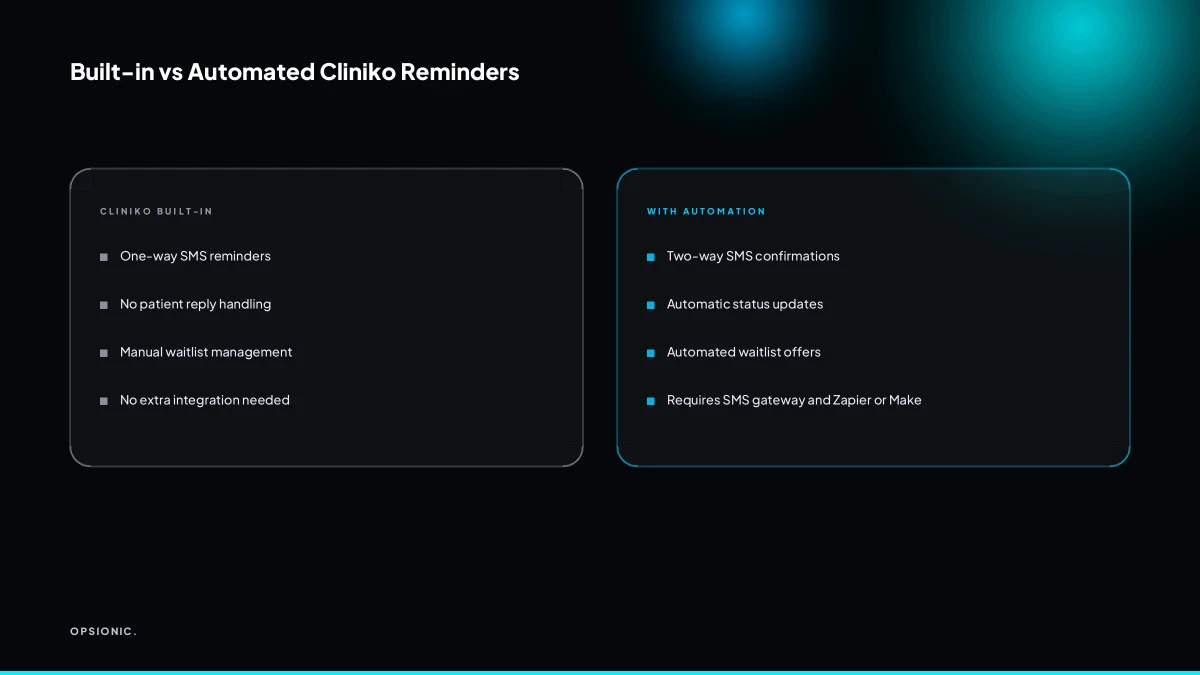
Cliniko sms reminders automation means using Cliniko's built-in SMS reminders plus add-ons to confirm, chase, and fill appointments. Cliniko sends one-way reminder texts on paid plans, but it cannot handle patient replies or auto-fill the waitlist from cancellations. You need an SMS gateway and an integration tool like Zapier or Make for two-way messaging and automated waitlist refills, while staying GDPR compliant.
Does Cliniko already send SMS reminders, and what do they include?
Yes, Cliniko can send SMS appointment reminders on its paid plans, but they are one-way notifications. The message typically includes the appointment date, time, and clinic name. You can set the timing, such as 24 or 48 hours before, but the patient cannot reply to confirm or cancel. The exact features depend on your Cliniko plan and the SMS credits you purchase.
SMS reminders are available on many Cliniko plans, though the number of included credits differs. You buy additional credits in blocks as you use them up. Each reminder sent consumes one credit, so a clinic with 200 appointments a month needs at least that many credits just for reminders. Cliniko’s own pricing page lists current credit costs, which change from time to time.
A standard reminder contains the appointment date, start time, and your clinic name. You can add a short custom note, but the message stays one-way. Patients receive it and can only read it. They cannot reply “yes” to confirm or “no” to cancel, and Cliniko does not record any response back into the appointment record.
To set the timing, open the appointment type settings in Cliniko and look for the reminder options. You can choose a fixed offset such as 24 or 48 hours before the appointment, or set a custom number of hours. The same timing applies to every appointment of that type, so you cannot vary it per patient without creating separate appointment types.
The real limitation is the missing reply loop. A patient who wants to cancel still has to phone the clinic or use a separate online form. That means the SMS saves you the work of dialling, but it does not close the loop on confirmations. If you want a two-way reminder flow, you have to build it outside Cliniko. The same logic applies to other booking systems, as we covered in our piece on automating appointment reminders in Acuity.
Can a patient confirm or cancel by replying to a Cliniko SMS?
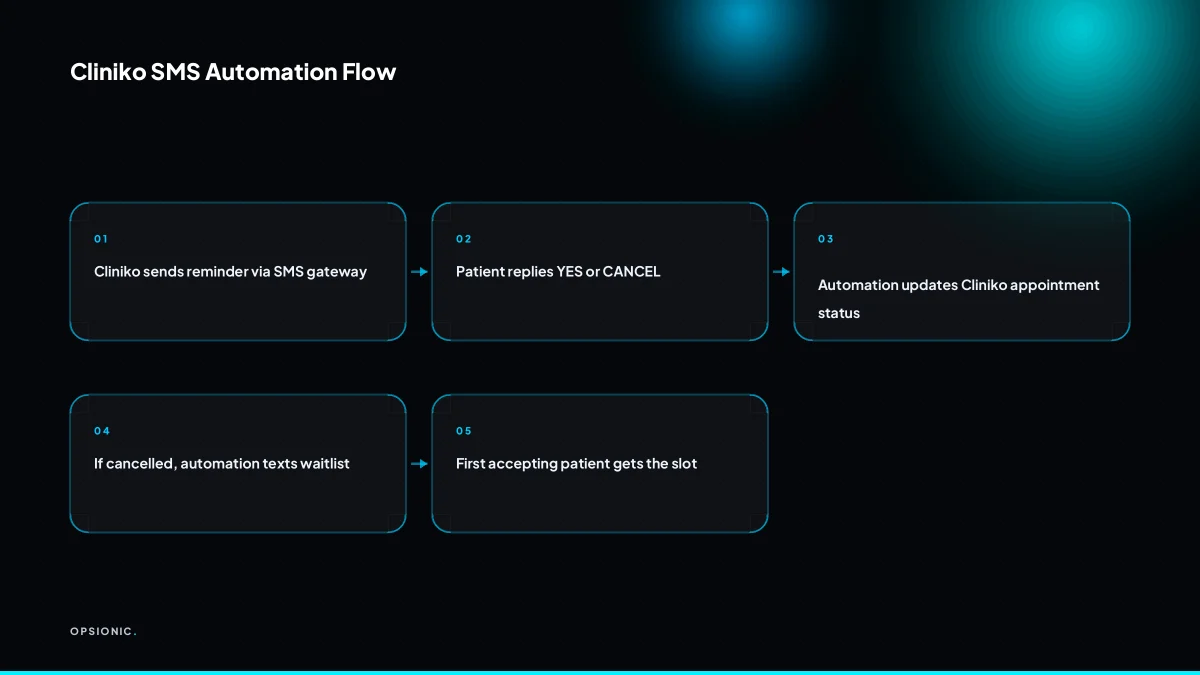
No. Cliniko’s native SMS does not support replies. Patients cannot respond to the message to confirm or cancel. To get two-way messaging, you must connect a separate SMS provider that supports replies, like Twilio or MessageMedia, through an integration tool such as Zapier or Make. That setup lets patients reply with words like YES or CANCEL, and the response can update Cliniko automatically.
Providers that support two-way replies include services such as Twilio, MessageMedia, Vonage and Plivo, but check each provider’s current capabilities before choosing. You rent or buy a dedicated long number, which becomes the sender ID patients see.
Zapier or Make sits in the middle. A webhook catches the inbound reply, reads the keyword and the patient’s phone number, then finds the matching appointment in Cliniko. The tool then updates the booking status or logs the cancellation reason. If you already retype bookings from a scheduler into your CRM, the same pattern applies, as we covered in our piece on Calendly to CRM automatically.
You might use a single word as a confirmation keyword, such as YES, CONFIRM or 1. Cancellation might be NO, CANCEL or 2. Keep the keyword list short so the automation does not misread a casual reply.
Not sure which of these applies to you?
Answer six questions and see what we would automate first in your business, and what it is worth.
How does Cliniko’s waitlist work when someone cancels?
Cliniko’s waitlist is designed as a manual list. When a patient cancels, the slot becomes free, but Cliniko does not automatically contact anyone on the waitlist or move them into the slot. A staff member must open the waitlist, see who is waiting, and manually offer the slot by phone or message. Automation can send a bulk SMS to waitlisted patients and update Cliniko when one accepts, but that requires an external integration.
After a cancellation, the manual sequence looks like this:
- Open the waitlist and find patients waiting for that service or practitioner.
- Call or message the first patient and offer the freed slot.
- Wait for a reply before offering the slot to anyone else.
- Book the patient into Cliniko and remove them from the waitlist.
An automation can shorten this. When a cancellation is logged, the automation reads the waitlist and sends an SMS to several patients at once, asking who wants the slot. The first patient to reply YES gets booked in, and the rest receive a follow-up saying the slot is gone.
The main risk is double-booking. If two patients reply YES within seconds of each other, the automation must lock the slot after the first acceptance and reject the second. Without that check, you have two patients arriving for one appointment. The same caution applies to any recall or reminder workflow, which we covered for dental practice automation.
What GDPR and data processing rules apply to Cliniko SMS automation?
Any SMS reminder or reply automation involving patient data is a processing activity under GDPR. You need a lawful basis, usually legitimate interest or consent, and a data processing agreement with your SMS provider and integration tool. Your privacy notice must mention SMS reminders and reply handling. You must also ensure patient data is not sent to countries without adequate protection and that you can delete data on request.
For reminders, legitimate interest is the common basis. The patient booked an appointment, expects to be told when it is, and would usually consider a reminder reasonable. Consent becomes the safer route if you add marketing content or use SMS for anything beyond the appointment itself. Record which basis you rely on for each workflow.
Your SMS provider and any integration tool you connect to Cliniko may be processors, depending on the arrangement. Get a signed data processing agreement from each before patient data flows. Check where their servers sit. A provider storing data in the US may need standard contractual clauses or another valid transfer mechanism, so check current guidance.
Update your privacy notice to state that you send SMS reminders and that replies may be processed automatically. Patients have the right to object to legitimate interest processing, so give them a clear way to opt out of SMS without losing their appointment.
Set a retention rule for message logs and reply data. A sensible approach is to delete them once the appointment has passed and any dispute window has closed. If a patient asks for erasure, you should be able to remove their data from Cliniko, your SMS provider, and any automation logs, subject to any legal obligations to retain records. The practical checklist in GDPR compliant automation for small business walks through these obligations step by step.
What is this costing you now?
Based on removing half of that time.
What breaks in the real world with Cliniko SMS automation?
Common failures include duplicate records when a patient replies twice, timezone drift if your SMS provider and Cliniko are set to different zones, and silent failures where the integration stops but nobody notices for weeks. Patients may reply after the slot is filled, causing confusion. SMS delivery can be delayed, and if a patient has opted out of messages, the automation may mark them as contacted when they were not.
Duplicate records from double replies. A patient texts YES twice, or their phone sends the same reply twice. The automation creates two confirmations or two contact entries against one appointment. You see the same patient listed twice in the day sheet and do not know which record is real. Fix it by having the automation check for an existing reply before writing a new one, and by merging duplicates in Cliniko when they slip through.
Timezone mismatch between systems. Your SMS provider sends a reminder at 09:00 in its own timezone. Cliniko thinks the appointment is at 10:00 local time. A patient gets a reminder an hour early or an hour late. Fix it by setting both systems to the same timezone and testing with an appointment you can watch arrive.
Silent failure of the integration. The connection drops, a token expires, or a webhook stops firing. Nobody notices because the front desk assumes the reminders are still going out. No-shows rise over a month before anyone checks. Fix it with a weekly test message and a monitor that alerts you when a reminder fails to send. This is the same failure pattern covered in why automation projects fail in small businesses: the system stops quietly, and the cost only shows up later.
Late replies after the slot is filled. A patient confirms by SMS at 14:10. The slot was filled at 14:05 by someone else. The automation still records the confirmation, and now two people think they have the same appointment. Fix it by having the automation check whether the slot is still open before confirming, and by sending a clear second message when the slot is gone.
Below what volume is doing Cliniko reminders by hand cheaper?
If your clinic has fewer than about 60 appointments a month, manual reminder calls or texts are probably cheaper than paying for an SMS gateway, integration tool, and setup time. A receptionist can send 60 personal messages in a few hours. Automation starts to pay off when you have more than 100 monthly appointments or when staff spend over five hours a week chasing confirmations, because the fixed costs stay the same while the time saved grows.
Here is a worked example with invented but realistic figures, not a client. Say a receptionist earns EUR 18 an hour and spends three minutes per appointment on reminders: sending the message, noting the reply, and calling anyone who has not answered. At 60 appointments a month, that is three hours, or EUR 54 of staff time. Add the cost of missed fills. If two patients a month cancel late and the slot goes empty, and each empty slot is worth EUR 60, that is another EUR 120. Manual reminders cost roughly EUR 174 a month in this example.
Now price the automated route. An SMS gateway starts at around EUR 20 a month at the time of writing, depending on volume and the vendor’s own pricing page. An integration tool to connect Cliniko to that gateway adds another EUR 20 to EUR 40 a month. Setup is a one-off, perhaps four to six hours of an agency or freelancer’s time. At 60 appointments, the fixed monthly costs of automation come close to the EUR 54 of staff time, but the automation does not fix the missed-fill problem on its own. It only helps if it also triggers a waitlist message the moment a cancellation lands.
The break-even point for most clinics sits somewhere between 80 and 120 appointments a month. Below that, the staff time saved is small enough that a receptionist can absorb it. Above that, the arithmetic flips. At 120 appointments, the same three minutes per reminder is six hours of staff time, or EUR 108. The SMS and integration costs stay flat. The automation is now cheaper before you even count the missed fills it prevents.
The hidden costs of manual chasing are the real argument. Staff time spent on reminders is time not spent answering the phone, checking in patients, or filling cancelled slots. A clinic that spends five hours a week chasing confirmations is losing half a receptionist day to work a script can do. Missed fills compound it: every late cancellation that goes unfilled is revenue already lost, and a manual process only notices the cancellation when someone happens to check.
Automation becomes clearly cheaper when two things are true at once. First, monthly appointment volume is over 100. Second, the clinic actually uses the freed staff time for something that earns money, not just to absorb the same admin more slowly. If you are unsure whether the payback sum works for your clinic, run the payback sum first before you commit to any build.
Want this running in your business next week?
A relaxed 20-minute video chat. Camera on or off. You leave with a plan whether or not you hire us.
- No call unless you ask for one
- From EUR 399 a month, no setup fee
- Built and run for you, not handed over as homework
Sources we checked
Questions people ask
Does Cliniko charge per SMS reminder?
Cliniko reminders use SMS credits, and each reminder sent uses one credit. Some plans include a number of credits and you buy more in blocks as they run out. Check Cliniko's own pricing page for current credit costs, as these change from time to time.
Can I use my existing SMS number for Cliniko reminders?
Cliniko sends reminders from the number it manages, so your own number is not used for native reminders. If you build a two-way flow through a provider such as Twilio or MessageMedia, you rent or buy a dedicated long number there, and that becomes the sender ID patients see and reply to.
What happens if a patient replies STOP to an automated SMS?
Your SMS provider records the opt-out and should block further messages to that number. Your automation must read that status before sending, or it will keep trying and may mark the patient as contacted when no message was delivered. Check the opt-out list weekly and route those patients to a phone call instead.
Can I send reminders via WhatsApp instead of SMS?
You can, through a provider that supports WhatsApp Business messaging, connected to Cliniko by an integration tool. WhatsApp has its own template approval process and per-message pricing, and patients must opt in. Treat it as a separate channel with its own consent record, not a drop-in replacement for SMS.
How do I test that my Cliniko SMS automation actually works?
Book a test appointment under your own name and number, let the reminder fire, reply with your confirm and cancel keywords, then check the appointment record in Cliniko for the status change. Repeat once a month, and add a monitor that alerts you when a scheduled reminder fails to send.
Is there a way to automate recall reminders in Cliniko?
Cliniko can send reminders tied to appointments, but recalls for patients who are not yet booked usually need a separate workflow. An external automation can read your patient list, find those due for a recall, send the message, and book the reply into Cliniko. Check the rules on health data before you build it.
Can I set different reminder times for different appointment types?
Yes, reminder timing in Cliniko is set per appointment type, so a 30-minute consultation and a longer procedure can use different offsets. You cannot vary the timing per individual patient within one appointment type, so a patient who needs a different lead time requires a separate appointment type.